What Is Xquartz
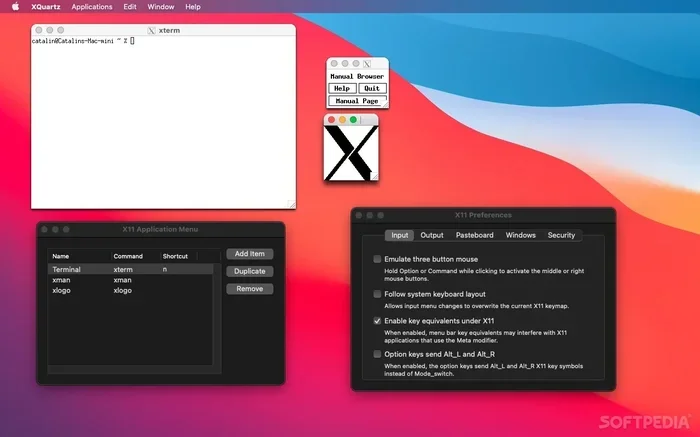
XQuartz is a free, open-source display server that brings the X Window System to macOS, allowing Mac users to run Linux and Unix graphical applications on their computers. It acts as a bridge between Apple’s operating system and the X protocol, enabling cross-platform software compatibility. Whether you are a developer, a researcher, or a casual user, XQuartz opens up a world of tools that would otherwise not work on a Mac.
XQuartz is a free, open-source display server that brings the X Window System to macOS. If you have ever used a Linux computer or worked with Unix-based tools, you know how important a graphical interface is. XQuartz fills that gap for Mac users. It allows you to run applications that were originally built for Linux or Unix systems right on your Mac desktop.
Many people wonder why they would need such a tool. The answer is simple. A huge amount of powerful software is built for Linux and Unix environments. Some of the best tools for coding, data analysis, scientific computing, and system administration were created with the X Window System in mind. XQuartz makes all of that software accessible on a Mac. In this article, we will explore everything you need to know about this tool, from what it does to how to install and use it effectively.
Key Takeaways
- XQuartz is a free X server for macOS: It lets you run Linux and Unix graphical apps on your Mac without any cost.
- It uses the X Window System protocol: This is the same display system used by most Linux and Unix computers worldwide.
- Installation is simple: You can download XQuartz directly from the official website and set it up in just a few minutes.
- It supports Apple Silicon Macs: XQuartz works on both Intel and Apple Silicon processors, making it versatile for modern Macs.
- It is ideal for developers and researchers: Many command-line tools and scientific applications require XQuartz to display their graphical interfaces on a Mac.
- Common issues are easy to fix: Most XQuartz problems, from display glitches to crashes, have straightforward solutions.
📑 Table of Contents
What Is XQuartz and How Does It Work?
At its core, XQuartz is an implementation of the X Window System for macOS. The X Window System, often called X11 or X, is a display protocol that has been the standard for graphical interfaces on Linux and Unix systems for decades. Apple’s macOS does not use X natively. It has its own display system called Quartz. XQuartz bridges that gap by providing a full X server that runs on top of macOS.
The X Window System Explained
The X Window System was developed at MIT in the 1980s. It became the standard graphical framework for Unix-like operating systems. X handles drawing windows, managing user input from keyboards and mice, and communicating between applications and the display hardware. When you open a program on a Linux desktop, X is usually working behind the scenes to make that happen.
XQuartz takes this same system and adapts it for macOS. It runs as a background service on your Mac. When you launch an X11 application, XQuartz creates a window on your Mac desktop where the app can render its graphical interface. The application thinks it is talking to a native display server, but XQuartz translates those commands into something macOS can understand.
How XQuartz Differs from Native Mac Apps
Native macOS applications use Apple’s Cocoa or Carbon frameworks. They integrate directly with macOS features like the menu bar, trackpad gestures, and Retina displays. X11 applications running through XQuartz look and feel a bit different. They often have a classic X11 window style. Some apps may not perfectly match the modern macOS aesthetic.
However, XQuartz has improved a lot over the years. It supports Retina displays, which means X11 apps look sharp on modern Mac screens. It also handles clipboard sharing between X11 apps and native Mac apps. You can copy text from a terminal running inside XQuartz and paste it into a native Mac text editor. This cross-app integration makes XQuartz much more usable than early versions of the software.
Who Needs XQuartz?
Not every Mac user needs XQuartz. But for certain groups of people, it is an essential tool. Let us look at who benefits most from installing it.
Developers and Programmers
If you write code, especially in fields like systems programming, web development, or DevOps, you have probably encountered tools that only run on Linux or Unix. Many command-line utilities and development frameworks are built for these environments. Some of these tools have graphical components that require an X server to display properly. XQuartz gives developers the ability to run these tools without switching to a Linux machine.
For example, many open-source development tools use a graphical interface built on X11. Without a working X server, these tools would only show a blank window or crash. With XQuartz installed, they work just as they would on a Linux system.
Researchers and Scientists
Scientific computing often relies on specialized software built for Unix environments. Tools for data visualization, molecular modeling, and statistical analysis frequently use X11 for their graphical output. Researchers who work with these tools on a Mac need XQuartz to view plots, graphs, and interactive visualizations.
Many universities and research institutions standardize on Linux or Unix for their computing infrastructure. If you are a researcher using a Mac, XQuartz lets you connect to remote Unix servers and display graphical applications locally on your laptop.
Casual Users Running Legacy Software
Some Mac users simply want to run older software that was originally designed for Linux or Unix. Whether it is a classic game, a specialized utility, or an open-source project, XQuartz can make it possible. The X Window System has been around for a long time, and there is a vast library of X11 applications available.
Running XQuartz may also affect how your Mac handles graphics tasks. If you notice your GPU running warmer than usual while using X11 applications, checking what is a good idle GPU temperature can help you understand whether your system is performing normally or running too hot.
Installing XQuartz on Your Mac
Installing XQuartz is straightforward. The process takes only a few minutes, and no technical expertise is required. Here is everything you need to know before you get started.
System Requirements
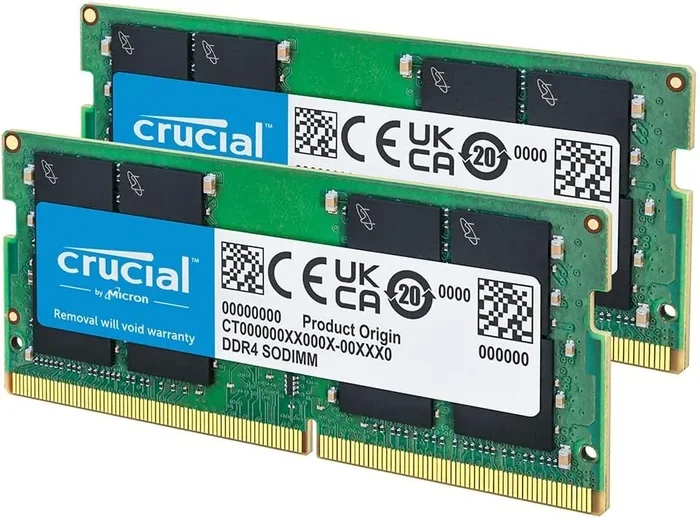
Before you install XQuartz, make sure your Mac meets the basic requirements. XQuartz works on most modern versions of macOS. You need a Mac running macOS 10.9 (Mavericks) or later. The software is free to download and use. In terms of hardware, you should have at least 4GB of RAM for smooth operation. If your Mac has less memory, you might experience sluggish performance when running X11 applications. To learn more about what RAM works best for your setup, check out what is good RAM for laptop to ensure your system is properly configured.
XQuartz also requires about 300MB of free disk space for the installation. The application itself is lightweight, but the X11 apps you run may need additional storage. A stable internet connection is needed to download the installer from the official XQuartz website.
Step-by-Step Installation
Follow these steps to install XQuartz on your Mac:
- Visit the official XQuartz website at xquartz.org.
- Click the download link for the latest version of XQuartz.
- Open the downloaded DMG file.
- Double-click the XQuartz installer package.
- Follow the on-screen instructions to complete the installation.
- Restart your Mac when prompted.
- Launch XQuartz from your Applications folder or Spotlight search.
Once XQuartz is installed, you will see a terminal-style window open on your desktop. This is the XQuartz X11 root window. From here, you can launch X11 applications by typing their commands in the terminal. You can also set XQuartz to start automatically when you log in to your Mac.
Setting Up XQuartz After Installation
After your first launch, XQuartz may prompt you to update your shell profile. This step is important because it allows your Mac’s terminal to communicate with the XQuartz server. The setup wizard will guide you through this process. Simply follow the prompts, and XQuartz will configure itself to work seamlessly with your Mac.
You should also check the XQuartz preferences to customize your experience. In the Preferences menu, you can adjust settings for the display, keyboard, and clipboard integration. These options let you fine-tune how X11 apps behave on your Mac.
Common Uses for XQuartz
XQuartz serves many purposes. From everyday utility to professional development, the software opens up a wide range of possibilities for Mac users. Let us explore the most common use cases.
Running Linux Command Line Tools
Many Linux command-line tools have graphical front ends that require an X server. With XQuartz, you can run these tools on your Mac. This is especially useful for developers who work across multiple operating systems. You can write code on your Mac and test it in a Linux-compatible environment without leaving your desk.
Package managers like Homebrew can install many Unix utilities directly on macOS. Some of these utilities, however, open graphical windows that need XQuartz to display. Having XQuartz installed ensures these tools work without any issues.
Using X11 Applications on macOS
The X11 application ecosystem is vast. Popular programs like GIMP (an image editor), Inkscape (a vector graphics editor), and various scientific visualization tools all run on X11. With XQuartz, you can install and use these applications on your Mac. They may not look exactly like native Mac apps, but they function the same way.
Many users also run terminal emulators and text editors through XQuartz. Programs like Emacs and Vim have graphical versions that benefit from the X11 framework. For power users who prefer these tools, XQuartz is indispensable.
Development and Testing Environments
Software developers often need to test their applications on multiple platforms. XQuartz provides a convenient way to test X11-based applications on a Mac. You can develop your code on macOS, run it through XQuartz, and verify that it looks and behaves correctly. This cross-platform testing saves time and reduces the need for separate Linux machines.
Containerized development environments also benefit from XQuartz. Tools like Docker can run Linux containers on a Mac, and some containers require an X server for graphical output. XQuartz integrates with these workflows, making it a valuable part of a modern developer’s toolkit.
Troubleshooting Common XQuartz Issues
Like any software, XQuartz can sometimes cause problems. Most issues are easy to fix with simple steps. Here are the most common problems and their solutions.
XQuartz Not Opening or Crashing
If XQuartz fails to open or crashes on launch, try these steps. First, make sure your macOS is up to date. Apple regularly releases updates that fix compatibility issues. Next, try reinstalling XQuartz. Download the latest version from the official site and run the installer again. If the problem persists, check your Mac’s security settings. macOS sometimes blocks apps from unidentified developers. You may need to allow XQuartz in System Preferences under Security and Privacy.
Display and Performance Problems
Some users experience display glitches or slow performance with X11 applications. This can happen if your Mac is low on memory or if the XQuartz configuration needs adjustment. Make sure your Mac has enough free RAM to handle both macOS and X11 applications at the same time. Closing unnecessary apps can free up resources. You can also adjust XQuartz’s preferences to optimize performance. Reducing the color depth or disabling anti-aliasing in the preferences menu can help apps run more smoothly.
If your Mac is running hot while using XQuartz, remember that intensive graphical tasks can push your hardware. Maintaining your Mac properly helps prevent overheating and extends its lifespan. To learn more about keeping your computer in top shape, explore what is the best investment for lifespan of PC for practical maintenance tips.
Compatibility with Apple Silicon Macs
Apple Silicon Macs use ARM-based processors instead of Intel. XQuartz has made progress in supporting these machines, but some limitations remain. Not all X11 applications run perfectly on Apple Silicon. If you are using a Mac with an M1, M2, or M3 chip, check the XQuartz release notes for compatibility information. Some users may need to use Rosetta 2 or run applications through alternative methods to get them working on Apple Silicon.
Is XQuartz Still Relevant in 2026?
Some people wonder if XQuartz is still needed in modern computing. The answer is yes. While macOS has become more powerful and versatile, there is still a large ecosystem of X11 software that does not have native macOS versions. Open-source projects, academic tools, and legacy applications continue to rely on the X Window System.
XQuartz remains actively maintained and updated. The development community continues to improve compatibility and performance with each new release. For anyone who works with Linux tools, runs Unix-based software, or simply wants to expand the range of applications available on their Mac, XQuartz is as relevant today as it ever was.
The rise of remote development and cloud computing has also increased the demand for X servers on Macs. Many developers connect to remote Linux servers and use X11 forwarding to display graphical applications locally. XQuartz makes this workflow seamless and efficient. It is a small piece of software that punches well above its weight in terms of utility.
In short, XQuartz fills a gap that Apple’s operating system does not address on its own. It empowers Mac users to access the full breadth of Unix and Linux software. Whether you are a seasoned developer or a curious beginner, taking the time to set up and learn XQuartz can significantly expand what your Mac can do.
Frequently Asked Questions
Do I need XQuartz if I already use macOS?
You only need XQuartz if you want to run applications that were built for the X Window System. Most everyday Mac apps do not require it. However, if you work with Linux-based tools, scientific software, or legacy X11 applications, XQuartz is essential for displaying their graphical interfaces on your Mac.
Is XQuartz safe to install on my Mac?
Yes, XQuartz is safe and open-source. It is developed by a trusted community of contributors and is available for free from the official XQuartz website. Always download it from the official source to ensure you get a clean, unmodified version of the software.
Can XQuartz slow down my Mac?
XQuartz is lightweight and should not noticeably slow down your Mac during normal use. However, running multiple X11 applications at the same time can consume more memory and processing power. Make sure your Mac has enough RAM and close unused apps to keep everything running smoothly.
Does XQuartz work on Apple Silicon Macs?
XQuartz has partial support for Apple Silicon Macs. Some X11 applications work well on M1, M2, and M3 chips, while others may have compatibility issues. Check the XQuartz release notes and community forums for the latest information on Apple Silicon support.
Can I uninstall XQuartz if I no longer need it?
Yes, you can uninstall XQuartz by dragging the application from your Applications folder to the Trash. You may also want to remove the XQuartz preference files and any X11 applications you installed through it. A simple restart after uninstalling completes the process.
What is the difference between XQuartz and a virtual machine?
XQuartz is not a virtual machine. It is specifically an X server that allows X11 applications to display on your Mac. A virtual machine runs an entire operating system inside macOS. XQuartz is much lighter and faster because it only handles the display protocol, not a full operating system.
=== CONCLUSION ===
XQuartz is a powerful and free tool that brings the X Window System to macOS. It bridges the gap between Apple’s operating system and the vast world of Linux and Unix software. Whether you are a developer who needs access to command-line tools, a researcher who relies on specialized scientific applications, or simply someone who wants to expand your Mac’s capabilities, XQuartz delivers real value.
Installing and configuring XQuartz is straightforward, and the software works on most modern Macs, including Apple Silicon models. While it may not be necessary for every user, for those who need it, XQuartz is an indispensable part of the Mac computing experience. Take the time to explore what XQuartz has to offer, and you may discover a whole new world of software at your fingertips.