What to Do with the Glare on My Phone
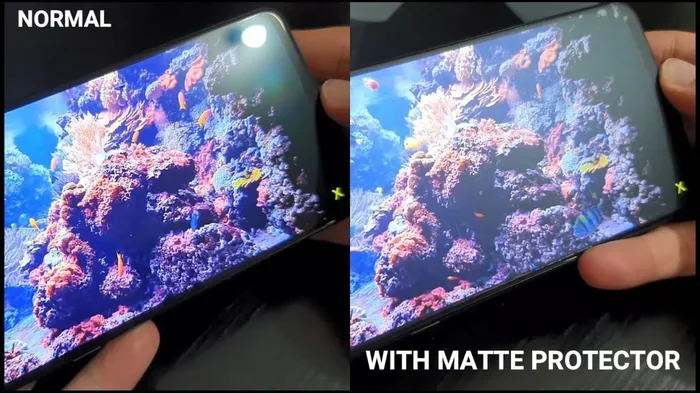
Glare on your phone screen can be annoying and even harmful to your eyes. Whether you are outdoors in sunlight or dealing with indoor reflections, there are proven ways to cut through the brightness and see your screen clearly. This guide covers quick fixes, protective accessories, display settings, and long-term solutions to help you deal with phone screen glare once and for all.
Key Takeaways
- Adjust brightness and display settings: Simple changes to your phone’s settings can make a huge difference in reducing glare.
- Use an anti-glare screen protector: A matte or anti-reflective protector is one of the best investments for clearer viewing.
- Change your viewing angle: Small shifts in position can eliminate reflections from windows and lights.
- Clean your screen regularly: Smudges and fingerprints make glare worse and reduce clarity.
- Use dark mode and color adjustments: These settings reduce eye strain and help with visibility in bright conditions.
📑 Table of Contents
- Why Does Your Phone Screen Glare So Much?
- Quick Fixes to Reduce Glare Right Now
- Best Accessories to Block Phone Screen Glare
- Display Settings That Help with Glare
- Long-Term Solutions for Permanent Glare Reduction
- Common Mistakes People Make When Dealing with Phone Glare
- Expert Tips for Better Screen Visibility
- Final Thoughts on Managing Phone Screen Glare
Why Does Your Phone Screen Glare So Much?
You know that frustrating moment. You are sitting outside, trying to check a message or scroll through a photo, and your phone screen turns into a mirror. Phone screen glare is one of the most common problems people face every day. It happens when light from the sun or indoor lamps bounces off your screen and washes out everything on it.
The science behind it is simple. Your phone screen emits light so you can see images and text. But when external light hits the glass surface, it reflects back at you. This creates a bright washout effect that makes your display almost impossible to read. The smoother and more reflective your screen, the worse the glare tends to be.
Several factors make glare worse. Screen brightness settings play a big role. If your phone is too dim, outdoor light easily overpowers it. If it is too bright, it can also strain your eyes. The angle of your screen matters too. Even a slight change in position can shift a reflection away or right into your line of sight.
Dirty screens are another hidden culprit. Fingerprints, oils, and dust create a rough surface that scatters light unevenly. This makes glare appear patchy and harder to ignore. Keeping your screen clean is one of the easiest ways to reduce it.
Understanding why glare happens is the first step toward fixing it. Once you know what causes it, you can take targeted action to minimize it. Let us explore the best solutions below.
Quick Fixes to Reduce Glare Right Now
Before you buy anything or change any settings, try these quick fixes. They cost nothing and work immediately. Most people see an improvement within seconds.
Adjust Your Screen Brightness
The simplest thing you can do is turn up your brightness. Most phones have an auto-brightness feature that adjusts based on surrounding light. Turn this on if you have not already. It uses a sensor to detect ambient light and changes your screen level accordingly. This is a great first step for reducing screen glare in changing environments.
If auto-brightness does not work well for you, try adjusting it manually. Go into your settings and find the display option. Slide the brightness bar up until the screen feels comfortable in your current lighting. Many people keep their brightness too low out of habit, which makes glare much more noticeable.
Turn On Dark Mode
Dark mode is a game changer for glare reduction. Instead of showing bright white backgrounds, dark mode uses dark colors that produce less light. This means less reflection off your screen. It also looks much better in low-light rooms and at night.
To enable dark mode, go to your phone settings and look for display or appearance. Toggle dark mode on. Some phones let you set a schedule, so dark mode turns on automatically at sunset. This saves battery life too, especially on OLED screens.
Change Your Viewing Angle
This might sound too simple, but it works. Tilt your phone slightly up or down. Shift it a few inches to the left or right. You will often find a sweet spot where the reflection disappears completely. This is because the angle of incidence equals the angle of reflection. Changing your phone position changes how light bounces off the surface.
Try holding your phone lower and angling it toward your face. Or lift it higher and tilt the screen away from overhead lights. You will be surprised how much difference a small adjustment makes.
Best Accessories to Block Phone Screen Glare
If quick fixes are not enough, accessories can make a big difference. These tools are designed specifically to cut glare and protect your screen at the same time.
Anti-Glare Screen Protectors
An anti-glare screen protector is one of the best investments you can make. These protectors have a matte finish that scatters light before it reflects off your screen. Instead of a sharp, blinding reflection, you see a soft, diffused glow. Text and images become much easier to read in bright conditions.
Look for protectors labeled “matte” or “anti-reflective.” They are available for almost every phone model. Installation is usually simple, and most come with alignment frames. A good protector also guards against scratches and cracks, so you get protection and visibility in one product.
Phone Hoods and Shades
Phone hoods are less common but very effective. They attach to the edge of your phone and create a shade over the screen. Think of them like a tiny visor for your phone. They block light from hitting the screen at certain angles, which reduces glare significantly.
These are especially useful for people who spend a lot of time outdoors. Hikers, photographers, and construction workers often use them. They are small, lightweight, and easy to clip on when needed.
Blue Light Filtering Glasses
While not a direct glare solution, blue light filtering glasses can help with overall eye comfort. They reduce the harshness of screen light, especially during evening use. Some people find that pairing these glasses with dark mode makes their phone much more comfortable to use for long periods.
You do not need a prescription for these. Many affordable options are available online. They come in clear lenses that still filter blue light effectively.
Display Settings That Help with Glare
Your phone has several built-in settings designed to improve visibility. Most people never explore these options fully. Here are the settings you should check.
Enable Adaptive Display
Many modern phones come with adaptive display technology. This feature continuously adjusts color temperature and brightness based on your environment. It warms up the screen in dim light and cools it down in bright light. This helps reduce eye strain and makes outdoor screen visibility much better.
To find this setting, go to Settings > Display > Adaptive Display. If your phone does not have this exact option, look for similar terms like “eye comfort shield” or “display adapt.”
Increase Text Size and Contrast
When glare makes your screen hard to read, increasing text size helps. Larger text is easier to see even when reflections are present. Go to Settings > Display > Font Size and increase it to a comfortable level.
You should also check contrast settings. Higher contrast makes text stand out more against the background. This is especially helpful when glare partially washes out your screen. A simple contrast boost can bring back clarity in bright environments.
Turn Off Always-On Display
If your phone has an always-on display feature, consider turning it off. This feature keeps a portion of your screen lit at all times. While convenient, it creates a constant surface for light to reflect off. Turning it off reduces overall glare and also saves battery life.
Go to Settings > Display > Always-On Display and toggle it off. You can always turn it back on when you need quick access to notifications.
Long-Term Solutions for Permanent Glare Reduction
Quick fixes and accessories handle the immediate problem. But if you want lasting relief, consider these long-term solutions.
Apply a Matte Screen Protector Permanently
If you use your phone a lot outdoors, a permanent matte protector is worth the investment. Unlike temporary fixes, it stays on your screen and works every time you pick up your phone. You do not need to adjust settings or change angles. The matte surface handles glare automatically.
Modern matte protectors have improved a lot over the years. Earlier versions made screens look slightly fuzzy. Newer versions maintain sharpness while still reducing reflection. Look for brands with high transparency ratings for the best clarity.
Keep Your Screen Clean Every Day
This is one of the most overlooked solutions. A clean screen reflects light more evenly and clearly. A dirty screen scatters light in uneven ways, making glare look worse. Get in the habit of wiping your screen with a microfiber cloth at least once a day.
Avoid using paper towels or rough fabrics. These can scratch the screen over time. A dedicated microfiber cloth costs very little and lasts a long time. For stubborn smudges, lightly dampen the cloth with water or a screen-safe cleaner.
Consider a Phone with an Anti-Reflective Coating
When it is time to upgrade your phone, look for models with anti-reflective coatings on the screen. Some flagship phones feature advanced glass treatments that naturally reduce reflections. These coatings are built into the display and cannot be worn off like a protector.
Research phone reviews before buying. Look for terms like “anti-reflective coating,” “matte display,” or “glare reduction.” These features make a noticeable difference for people who use their phones outdoors frequently.
Common Mistakes People Make When Dealing with Phone Glare
Many people try to fix glare in ways that actually make it worse. Here are common mistakes to avoid.
Using regular screen protectors. Standard glossy protectors can actually increase glare because they add another reflective surface. Always choose matte or anti-glare versions instead.
Cranking brightness to maximum. While this helps in direct sunlight, it drains your battery fast and can cause eye strain indoors. Use auto-brightness or adjust manually to a comfortable level.
Ignoring the cleaning factor. People often focus on settings and accessories but forget the simplest fix. A dirty screen makes every other glare solution less effective. Clean your screen first, then adjust settings.
Holding the phone too close to reflective surfaces. Standing right next to a window or under a bright overhead light creates maximum reflection. Move slightly away or reposition yourself to break the reflection path.
Expert Tips for Better Screen Visibility
Here are some extra tips from display experts that most people do not know about.
- Use your hand as a visor. Cup your hand slightly above the screen to block overhead light. This creates a small shadow that improves visibility instantly.
- Sit in the shade when possible. Even moving under a tree or awning can dramatically reduce glare. Direct sunlight is the biggest enemy of screen visibility.
- Turn down color saturation. Overly vivid colors can increase the perception of glare. Lowering saturation slightly makes the screen easier on the eyes.
- Use voice commands outdoors. If you cannot see your screen, use voice assistant features to navigate. This avoids the need to look at a glared-out screen entirely.
Final Thoughts on Managing Phone Screen Glare
Phone screen glare is a daily frustration for millions of people. But it does not have to ruin your experience. With the right combination of settings, accessories, and habits, you can see your screen clearly in almost any lighting condition.
Start with the quick fixes. Adjust brightness, turn on dark mode, and change your viewing angle. Then invest in an anti-glare screen protector and keep your screen clean. These steps alone will transform how you use your phone in bright environments.
Remember that reducing screen glare is not just about convenience. It also protects your eyes from strain and fatigue. The less you squint and struggle to see your screen, the more comfortable your daily phone use becomes. Make these changes today and your eyes will thank you tomorrow.
Whether you are checking messages at a café, scrolling through photos at the beach, or navigating a map in the park, you deserve a clear and glare-free screen. Use the tips in this guide to take back control of your phone display visibility once and for all.
Frequently Asked Questions
Why is my phone screen so reflective?
Phone screens use glass surfaces that naturally reflect light. The smoother the glass, the more it acts like a mirror. This reflection becomes more noticeable in bright environments where sunlight or indoor lights bounce directly off the screen and into your eyes.
Do anti-glare screen protectors really work?
Yes, they work very well. Anti-glare protectors have a matte finish that scatters incoming light before it reflects off your screen. This diffusion reduces the sharp reflections you normally see and makes your screen much easier to read in bright conditions.
Can I reduce glare without buying anything?
Absolutely. You can adjust your screen brightness, enable dark mode, change your viewing angle, and clean your screen with a microfiber cloth. These free steps can make a significant difference in how much glare you experience.
Does dark mode help with glare?
Yes, dark mode reduces the overall light output from your screen. With less light coming from the display, there is less reflection off the glass surface. This makes dark mode one of the simplest and most effective ways to cut down on glare.
What is the best way to clean my phone screen?
Use a soft microfiber cloth slightly dampened with water. Gently wipe the screen in circular motions. Avoid using harsh chemicals, paper towels, or rough fabrics. Clean screens reflect light more evenly and show less glare than dirty ones.
Should I avoid using my phone in direct sunlight?
While it is best to minimize direct sun exposure to your screen, you do not need to avoid it entirely. Use the tips in this guide to improve visibility outdoors. Adjust brightness, find shade when possible, and angle your screen to reduce reflections for a much better experience.