Which Iphones Have Usb C
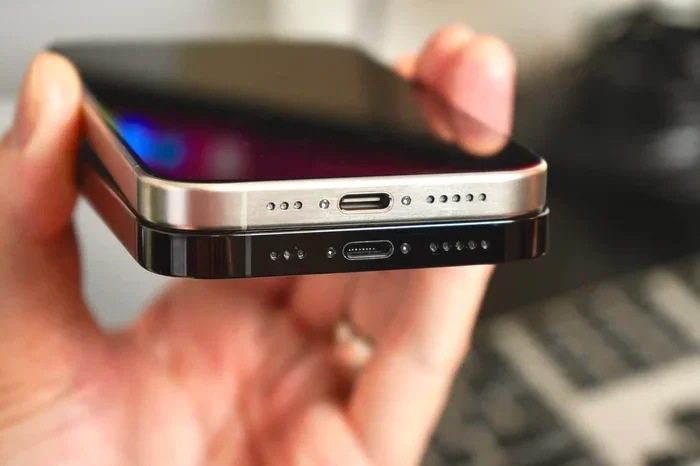
Apple made the big switch to USB-C starting with the iPhone 15 lineup. Every iPhone from the iPhone 15 series onward uses a USB-C port for charging, data transfer, and accessories. This change brings faster speeds, universal compatibility, and a cleaner, more versatile charging experience for millions of users worldwide.
This is a comprehensive guide about Which Iphones Have Usb C.
Key Takeaways
- iPhone 15 and newer models all feature USB-C ports, replacing the older Lightning connector.
- The switch to USB-C was driven by EU regulations and Apple’s desire for universal compatibility.
- USB-C enables faster data transfer and quicker charging compared to Lightning.
- You can now use one cable for your iPhone, iPad, Mac, and many other devices.
- All iPhone 15, 15 Plus, 15 Pro, and 15 Pro Max models use USB-C.
- The iPhone 16 series continues the USB-C standard with even faster transfer speeds.
- You may need a USB-C adapter or cable if you have older Lightning accessories.
[FEATURED_IMAGE_PLACEHOLDER]
Which iPhones Have USB-C?
Apple finally made the move to USB-C, and it changed everything. If you have been using an iPhone with a Lightning port, you might be wondering which models now support USB-C. The answer is simple: every iPhone from the 15 series onward uses USB-C.
This shift happened in 2023 when Apple released the iPhone 15 and iPhone 15 Plus. Then, the iPhone 15 Pro and iPhone 15 Pro Max joined the lineup with even faster USB-C capabilities. And in 2024, the iPhone 16 series kept the USB-C standard alive. So if you own any of these models, you are fully in the USB-C world now.
The change was not just about following rules. It was about making life easier for users. One cable fits your phone, your tablet, your laptop, and many other gadgets. No more carrying multiple cables around. Let us break down exactly which iPhones have USB-C and what this means for you.
The iPhone Models That Use USB-C
Apple made a clear break from Lightning starting with the iPhone 15 family. Here is a full look at every iPhone model that now features a USB-C port.
iPhone 15 and iPhone 15 Plus
The iPhone 15 and iPhone 15 Plus were the first iPhones to ditch Lightning. They use a standard USB-C 2.0 port. This means you get fast charging and the ability to connect to a wide range of USB-C accessories. Data transfer speeds max out at 480 Mbps, which is still much faster than what Lightning offered.
These models are perfect for most users. You get a great camera system, a bright display, and now a universal charging port. If you have been holding out on upgrading because of Lightning, this is the moment that changed everything.
iPhone 15 Pro and iPhone 15 Pro Max
The Pro models took USB-C even further. The iPhone 15 Pro and iPhone 15 Pro Max use a USB-C 3.0 port, which delivers data transfer speeds up to 10 Gbps. That is a huge jump from the base iPhone 15 models.
This faster speed means you can transfer large video files from your phone to a computer in seconds. It also opens the door to connecting external drives, displays, and other pro-level accessories. If you are a content creator or a power user, the Pro models give you serious USB-C advantages.
iPhone 16 Series
Apple carried USB-C forward with the iPhone 16, iPhone 16 Plus, iPhone 16 Pro, and iPhone 16 Pro Max. These models maintain the USB-C standard and offer even better performance. The Pro models continue to support faster data transfer speeds, making them ideal for professionals who work on the go.
The iPhone 16 series also benefits from improved USB-C cables and accessories that have become more widely available since the iPhone 15 launch. The ecosystem around USB-C iPhones has grown fast.
Why Did Apple Switch to USB-C?
Apple did not make this change overnight. There were real reasons behind the switch from Lightning to USB-C. Let us look at why this happened and what drove the decision.
EU Regulations
The European Union passed a law requiring all smartphones to use a universal charging standard. That standard is USB-C. Apple could not ignore this rule since the EU is one of its biggest markets. So, Apple made the switch starting with the iPhone 15 lineup.
This regulation helped reduce electronic waste. Instead of every device needing its own cable, one USB-C cable could power phones, tablets, and laptops from many different brands.
Universal Compatibility
Beyond regulations, USB-C simply makes more sense. You probably already have USB-C cables lying around for your laptop, tablet, earbuds, or portable charger. With a USB-C iPhone, you can share cables across all your devices. This is a huge convenience that Lightning never offered.
Think about it. You travel with one bag, and everything charges with the same cable. Your phone, your iPad, your MacBook, and even some of your headphones all use USB-C. That is the power of a universal connector.
Faster Speeds and Better Performance
USB-C is inherently faster than Lightning. It supports higher data transfer rates, faster charging speeds, and video output. The Pro models take full advantage with USB-C 3.0 speeds that make file transfers feel instant. Even the base iPhone 15 models are noticeably faster with USB-C 2.0 compared to Lightning.
What USB-C Means for iPhone Accessories
The switch to USB-C changed the accessory game completely. You now need USB-C cables, USB-C chargers, and USB-C-compatible accessories. Let us explore what this means for your daily iPhone use.
Charging Your iPhone with USB-C
You can now charge your iPhone with the same cable you use for your other devices. A single USB-C to USB-C cable powers up your phone quickly. Apple supports fast charging with USB-C, so you can go from zero to 50 percent in about 30 minutes with the right charger.
Make sure you use a quality USB-C cable that supports the power delivery your iPhone needs. Cheap cables might charge slowly or not work at all. Look for cables that are MFi certified for the best results.
Connecting USB-C Accessories
With a USB-C iPhone, you can connect a wide range of accessories directly. Want to plug in your headphones? Many modern headphones now use USB-C. You can check out the best USB Type C headphones available to pair with your iPhone. No dongles, no adapters, just plug and play.
You can also connect external storage, microphones, cameras, and even monitors directly to your iPhone using USB-C. This opens up creative possibilities that Lightning never could.
Data Transfer Made Easy
Transferring files between your iPhone and a computer is now faster and simpler. Just plug in a USB-C cable and your iPhone shows up as a storage device. You can move photos, videos, documents, and backups with ease.
For users who need even more storage on the go, you can connect external drives to your iPhone using USB-C. This is especially useful for the Pro models that support faster transfer speeds. If you want to expand your iPhone storage using external drives, look into options like the M2 NVMe SSD in USB enclosures that connect directly through USB-C.
USB-C vs Lightning: What Changed?
The move from Lightning to USB-C was more than just a port swap. Let us compare the two and see what actually changed for iPhone users.
Speed and Performance
Lightning was limited in speed and power delivery. USB-C opened the door to much faster data transfer and quicker charging. The base iPhone 15 models use USB-C 2.0, which is still a big upgrade over Lightning. The Pro models go even further with USB-C 3.0 speeds.
Cable Compatibility
Before USB-C, you needed a Lightning cable specifically for your iPhone. Now, you can use any USB-C cable you already own. This saves money and reduces clutter. You no longer need to buy a special Apple cable just for your phone.
Future-Proofing
USB-C is the future of charging and data transfer. Almost every new device uses it. By switching to USB-C, Apple made sure the iPhone stays relevant for years to come. Any cable or accessory you buy today will likely work with your next iPhone too.
Common Mistakes with iPhone USB-C
Switching to USB-C comes with a few pitfalls. Here are some common mistakes to avoid so you get the best experience with your USB-C iPhone.
Using Cheap or Non-Certified Cables
Not all USB-C cables are created equal. Cheap, uncertified cables may not support fast charging or proper data transfer. Always look for MFi-certified cables to ensure safety and performance. A bad cable can even damage your iPhone’s USB-C port.
Forcing Cables or Accessories
USB-C is reversible, so there is no wrong way to plug it in. But some people still force accessories into the port. If something does not fit easily, stop and check. Forcing connections can damage the port or the accessory.
Ignoring Firmware Updates
Apple sometimes releases updates that improve USB-C performance and compatibility. Make sure your iPhone is running the latest iOS version. These updates can fix connection issues and add support for new accessories.
Tips for Getting the Most Out of iPhone USB-C
Now that you know which iPhones have USB-C, here are some practical tips to maximize your experience.
- Invest in a good USB-C hub. A hub lets you connect multiple accessories at once, including external drives, monitors, and chargers.
- Keep a spare cable at work and home. Since USB-C is universal, you can use the same cable everywhere, but having backups never hurts.
- Explore USB-C audio. Ditch wireless earbuds if you want wired options. Many USB-C headphones offer great sound quality without needing a dongle.
- Back up with external drives. Connect a USB-C external drive to back up your photos and videos directly from your iPhone.
- Check for MFi certification. Always choose certified accessories to protect your iPhone and ensure optimal performance.
The Future of iPhone Connectivity
USB-C is here to stay on iPhones. Apple has fully embraced this connector, and future iPhone models will continue using it. The technology behind USB-C keeps improving too. Newer standards like USB4 offer even faster speeds and more power delivery.
As the ecosystem grows, you will see more accessories designed specifically for USB-C iPhones. From faster chargers to advanced docking stations, the options are expanding every year. This is great news for iPhone users who want a seamless, connected experience across all their devices.
The switch to USB-C was a smart move by Apple. It simplified charging, improved performance, and brought the iPhone into alignment with the rest of the tech world. Whether you have an iPhone 15, an iPhone 16, or are planning to upgrade soon, USB-C makes the experience better and more versatile.
Conclusion
So, which iPhones have USB-C? The answer is every iPhone from the 15 series and beyond. The iPhone 15, iPhone 15 Plus, iPhone 15 Pro, iPhone 15 Pro Max, and the entire iPhone 16 lineup all use USB-C. This universal connector brings faster speeds, better compatibility, and a simpler charging experience.
If you are still on a Lightning iPhone, it might be time to consider upgrading. The USB-C transition makes a real difference in daily use. You will wonder how you ever managed with multiple cables and slow transfers.
Embrace the USB-C era. Your iPhone, your accessories, and your sanity will thank you.
Frequently Asked Questions
Which iPhone was the first to use USB-C?
The iPhone 15, released in September 2023, was the first iPhone to feature a USB-C port. Apple replaced the Lightning connector with USB-C starting with this model, and all subsequent iPhones have continued with USB-C.
Do all iPhone 15 models have USB-C?
Yes, every iPhone 15 model uses USB-C. This includes the iPhone 15, iPhone 15 Plus, iPhone 15 Pro, and iPhone 15 Pro Max. They all feature USB-C ports for charging, data transfer, and accessories.
Can I use my old Lightning cable with a USB-C iPhone?
No, you cannot use a Lightning cable directly with a USB-C iPhone. You will need a USB-C cable instead. However, you can buy Lightning to USB-C adapters if you need to use older Lightning accessories temporarily.
Is USB-C faster than Lightning on iPhones?
Yes, USB-C is significantly faster than Lightning. The base iPhone 15 models use USB-C 2.0 for faster data transfer and charging. The Pro models use USB-C 3.0 with speeds up to 10 Gbps, which is much faster than Lightning ever was.
Can I charge my iPhone with any USB-C charger?
You can charge your iPhone with most USB-C chargers, but for the best results, use a charger that supports USB Power Delivery. Apple recommends 20W or higher USB-C chargers for fast charging on all USB-C iPhones.
Will future iPhones continue to use USB-C?
Yes, Apple has committed to USB-C for all future iPhones. The EU regulation and the benefits of universal compatibility make it very unlikely that Apple will switch back to Lightning or adopt any other connector.