Why Do Keyboards Have 2 Usb Ports
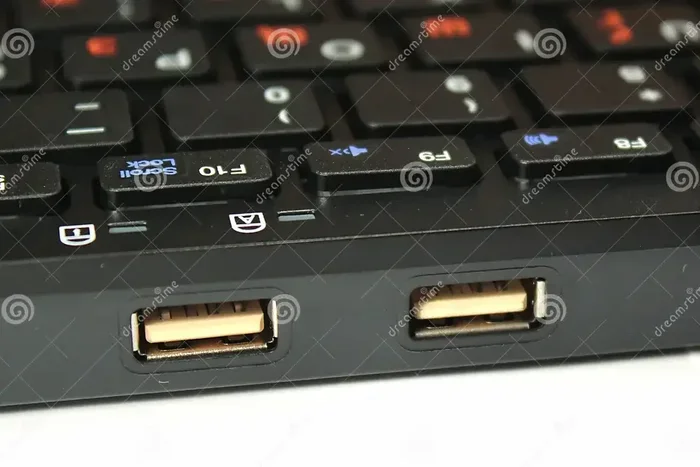
Keyboards have two USB ports to serve different purposes: one handles data and communication with your computer, while the second port acts as a passthrough hub for connecting other USB devices. Understanding this dual-port design helps you get the most from your keyboard setup and avoid common connectivity confusion.
You plug in your brand new keyboard and notice something interesting. There are two USB ports on the cable or on the keyboard itself. One goes into your computer. But what about the second one? You may have wondered about this more than once. The answer is simpler than you think, but there is more to it than meets the eye.
Keyboards with two USB ports are more common than most people realize. They serve specific purposes that make your setup cleaner and more functional. In this guide, we will break down exactly why keyboards have two USB ports, what each port does, and how you can use them to your advantage.
## The Basic Reason Behind Dual USB Ports
When you first look at a keyboard cable, two USB connectors seem redundant. Why would a keyboard need two plugs? The short answer is that each port has a different job. One port sends and receives data between the keyboard and your computer. The second port serves as a passthrough connection or provides additional power.
Think of it like a power strip. You plug one cord into the wall, and then you get multiple outlets to connect other devices. A keyboard with two USB ports works on a similar idea. It connects to your PC through one port and then offers the second port for another device.
This design is especially common in gaming keyboards and full-size models with built-in USB hubs. Manufacturers include this feature because users often have many USB devices on their desk. A mouse, webcam, headset, and flash drive all compete for limited ports on your computer. The keyboard solves this problem by acting as a small hub.
### How USB Passthrough Works
USB passthrough is the main reason for the second port. It takes the USB connection from your computer and passes it through to the second port. This lets you connect another device directly through the keyboard. Your PC still recognizes the device, but the data travels through the keyboard first.
For example, you might plug your USB mouse into the keyboard’s second port. The keyboard forwards the mouse signals to your computer. This keeps your desk tidy and reduces cable clutter. It is a simple but effective design choice that many people overlook.
Not all passthrough ports are equal, though. Some keyboards share the same USB bandwidth between both ports. This means if you plug in a high-speed device, it might slow down the keyboard’s response time. Other keyboards use separate USB controllers for each port, which gives you full-speed performance on both connections.
## The Two Ports Serve Different Functions
It helps to understand what each port actually does. The two USB ports on a keyboard are not identical twins. They have different roles depending on the keyboard model and design.
### Port 1: The Data Connection
The first USB port is the main connection. This is the one that talks directly to your computer. It sends every keypress, macro command, and LED lighting instruction to your PC. It also receives firmware updates and configuration data from your computer.
This port is essential. Without it, the keyboard simply will not work. It handles all the communication between you and your system. When you type a document or play a game, this port is working hard behind the scenes.
If you have ever experienced USB mouse not working on laptop issues, you know how frustrating a single bad connection can be. The data port on your keyboard is just as important. A loose or faulty connection here means your keyboard stops responding entirely.
### Port 2: The Passthrough or Power Port
The second port usually serves as a passthrough or auxiliary connection. On most keyboards, this port does not handle keyboard data at all. Instead, it provides a USB connection for other devices.
Some keyboards use the second port purely for power. This is common with backlit keyboards that need extra current. The second port pulls additional 5V power from a second USB header on your motherboard. This keeps the backlighting bright without draining power from the data port.
Other keyboards use the second port for USB 2.0 passthrough. This means you can connect low-speed devices like a mouse or keyboard through the keyboard to your PC. It is a convenient way to expand your USB options without buying a separate hub.
## Gaming Keyboards and Dual Port Design
Gaming keyboards are the biggest users of dual USB port designs. If you have ever wondered why your gaming keyboard has two cables or two USB plugs, there is a clear reason.
Gamers need fast, reliable input. Every millisecond counts during a competitive match. A single USB port might share bandwidth with other devices, causing slight delays. By using two separate ports, the keyboard gets a dedicated connection for data and another for passthrough devices.
### Reducing Input Lag
Input lag is the delay between pressing a key and seeing the action on screen. It sounds tiny, but in fast-paced games, it matters. Dual USB connections help reduce this lag by giving the keyboard its own dedicated data line.
Many high-end gaming keyboards use a second USB cable specifically for this purpose. One cable handles all the keyboard functions, and the second cable provides passthrough for a mouse or other peripherals. This setup keeps everything fast and responsive.
### RGB Lighting Power Needs
RGB lighting is another reason gaming keyboards use two ports. The colorful backlighting draws significant power. A single USB port provides 500 milliamps of power, which is enough for basic lighting. But when you have multiple LED zones, the keyboard needs more current.
The second USB port supplies the extra power needed for vibrant RGB effects. Without it, some lighting modes might not work, or the keyboard might dim automatically to stay within power limits. This is why many gaming keyboards with RGB always include a second USB connection.
## Legacy Keyboards: The PS/2 and USB Combo
Older keyboards sometimes had two ports for a completely different reason. Before USB became standard, keyboards used PS/2 connectors. These were round, purple plugs that connected directly to the motherboard.
When USB started becoming popular, manufacturers wanted to support both connection types. They put one PS/2 port and one USB port on the same keyboard. This let users connect their keyboard to older computers or newer systems without buying a new keyboard.
### Backward Compatibility Matters
This dual-port design was all about compatibility. A student might have a brand new laptop with only USB ports. But they also had an older desktop with PS/2 inputs. A keyboard with both connectors worked on either machine.
Today, PS/2 ports are rare. Most modern computers only have USB connections. But you can still find some keyboards with dual PS/2 and USB ports. These are mostly aimed at industrial or legacy use cases where older equipment is still in service.
## Types of Keyboards With Two USB Ports
Not all dual-port keyboards work the same way. Different types serve different needs. Here is a breakdown of the most common kinds.
### Gaming Keyboards
Gaming keyboards almost always feature two USB connections. One handles data, and the other provides power or passthrough. These keyboards often come with extra features like macro keys, programmable switches, and dedicated software. The dual port design supports all of these features without compromising performance.
### Full-Size Keyboards With Built-In Hubs
Some full-size desktop keyboards include a small built-in USB hub. The second port on the keyboard connects to this hub, giving you an extra USB outlet on your desk. This is very useful if your computer has limited USB ports. You effectively get two or three extra connections from your keyboard alone.
### Compact and Travel Keyboards
Even some compact travel keyboards have dual USB ports. These usually use one port for data and one for charging a connected device. If you travel with a phone or tablet, the keyboard can double as a charging station through its second port.
## Common Mistakes People Make With Dual-Port Keyboards
Many users make mistakes that cause problems with their dual-port keyboards. Knowing what to avoid saves time and frustration.
### Plugging Both Ports Into the Same USB Hub
One common mistake is connecting both USB plugs from the keyboard into the same USB hub. This can cause power issues. The hub might not supply enough current for both ports, leading to flickering lights or unresponsive keys. Always plug the main data port directly into your computer when possible.
### Ignoring the Passthrough Port Speed
Another mistake is assuming the second port is always fast. Some passthrough ports are USB 2.0, which is much slower than USB 3.0 or USB-C. If you plug a high-speed device into a USB 2.0 passthrough port, it will run at the slower speed. Check your keyboard specs to know what your second port supports.
### Forgetting to Update Keyboard Firmware
Many dual-port keyboards need firmware updates to work correctly. The second port sometimes only activates after a firmware update. If your passthrough port is not working, check the manufacturer’s website for updates. This simple step fixes many issues.
## Quick Tips for Getting the Most From Your Dual-Port Keyboard
Here are some practical tips to help you use your keyboard’s two USB ports effectively.
- Always plug the main data port directly into your computer. Do not route it through a hub or extension cable if you can avoid it.
- Use the passthrough port for low-speed devices. Mice, keyboards, and flash drives work great. Avoid plugging in webcams or external drives that need high bandwidth.
- Check your keyboard manual. It will tell you exactly what each port does and whether they share bandwidth.
- Update your keyboard firmware regularly. This keeps both ports working at their best and fixes known bugs.
- Use a powered USB hub if you need more ports. A keyboard passthrough port is convenient but limited. For multiple devices, a powered hub is a better solution.
- Avoid plugging power-hungry devices into the passthrough port. External hard drives and cooling pads may not get enough power through the keyboard.
## Expert Insights on Dual USB Port Keyboards
Keyboard manufacturers design dual-port keyboards with specific use cases in mind. The trend toward dual ports has grown as USB devices have multiplied. Most modern desks have at least five or six USB-connected devices. Keyboards with built-in passthrough help manage that demand.
According to peripheral design experts, the two-port setup is not just a marketing gimmick. It solves a real problem. Desktop users often run out of USB ports, especially on laptops with limited connectivity. A dual-port keyboard gives users one or two extra connections without adding bulk to their setup.
The design also improves cable management. Instead of running three or four cables from your desk to your computer, you run just one or two. The keyboard handles the rest. This keeps your workspace clean and reduces cable clutter, which is something every desk user appreciates.
## Why Some Keyboards Only Have One USB Port
It is worth noting that not all keyboards need two ports. Basic keyboards with simple membrane switches usually work fine with a single USB connection. They do not have RGB lighting, built-in hubs, or passthrough features. One port is all they need.
If you buy a keyboard and it only has one USB port, that is perfectly normal. It does not mean the keyboard is low quality. It simply means the design does not include extra features that require a second connection.
## Final Thoughts on Why Keyboards Have 2 USB Ports
The reason keyboards have two USB ports comes down to function and convenience. One port handles all the keyboard data. The second port provides passthrough connectivity or extra power for lighting and peripherals. This design has become standard in gaming keyboards, full-size desktop models, and even some compact travel boards.
Understanding how your keyboard’s ports work helps you troubleshoot issues and get better performance. Next time you plug in your keyboard, take a moment to check which port does what. You might discover a feature you never knew existed.
Dual USB ports are not a mystery. They are a practical solution to common connectivity problems. Whether you are a gamer, a office worker, or a casual user, knowing how these ports work gives you more control over your setup.
## Frequently Asked Questions
Can I plug a USB flash drive into my keyboard’s second port?
Yes, in most cases you can. The second port on many keyboards acts as a passthrough connection. However, flash drives that need high transfer speeds may not work well if the passthrough port is USB 2.0. Check your keyboard specs to confirm the port speed before plugging in storage devices.
Will using both USB ports on my keyboard slow down my typing?
Usually no. The data port handles all keyboard input, and the second port is separate. On well-designed keyboards, each port has its own USB controller. This means typing speed and responsiveness stay the same regardless of what you plug into the second port.
Why does my keyboard have two USB cables instead of one dual connector?
Two separate cables provide more reliable power and data transfer. Each cable carries its own load, which reduces interference and improves stability. This design is especially common in gaming keyboards where consistent performance matters. It also allows one cable to handle data while the other supplies extra power for lighting.
Can I use both USB ports to connect two separate keyboards to one computer?
No, the second port on a keyboard is not designed to connect another keyboard. It is meant for passthrough devices like mice or flash drives. If you need to connect two keyboards, you should use separate USB ports on your computer or a USB hub.
Do wireless keyboards have two USB ports too?
Some wireless keyboards do include dual USB ports. The wireless receiver plugs into one port, and the second port serves as a passthrough. However, most wireless keyboards only have a single USB port for the receiver since they do not need the extra data connection that wired keyboards require.
Is it safe to plug a USB hub into my keyboard’s second port?
It is generally safe for low-power devices like mice and keyboards. However, plugging in a powered hub or high-draw devices can overload the passthrough port. The keyboard’s passthrough port shares power with the keyboard itself, so too many devices may cause instability or disconnections.
Key Takeaways
- Dual USB ports serve separate roles: one port handles data, and the other provides passthrough connectivity or extra power.
- USB passthrough lets you daisy-chain devices: you can plug a mouse, flash drive, or headset into your keyboard instead of your PC.
- Not all dual-port keyboards work the same way: some share bandwidth, while others offer independent connections.
- Gaming keyboards often use two ports for stability: this reduces input lag and keeps your peripherals running smoothly.
- Older keyboards sometimes had two ports for PS/2 and USB: this allowed backward compatibility with legacy systems.
- Checking your keyboard manual helps: it clarifies whether both ports are active or if one is for passthrough only.
- USB port confusion is common: knowing your keyboard’s design saves time and prevents unnecessary troubleshooting.
Frequently Asked Questions
What is Why Do Keyboards Have 2 Usb Ports?
Why Do Keyboards Have 2 Usb Ports is an important topic with many practical applications.