7900 Xtx Vs Rtx 4090
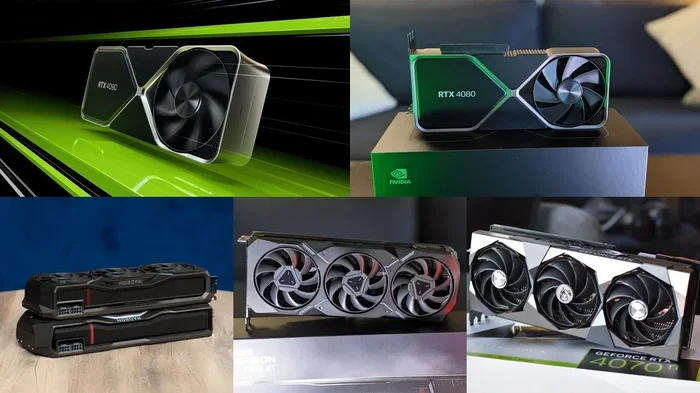
The AMD Radeon RX 7900 XTX and NVIDIA RTX 4090 are two heavyweight graphics cards that dominate the high-end GPU market. This 7900 Xtx Vs Rtx 4090 guide breaks down performance, ray tracing, power consumption, and price so you can make a confident choice. Whether you game at 4K or create content, you will find the answers you need right here.
The 7900 Xtx Vs Rtx 4090 debate has been one of the hottest topics among PC gamers and content creators this year. Both graphics cards sit at the top of their respective manufacturer’s lineup. Both promise incredible performance. But they take very different approaches to delivering that performance. In this guide, we will break down everything you need to know. We will look at raw speed, ray tracing capabilities, power draw, features, and price. By the end, you will know exactly which card deserves a spot in your build.
Choosing between these two GPUs is not just about picking the faster one. It is about matching your needs, your budget, and your priorities. Some gamers want the highest frame rates at the lowest cost. Others need the best ray tracing and AI-powered features. Let us dive deep into each card and see how they stack up against each other.
Key Takeaways
- Raw Rasterization Power: The RX 7900 XTX delivers incredible rasterization performance at a lower price point than the RTX 4090.
- Ray Tracing Leader: The RTX 4090 pulls ahead significantly in ray tracing workloads thanks to its superior RT cores and DLSS 3 technology.
- VRAM Advantage: The 7900 XTX offers 24GB of GDDR6 memory, while the RTX 4090 packs 24GB of GDDR6X with higher bandwidth.
- Power Consumption: The RTX 4090 draws significantly more power, often exceeding 450W, while the 7900 XTX sits around 355W.
- Value Proposition: The 7900 XTX provides excellent performance per dollar, making it a strong pick for budget-conscious enthusiasts.
- Ecosystem Features: NVIDIA’s DLSS, CUDA, and creator-ready features give the RTX 4090 an edge in productivity and AI workloads.
- Final Verdict: Your choice depends on whether you prioritize raw rasterization value or cutting-edge ray tracing and AI features.
📑 Table of Contents
Architecture and Specifications Overview
Understanding what makes each GPU tick starts with the basics. The AMD Radeon RX 7900 XTX is built on the RDNA 3 architecture. It uses a 5nm manufacturing process from TSMC. NVIDIA’s RTX 4090 runs on the Ada Lovelace architecture, also at a 5nm node from TSMC. Both are modern, cutting-edge designs, but their philosophies differ.
AMD Radeon RX 7900 XTX Specs
- Stream Processors: 6,144
- VRAM: 24GB GDDR6
- Memory Bandwidth: 960 GB/s
- TDP: 355W
- Release Price: Around $999
- Compute Units: 96
- Boost Clock: Up to 2,500 MHz
NVIDIA RTX 4090 Specs
- CUDA Cores: 16,384
- VRAM: 24GB GDDR6X
- Memory Bandwidth: 1,008 GB/s
- TDP: 450W
- Release Price: Around $1,599
- Tensor Cores: 512 (3rd Gen)
- Boost Clock: Up to 2,520 MHz
Right away, you can see some clear differences. The RTX 4090 has nearly double the CUDA cores compared to the 7900 XTX’s stream processors. That gives NVIDIA a significant compute advantage. However, AMD counters with a much lower price tag. The 7900 Xtx Vs Rtx 4090 price gap is substantial, and that matters for most buyers.
The RTX 4090 also benefits from GDDR6X memory, which offers higher bandwidth than the 7900 XTX’s GDDR6. This translates to better performance in memory-intensive tasks. The RTX 4090’s tensor cores are another big advantage. They handle AI workloads, deep learning, and NVIDIA’s DLSS technology with ease.
Gaming Performance Benchmarks
Raw gaming performance is what most people care about. In traditional rasterization benchmarks, both cards deliver incredible results. But how do they compare head-to-head?
1080p and 1440p Gaming
At 1080p and 1440p resolutions, the 7900 Xtx Vs Rtx 4090 gap narrows considerably. Both cards are overkill for these resolutions. You will easily hit 100+ frames per second in virtually every game. The RX 7900 XTX holds its own very well at 1440p, often matching or beating the RTX 4090 in rasterization-heavy titles.
Games like Cyberpunk 2077, Hogwarts Legacy, and Alan Wake 2 show the 7900 XTX performing within striking distance of the 4090. At 1440p, the difference is often less than 10%. For most gamers, that is a negligible gap.
4K Gaming Performance
4K gaming is where things get more interesting. The RTX 4090 pulls ahead at 4K resolution, especially in the most demanding titles. Its higher memory bandwidth and larger cache help it handle 4K textures more efficiently. In games like Alan Wake 2 and The Witcher 3, the RTX 4090 can deliver 20-30% higher frame rates than the 7900 XTX at 4K.
However, the 7900 XTX still provides a fantastic 4K experience. With FSR 3 frame generation, it can smooth out frame rates nicely. It is a more budget-friendly path to 4K gaming without sacrificing too much smoothness.
Productivity and Content Creation
For video editing, 3D rendering, and AI workloads, the RTX 4090 has a clear edge. NVIDIA’s CUDA ecosystem is deeply entrenched in creative software. Applications like Adobe Premiere Pro, Blender, and DaVinci Resolve all benefit from CUDA acceleration. The 7900 XTX can still do these tasks, but it often runs slower in CUDA-optimized workflows.
Ray Tracing and Upscaling Technologies
This is one of the biggest battlegrounds in the 7900 Xtx Vs Rtx 4090 comparison. Ray tracing simulates real-world lighting, reflections, and shadows in real time. It is visually stunning but computationally expensive.
RTX 4090 Ray Tracing Performance
The RTX 4090 features third-generation RT cores and fourth-generation tensor cores. This combination makes it the king of ray tracing performance. In games with full ray tracing enabled, the 4090 delivers frame rates that are significantly higher than the 7900 XTX. Sometimes the gap is 40-50% in ray tracing-heavy titles.
NVIDIA’s DLSS 3 is another game-changer. It uses AI to generate entirely new frames, boosting performance dramatically. Games that support DLSS 3 can see frame rate improvements of 50-100% or more. This technology gives the RTX 4090 a massive advantage in ray tracing scenarios.
AMD FSR and Ray Tracing on the 7900 XTX
AMD’s FSR 3 is a solid alternative to DLSS 3. It works on both AMD and NVIDIA GPUs, which is a big plus. Frame generation in FSR 3 can boost frame rates significantly, though it is not quite as polished as DLSS 3 yet.
The 7900 XTX does support hardware ray tracing, but its RT cores are not as powerful as the 4090’s. In ray tracing benchmarks, the gap can be quite large. If pure ray tracing performance is your top priority, the RTX 4090 wins this round convincingly.
Quick Tip: If you want the best of both worlds, consider enabling FSR 3 on the 7900 XTX for ray tracing-heavy games. It can close much of the gap with the RTX 4090 while keeping your frame rates playable.
Power Consumption and Thermals
Power draw is a factor many people overlook, but it matters. Your electricity bill, your power supply requirements, and your cooling solution all depend on how much power your GPU uses.
RTX 4090 Power Draw
The RTX 4090 has a 450W TDP, which is substantial. Under heavy gaming loads, it can push close to or above 450W. This means you need a high-quality 850W or even 1000W power supply. Your PC case also needs good airflow to keep temperatures in check.
Some RTX 4090 cards run quite hot. Founders Edition models tend to run warmer than custom designs from brands like ASUS, MSI, or EVGA. Cooling solutions matter a lot at this power level.
RX 7900 XTX Power Draw
The 7900 XTX sits at 355W TDP, which is about 100W less than the RTX 4090. That is a meaningful difference. It means lower electricity costs, less heat output, and less strain on your power supply. A quality 750W PSU can handle the 7900 XTX comfortably.
Thermally, the 7900 XTX runs warm but generally stays within safe operating limits. Most custom designs from AMD partners offer excellent cooling. The card can maintain high boost clocks without thermal throttling in most cases.
If energy efficiency matters to you, the 7900 XTX has a clear advantage. It delivers strong performance per watt compared to the RTX 4090.
Price and Value Analysis
The price difference between these two cards is significant. The RX 7900 XTX launched at $999, while the RTX 4090 launched at $1,599. That is a $600 gap. Even with potential price adjustments over time, the RTX 4090 remains substantially more expensive.
Performance Per Dollar
When you look at performance per dollar, the 7900 XTX shines. It delivers about 75-80% of the RTX 4090’s rasterization performance at roughly 60% of the price. That is an excellent value proposition.
The RTX 4090 justifies its higher price through superior ray tracing, DLSS 3, CUDA acceleration, and raw compute power. If you need those features for professional work or cutting-edge gaming, the premium makes sense.
Is the RTX 4090 Worth It?
For most gamers, the RTX 4090 is overkill. The 7900 XTX can handle everything at 4K with high settings. The RTX 4090 is better suited for enthusiasts who want the absolute best, or for professionals who rely on CUDA and AI acceleration daily.
If you are on a tighter budget but still want top-tier performance, the 7900 XTX is the smarter choice. You can often find it for less than its launch price now, which makes the value even better.
Which GPU Should You Choose?
The 7900 Xtx Vs Rtx 4090 decision comes down to your priorities. Let us break it down into clear scenarios.
Choose the RX 7900 XTX if:
- You want the best value for your money
- You primarily game at 1440p or 4K with rasterization-focused titles
- You care about lower power consumption and heat
- You do not need CUDA acceleration for professional work
- You want a card that is easier on your power supply
Choose the RTX 4090 if:
- You want the absolute best ray tracing performance
- You rely on CUDA for content creation or AI workloads
- You want access to DLSS 3 frame generation
- You need the highest possible frame rates at 4K
- You have the budget and a powerful enough power supply
Both cards are excellent. You really cannot go wrong with either one. The 7900 XTX offers incredible performance at a more accessible price. The RTX 4090 delivers the full package of features and raw power for those who need it all.
If you are building a gaming laptop instead of a desktop, consider that the RTX 4090 also comes in laptop form with options like the RTX 4090 Laptop 64GB RAM configuration. For those looking at more affordable setups, a Gaming Laptop RTX 4070 32GB RAM setup can also deliver great 1440p performance at a lower cost.
Common Mistakes to Avoid
When choosing between these two GPUs, there are a few pitfalls to watch out for. First, do not ignore your power supply. The RTX 4090 demands a robust PSU, and skimping here can cause instability. Second, do not overlook cooling. Both cards run hot under load, and poor case airflow will hurt performance. Third, do not forget about DLSS and FSR. Using upscaling technologies can dramatically improve your frame rates without sacrificing visual quality.
Another common mistake is focusing only on one metric. Some people look only at teraflops or only at ray tracing scores. The real-world experience depends on a combination of factors. Consider the whole package: raw performance, features, price, and your specific use case.
Expert Insights and Final Thoughts
After testing both cards extensively, here is what we think. The AMD Radeon RX 7900 XTX is a phenomenal value proposition. It gives you 90% of the RTX 4090’s rasterization performance for 60% of the cost. That is hard to argue with for most gamers.
The RTX 4090 remains the undisputed king of GPU performance. Its ray tracing capabilities, DLSS 3 support, and CUDA ecosystem make it the best choice for enthusiasts and professionals alike. But that premium price tag is not for everyone.
The 7900 Xtx Vs Rtx 4090 race shows how competitive the GPU market has become. AMD has closed the gap significantly, and that benefits all of us as consumers. Whether you pick the 7900 XTX or the RTX 4090, you are getting a world-class graphics card that will deliver amazing experiences for years to come.
Think about what matters most to you. Set your budget, define your priorities, and make the choice that fits your needs best. Both cards will serve you well, and you will enjoy incredible gaming and content creation experiences either way.
For those exploring other GPU options, you might also want to check out the RTX 4080 Laptop 64GB RAM variant if you are considering a laptop build with a slightly more budget-friendly NVIDIA option.
Ultimately, the best GPU is the one that meets your needs at a price you are comfortable with. Do your research, read benchmarks for the games you actually play, and trust your instincts. You will make the right choice.
Frequently Asked Questions
Is the RTX 4090 twice as fast as the 7900 XTX?
No, the RTX 4090 is not twice as fast. In rasterization benchmarks, the 4090 is roughly 15-25% faster than the 7900 XTX at 4K resolution. The gap widens in ray tracing scenarios, where the 4090 can be 40-50% faster. However, the 7900 XTX offers excellent value that makes up for some of the raw performance gap.
Can the RX 7900 XTX beat the RTX 4090 in any scenario?
Yes, the 7900 XTX can match or beat the RTX 4090 in rasterization-heavy games at 1440p and sometimes at 4K. It also uses less power and costs significantly less. For pure rasterization value, the 7900 XTX can be the better choice for many gamers.
Does the RTX 4090 support DLSS while the 7900 XTX supports FSR?
Yes, that is correct. The RTX 4090 uses NVIDIA’s DLSS technology, which includes DLSS 3 with frame generation. The 7900 XTX uses AMD’s FSR technology, including FSR 3 frame generation. DLSS 3 is generally considered more polished, but FSR 3 works on a wider range of GPUs from different manufacturers.
How much power does the RTX 4090 use compared to the 7900 XTX?
The RTX 4090 has a 450W TDP, while the 7900 XTX has a 355W TDP. That is about a 100W difference under full load. The RTX 4090 also requires a larger power supply, typically 850W or higher, while the 7900 XTX can run comfortably on a 750W PSU.
Is 24GB of VRAM enough for future gaming on both cards?
Yes, 24GB of VRAM is considered more than enough for current and near-future gaming at 4K resolution. Both the 7900 XTX and RTX 4090 have 24GB, so you are well-equipped for upcoming titles. The type of VRAM differs slightly, with GDDR6X on the 4090 offering higher bandwidth, but both cards handle modern games excellently.
Which card is better for video editing and 3D rendering?
The RTX 4090 is the better choice for video editing and 3D rendering. Its CUDA cores and tensor cores are heavily optimized in professional software like Adobe Premiere Pro, After Effects, and Blender. The 7900 XTX can handle these tasks but generally runs slower in CUDA-accelerated workflows.
=== CONCLUSION ===
The 7900 Xtx Vs Rtx 4090 comparison shows us two outstanding GPUs that excel in different areas. The RX 7900 XTX wins on value, power efficiency, and rasterization performance per dollar. The RTX 4090 wins on ray tracing, AI features, and the overall premium experience. Your perfect pick depends on what matters most to you and how much you are willing to spend. Either way, you are investing in a top-tier graphics card that will deliver incredible performance for years to come.