64 Gb of Ram Laptop

A 64 GB of RAM laptop is a powerhouse machine built for professionals, creators, and extreme multitaskers who demand top-tier performance. While most users won’t need this much memory, those working with video editing, 3D rendering, virtual machines, or large datasets will find it transformative. This guide breaks down everything you need to know before investing in a 64 GB of RAM laptop.
Key Takeaways
- 64 GB of RAM is overkill for average users: Everyday tasks like browsing, streaming, and office work rarely need more than 8–16 GB of RAM.
- Ideal for professional workloads: Video editors, 3D animators, software developers, and data scientists benefit the most from a 64 GB of RAM laptop.
- Gaming gains are limited: Most games don’t utilize more than 16–32 GB, so a 64 GB of RAM laptop is primarily for gaming and streaming or content creation simultaneously.
- Future-proofing matters: Investing in 64 GB now means your laptop stays relevant for years as software demands grow.
- Price is significantly higher: Laptops with 64 GB of RAM cost considerably more, so budget accordingly and prioritize your actual needs.
- Not all laptops support 64 GB: Check the motherboard and processor compatibility before purchasing or upgrading.
- DDR5 is the new standard: Modern 64 GB configurations use DDR5 RAM, offering faster speeds and better power efficiency than DDR4.
📑 Table of Contents
- What Is a 64 GB of RAM Laptop?
- Who Actually Needs 64 GB of RAM?
- 64 GB of RAM for Gaming: Is It Worth It?
- How Does 64 GB Compare to 16 GB and 32 GB?
- What to Look for in a 64 GB of RAM Laptop
- Can You Upgrade a Laptop to 64 GB of RAM?
- Best Use Cases for a 64 GB of RAM Laptop
- Price Considerations and Value
- Future-Proofing: Will 64 GB Become the Norm?
- Conclusion
What Is a 64 GB of RAM Laptop?
Let’s start with the basics. RAM stands for Random Access Memory. It’s your laptop’s short-term memory. Every time you open a browser tab, run an app, or load a file, your computer uses RAM to keep things running smoothly. The more RAM you have, the more tasks your laptop can handle at once without slowing down.
A 64 GB of RAM laptop is a machine equipped with 64 gigabytes of memory. That’s a massive amount. For context, most budget laptops ship with 8 GB. Mid-range models offer 16 GB. Even many gaming laptops cap out at 32 GB. So 64 GB puts you in a completely different league.
But here’s the thing — more RAM doesn’t always mean a better experience. If you’re just checking email and watching YouTube, 64 GB won’t make your laptop feel any faster than one with 16 GB. The benefits only show up when you’re running memory-hungry applications. Think video editing in 4K, running multiple virtual machines, or working with enormous spreadsheets and databases.
Who Actually Needs 64 GB of RAM?
Professional Video Editors and Content Creators
If you edit videos professionally, especially in 4K or 8K resolution, a 64 GB of RAM laptop can be a game-changer. Programs like Adobe Premiere Pro, DaVinci Resolve, and Final Cut Pro eat up memory like crazy. When you’re working with multiple layers, effects, color grading, and high-resolution footage, 32 GB can feel tight. 64 GB gives you breathing room. Your timeline scrubbing stays smooth. Renders finish faster. And you can keep your browser, music apps, and communication tools open without everything grinding to a halt.
Visual guide about 64 Gb of Ram Laptop
Image source: eadn-wc04-5582623.nxedge.io
3D Artists and Animators
3D modeling and rendering software like Blender, Maya, Cinema 4D, and Unreal Engine are incredibly memory-intensive. Complex scenes with high-polygon models, detailed textures, and ray-traced lighting can easily consume 32 GB or more. A 64 GB of RAM laptop lets you work on larger projects without constant crashes or slowdowns. If you’re rendering animations or building game assets, this much RAM is practically essential.
Software Developers and Engineers
Developers who run virtual machines, Docker containers, or local servers benefit enormously from 64 GB of RAM. Imagine running a Windows VM, a Linux VM, a database server, and your IDE all at once. That’s easily 30–40 GB of memory in use. With 64 GB, you can do all of that and still have room for your browser with 50 tabs open. Engineers running CAD software, simulations, or compiling large codebases will also notice a significant improvement.
Data Scientists and Analysts
Working with massive datasets in Python, R, or MATLAB? Loading a 10 GB dataset into memory for analysis requires a lot of RAM. A 64 GB of RAM laptop lets you load, manipulate, and analyze huge files without constantly swapping to disk. Machine learning practitioners training models locally will also appreciate the extra headroom, especially when working with large neural networks or image datasets.
Extreme Multitaskers
Some people just have a lot going on at once. Maybe you’re a streamer running OBS, a game, chat overlays, and a video editor simultaneously. Or perhaps you’re a researcher with dozens of browser tabs, a PDF reader, a note-taking app, and a statistical analysis tool all open. If your workflow involves juggling many demanding applications, 64 GB keeps everything responsive.
64 GB of RAM for Gaming: Is It Worth It?
This is a question we get asked a lot. The short answer: probably not for gaming alone. Most modern games are designed to run well on 16 GB of RAM. Some newer titles recommend 32 GB for optimal performance, especially at high resolutions with maxed-out settings. But very few games actually benefit from 64 GB.

Visual guide about 64 Gb of Ram Laptop
Image source: 360life.shinyusha.co.jp
However, there’s a caveat. If you’re a gaming content creator who streams, records, and edits gameplay videos, a 64 GB of RAM laptop makes a lot of sense. Streaming software like OBS uses RAM. So does your game. So does your video editor running in the background. When you combine all those workloads, 64 GB ensures nothing stutters or drops frames.
If you want to explore more about gaming-specific configurations, check out our guide on 64 GB RAM gaming laptops for detailed recommendations and benchmarks.
How Does 64 GB Compare to 16 GB and 32 GB?
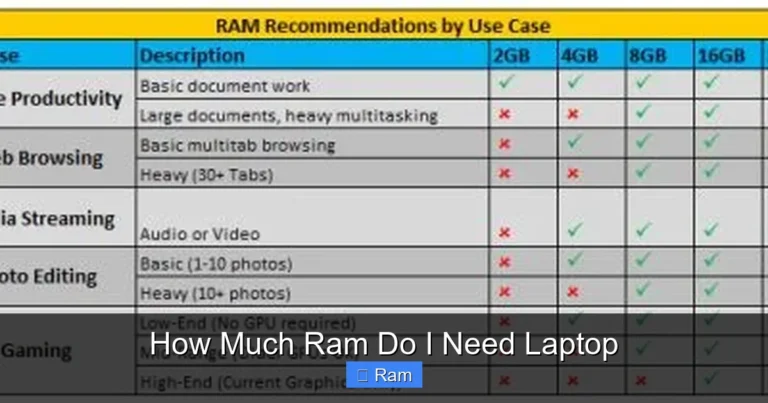
Let’s put things in perspective. A 16 GB RAM Windows laptop is the sweet spot for most users. It handles everyday tasks, moderate gaming, and light content creation without breaking a sweat. It’s affordable and widely available.
Visual guide about 64 Gb of Ram Laptop
Image source: illustcenter.com
Stepping up to 32 GB gives you noticeable headroom. You can run more applications simultaneously, work with larger files, and enjoy smoother performance in demanding software. A HP laptop with 32 GB of RAM is a solid choice for power users who need extra capacity without going overboard.
But 64 GB? That’s a different category entirely. It’s not about incremental improvement. It’s about enabling workflows that simply aren’t possible with less memory. If you’ve ever seen your RAM usage hit 90%+ on a 32 GB machine, you know the frustration. With 64 GB, that becomes a non-issue.
Here’s a quick comparison:
- 8 GB: Basic tasks, light browsing, simple office work
- 16 GB: Standard multitasking, casual gaming, light photo editing
- 32 GB: Heavy multitasking, serious gaming, moderate video editing
- 64 GB: Professional workloads, 4K/8K editing, 3D rendering, virtual machines, data science
What to Look for in a 64 GB of RAM Laptop
Processor (CPU)
Pairing 64 GB of RAM with a weak processor defeats the purpose. You need a powerful CPU to take advantage of all that memory. Look for Intel Core i7 or i9 processors (12th generation or newer) or AMD Ryzen 7 or 9 chips (5000 series or newer). These processors have enough cores and threads to handle the demanding workloads that justify 64 GB of RAM.
Visual guide about 64 Gb of Ram Laptop
Image source: makerfaire.com
Graphics Card (GPU)
If you’re buying a 64 GB of RAM laptop for creative work or gaming, the GPU matters just as much as the CPU. NVIDIA RTX 4070, 4080, or 4090 laptops are excellent choices. For professional work, NVIDIA’s RTX A-series or AMD’s Radeon Pro cards offer certified drivers for creative applications.
RAM Type: DDR4 vs DDR5
Most modern 64 GB laptops use DDR5 RAM. DDR5 offers higher bandwidth, better power efficiency, and faster speeds compared to DDR4. If you’re buying new, DDR5 is the way to go. However, DDR4 laptops with 64 GB configurations still exist and can be more affordable. Just know that DDR5 is the future.
Storage
Don’t overlook storage. A fast NVMe SSD with at least 1 TB of capacity is recommended. If you’re working with large video files or datasets, consider 2 TB or more. Some laptops offer dual SSD slots, which is a nice bonus for expandability.
Display Quality
For creative professionals, display quality is critical. Look for laptops with at least a 15.6-inch screen, 1440p or 4K resolution, and good color accuracy (100% sRGB or higher). OLED panels offer stunning contrast and vibrant colors, though they come at a premium.
Cooling System
A laptop with 64 GB of RAM is likely packing high-end components that generate serious heat. A robust cooling system with multiple fans, heat pipes, and good airflow is essential. Poor cooling leads to thermal throttling, which negates the performance benefits of your expensive hardware.
Can You Upgrade a Laptop to 64 GB of RAM?
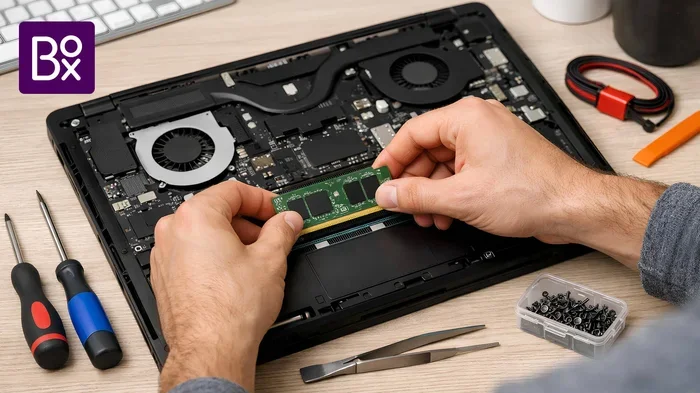
Maybe. It depends on the laptop. Some laptops have soldered RAM, meaning the memory is permanently attached to the motherboard and can’t be upgraded. Others have SO-DIMM slots that let you swap or add RAM sticks.
Before attempting an upgrade, check your laptop’s specifications. Look up the maximum supported RAM. Some laptops officially support only 32 GB but can actually handle 64 GB with the right memory modules. It’s always a good idea to consult your manufacturer’s documentation or community forums.
If you’re curious about the upgrade process, our guide on how to increase RAM on a laptop walks you through the steps. And if you’re not sure how much RAM you currently have, learn how to check your laptop’s RAM in just a few clicks.
A few important notes about upgrading:
- Match the RAM type: DDR4 and DDR5 are not interchangeable. Make sure you buy the correct type.
- Use matched pairs: For best performance, install RAM in pairs (two 32 GB sticks for 64 GB total).
- Check compatibility: Not every DDR4 or DDR5 stick works in every laptop. Verify speed and voltage compatibility.
- Warranty concerns: Opening your laptop to upgrade RAM may void the warranty on some models.
Best Use Cases for a 64 GB of RAM Laptop
Let’s get specific. Here are real-world scenarios where a 64 GB of RAM laptop shines:

Visual guide about 64 Gb of Ram Laptop
Image source: images.pexels.com
- 4K/8K Video Editing: Editing multi-cam 4K footage with effects, transitions, and color grading in real time.
- 3D Rendering: Rendering complex scenes in Blender, Maya, or Cinema 4D without waiting hours.
- Virtual Machines: Running 3–4 virtual machines simultaneously for development or testing.
- Music Production: Working with large sample libraries and dozens of tracks in DAWs like Ableton or Logic Pro.
- Photography: Editing massive RAW photo libraries in Lightroom or Capture One with multiple applications open.
- Scientific Computing: Running simulations, data analysis, and machine learning models locally.
- Software Compilation: Building large software projects like the Linux kernel or Chromium in minutes instead of hours.
Price Considerations and Value
Let’s talk money. A 64 GB of RAM laptop is not cheap. You’re looking at a starting price of around $1,500 for entry-level configurations and easily $3,000–$5,000 for high-end models with top-tier CPUs and GPUs.

Visual guide about 64 Gb of Ram Laptop
Image source: png.pngtree.com
The question is whether the investment makes sense for you. If your work depends on this level of performance and you’re losing time waiting for renders, compiles, or data processing, the productivity gains can justify the cost. Time is money, after all.
But if you’re buying 64 GB “just in case” or because it sounds impressive, you’re probably wasting money. A 16 GB or 32 GB laptop will serve you just fine for most tasks, and you can always upgrade later if your needs change.
Here’s a practical tip: if you’re on the fence between 32 GB and 64 GB, check your current RAM usage. Open your task manager or activity monitor during a typical work session. If you’re consistently using more than 24–28 GB, 64 GB is a worthwhile upgrade. If you’re barely hitting 16 GB, save your money.
Future-Proofing: Will 64 GB Become the Norm?
Technology moves fast. Software gets more demanding every year. Operating systems, browsers, and applications all trend toward higher memory usage over time. What feels like overkill today might be standard in five years.
We’ve already seen this pattern. A decade ago, 4 GB of RAM was plenty. Then 8 GB became the standard. Now 16 GB is the baseline for new laptops, and 32 GB is increasingly common in mid-range models. It’s not unreasonable to think that 64 GB could become mainstream within the next five to seven years.
If you keep your laptop for 5+ years, buying a 64 GB of RAM laptop now could save you from needing to replace it sooner. It’s a form of future-proofing. You’re buying headroom for tomorrow’s software demands.
That said, future-proofing has diminishing returns. Technology also changes in ways you can’t predict. A laptop bought today might be obsolete for reasons unrelated to RAM — maybe a new processor architecture, a better display technology, or a shift to cloud-based computing. So while 64 GB is a nice cushion, don’t let it be the only factor in your buying decision.
Conclusion
A 64 GB of RAM laptop is a specialized tool for specialized needs. It’s not for everyone, and that’s perfectly fine. If you’re a professional video editor, 3D artist, developer, data scientist, or extreme multitasker, 64 GB of RAM can transform your workflow and save you hours of waiting.
Visual guide about 64 Gb of Ram Laptop
Image source: ginatw.com
For everyone else — casual users, students, office workers, and even most gamers — 16 GB or 32 GB is more than enough. Spend the money you save on a better display, faster storage, or a more comfortable keyboard. Those upgrades will improve your daily experience far more than extra RAM you’ll never use.
The key is honesty about your actual needs. Don’t buy specs for the sake of specs. Buy what helps you do your work better, faster, and more enjoyably. And if that means 64 GB of RAM, go for it — you won’t regret having the extra power when you need it.
Frequently Asked Questions
What is 64 gb of ram laptop?
64 gb of ram laptop is an important topic with many practical applications.