M.2 2280 Nvme Ssd
An M.2 2280 NVMe SSD is a high-speed solid state drive that fits into modern motherboards and delivers blazing fast storage performance. It uses the NVMe protocol over PCIe to offer speeds far beyond traditional SATA drives. Whether you are building a new PC or upgrading an older one, this compact drive is a game changer.
If you have been shopping for a new solid state drive, you have probably seen the term M.2 2280 NVMe SSD everywhere. It sounds technical, but the concept is actually quite simple. This small, flat drive plugs directly into your motherboard and offers some of the fastest storage available today.
Whether you are a gamer, a content creator, or just someone tired of slow boot times, an M.2 2280 NVMe SSD can transform your experience. In this guide, we will break down everything you need to know. We will cover what it is, how it works, why it beats older drive types, and how to choose the right one for your needs.
Key Takeaways
- Form Factor: The M.2 2280 size means 22mm wide and 80mm long, the most common SSD length.
- Speed: NVMe drives use PCIe lanes to deliver much faster read and write speeds than SATA SSDs.
- Compatibility: Most modern motherboards have M.2 slots that support 2280 NVMe drives.
- Use Cases: Ideal for boot drives, gaming, video editing, and any task that demands fast storage.
- Price: Prices have dropped significantly, making M.2 NVMe SSDs affordable for everyone.
- Installation: Installing an M.2 SSD is simple and requires no cables.
📑 Table of Contents
What Is an M.2 2280 NVMe SSD?
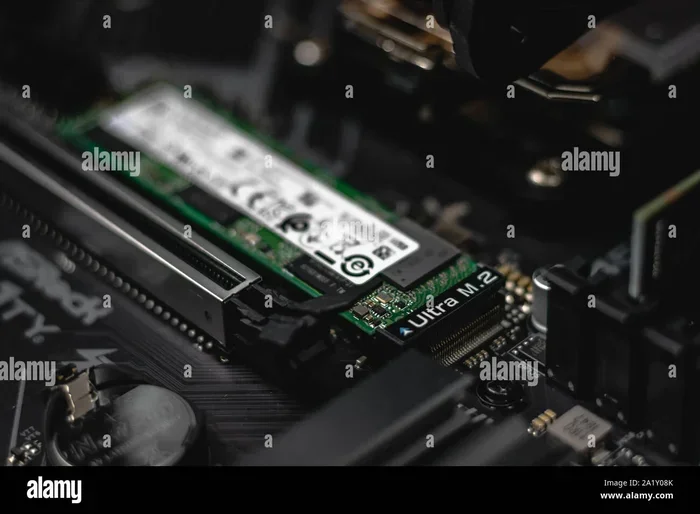
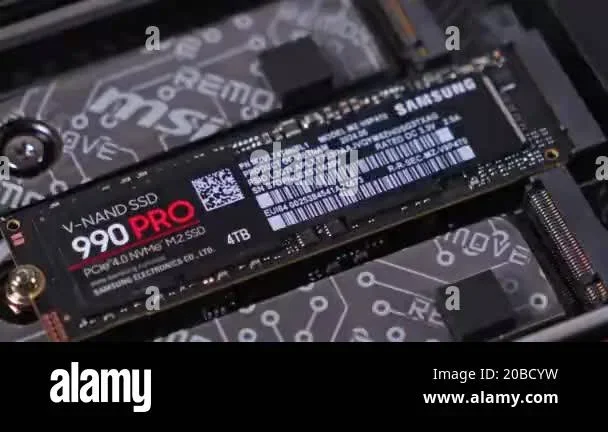
Let us start with the basics. M.2 refers to the form factor, which is the physical size and shape of the drive. The number 2280 tells you the dimensions: 22 millimeters wide and 80 millimeters long. This is the most popular size for modern NVMe SSDs.
NVMe stands for Non-Volatile Memory Express. It is a communication protocol designed specifically for flash storage. Unlike older protocols, NVMe uses the PCIe bus to transfer data at incredible speeds. This means an M.2 2280 NVMe SSD can read and write data far faster than traditional drives.
A solid state drive like this has no moving parts. It uses NAND flash memory to store data, which makes it both durable and fast. There are no spinning disks or read/write heads to worry about. This also means quieter operation and lower power consumption.
M.2 vs. 2280: What Does the Name Mean?
The name M.2 2280 tells you two things at once. M.2 is the connector type and overall form factor. 2280 is the specific size within that family. Other common lengths include 2230, 2242, and 2260, but 2280 is the standard for most desktop and laptop SSDs.
When people say M.2 NVMe SSD, they usually mean the 2280 size. However, not all M.2 slots support 2280 drives, so always check your motherboard manual. Some older boards may only accept shorter M.2 modules.
How Does NVMe Technology Work?
NVMe technology was designed to take full advantage of fast flash memory. Traditional SATA SSDs were limited by the SATA III interface, which caps speeds at around 550 MB/s. NVMe bypasses this bottleneck by connecting directly to the PCIe lanes on your motherboard.
Think of it like a highway. SATA is a single-lane road, while PCIe is a multi-lane superhighway. More lanes mean more data can flow at the same time. This is why NVMe drives deliver speeds that SATA drives simply cannot match.
Most M.2 2280 NVMe SSDs use PCIe Gen 3 or Gen 4 today. Gen 3 offers speeds up to about 3,500 MB/s, while Gen 4 can reach around 7,000 MB/s. The latest Gen 5 drives push even further, but they are still relatively new and expensive.
PCIe Lanes and Bandwidth
Your motherboard has a set number of PCIe lanes. These lanes connect different components like your GPU, network card, and NVMe SSDs. When you install an M.2 2280 NVMe SSD, it uses one or two of these lanes.
Most M.2 slots use four PCIe lanes, which provides plenty of bandwidth for storage tasks. However, some slots may only use two lanes, which can slightly limit speeds. Always check your motherboard specifications before purchasing a drive.
M.2 2280 NVMe SSD vs. SATA SSD
This is one of the most common questions people ask. The short answer is that NVMe is significantly faster. But let us look at the details to understand why that matters in real-world use.
| Feature | M.2 NVMe SSD | SATA SSD |
|---|---|---|
| Interface | PCIe (NVMe protocol) | SATA III |
| Max Read Speed | Up to 7,000+ MB/s | Up to 550 MB/s |
| Max Write Speed | Up to 5,000+ MB/s | Up to 520 MB/s |
| Form Factor | M.2 2280 (compact) | 2.5 inch (larger) |
| Cables Needed | None | SATA data and power |
| Price per TB | Moderate | Lower |
For everyday tasks like web browsing and office work, the difference may not be obvious. But when you are booting Windows, loading large games, or editing 4K video, the speed advantage becomes very clear. Games load faster, files transfer in seconds, and your system feels much more responsive.
If you are currently using a SATA SSD, upgrading to an M.2 2280 NVMe SSD is one of the best improvements you can make. It is a simple upgrade that makes a noticeable difference every day.
Benefits of Using an M.2 2280 NVMe SSD
There are many reasons to choose this type of drive for your system. Let us walk through the biggest advantages.
Blazing Fast Speeds
The most obvious benefit is speed. An M.2 2280 NVMe SSD can read data at thousands of megabytes per second. This means your operating system boots in seconds, applications launch instantly, and file transfers finish in a flash.
For gamers, this means shorter load screens and faster level transitions. For video editors, it means smoother playback and quicker exports. The speed difference compared to a traditional hard drive is enormous.
Compact Size
Because the M.2 2280 form factor is so small, it takes up very little space inside your PC case. There are no cables to manage, no drive bays to fill, and no bulky enclosures. This makes it perfect for small form factor builds and minimalist setups.
The drive simply slots into the M.2 connector on your motherboard and stays there with a single screw. It is one of the cleanest storage solutions available.
Energy Efficiency
NVMe SSDs are designed to be power efficient. They consume less energy than traditional hard drives and even some SATA SSDs. This can lead to slightly lower electricity bills and better battery life on laptops.
Less heat generation is another bonus. Since the drive stays cooler, your overall system thermals improve, which can help other components run more efficiently.
No Moving Parts
Unlike traditional hard disk drives, NVMe SSDs have no moving parts. This makes them much more resistant to physical shock and vibration. If you drop a laptop with an NVMe drive, your data is much safer than it would be on a spinning hard drive.
There are no mechanical failures to worry about either. Traditional drives can fail when the read/write head crashes into the platter. NVMe drives simply do not have this problem.
How to Choose the Right M.2 2280 NVMe SSD
Not all NVMe SSDs are the same. There are several factors to consider before making a purchase. Here is what you should look at.
Capacity
M.2 2280 NVMe SSDs come in a wide range of capacities. You can find models starting at 250GB and going all the way up to 4TB or more. Your choice should depend on what you plan to store.
For a boot drive with a few games and applications, 1TB is usually enough. If you work with large video files or have a massive game library, consider 2TB or more. Check out our guide on 1TB NVMe M.2 SSD options for more details on choosing the right capacity.
PCIe Generation
The PCIe generation affects the maximum speed of your drive. PCIe Gen 3 is still very fast and offers great value. PCIe Gen 4 is noticeably faster and is becoming the new standard. PCIe Gen 5 is the latest but comes at a premium price.
For most users, a Gen 3 or Gen 4 drive will be more than enough. You only need Gen 5 if you are doing extremely intensive work like 8K video editing or running professional workloads.
DRAM Cache
Some NVMe SSDs include a DRAM cache, which helps with sustained performance and random read/write operations. Drives with DRAM tend to be faster and more consistent, especially under heavy workloads.
Budget-friendly models may skip the DRAM cache and rely on the host memory buffer instead. These drives are still fast for most tasks but may slow down during prolonged heavy use. If you want the best performance, look for a model with DRAM support.
Brand and Warranty
Stick with reputable brands that offer solid warranties and a track record of reliability. Popular choices include Samsung, Crucial, Kingston, and WD. Many manufacturers offer 5-year warranties on their NVMe SSDs, which gives you peace of mind.
If you are considering the Kingston NV2, you can check out our review to see how it performs in real-world tests. Similarly, the Crucial P310 is another popular option that offers excellent value for the price.
Installation Guide: Setting Up Your M.2 2280 NVMe SSD
Installing an M.2 2280 NVMe SSD is one of the easiest PC upgrades you can do. You do not need cables or special tools. Here is a simple step-by-step guide.
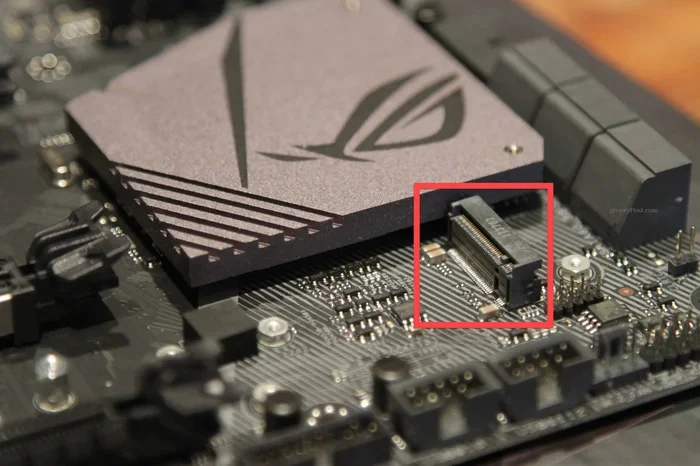
First, locate the M.2 slot on your motherboard. It is usually labeled and positioned near the CPU or GPU area. Consult your motherboard manual if you are not sure where it is.
Second, insert the drive at a 30-degree angle into the M.2 slot. Gently push it down and secure it with the small screw that came with your motherboard. The drive should sit flat against the board.
Third, enter your BIOS or UEFI settings and make sure the M.2 slot is enabled. You may also need to set the SATA mode to AHCI or RAID depending on your configuration. Save your settings and boot into your operating system.
Finally, initialize and format the drive through your operating system. On Windows, you can use the Disk Management tool to partition and format the new NVMe drive. Once formatted, it is ready to use as your boot drive or additional storage.
Quick Tips for Installation
- Always ground yourself before touching components to avoid static damage.
- Do not force the drive into the slot. It should slide in smoothly.
- Keep the screw snug but do not overtighten it.
- Make sure your motherboard BIOS is updated for the best compatibility.
- If the drive is not showing up, try reseating it or checking the BIOS settings.
Common Mistakes to Avoid
Even though installation is straightforward, there are a few common mistakes that people make. Being aware of these can save you time and frustration.
One mistake is buying a 2280 drive for a motherboard that only supports shorter lengths like 2230 or 2242. Always double-check the maximum supported length before purchasing. Another mistake is confusing M.2 SATA drives with M.2 NVMe drives. They look the same but use different protocols and are not interchangeable in all cases.
Some users also forget to enable the M.2 slot in the BIOS. If your new drive is not showing up after installation, check the BIOS settings first. This is a simple fix that many people overlook.
Finally, avoid filling your NVMe SSD to near capacity. Keeping at least 10 to 20 percent free space helps maintain performance and extends the lifespan of the drive. Solid state drives perform best when they have room to manage wear leveling and garbage collection.
Is an M.2 2280 NVMe SSD Worth It?
The short answer is absolutely yes. The price of M.2 NVMe SSDs has come down dramatically in recent years. You can get a fast, reliable 1TB drive for a very reasonable price. The performance gains over older storage solutions are enormous.
Whether you are building a new PC or upgrading an existing one, this type of drive is the best choice for most users. It is fast, compact, reliable, and affordable. The days of waiting minutes for your system to boot are over.
If you want to learn more about pricing and options, check out our guide on NVMe M.2 SSD 1TB prices. For a deeper dive into specific models, our Samsung 970 EVO Plus review covers one of the most popular drives on the market.
An M.2 2280 NVMe SSD is not just a storage upgrade. It is an upgrade to your entire computing experience. Faster boot times, quicker application launches, and smoother multitasking are all part of the package. Once you make the switch, you will never want to go back to slower storage.
Take the time to choose the right drive for your needs, follow the installation steps carefully, and enjoy the speed. Your system will thank you every single day.
Frequently Asked Questions
What does M.2 2280 mean?
M.2 refers to the form factor and connector type. 2280 means the drive is 22 millimeters wide and 80 millimeters long. This is the standard size for most NVMe SSDs used in desktops and laptops today.
How fast is an M.2 2280 NVMe SSD?
Speeds vary by model and PCIe generation. PCIe Gen 3 drives typically reach 3,500 MB/s read speeds, while Gen 4 drives can hit 7,000 MB/s or more. These speeds are many times faster than traditional SATA SSDs.
Can I use an M.2 2280 NVMe SSD as a boot drive?
Yes, absolutely. Most people use an M.2 2280 NVMe SSD as their primary boot drive. It dramatically reduces Windows boot times and makes the entire system feel much faster and more responsive.
Do I need a special motherboard for an M.2 NVMe SSD?
You need a motherboard with an M.2 slot that supports NVMe. Most modern motherboards include at least one M.2 slot with NVMe support. Check your motherboard specifications to confirm compatibility before buying.
Is an NVMe M.2 SSD better than a regular SSD?
Yes, NVMe M.2 SSDs are significantly faster than traditional SATA SSDs. They use the PCIe interface and NVMe protocol to deliver much higher read and write speeds. For most users, the performance difference is very noticeable.
How long does an M.2 2280 NVMe SSD last?
Most NVMe SSDs have a lifespan of 5 to 10 years or more under normal use. They use NAND flash memory with no moving parts, which makes them durable. Many manufacturers offer 5-year warranties, reflecting their confidence in the drive longevity.