1tb Pcie 4.0 Nvme Ssd
A 1TB PCIe 4.0 NVMe SSD delivers blazing-fast storage speeds that transform your computing experience. Whether you are gaming, editing video, or just want a snappy system, this drive offers the perfect balance of capacity, performance, and value. In this guide, we break down everything you need to know.
Key Takeaways
- Blazing Speeds: A 1TB PCIe 4.0 NVMe SSD can reach sequential read speeds of up to 7,000 MB/s, far surpassing older SATA drives.
- Gaming Ready: Load times drop dramatically, making this the go-to storage upgrade for serious gamers.
- Wide Compatibility: Most modern motherboards and laptops support PCIe Gen 4 M.2 slots, making upgrades easy.
- Price Sweet Spot: The 1TB size hits the perfect balance between capacity and affordability for most users.
- Thermal Management Matters: Proper heatsinking prevents thermal throttling and keeps your drive running at peak performance.
- Future-Proof Investment: PCIe 4.0 technology is widely adopted and will remain relevant for years to come.
- Easy Installation: Most 1TB PCIe 4.0 NVMe SSDs use the M.2 2280 form factor and install in minutes.
📑 Table of Contents
What Is a 1TB PCIe 4.0 NVMe SSD?
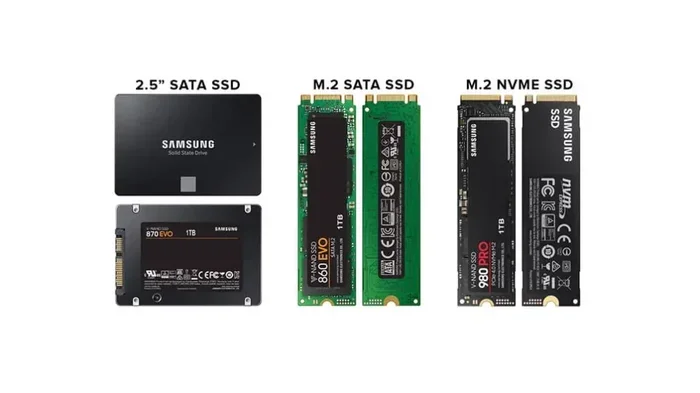
A 1TB PCIe 4.0 NVMe SSD is a high-performance storage drive that uses the fourth generation of the Peripheral Component Interconnect Express standard. It combines the NVMe protocol with a 1TB storage capacity to deliver incredibly fast data transfer speeds. This type of drive has become the gold standard for modern desktops and laptops.
Let us break that down simply. PCIe 4.0 refers to the connection interface. It offers twice the bandwidth of PCIe 3.0. NVMe stands for Non-Volatile Memory Express. It is a protocol designed specifically for flash storage, meaning data access is nearly instant. The 1TB part tells you the drive holds one terabyte of data. That is enough room for your operating system, dozens of games, and all your files.
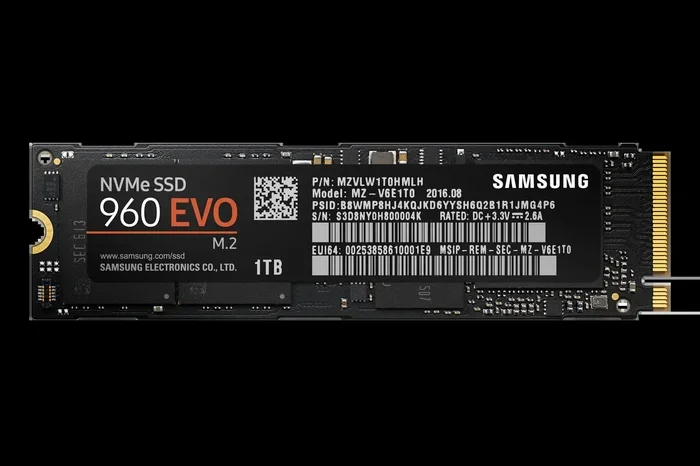
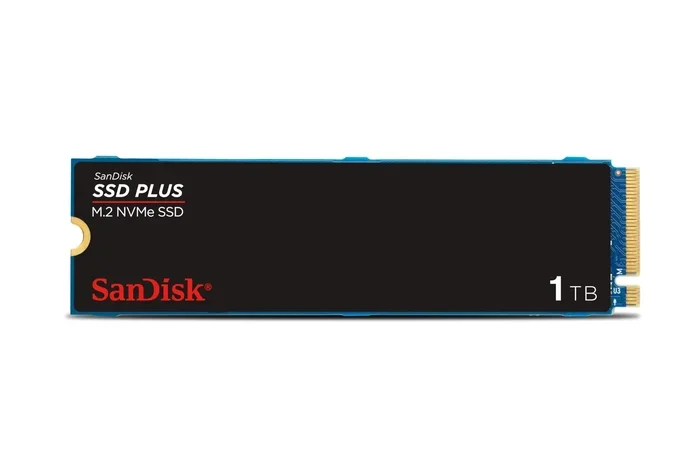
Most of these drives come in the M.2 2280 form factor. That is a small, stick-like shape that slots directly into your motherboard. No bulky cables needed. If you have looked into upgrading your storage lately, you have probably seen this term pop up everywhere. That is because 1TB NVMe M.2 SSD technology has become the go-to choice for builders and upgraders alike.
How It Differs from SATA SSDs
Older SATA SSDs still work fine. But they are limited by the SATA III interface, which caps out around 550 MB/s. A 1TB PCIe 4.0 NVMe SSD blows past that limit. We are talking theoretical speeds up to 7,000 MB/s or even higher on some drives. That is roughly ten times faster. The real-world difference is night and day. Boot times, file transfers, and game loads all benefit enormously.
Key Benefits of PCIe 4.0 NVMe Storage
Upgrading to a 1TB PCIe 4.0 NVMe SSD brings several tangible benefits. Let us look at the most important ones.
1. Insanely Fast Load Times
Gamers love this the most. Open-world games with massive asset files see load times shrink dramatically. Instead of staring at loading screens for 30 seconds, you might be in the game in under 5 seconds. NVMe PCIe M.2 SSD drives also reduce texture pop-in and streaming stutter in demanding titles.
2. Superior File Transfer Speeds
If you work with large files, video editing, or frequently move data around, the speed difference is huge. Copying a 100GB file that might take several minutes on a SATA drive could take just a minute or two on a 1TB PCIe 4.0 NVMe SSD. This is a real productivity booster.
3. Lower Latency
Latency is the delay between requesting data and receiving it. NVMe drives have significantly lower latency compared to SATA. This makes your system feel instantly responsive. Every click, every app launch, every file open happens faster.
4. Energy Efficiency
Modern PCIe Gen 4 NVMe drives are designed to sip power. This is great for laptop users. You get better battery life without sacrificing speed. Many 1TB M.2 NVMe SSD models include power management features that optimize energy use during idle and active states.
5. Compact and Clean Design
The M.2 form factor is tiny. It takes up very little space on your motherboard. This keeps your build clean and organized. There are no cables to manage. For small form factor PCs and laptops, this is a huge advantage.
How to Choose the Best 1TB PCIe 4.0 NVMe SSD
Not all 1TB PCIe 4.0 NVMe SSD models are created equal. Before you buy, consider these factors.
Sequential Read and Write Speeds
This is the most important spec. Look for drives that offer at least 5,000 MB/s sequential read speeds. Top-tier models push beyond 7,000 MB/s. Write speeds matter too, especially if you frequently save large files. A good target is at least 4,000 MB/s for writes.
NAND Flash Type
The type of NAND flash inside the drive affects longevity and performance. Look for drives using 3D TLC NAND or 3D QLC NAND. TLC offers a great balance of speed and endurance. QLC provides more capacity per dollar but trades some write performance. High-end models from brands like Crucial, Samsung, and WD often use TLC for best results.
DRAM Cache
Some 1TB PCIe 4.0 NVMe SSD models include a DRAM cache chip. This helps the drive manage data more efficiently. Drives with DRAM cache generally deliver more consistent performance, especially during sustained workloads. Budget models sometimes skip DRAM, which can lead to slower performance under heavy use.
Thermal Management
Fast drives generate heat. Without proper cooling, they can thermally throttle and slow down. Many modern Crucial P310 1TB PCIe Gen4 NVMe M.2 SSD models come with built-in heatsinks or support motherboard-mounted heatsinks. This is worth checking before your purchase. A drive that maintains its speed under load is far more valuable than one that slows down after a few minutes.
Endurance and Warranty
Check the TBW rating (Total Bytes Written). This tells you how much data the drive can handle before potential wear. A typical 1TB M.2 NVMe SSD rated around 600 to 1,500 TBW should last many years for normal use. A strong warranty of at least 5 years gives peace of mind.
Top 1TB PCIe 4.0 NVMe SSD Picks for 2024
Here are some of the best options available right now. Each one brings something different to the table.
Best Overall
The Crucial P310 stands out as a top pick. It delivers excellent sequential read speeds up to 5,000 MB/s. It uses efficient 3D QLC NAND and offers a slim profile. It works great as a boot drive or game storage. For those who want a reliable 1TB M.2 NVMe SSD, this is a strong contender.
Best for Gaming
Drives with DRAM cache and high random read IOPS are ideal for gaming. Look for models that excel at 4K random reads. This directly affects how fast games and applications load. Samsung and WD Black models tend to shine here. They offer consistent performance even with many games installed.
Best Budget Pick
If price matters most, there are excellent budget NVMe PCIe M.2 SSD options. These may use QLC NAND and skip DRAM. But they still offer a big speed boost over SATA. Brands like Kingston and Lexar offer competitive pricing. They are perfect for users who want fast storage without breaking the bank.
Best for Creative Pros
Video editors and 3D artists need sustained write speeds. Look for drives with DRAM cache and high TBW ratings. Premium models from Samsung and WD deliver the consistency pros need. A 1TB PCIe 4.0 NVMe SSD in this category handles large project files with ease.
| Category | Top Feature | Best For |
|---|---|---|
| Best Overall | Balanced speed and price | General users and gamers |
| Best for Gaming | High random IOPS and DRAM cache | Hardcore gamers |
| Best Budget Pick | Low price per GB | Budget-conscious builders |
| Best for Creative Pros | Sustained write performance | Video editors and designers |
Installation Tips and Compatibility
Installing a 1TB PCIe 4.0 NVMe SSD is usually straightforward. But a few things are worth keeping in mind.
Check Your Motherboard
Not all motherboards support PCIe 4.0. You need a board with a PCIe Gen 4 M.2 slot. Most modern AMD Ryzen boards and Intel 12th and 13th gen boards support it. Check your motherboard manual before buying. If your board only supports PCIe 3.0, the drive will still work. It simply runs at 3.0 speeds.
M.2 Slot Location
Some motherboards have multiple M.2 slots. Not all of them run at PCIe 4.0 speeds. Often only the primary M.2 slot supports Gen 4. Others may be limited to Gen 3. Be sure to install your 1TB NVMe M.2 SSD in the right slot. Check the board manual for the exact slot that supports Gen 4 x4.
Heatsink Considerations
If your motherboard has a built-in M.2 heatsink, use it. It helps keep your 1TB PCIe 4.0 NVMe SSD cool during heavy workloads. Some drives come with their own heatsink attached. In that case, you may need to remove the drive heatsink before installation if your board already has one. Otherwise, you risk double-heatsinking and poor contact.
Simple Installation Steps
Here is a quick rundown.
- Power down your PC and unplug it.
- Open the case and locate the M.2 slot on your motherboard.
- Remove the M.2 mounting screw if there is one.
- Insert the drive at a 30-degree angle into the slot. Press it down firmly.
- Secure it with the screw.
- Close the case and boot up.
For laptops, the process is similar but varies by model. Many gaming laptops have easy-access panels. You can swap in a new laptop with 1TB NVMe SSD in just a few minutes. Always check your laptop manual first.
BIOS and OS Setup
After installation, enter your BIOS to confirm the drive is detected. Look for it under the storage or boot section. If you are installing a fresh operating system, make sure your boot media supports NVMe. Most modern Windows and Linux installers do. You may need to load NVMe drivers during installation on older systems.
Common Mistakes to Avoid
Even simple upgrades can go wrong. Here are pitfalls to watch out for.
Buying a Drive That Is Too Hot
Some 1TB PCIe 4.0 NVMe SSD models run very hot. Without a heatsink, they can thermal throttle. This means they slow down to protect themselves. Always check reviews for thermal performance. Make sure your system has adequate cooling for the drive.
Ignoring Motherboard Limitations
Just because a drive supports PCIe 4.0 does not mean your system can use those speeds. As mentioned earlier, your motherboard must support Gen 4. Otherwise, you are paying for speed you cannot use. Research your hardware before spending money on a high-end 1TB PCIe 4.0 NVMe SSD.
Skipping Firmware Updates
Drive manufacturers occasionally release firmware updates. These can improve performance and fix bugs. After installing your drive, check the manufacturer website for updates. This is a quick and easy step that many people overlook.
Forgetting About Data Backup
SSDs are reliable, but no storage is failure-proof. Always keep backups of important data. Use an external drive or cloud storage. This protects you from unexpected data loss.
Using the Wrong Software
Some optimization tools are not designed for NVMe drives. Avoid using traditional defragmenters on your 1TB PCIe 4.0 NVMe SSD. NVMe drives do not need defragmentation. Windows 10 and 11 automatically handle TRIM and optimization for NVMe properly.
Expert Insights and Quick Tips
Here are some bonus tips from storage experts.
- Enable Resizable BAR if your system supports it. This allows the CPU to access the full SSD memory at once, improving performance in some scenarios.
- Keep at least 10% of drive free. NVMe drives perform better when not completely full. Fill a 1TB drive only up to around 900GB for best results.
- Use the drive as a boot drive. Your operating system benefits the most from NVMe speed. Use a secondary drive for bulk storage if needed.
- Consider PCIe Gen 5 for the future. If your motherboard supports it, Gen 5 offers even faster speeds. But for most users, a 1TB PCIe 4.0 NVMe SSD is more than enough today.
Conclusion
A 1TB PCIe 4.0 NVMe SSD is one of the best upgrades you can make to your PC or laptop. It transforms your system into a fast, responsive machine. Games load in seconds. Files transfer in moments. Your everyday experience feels smoother than ever.
We have covered what these drives are, their benefits, how to choose the right one, and how to install it. We have also highlighted common mistakes to avoid. Whether you are a gamer, a creative professional, or someone who values speed, this storage solution delivers. The market is full of great options at various price points. Take your time, compare models, and pick the one that fits your needs and budget best.
The bottom line: investing in a quality 1TB PCIe 4.0 NVMe SSD is a smart, future-proof decision. Your system will thank you. Now go ahead and upgrade. You will not regret it.
Frequently Asked Questions
Is a 1TB PCIe 4.0 NVMe SSD worth it for gaming?
Absolutely. A 1TB PCIe 4.0 NVMe SSD drastically reduces game load times and improves overall system responsiveness. It is one of the best upgrades a gamer can make. You will notice faster level loads, quicker texture streaming, and smoother open-world gameplay.
Can I install a PCIe 4.0 NVMe SSD in a PCIe 3.0 slot?
Yes, it is backward compatible. The drive will work in a PCIe 3.0 slot, but it will be limited to PCIe 3.0 speeds. This means you will still get a big boost over SATA, but you will not reach the full potential of the Gen 4 interface.
How long does a 1TB PCIe 4.0 NVMe SSD last?
Most 1TB NVMe drives last between 5 and 10 years under normal usage. The TBW rating typically ranges from 600 to 1,500 TBW for this capacity. That is more than enough for years of daily use. Most manufacturers offer a 5-year warranty as well.
Do I need a heatsink for a 1TB PCIe 4.0 NVMe SSD?
It depends on your system. Many motherboards come with built-in M.2 heatsinks. If yours does, you are covered. For custom builds or laptops without heatsinks, consider buying a drive with a built-in heatsink or a separate one. This prevents thermal throttling and keeps speeds consistent.
What is the difference between PCIe 4.0 and PCIe 5.0 NVMe SSDs?
PCIe 5.0 offers roughly double the bandwidth of PCIe 4.0. This translates to speeds up to 14,000 MB/s or higher. However, PCIe 5.0 drives are more expensive and generate more heat. For most users, a 1TB PCIe 4.0 NVMe SSD provides more than enough speed and better value today.
Will a 1TB PCIe 4.0 NVMe SSD fit in any laptop?
Most modern laptops that support M.2 expansion can use a 1TB PCIe 4.0 NVMe SSD. Check your laptop manual for the supported form factor, usually M.2 2280. Some ultra-thin laptops may only support SATA M.2 drives. Always verify compatibility before purchasing.