Is There a Difference Between a Mini Usb and a Micro Usb
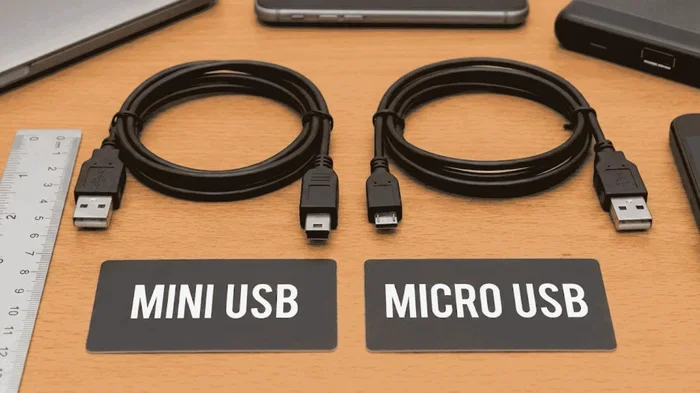
Yes, there is a clear difference between a Mini USB and a Micro USB. They differ in size, design, data transfer speeds, and the devices they support. Micro USB replaced Mini USB as the go-to standard for most smartphones, cameras, and portable gadgets. Understanding these differences helps you choose the right cable for your devices and avoid compatibility headaches.
This is a comprehensive guide about Is There A Difference Between A Mini Usb And A Micro Usb.
Key Takeaways
- Size Matters: Micro USB is significantly smaller than Mini USB, making it ideal for compact devices like smartphones and tablets.
- Different Connectors: The two USB types have different shapes and pin configurations, so they are not interchangeable.
- Data Transfer Speeds: Both support USB 2.0, but Micro USB has a more robust design for modern data needs.
- Device Compatibility: Mini USB is mostly found on older electronics, while Micro USB dominates current budget and mid-range devices.
- Durability Differences: Micro USB connectors are rated for more plug/unplug cycles than Mini USB.
- Transition to USB-C: Both Mini and Micro USB are being phased out in favor of the newer USB-C standard.
[FEATURED_IMAGE_PLACEHOLDER]
Is There a Difference Between a Mini USB and a Micro USB?
If you have ever dug through a drawer full of old cables, you may have found both a Mini USB and a Micro USB and wondered if they are the same thing. They look similar at first glance, but they are very different connectors. The short answer is yes, there is a big difference between them.
Mini USB and Micro USB are two distinct types of USB connectors. They serve the same basic purpose, which is to transfer data and charge devices. However, they differ in size, shape, compatibility, and the era of technology they belong to. Picking the wrong one can mean a cable that does not fit or a device that will not charge.
This guide breaks down every difference you need to know. Whether you are sorting through old cables or buying a replacement, you will know exactly which connector your device needs. We will cover size, design, data speeds, device compatibility, and more. By the end, you will be an expert on these two common USB cable types.
Mini USB connectors were popular in the early 2000s. You would find them on cameras, MP3 players, and some older phones. Micro USB came along later and quickly took over as the standard for most portable electronics. Today, both are considered older standards, but millions of devices still use them every day.
Physical Size and Design Differences
The most obvious difference between a Mini USB and a Micro USB is the size. They are not interchangeable, and you cannot force one into the other’s port. Here is a closer look at what sets them apart physically.
Mini USB: The Larger Connector
A Mini USB connector is about 6.85 mm wide and 1.8 mm tall. It has a taller, more rectangular shape with a flat top. The Mini USB plug has five pins inside, which handle data transfer and power delivery. It was designed before the era of slim smartphones, so it feels bulky by today’s standards.
You would typically find a Mini USB port on older digital cameras, GPS devices, and some portable hard drives. The connector is sturdy but takes up more space than what modern devices allow. If you try to plug a Mini USB into a Micro USB port, it simply will not fit.
Micro USB: The Compact Alternative
A Micro USB connector measures just 6.85 mm wide but only 1.25 mm tall. That makes it about 30 percent shorter than the Mini USB. The smaller size was a game-changer because it allowed phone manufacturers to design thinner, lighter devices. The Micro USB also has five pins, but the arrangement is slightly different from the Mini version.
Micro USB connectors come in two styles: Micro-A and Micro-B. Micro-A is flat on one side, while Micro-B has a slightly raised ridge. Both fit into the same Micro USB port on a device. The compact design made Micro USB the favorite for smartphones, fitness trackers, and Bluetooth speakers throughout the 2010s.
Side-by-Side Size Comparison
Here is a quick comparison of the two connectors:
- Mini USB width: 6.85 mm
- Micro USB width: 6.85 mm
- Mini USB height: 1.8 mm
- Micro USB height: 1.25 mm
- Mini USB pin count: 5 pins
- Micro USB pin count: 5 pins
Even though the width is the same, the height difference is what prevents them from being cross-compatible. The Micro USB is simply too short to reach the pins in a Mini USB port, and vice versa.
Data Transfer Speeds and Performance
Both Mini USB and Micro USB were designed to support USB 2.0 standard. This means the theoretical maximum data transfer speed for both is 480 Mbps. In real-world use, you can expect transfer speeds between 30 and 40 Mbps for both connector types.
Do the Connectors Affect Speed?
Here is the good news. The connector type itself does not limit speed. A Micro USB cable and a Mini USB cable will perform the same when transferring files, as long as both support USB 2.0. The speed depends on the internal wiring and the USB standard, not the shape of the plug.
However, the quality of the cable matters a lot. A cheap USB cable with thin wiring will transfer data slower than a well-built one. This applies to both Mini USB and Micro USB cables. If you need fast file transfers, look for cables labeled with good shielding and thicker gauges.
Neither connector type supports USB 3.0 speeds. That is an important limitation to keep in mind. If you need faster data transfer, you would need a cable with a different connector entirely, like a USB-C or a USB 3.0 Micro-B connector.
Device Compatibility and Which Devices Use Each
Knowing which connector your device uses is essential. Using the wrong cable can damage the port or simply not work at all. Here is a breakdown of the devices that use each type.
Devices That Use Mini USB
Mini USB was the standard connector for many portable electronics from the early 2000s through the mid-2000s. You will still find it on the following devices:
- Older digital cameras from brands like Canon and Sony
- Portable GPS navigation units
- MP3 players and older iPods
- Some Bluetooth headsets
- Older portable hard drives and USB hubs
- Certain e-readers and tablet devices from the mid-2000s
If you own any of these older gadgets, you will need a Mini USB cable for charging and data transfer. These cables are harder to find new today, but they are still available online and at electronics stores.
Devices That Use Micro USB
Micro USB became the industry standard for mobile devices starting around 2008 and remained dominant through the mid-2020s. Here are the common devices that use it:
- Android smartphones from Samsung, LG, Motorola, and others
- Budget and mid-range tablets
- Fitness trackers and smartwatches
- Portable Bluetooth speakers
- LED flashlights and portable battery packs
- Many drones and RC controllers
- Some security cameras and trail cameras
If you have ever bought a replacement cable for an Android phone, there is a very good chance it was a Micro USB. This connector became so widespread that it is one of the most recognized cable types in the world. Even today, many affordable devices still rely on Micro USB instead of newer standards.
For instance, many gully cameras and trail cameras still use Micro USB for charging and data transfer, which makes them easy to power in the field. Similarly, if you are shopping for a USB mouse for your laptop, you might encounter both connector types depending on the model.
Durability and Lifespan
Connectors wear out over time. Every time you plug and unplug a cable, the contacts inside the connector experience friction. The design of each connector affects how long it lasts.
A Micro USB connector is typically rated for about 10,000 plug/unplug cycles. The Mini USB is rated for around 5,000 cycles. This means a Micro USB cable should last roughly twice as long as a Mini USB cable under normal daily use.
The smaller size of the Micro USB also means the connector is less likely to catch on fabric or get bent accidentally. However, the thin design can make the connector feel a bit fragile if you are yanking cables out forcefully. The best practice is to grip the connector itself when unplugging, not the cable.
Over time, you may notice a loose fit in the port. This is a common issue with both connector types. Dust and lint can also build up inside the port and interfere with the connection. A quick clean with a toothpick or compressed air can often fix this problem.
Mini USB vs Micro USB: Which One Do You Need?
Choosing between a Mini USB and a Micro USB is simple once you know your device. Check your device manual or look at the port on the gadget itself. The shape of the port will tell you everything you need to know.
If you have an older camera, GPS unit, or MP3 player, you need a Mini USB cable. If you have a smartphone, tablet, or portable speaker from the last decade, you almost certainly need a Micro USB cable.
When buying a replacement cable, make sure to check the version. Both connectors come in USB 2.0 versions, but some Micro USB cables support faster charging with higher amperage. Look for cables rated for at least 2 amps if you want quicker charging times.
If you are shopping for laptop accessories like extra RAM or a new USB mouse, check what ports your laptop has. Many older laptops still include a Micro USB port for data or charging. When planning to buy a laptop computer, keep in mind that newer models are dropping both Mini USB and Micro USB in favor of USB-C.
The transition from Mini USB to Micro USB was one of the biggest changes in portable electronics. It allowed devices to become thinner, lighter, and more portable. Today, the industry is making a similar shift toward USB-C, which offers even faster speeds and reversible plugging.
Common Mistakes People Make with Mini and Micro USB
There are a few common mistakes that people make when dealing with these two connector types. Avoiding these can save you time, money, and frustration.
- Assuming they are interchangeable: They are not. A Mini USB plug will not fit into a Micro USB port, and vice versa. Forcing a cable can damage the port.
- Buying the wrong cable version: Not all Micro USB cables support the same data speeds or charging speeds. Check the cable specifications before purchasing.
- Ignoring cable quality: Cheap cables with poor shielding can cause slow data transfer, overheating, or even damage your device. Invest in quality cables from reputable brands.
- Forgetting about adapters: If you only have a Micro USB cable but need a Mini USB connection, adapters exist. However, adapters add bulk and can sometimes cause connection issues.
- Keeping outdated cables: If you have a device that still uses Mini USB, consider upgrading to a newer device that uses USB-C. It is more future-proof and widely available.
Expert Insights on USB Connector Evolution
The journey from Mini USB to Micro USB to USB-C tells the story of how technology has evolved to meet consumer demands. Each generation brought smaller sizes, faster speeds, and better durability.
Mini USB was a breakthrough in its time. It replaced the large USB-A connector on many portable devices and made them more user-friendly. But as phones and gadgets got smaller, the Mini USB was no longer compact enough.
The introduction of Micro USB was a turning point. It opened the door for the slim smartphones and wearable devices we use today. The standard was so successful that it became a global norm, supported by virtually every major electronics manufacturer.
Now, the industry is moving toward USB-C as the universal connector. USB-C offers reversible plugging, faster data speeds up to 40 Gbps with USB 4.0, and higher power delivery for charging larger devices. The shift away from Micro USB has been driven by regulations in many countries requiring a single charging standard.
If you are still using devices with Mini USB or Micro USB connectors, there is no rush to replace them. Both standards still work perfectly fine for their intended purposes. Just be aware that replacement cables may become harder to find over time.
When you are next buying accessories, consider future-proofing your setup. A USB-C hub or adapter can bridge the gap between old and new connectors. This way, you can keep your existing Micro USB devices while preparing for the next generation of technology.
Conclusion
So, is there a difference between a Mini USB and a Micro USB? Absolutely. They differ in size, shape, compatibility, and the devices they are designed for. Mini USB is an older, larger connector found on legacy devices, while Micro USB is a smaller, more modern standard that dominated portable electronics for over a decade.
Both connectors share the same USB 2.0 data speeds, but the Micro USB offers better durability and a more compact design. The key takeaway is to match the right cable to your device. Using the wrong connector will not work and could potentially harm your device.
As technology continues to advance, both Mini USB and Micro USB are gradually being replaced by USB-C. But for now, millions of devices around the world still rely on these connectors. Understanding the differences helps you make smart buying decisions and keeps your gadgets powered and connected.
Next time you reach for a cable, you will know exactly whether you need a Mini USB or a Micro USB. Keep this guide handy for quick reference, and you will never have to guess again.
Frequently Asked Questions
Can I use a Micro USB cable with a Mini USB device?
No, you cannot. The two connectors have different shapes and sizes, so they are not compatible with each other. You would need the correct cable type for your specific device. Using the wrong connector can also damage the port.
Is Micro USB faster than Mini USB for data transfer?
Not necessarily. Both connectors support USB 2.0 speeds, which max out at 480 Mbps. The speed depends on the USB standard, not the connector type. A high-quality Micro USB cable will transfer data at the same speed as a Mini USB cable if both are USB 2.0.
Are Mini USB and Micro USB cables still available for purchase?
Yes, they are still available, though they are becoming less common as USB-C gains popularity. You can find both types online and at electronics retailers. However, selection may be more limited compared to USB-C cables.
What devices still use Mini USB today?
Most devices that use Mini USB are older models. These include vintage digital cameras, older GPS units, and legacy MP3 players. Some specialized equipment like certain medical devices or industrial tools may also still use Mini USB connectors.
Should I switch from Micro USB to USB-C?
If your device supports USB-C, switching is a great idea. USB-C offers faster data transfer, higher power delivery, and a reversible connector. However, if your device only has a Micro USB port, there is no need to replace it unless you want a newer device.
Can I charge my phone faster with a better Micro USB cable?
Yes, the quality of your cable can affect charging speed. Look for Micro USB cables rated for higher amperage, typically 2 amps or more. Thicker wires and better connectors reduce resistance and allow more current to flow to your device.
Frequently Asked Questions
What is Is There A Difference Between A Mini Usb And A Micro Usb?
Is There A Difference Between A Mini Usb And A Micro Usb is an important topic with many practical applications.