Does Micro Usb Supply Power
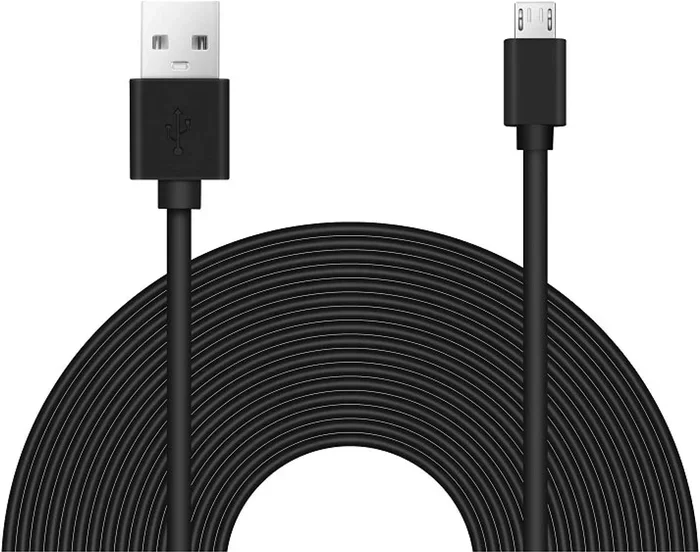
Yes, Micro USB cables supply power to charge devices and run peripherals. The standard Micro USB connector delivers 5 volts of power, making it a reliable source for smartphones, cameras, and other small electronics. Understanding Micro USB power output helps you choose the right cable and avoid slow charging or damaged ports.
Have you ever plugged in a Micro USB cable and wondered if it really supplies power? The short answer is yes. But the full story is more interesting than you might think. Micro USB has been around for over a decade, and it remains one of the most common connectors in the world. Whether you are charging your phone, powering a security camera, or running a USB hub, understanding how Micro USB power delivery works can save you time, money, and frustration.
In this guide, we will break down everything you need to know about Micro USB and power supply. We will cover voltage, amperage, charging speeds, and the differences between cable types. By the end, you will know exactly what to expect from your Micro USB connections.
Key Takeaways
- Micro USB does supply power: It delivers 5 volts and up to 2.4 amps in the standard configuration.
- Power output varies by cable and port type: Standard Micro USB differs from Micro USB 3.0 in wattage delivery.
- Charging speed depends on amperage: Higher amperage means faster charging for your devices.
- Micro USB can power accessories: Cameras, portable speakers, and USB hubs all rely on Micro USB for power.
- Not all Micro USB cables are equal: Some cables only carry power, while others handle data and power together.
- Using the wrong cable can cause issues: Poor-quality cables may deliver inconsistent power or damage your device.
📑 Table of Contents
What Is Micro USB and How Does It Deliver Power?
Micro USB is a compact connector standard used for charging and data transfer. It comes in two main types: Micro USB 2.0 and Micro USB 3.0. Both can deliver power, but they differ in design and capability. The Micro USB 2.0 connector has five pins, while the Micro USB 3.0 version has more pins to support faster data speeds and higher power delivery.
When you plug a Micro USB cable into a device, the connector creates a circuit that allows electrical current to flow. This current is what charges your battery or powers your accessory. The standard voltage for Micro USB is 5 volts, which is safe for most portable electronics.
How Much Power Does Micro USB Supply?
The power output of a Micro USB cable depends on the specification it follows. The original USB 2.0 standard supplies up to 2.5 watts of power. This equals 5 volts at 0.5 amps. That is enough to charge a phone slowly or power small accessories like a portable USB fan or a LED light.
With the Battery Charging Specification 1.2, Micro USB can deliver up to 2.4 amps at 5 volts. This gives you 12 watts of power, which charges most smartphones much faster. Some devices also support dedicated charging ports that allow even higher current without data transfer.
Here is a simple breakdown of common Micro USB power outputs:
- USB 2.0 Standard: 5V at 0.5A (2.5W)
- Battery Charging Spec 1.2: 5V at 2.4A (12W)
- Dedicated Charging Port: 5V at 1.5A to 2.4A (7.5W to 12W)
Keep in mind that the actual power your device receives depends on both the cable and the charger. A cheap cable with thin wiring may limit the current, resulting in slower device charging. This is why using a quality charging cable matters more than most people realize.
Micro USB Power vs. Other USB Standards
It helps to compare Micro USB power delivery with other USB types. This gives you a clear picture of where Micro USB stands today. USB standards have evolved significantly, and each new version brings better power management and faster charging.
Micro USB 2.0 vs. Micro USB 3.0
Micro USB 2.0 is the most common type you will find. It supplies 5 volts of power and handles data transfer speeds up to 480 Mbps. Most budget devices, older phones, and basic accessories use this connector. When it comes to power supply, Micro USB 2.0 delivers up to 2.5 watts under the standard USB spec.
Micro USB 3.0, on the other hand, supports faster data transfer at 5 Gbps. It also has the potential for slightly higher power delivery because of its extra pins. However, most Micro USB 3.0 devices still operate at 5 volts. The real advantage of USB 3.0 is speed, not necessarily power output.
Micro USB vs. USB-C
USB-C has largely replaced Micro USB in newer devices. One big reason is power delivery. USB-C supports USB Power Delivery (USB PD), which can supply up to 100 watts. That is a massive jump from the 5 watts a standard Micro USB cable provides.
However, Micro USB still works well for low-power devices. Things like wireless mice, Bluetooth adapters, and small security camera power supply units all run perfectly fine on Micro USB power. If you are looking for a power supply PC best buy option for older devices, Micro USB remains a solid choice for peripherals and accessories.
| Feature | Micro USB 2.0 | Micro USB 3.0 | USB-C |
|---|---|---|---|
| Voltage | 5V | 5V | 5V to 20V |
| Max Current | 0.5A to 2.4A | 0.5A to 2.4A | Up to 5A |
| Max Power | 2.5W to 12W | 2.5W to 12W | Up to 100W |
| Data Speed | 480 Mbps | 5 Gbps | Up to 40 Gbps |
| Common Devices | Phones, cameras, accessories | External drives, cameras | Modern phones, laptops |
Can Micro USB Power External Devices?
Yes, Micro USB can power a wide range of external devices. This is one of the reasons it has remained so popular for so long. Many manufacturers choose Micro USB because it is affordable, reliable, and widely available.
Devices Powered by Micro USB
Here are some common devices that rely on Micro USB for their power supply:
- Smartphones and tablets: Most older phones use Micro USB for charging. The cable delivers enough power to keep your battery topped up throughout the day.
- Security cameras: Many CCTV cameras use Micro USB or barrel connectors that accept Micro USB cables. A security camera power supply 12V may include a Micro USB adapter for convenient powering.
- Portable Bluetooth speakers: Compact speakers often charge through Micro USB because the connector is small and widely supported.
- GPS trackers and wearables: Fitness trackers and GPS devices frequently use Micro USB for charging on the go.
- USB hubs and adapters: Some portable USB hubs draw power through Micro USB to add extra ports to your laptop or tablet.
If you have ever searched for a power supply for CCTV cameras, you may have noticed that many options include Micro USB connections. This is because Micro USB offers a simple and standardized way to deliver power to surveillance equipment. The cctv camera power supply box often features multiple Micro USB outputs to power several cameras from a single source.
How to Ensure Stable Power Delivery
Not all Micro USB cables are created equal. The quality of the cable directly affects how much power reaches your device. Here are some quick tips to ensure stable power delivery:
- Use cables from reputable brands that match the best pc power supply brands standards for quality.
- Check the cable gauge. Thicker cables carry more current without voltage drop.
- Avoid extremely long cables for charging. Longer cables increase resistance and reduce power output.
- Inspect your cables regularly. Frayed or damaged cables can deliver inconsistent power.
- Match your cable to your device’s charging requirements. A low-powered cable on a high-demand device will result in slow charging.
Common Problems with Micro USB Power Supply
Even though Micro USB is a mature standard, it is not without its issues. Many users experience power-related problems that can be frustrating. Understanding these common problems helps you troubleshoot effectively.
Slow Charging
The most common complaint about Micro USB is slow charging. If your phone takes forever to charge, the cable or charger may be to blame. A low-quality cable may only deliver 0.5 amps instead of the 2.4 amps your device needs. This cuts your charging speed in half or more.
Another cause of slow charging is a dirty or damaged connector. Dust and lint can build up inside the Micro USB port and block proper contact. A quick clean with a toothpick or compressed air often fixes this issue immediately.
Intermittent Power
Sometimes your device loses power randomly while charging. This usually points to a loose connection. The Micro USB connector is not as secure as USB-C. It can wobble or shift slightly, breaking the circuit momentarily.
If you notice this problem, try a different cable first. If the issue persists, the port on your device may be worn out. In that case, you might need a power supply unit for CCTV cameras replacement or a charging port repair.
Overheating During Charging
A warm cable or charger during use is normal. But if your Micro USB cable or port gets hot to the touch, something is wrong. Overheating can happen when a cable delivers too much resistance or when the power supply sends inconsistent voltage.
Stop using the cable immediately if it gets very hot. Continuing to use a faulty cable can damage your device or even create a safety hazard. Always choose cables that support proper power management and heat dissipation.
Quick Tips for Getting the Most from Micro USB Power
Here are some practical tips to help you get the best performance from your Micro USB connections:
- Choose the right amperage: Match your charger to your device. A tablet needs more amperage than a fitness tracker. Check your device manual for the recommended charging current.
- Use short cables when possible: Shorter cables reduce resistance and deliver power more efficiently. For fast charging, keep your cable under 3 feet.
- Buy from trusted sellers: Cheap knockoff cables often fail to deliver the rated power. Invest in quality cables that meet USB certification standards.
- Keep connectors clean: Regularly clean your Micro USB ports to maintain good electrical contact and consistent power delivery.
- Consider upgrading to USB-C: If you buy new devices, USB-C offers better power delivery and faster data transfer. It is the future of USB connectivity.
If you are looking for reliable power solutions for your devices, consider exploring options at a best buy power supply PC retailer. They often carry high-quality cables and adapters that work well with Micro USB devices. Similarly, if you need a dependable best budget power supply PC option for your home setup, many of these include Micro USB outputs for versatile use.
Is Micro USB Still Relevant Today?
Despite the rise of USB-C, Micro USB remains widely relevant. Millions of devices still use it, from budget smartphones to home security systems. Many manufacturers continue to include Micro USB cables in their product boxes because of the low cost and broad compatibility.
The connector has proven its reliability over the years. It delivers consistent power for devices that do not need high wattage. For most everyday gadgets, Micro USB power supply is more than enough. You can charge your phone, power your camera, or run a small speaker without any issues.
That said, if you are buying new accessories or cables, consider future-proofing your setup. USB-C is becoming the universal standard, and investing in it now saves you from buying adapters later. But for existing devices, Micro USB will continue to work just fine for years to come.
Understanding how your devices receive power helps you make smarter buying decisions. Whether you are replacing a worn-out cable or setting up a new security system, knowing your Micro USB power supply options puts you ahead. Keep your cables in good condition, use the right charger, and your devices will stay powered and ready to go.
Conclusion
So, does Micro USB supply power? Absolutely. The Micro USB connector has been a workhorse in the electronics world for years. It delivers reliable 5-volt power to charge phones, run cameras, and keep accessories working. While newer standards like USB-C offer higher wattage and faster charging, Micro USB still handles the job for most everyday devices.
The key takeaway is to use quality cables and match your charger to your device’s needs. A good charging cable ensures stable power delivery and extends the life of your devices. Whether you are powering a security camera power supply 12v setup or simply charging your phone, Micro USB remains a dependable choice.
Take a moment to check your cables today. If they are worn or cheap, replace them with certified options. Your devices will charge faster, run cooler, and last longer. Simple changes like this make a real difference in your daily tech experience.
Frequently Asked Questions
Can Micro USB charge all devices?
Micro USB can charge most devices that use the Micro USB port, including smartphones, tablets, cameras, and portable speakers. However, the charging speed depends on the amperage your device supports. Some tablets or power-hungry devices may charge slowly on a standard Micro USB connection.
How do I know if my Micro USB cable supports power delivery?
Most Micro USB cables support basic power delivery of 5 volts at 0.5 to 2.4 amps. Check the cable specifications or packaging for details. Cables that support faster charging usually mention the amperage rating on the cable or charger itself.
Can I use a Micro USB cable to power a USB hub?
Yes, many portable USB hubs use Micro USB cables to draw power from a charger or computer. This allows the hub to power additional USB devices. Make sure your Micro USB cable can handle the current requirements of the hub and connected devices.
Does Micro USB 3.0 supply more power than Micro USB 2.0?
Both Micro USB 2.0 and Micro USB 3.0 typically deliver the same voltage of 5 volts. The main difference is data transfer speed. Power output depends more on the charger and cable quality than the USB version itself.
Why does my Micro USB cable get hot while charging?
A slightly warm cable during charging is normal. However, if the cable gets very hot, it may indicate a problem. This could be caused by a faulty cable, poor connection, or an incompatible charger. Stop using the cable and replace it to avoid potential damage.
What is the maximum wattage Micro USB can deliver?
Standard Micro USB 2.0 delivers up to 2.5 watts (5V at 0.5A). With the Battery Charging Specification, it can deliver up to 12 watts (5V at 2.4A). This is enough for most phones and small accessories but falls short compared to USB-C Power Delivery.