Does Sata to Usb Adapter Need Power
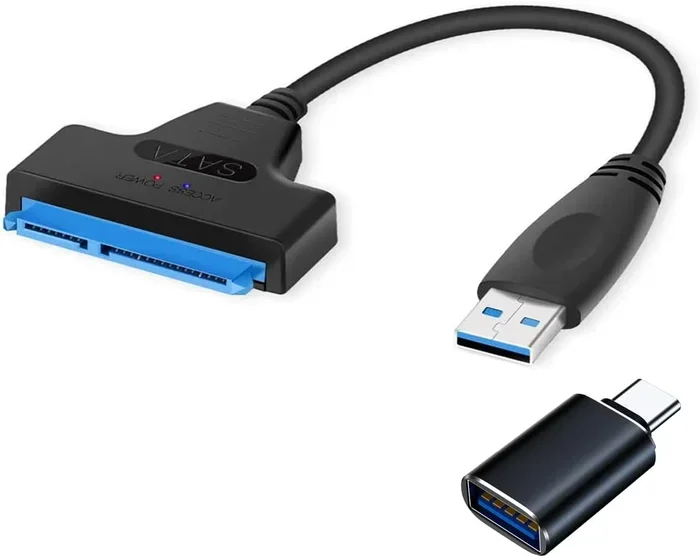
Yes, some SATA to USB adapters need power, but not all of them do. The answer depends on the drive size, the USB port you use, and the adapter design. Small 2.5-inch drives often draw enough power from USB alone, but larger 3.5-inch drives and SSD enclosures usually require an external power source or a dual-USB connection.
Key Takeaways
- Bus-powered adapters pull all their power from the USB port and work well with 2.5-inch drives.
- 3.5-inch drives almost always need external power because they draw more electricity than a single USB port can provide.
- USB 3.0 ports deliver more power than USB 2.0, which can help some adapters run without extra power.
- Y-cable adapters use two USB ports to split the power load and are a popular middle-ground solution.
- Enclosure-style adapters often include built-in power supplies for worry-free use.
- Always check your drive’s wattage before buying an adapter to avoid connection drops or data loss.
📑 Table of Contents
- Does a SATA to USB Adapter Need Power?
- What Is a SATA to USB Adapter?
- Why Do Some Adapters Need Power and Others Do Not?
- Types of SATA to USB Adapters and Their Power Needs
- How to Tell If Your Drive Needs an Adapter With Power
- Common Mistakes People Make With SATA to USB Adapters
- Expert Tips for Choosing the Right Adapter
- Final Thoughts
Does a SATA to USB Adapter Need Power?
If you have ever plugged a SATA to USB adapter into your computer and watched it fail to recognize your drive, the problem is almost always power. It is one of the most common frustrations people face when connecting old hard drives or SSDs to modern laptops and desktops.
The short answer is that some adapters need power and some do not. It all comes down to the type of drive you are using, the USB port available, and the design of the adapter itself. Let us walk through everything you need to know so you never run into this headache again.
Whether you are trying to recover data from an old laptop drive or turn a spare SATA hard drive into portable storage, understanding power requirements is the first step. This guide breaks it all down in plain language so you can make the right choice without any confusion.
What Is a SATA to USB Adapter?
A SATA to USB adapter is a small device that bridges the gap between a SATA drive and a modern computer. Most desktops and laptops made after 2015 no longer include internal SATA ports on their motherboards for everyday use. These adapters let you connect a 2.5-inch or 3.5-inch SATA drive to your computer through a standard USB cable.
The adapter typically has two ends. One end plugs directly into the SATA connector on the drive. The other end connects to your computer through a USB cable. Some models come as a single cable unit, while others include a separate power brick or a dual-USB cable setup.
People use these adapters for all kinds of tasks. You might want to clone a drive, recover lost files, or simply use an old drive as extra storage. No matter the reason, knowing how power flows through the adapter is essential for a smooth experience.
How Does the Adapter Receive Power?
There are three main ways a SATA to USB adapter gets its electricity. The first is through the USB port itself. This is called bus power. The second is through a dedicated external power adapter, similar to the brick that comes with a laptop charger. The third is through a combination of both, often using a Y-shaped cable that draws power from two USB ports at once.
Each method has its strengths and weaknesses. Bus-powered setups are clean and portable, but they have strict limits on how much power they can deliver. Externally powered adapters can handle bigger drives but are less convenient for travel. The dual-USB option splits the difference and works well for most mid-range drives.
Why Do Some Adapters Need Power and Others Do Not?
The reason some adapters need extra power comes down to physics. Different drives consume different amounts of electricity. A small 2.5-inch portable hard drive might only need 1 to 2 watts to run. A larger 3.5-inch desktop drive can pull 8 watts or more during heavy use. A SATA SSD falls somewhere in between but still varies by model.
USB ports have strict power limits too. A standard USB 2.0 port delivers about 2.5 watts. A USB 3.0 port can push around 4.5 watts. USB-C ports on modern devices can deliver even more, sometimes up to 15 watts through Power Delivery protocols. So when a drive needs more juice than a single USB port can provide, the adapter will need help.
Bus-powered adapters rely entirely on the USB port for electricity. They are simple, compact, and great for lightweight drives. Externally powered adapters come with their own power supply and can handle the hungriest drives without breaking a sweat. The key is matching your drive to the right type of adapter.
Types of SATA to USB Adapters and Their Power Needs
Not all adapters are created equal. Let us look at the most common types and understand their power profiles so you can pick the best one for your situation.
Bus-Powered Adapters
Bus-powered adapters draw all their power from a single USB port. They tend to be small, lightweight, and cable-free. These are perfect for 2.5-inch drives and smaller SATA SSDs. If you are working with a laptop hard drive or a thin optical drive, a bus-powered adapter will usually do the job.
The downside is that these adapters struggle with larger 3.5-inch drives. You may see the drive spin up, click repeatedly, or not be recognized at all. If your computer has a USB port that supports USB-C Power Delivery, the situation improves slightly, but it still may not be enough for power-hungry desktop drives.
Externally Powered Adapters
Externally powered adapters come with a wall plug or a power brick. They provide a dedicated power source that is not tied to the USB port’s limits. These adapters can handle 3.5-inch desktop drives, high-performance SSDs, and even optical drives without any issues.
If you plan to use a drive for extended periods or run intensive tasks like cloning or backups, an externally powered adapter is the safest bet. The trade-off is less portability. You need to carry the power brick along with the adapter, which adds bulk to your setup.
Dual-USB and Y-Cable Adapters
Dual-USB adapters use a Y-shaped cable that splits power between two USB ports. One port handles data, and the other provides additional electricity. This design gives you more power than a single port can offer without needing a wall plug.
These adapters are a popular choice for people who want a middle ground. They work well with most 2.5-inch drives and can handle some 3.5-inch drives that do not draw too much power. However, they still rely on the combined output of two USB ports, so extremely power-hungry drives may still cause problems.
How to Tell If Your Drive Needs an Adapter With Power
Figuring out whether your drive needs a powered adapter is simpler than you might think. Start by checking the drive label. It will list the voltage and amperage requirements. Multiply those numbers to get the wattage. Then compare that to what your USB port can deliver.
Here is a quick reference guide:
- 2.5-inch drives under 1TB: Usually bus-powered. A single USB 3.0 port is enough.
- 2.5-inch drives over 1TB: May need dual-USB or external power depending on the model.
- 3.5-inch drives: Almost always need an externally powered adapter.
- SATA SSDs: Most work on bus power, but high-performance models may need extra juice.
- Optical drives: Always need an externally powered adapter.
If you are unsure, look for an adapter that explicitly states its power delivery specs. A good adapter will list the maximum drive size it supports and the power source it requires. This information saves you from buying the wrong product and wasting time.
Common Mistakes People Make With SATA to USB Adapters
Power-related mistakes are the number one reason adapters fail to work properly. Here are the most common errors and how to avoid them.
Using a USB Hub Without Its Own Power
Plugging your adapter into an unpowered USB hub is a quick way to run into power problems. Unpowered hubs split the power from a single port across multiple devices. This leaves even less electricity for your drive. Always plug directly into the computer or use a powered USB hub when using an adapter.
Ignoring the Drive’s Spin-Up Current
Hard drives draw a burst of power when they first start spinning. This is called the spin-up current, and it can be two to three times the drive’s normal running wattage. A bus-powered adapter might handle the steady-state power just fine but fail during spin-up. This causes the drive to repeatedly start and stop, which can damage the drive over time.
Using the Wrong USB Port
Not all USB ports are equal. A USB 2.0 port delivers far less power than a USB 3.0 port. If your adapter supports USB 3.0, always plug it into a USB 3.0 port. On laptops, check if the port is on the left or right side, as some manufacturers reserve the higher-powered ports for specific uses.
Forgetting to Use the Power Adapter That Comes With the Adapter
Some adapters come with an optional power adapter. It is tempting to leave it out to keep things simple. But if you are connecting a drive that sits near the power threshold, that extra adapter makes all the difference. Always use every component that comes in the box if your drive demands it.
Expert Tips for Choosing the Right Adapter
When shopping for a SATA to USB adapter, keep these tips in mind to make the process smooth and straightforward.
- Check compatibility first. Make sure the adapter supports your drive size (2.5-inch or 3.5-inch) and interface (SATA I, II, or III).
- Look for USB 3.0 or USB 3.1 support. These ports deliver more power and faster data transfer speeds. A USB 3.0 adapter is a solid choice for most users.
- Consider an enclosure-style adapter. Enclosures protect the drive and often include built-in power supplies. They are a great option if you plan to use the drive regularly.
- Read user reviews. Real-world feedback often reveals power issues that product specs do not mention.
- Buy from reputable brands. Reliable brands use better components and provide clearer power specifications.
If you are looking for a versatile option that handles most drives without power headaches, consider an adapter with a dedicated power supply. It gives you peace of mind and works with a wider range of drives. For lighter tasks with smaller drives, a simple bus-powered adapter keeps your setup clean and portable.
Final Thoughts
So, does a SATA to USB adapter need power? The answer is it depends on your drive and your setup. Small drives usually work fine with bus power from a single USB port. Larger drives and SSD enclosures often need an external power source or a dual-USB connection to function properly.
The best approach is to know your drive’s power requirements before you buy an adapter. Check the label, compare it to the adapter specs, and choose accordingly. A little homework upfront saves you from frustrating connection drops and potential data loss later.
Whether you are a tech enthusiast or someone just trying to rescue files from an old drive, understanding adapter power needs puts you in control. Pick the right adapter, use the right port, and your SATA drive will work reliably every time.
Frequently Asked Questions
Can I use a SATA to USB adapter without any power supply?
Yes, you can, but only if you are using a 2.5-inch drive or a small SATA SSD. These drives draw very little power and can run on bus power from a single USB 3.0 port. If you try this with a 3.5-inch drive, it will likely fail to work or cause connection issues.
Why does my SATA to USB adapter keep disconnecting?
The most common reason is insufficient power. When a drive demands more electricity than the USB port can provide, the connection drops. Try using a dual-USB cable or an adapter with an external power supply to fix this problem.
Do I need a powered USB hub for my adapter?
You do not always need one, but it helps a lot. A powered USB hub provides stable electricity and prevents power-related disconnects. If you are using a power-hungry drive, a hub with its own power supply is a smart investment.
What is the difference between bus-powered and externally powered adapters?
A bus-powered adapter draws all its power from the USB port. An externally powered adapter has its own power brick or wall plug. Externally powered adapters can handle larger drives, while bus-powered ones are best for smaller, lighter drives.
Can a USB-C adapter power a 3.5-inch SATA drive?
It depends on the adapter and the USB-C port. Some USB-C ports with Power Delivery can supply enough power, but most 3.5-inch drives still need an externally powered adapter for reliable operation. Always check the adapter specifications before purchasing.
How do I know if my drive is bus-powered or needs external power?
Check the drive label for its voltage and amperage ratings. Multiply those numbers to get the wattage. Then compare it to what your USB port or adapter can deliver. If the drive’s wattage exceeds the USB port’s output, you need an adapter with external power.