Do Audio Jack to Usb Adapters Work
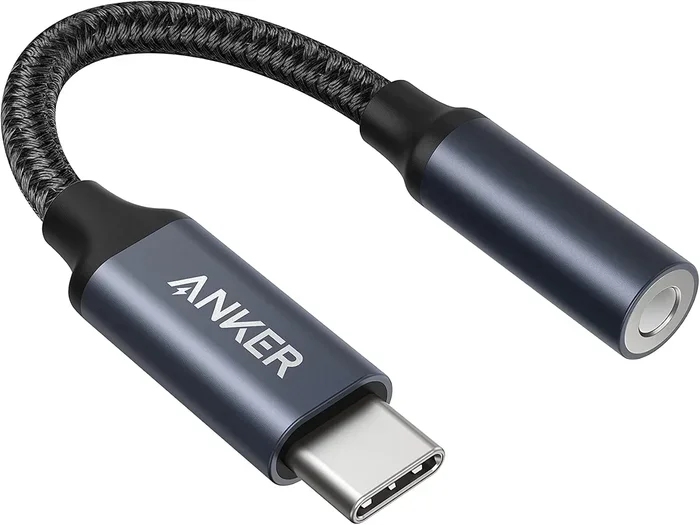
Do audio jack to USB adapters work? Yes, they do. These small devices convert analog audio signals to digital data your computer can process. They solve real problems like broken headphone jacks, missing ports, and poor built-in sound quality on modern laptops.
If you have ever plugged in headphones or a microphone only to find the audio jack on your laptop or desktop is broken or missing, you know the frustration. An audio jack to USB adapter promises to fix that problem. But do these little dongles actually work? The short answer is yes. The longer answer depends on your device, your operating system, and the type of adapter you pick.
Audio jack to USB adapters have become essential tools for many people. Modern laptops are dropping the 3.5mm headphone jack altogether. Even desktops sometimes lack enough audio ports for all your gear. A USB audio adapter bridges that gap. It takes the analog signal from your headphones or microphone and converts it into digital data your computer understands.
In this guide, we will walk through everything you need to know. We will cover how these adapters work, when you need one, the different types available, and how to troubleshoot common problems. By the end, you will know exactly whether an audio jack to USB adapter is the right solution for you.
Key Takeaways
- Audio jack to USB adapters work reliably for most devices, turning old analog connections into modern digital input and output options.
- They are plug and play in most cases, but installing the right driver or software boosts performance significantly.
- Compatibility depends on your device, operating system, and the type of adapter you choose.
- Common issues like no sound or static noise are usually easy to fix with simple troubleshooting steps.
- USB sound cards and external DACs offer better audio quality than cheap universal adapters for audiophiles and professionals.
- Not all adapters are equal, so check your specific needs before purchasing.
📑 Table of Contents
What Is an Audio Jack to USB Adapter?
An audio jack to USB adapter is a small device that connects to a USB port on your computer. It provides a 3.5mm audio jack for headphones, microphones, or speakers. Think of it as a translator between two different audio languages. Your computer speaks digital, and your headphones speak analog. The adapter converts the signal so both devices can understand each other.
These adapters come in different shapes and sizes. Some are tiny thumb-sized sticks. Others are larger external sound cards with extra features. The basic ones handle simple audio input and output. More advanced versions include built-in digital-to-analog converters, or DACs, for better sound quality.
How Does the Conversion Work?
Inside every audio jack to USB adapter is a small chip. This chip handles the conversion process. When you send audio out through the adapter, it takes digital data from your computer and turns it into an analog electrical signal. When you plug in a microphone, it does the reverse. It takes the analog signal from the mic and converts it into digital data the computer can record or process.
This process happens in real time. You will not notice any delay with most adapters. The quality of the conversion depends on the chip inside the adapter. Cheap adapters use basic chips that get the job done. Better adapters use higher-quality components that produce clearer, richer sound.
How Do Audio Jack to USB Adapters Work?
Understanding how these adapters work helps you choose the right one. The basic process involves three steps. First, the adapter receives a digital audio signal from your computer through the USB connection. Second, the internal chip processes and converts that signal. Third, the adapter outputs the converted signal through the 3.5mm audio jack.
For microphone input, the process reverses. The analog signal from the microphone enters the adapter through the audio jack. The chip converts it to digital data. Then the adapter sends that data to your computer through the USB connection.
Most adapters work on a plug and play basis. You plug them in, and your operating system recognizes them immediately. However, some adapters require you to install driver software. This software tells your computer how to communicate with the adapter properly. Without the right driver, you may experience no sound or very low volume.
If you are also dealing with other laptop connectivity issues, you might find our guide on how to work a laptop without a mouse helpful for general troubleshooting.
USB Audio Class Compatibility
Most audio jack to USB adapters follow a standard called USB Audio Class. This is a set of rules that ensures compatibility across different devices and operating systems. Windows, macOS, and Linux all support USB Audio Class 1.0 and 2.0. This means most adapters work right out of the box without extra setup.
However, some adapters use proprietary chips that need custom drivers. These adapters may offer better features but require more setup. Always check the manufacturer’s website for driver support before buying.
When Do You Need an Audio Jack to USB Adapter?
You might need an audio jack to USB adapter more often than you think. Here are the most common situations where these adapters save the day.
Your Laptop Dropped the 3.5mm Jack
Many newer laptops, especially ultrabooks and tablets, have removed the headphone jack entirely. If you love wired headphones or need to connect a traditional microphone, a USB adapter is your best option. It gives you back the port you lost without sacrificing audio quality.
Your Built-In Sound Card Is Low Quality
Even if your laptop has a working audio jack, the built-in sound card might be mediocre. Cheap onboard audio can produce static, background noise, and weak volume. A USB audio adapter bypasses the built-in sound card entirely. It uses its own dedicated audio processing, which usually results in much cleaner sound.
You Need Extra Audio Ports
Some people need to connect multiple audio devices at once. For example, you might want to use a headset for calls while also playing music through external speakers. A USB adapter with multiple jacks lets you do this without constantly unplugging cables.
You Want to Use Professional Audio Gear
Musicians, podcasters, and content creators often need better audio input than a laptop can provide. A USB adapter with a dedicated DAC delivers studio-quality sound. It allows you to connect professional microphones and studio headphones that need a stronger, cleaner signal.
For more tips on getting accessories working with your laptop, check out our article on how do you connect a mouse to a laptop for general USB device setup guidance.
Types of Audio Jack to USB Adapters
Not all adapters are the same. Choosing the right type depends on what you plan to do with it. Here is a breakdown of the most common options.
Basic USB Audio Adapters
These are the simplest and most affordable options. They typically have one 3.5mm output jack for headphones or speakers. Some models also include a 3.5mm input jack for microphones. They are small, lightweight, and perfect for everyday use. You plug them in, and they work immediately.
USB Sound Cards
USB sound cards look like small circuit boards that sit flat on your desk. They offer more features than basic adapters. Many include volume controls, mute buttons, and multiple audio jacks. Some even have RGB lighting for a gaming setup. These are great for users who want more control over their audio.
External DACs and USB Audio Interfaces
Digital-to-analog converters, or DACs, are the premium option. They offer the best audio quality available from a USB adapter. These devices are used by audiophiles, musicians, and professionals who demand clean, accurate sound. They cost more but deliver a noticeable difference in audio clarity and detail.
USB-C Audio Adapters
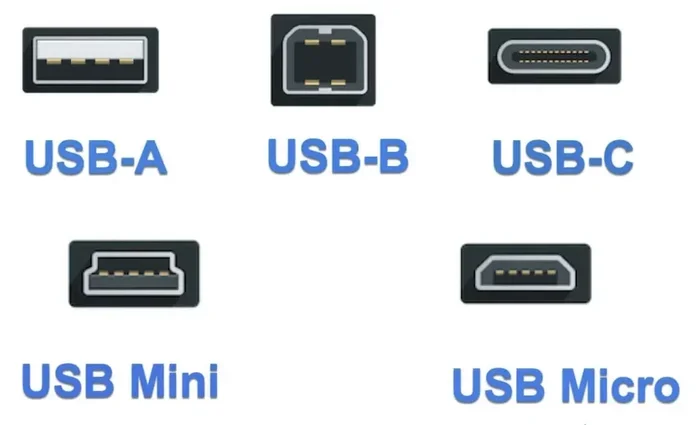
With the rise of USB-C laptops, USB-C audio adapters have become popular. These adapters connect to a USB-C port and provide a 3.5mm audio jack. Some also include USB-A ports for backward compatibility. Make sure you get the right type for your laptop’s port.
| Adapter Type | Best For | Price Range | Audio Quality |
|---|---|---|---|
| Basic USB Audio Adapter | Everyday listening | $5 – $15 | Standard |
| USB Sound Card | Gaming and multi-device setups | $15 – $40 | Good |
| External DAC | Audiophiles and professionals | $40 – $200+ | Excellent |
| USB-C Audio Adapter | USB-C laptops and tablets | $10 – $30 | Standard to Good |
Common Problems and How to Fix Them
Even though audio jack to USB adapters work well for most people, issues can happen. Here are the most common problems and how to solve them.
No Sound After Plugging In
If you plug in your adapter and hear nothing, do not panic. First, check that the adapter is fully inserted into the USB port. Try a different USB port if the first one does not work. Next, make sure your computer is set to use the USB adapter as the default audio output device. On Windows, go to Settings > System > Sound and select the USB adapter. On macOS, go to System Preferences > Sound and choose the USB device.
Static or Crackling Noise
Static noise is annoying but usually fixable. Try moving the adapter away from other USB devices that might cause interference. Avoid using USB hubs if possible. Plug the adapter directly into your computer. If the noise persists, update the audio driver through your device manager or system settings.
Low Volume
If your audio sounds quiet, check the volume settings on your computer. Also check the volume on the adapter itself if it has a built-in control. Some adapters have a physical volume knob or button. Make sure it is turned up. You can also boost the volume through your operating system’s sound settings.
Microphone Not Recognized
If your microphone is not working through the adapter, make sure it is plugged into the correct jack. Input and output jacks look similar but serve different purposes. On Windows, go to Settings > Privacy > Microphone and make sure access is allowed. On macOS, check System Preferences > Sound > Input and select the USB adapter.
For general laptop audio troubleshooting, you may also want to check our guide on do speakers need to be broken in for tips on getting the best sound from your setup.
Driver Issues on Windows
Some adapters need specific drivers to work properly on Windows. If your adapter is not recognized, visit the manufacturer’s website and download the latest driver. You can also try uninstalling the current driver through Device Manager and restarting your computer. Windows will often reinstall the driver automatically on reboot.
Are Audio Jack to USB Adapters Worth It?
The answer is yes for most people. An audio jack to USB adapter is a small investment that solves big problems. It costs between five and thirty dollars for a basic model. Even the premium options rarely exceed two hundred dollars. Compare that to buying a new laptop just because it lacks a headphone jack.
These adapters also extend the life of your existing gear. You can keep using your favorite wired headphones, studio monitors, or professional microphones without upgrading everything to wireless or Bluetooth alternatives.
That said, not every adapter is worth buying. Cheap no-name adapters from unknown brands may have poor build quality and unreliable performance. Stick with reputable brands that offer good reviews and customer support. Look for adapters that are compatible with your specific operating system.
If you only need a simple audio solution for casual listening, a basic USB adapter works perfectly. If you are a serious music listener or content creator, investing in a quality external DAC will give you much better results.
Audio jack to USB adapters fill a real gap in modern computing. As laptops and tablets continue to remove traditional audio ports, these adapters become more essential. They are portable, affordable, and easy to use. Whether you need a quick fix for a broken jack or a permanent audio upgrade, there is an adapter that fits your needs.
The bottom line is straightforward. Do audio jack to USB adapters work? Absolutely. They work for listening to music, taking calls, recording audio, and connecting speakers. The key is choosing the right adapter for your situation and following the setup steps correctly. With the right adapter in hand, you will never worry about a missing audio jack again.
Frequently Asked Questions
Can I use an audio jack to USB adapter with any laptop?
Most laptops work with these adapters regardless of brand or model. The adapter uses a standard USB connection that is supported by Windows, macOS, and ChromeOS. Just make sure your laptop has a free USB port, and you should be good to go.
Do I need to install drivers for an audio jack to USB adapter?
Many adapters work without any drivers. They follow the USB Audio Class standard, which operating systems recognize automatically. However, some adapters with advanced features may require you to download a driver from the manufacturer’s website for full functionality.
Will a USB audio adapter improve my sound quality?
It depends on the adapter. A basic adapter will give you a cleaner signal than a cheap onboard sound card. But for the best sound quality, you need an external DAC or a USB audio interface. These devices use higher-quality components to produce noticeably better audio.
Can I use an audio jack to USB adapter for gaming headsets?
Yes, you can. Many gamers use USB audio adapters to connect their headsets. For the best gaming experience, look for adapters with a microphone input and a volume control. USB sound cards are especially popular for gaming setups because they offer extra features and better mic clarity.
Why does my adapter produce static noise?
Static noise usually comes from USB interference or a loose connection. Try plugging the adapter directly into a USB port on your computer instead of a hub. Also, make sure the adapter is fully seated. Updating your audio drivers often resolves static issues as well.
Are USB-C audio adapters different from regular USB adapters?
Yes, they are different in the connection type but work the same way. USB-C adapters connect to the newer oval-shaped USB-C ports found on modern laptops and tablets. Regular USB adapters connect to the traditional rectangular USB-A ports. Make sure you buy the right type for your device.