Is the Iphone 15 Usb C or Lightning
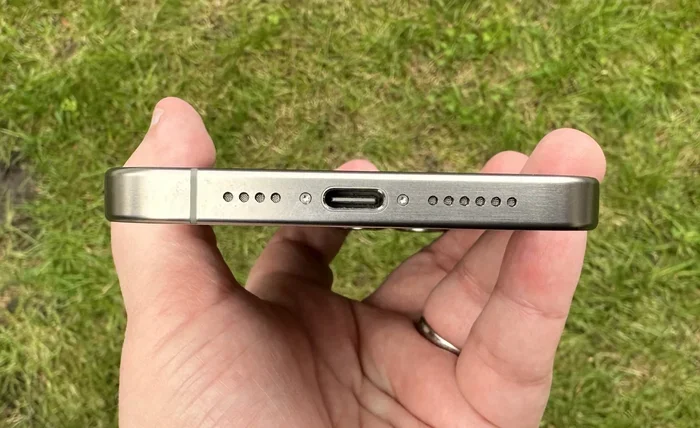
The iPhone 15 uses USB C, not Lightning. Apple made the switch to the universal USB C port starting with the iPhone 15 lineup. This change brings faster data transfer, faster charging, and better compatibility with other devices. If you are still using a Lightning cable, it is time to upgrade.
Apple changed the game with the iPhone 15. The company ditched the Lightning port and moved to USB C. If you have been using iPhones for years, this shift might feel surprising. But it is a big deal, and it affects how you charge your phone, transfer files, and pick accessories. In this guide, we will walk through everything you need to know about the iPhone 15 USB C connection and what it means for you.
The short answer is clear. The iPhone 15 uses USB C, not Lightning. Every model in the iPhone 15 lineup comes with a USB C port. This includes the iPhone 15, iPhone 15 Plus, iPhone 15 Pro, and iPhone 15 Pro Max. Apple made this change for several reasons, and the effects reach far beyond just the charging cable you plug in.
Understanding the port change matters because it impacts your daily routine. You cannot just grab any old Lightning cable anymore. You need a USB C cable, and your accessories need to match. Let us dive deeper into why Apple made this switch and what you should know.
Key Takeaways
- The iPhone 15 uses USB C: Apple officially replaced the Lightning port with USB C starting with the iPhone 15 series.
- Faster charging and data transfer: USB C supports faster speeds and higher wattage compared to the older Lightning connector.
- Better compatibility: USB C works with many devices you already own, from laptops to tablets and chargers.
- You need new cables: Your old Lightning cables will not work with the iPhone 15, so you will need USB C cables.
- Regulation drove the change: The European Union pushed for a universal charging standard, which is why Apple made the switch.
- Check your accessories: Make sure your chargers, cases, and other add-ons are USB C compatible before buying.
📑 Table of Contents
- Why Did Apple Switch From Lightning to USB C?
- What USB C Means for Your Charging Setup
- Data Transfer: How Fast Is USB C on the iPhone 15?
- Accessories You Will Need for the iPhone 15
- iPhone 15 vs iPhone 14: What Changed with the Port?
- Common Mistakes People Make After Switching to USB C
- What the Future Holds for USB C and Apple Devices
- Final Thoughts
Why Did Apple Switch From Lightning to USB C?
Apple has used the Lightning connector since 2012. That is over a decade of relying on the same port design. So why the sudden change? The answer comes down to a mix of regulation, technology, and user convenience.
The European Union Regulation
The biggest driver behind the switch was the European Union. The EU passed a law requiring all smartphones to use USB C as the standard charging port. This law aimed to reduce e-waste and make life easier for consumers. Instead of carrying different cables for different devices, one USB C cable could charge everything.
Apple could not ignore this regulation. The EU is one of the largest smartphone markets in the world. So the company decided to adopt USB C across its iPhone lineup. This move also aligned Apple with other manufacturers. Samsung, Google, and many other brands already used USB C on their phones.
Better Technology and Faster Speeds
USB C is simply a better technology than Lightning. It supports faster data transfer speeds and higher power delivery. The iPhone 15 with USB C can transfer data at much quicker rates than the Lightning connection ever allowed. This means moving photos, videos, and files to and from your phone happens faster.
USB C also supports USB Power Delivery, which means your phone can charge at higher wattages. You get quicker charging times and more efficient power use. For people who are always on the go, this is a welcome improvement.
A More Universal Connector
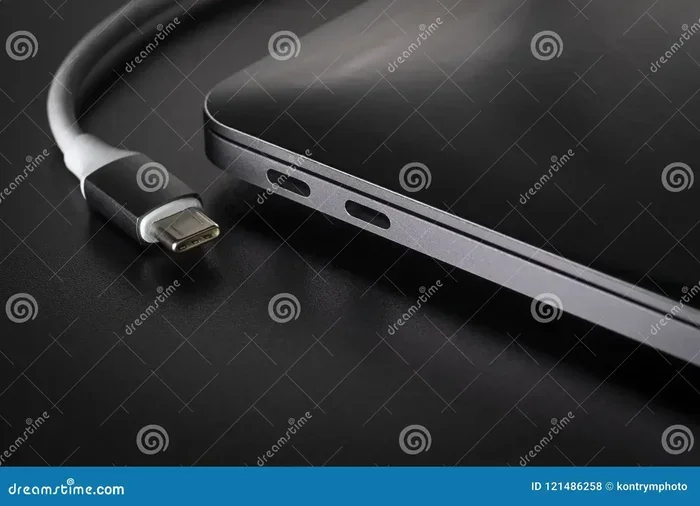
One of the best things about USB C is its universality. You likely already have USB C cables lying around. Your laptop, tablet, earbuds, and maybe even your car charger use USB C. With the iPhone 15, you can share cables across all your devices. This reduces clutter and makes travel much simpler.
What USB C Means for Your Charging Setup
Switching to USB C changes how you charge your iPhone 15. You can no longer use your old Lightning cables or Lightning-powered chargers. Let us break down what you need to know about charging the new iPhone 15.
Charging Speeds and Power Delivery
The iPhone 15 supports USB Power Delivery charging. This means you can charge your phone faster with the right charger and cable. Apple includes a USB C to USB C cable in the box, but you need a USB C power adapter for fast charging.
Here are some quick tips for getting the best charging speeds:
- Use a USB C power adapter with at least 20 watts. This will give you fast charging speeds.
- Avoid cheap, uncertified cables. Poor quality cables can slow down charging and may even damage your device.
- Look for USB C cables that support USB Power Delivery. Not all USB C cables are created equal.
With the right setup, you can charge your iPhone 15 from zero to about 50 percent in around 30 minutes. That is a big improvement over what Lightning could offer.
Can You Still Use Old Lightning Accessories?
The honest answer is no. Your Lightning cables, Lightning docks, and Lightning-based accessories will not work with the iPhone 15. The physical port shape is completely different. USB C is larger and has a different design than Lightning.
This means you will need to replace any Lightning accessories you rely on. It can feel frustrating, especially if you have a collection of Lightning cables. But the long-term benefits of a universal connector outweigh the short-term inconvenience.
Data Transfer: How Fast Is USB C on the iPhone 15?
Data transfer is one of the biggest improvements with the USB C port on the iPhone 15. The Lightning port was limited in speed, which made transferring large files a slow process. USB C changes that completely.
With the iPhone 15, you can transfer data at USB 3 speeds on certain models. This is especially true for the iPhone 15 Pro and iPhone 15 Pro Max. These models support faster data transfer rates, making it easy to move large photo and video files to your computer.
If you want to transfer files between your iPhone 15 and other devices, a USB C cable is all you need. You can connect your phone directly to a laptop, external drive, or even a monitor. The versatility of USB C opens up many possibilities that Lightning never could.
For everyday use, this means backing up your phone, sharing files, and syncing data happens much faster. If you work with large media files or need to move data regularly, this upgrade is a game changer.
Accessories You Will Need for the iPhone 15
Now that you know the iPhone 15 uses USB C, you will need to update your accessories. Here is a list of what you should consider getting.
USB C Cables
You need a good quality USB C cable. Apple sells its own USB C to USB C cable, but there are many third-party options too. Look for cables that are certified for USB Power Delivery and data transfer. A durable braided cable is a great choice because it resists fraying and lasts longer.
USB C Chargers
You will need a USB C charger if you want fast charging. Many modern laptops and tablets already come with USB C chargers, so you might already have one. If not, pick a charger that supports USB Power Delivery and at least 20 watts of output.
Protective Cases and Covers
Protecting your new iPhone 15 is important. A good case keeps your phone safe from drops and scratches. If you are worried about the camera lens, consider a protective case designed for iPhone 15 camera protection. These cases offer extra coverage around the camera module and help prevent scratches on the lens.
You can also find camera covers specifically made for the iPhone 15. These small accessories add an extra layer of defense for your camera lens, which is especially useful if you take lots of photos and use your phone daily.
Adapters and Hubs
One of the great things about USB C is the wide range of adapters available. You can get USB C to HDMI adapters, USB C hubs with multiple ports, and even USB C to SD card readers. These accessories make the iPhone 15 more versatile for work, travel, and creative projects.
iPhone 15 vs iPhone 14: What Changed with the Port?
Comparing the iPhone 15 to its predecessor, the iPhone 14, highlights the significance of the port change. The iPhone 14 still uses the Lightning connector. The iPhone 15 replaces it entirely with USB C. This is not just a small update. It is a fundamental shift in how the device connects to the world.
Here is a quick comparison of the two:
- iPhone 14: Uses the Lightning port. Charges at standard speeds. Limited data transfer rates. Requires Lightning-specific cables and accessories.
- iPhone 15: Uses the USB C port. Charges faster with USB Power Delivery. Faster data transfer speeds. Compatible with the universal USB C ecosystem.
If you are upgrading from an iPhone 14 to an iPhone 15, you will notice the difference right away. Your old Lightning cables will not fit. You will need new USB C cables and possibly a new charger. But the improved speed and versatility make the switch worthwhile.
Common Mistakes People Make After Switching to USB C
Making the switch from Lightning to USB C can be tricky at first. Here are some common mistakes to avoid.
Buying Cheap, Uncertified Cables
This is the biggest mistake people make. Not all USB C cables are equal. Cheap, uncertified cables may not support fast charging or proper data transfer. They can also be a safety risk. Always look for cables that are certified by USB Implementers Forum or sold by reputable brands.
Assuming All USB C Cables Support Fast Charging
Just because a cable has a USB C connector does not mean it supports fast charging. Some USB C cables are designed only for data transfer and not for power delivery. Check the specifications before you buy to make sure the cable supports USB Power Delivery.
Forgetting to Update Your Accessories
It is easy to forget that your car charger, wireless charging pad, or desk dock may need to be replaced. Any accessory that connects through a Lightning port will not work with the iPhone 15. Take stock of your accessories and replace what you need before you rely on the new phone.
What the Future Holds for USB C and Apple Devices
The switch to USB C on the iPhone 15 is not just a one-time change. It signals Apple’s long-term commitment to the USB C standard. The iPad Air, iPad Pro, and MacBook already use USB C. Now, the iPhone joins the same ecosystem.
This means Apple will likely continue refining USB C support across its product lineup. Future iPhones will benefit from even faster speeds, better power delivery, and more seamless integration with other Apple devices and third-party accessories.
For consumers, this is great news. A single cable to rule them all is no longer a dream. It is a reality. And Apple is finally on board with the rest of the industry.
Final Thoughts
The iPhone 15 uses USB C, and that change brings real benefits. Faster charging, quicker data transfer, and a universal connector that works across all your devices. The switch from Lightning to USB C was driven by regulation, but the results speak for themselves.
If you are buying an iPhone 15, make sure you have the right cables and accessories. Ditch the old Lightning cables and invest in quality USB C options. Your charging routine, file transfers, and overall experience will improve noticeably.
The future of smartphone charging is USB C. Apple embraced it, and now you know exactly what to expect. Welcome to the new era of iPhone connectivity.
Frequently Asked Questions
Can I still use my old Lightning cable with the iPhone 15?
No, the iPhone 15 does not have a Lightning port. You will need a USB C cable to charge and transfer data with the new phone. Your old Lightning cables are not compatible with the iPhone 15.
Does the iPhone 15 charge faster with USB C?
Yes, the iPhone 15 supports USB Power Delivery, which allows for faster charging speeds. With a 20-watt or higher USB C charger, you can charge your iPhone 15 significantly faster than you could with a Lightning connection.
Do I need a special USB C cable for the iPhone 15?
You need a USB C to USB C cable that supports USB Power Delivery. Not all USB C cables are the same. Look for certified cables that handle both data transfer and fast charging for the best results.
Is USB C better than Lightning for data transfer?
Yes, USB C offers much faster data transfer speeds than Lightning. The iPhone 15 Pro models especially benefit from USB 3 speeds, making it easy to move large files like photos and videos quickly.
Why did Apple switch from Lightning to USB C?
Apple switched to USB C mainly because of a European Union regulation that requires all smartphones to use the USB C standard. The change also brings better technology, faster speeds, and more universal compatibility across devices.
Can I use the same USB C charger for my iPhone 15 and other devices?
Yes, one of the biggest advantages of USB C is universal compatibility. You can use the same USB C charger for your iPhone 15, your laptop, your tablet, and many other devices. This reduces cable clutter and makes life much more convenient.
=== CONCLUSION ===
The iPhone 15 uses USB C, not Lightning. This is a significant change that brings real-world benefits to your daily routine. From faster charging to better data transfer and universal compatibility, USB C is the clear winner. Make sure you update your cables, chargers, and accessories to match the new standard. Once you make the switch, you will wonder why Apple did not do it sooner.