Does a Usb Extension Cable Affect Performance
A USB extension cable can affect performance, but the impact depends on cable length, quality, and the USB version you are using. Short passive cables under 3 meters usually maintain full speed, while longer cables may cause signal loss and slower data transfer. Choosing the right type of extension cable ensures your devices keep running at peak performance without any frustrating slowdowns.
You plug in your USB extension cable and notice something feels off. Your file transfers take longer than usual. Your external drive seems sluggish. The question hits you: does a USB extension cable affect performance?
The short answer is yes, it can. But the full picture is more nuanced than you might think. A lot depends on cable length, build quality, and the USB standard your device supports. In this guide, we break down everything you need to know about how extension cables impact your USB experience.
Whether you are charging your phone across the room or connecting an external hard drive, understanding how these cables work helps you make smarter choices. Let us dive in.
Key Takeaways
- Cable Length Matters: Longer USB extension cables can reduce data transfer speed and signal quality over distance.
- Active vs Passive: Active extension cables boost the signal, while passive ones simply extend it without amplification.
- USB Version Matters: USB 3.0 and 3.1 cables handle data better than older USB 2.0 versions over longer distances.
- Quality Counts: Cheap, thin cables often cause connection drops and data integrity issues.
- Proper Usage Tips: Keep cables under 5 meters and avoid sharp bends to maintain optimal performance.
- Charging Speed: Extension cables can reduce charging speed due to increased resistance over distance.
- Certification Matters: Always look for USB-IF certified cables to ensure reliable performance.
📑 Table of Contents
How USB Extension Cables Work
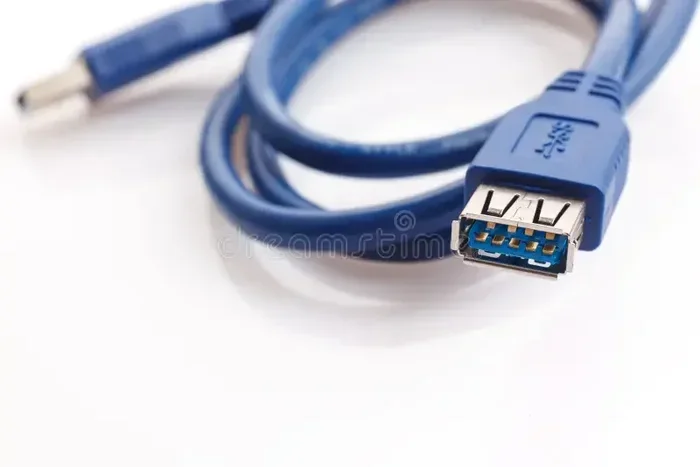
A USB extension cable is a simple device. It has a male connector on one end and a female connector on the other. This lets you extend the reach between your host device and a peripheral. The cable carries both data and power from one point to another.
Inside the cable, you find copper wires wrapped in shielding. The number of wires and the quality of shielding determine how well the cable performs. USB extension cables come in different grades, and not all of them are created equal.
When you push data through a cable, the signal travels from the source to the destination. Over distance, that signal weakens. This is called signal degradation. The longer the cable, the more the signal loses strength. This is the core reason extension cables can hurt performance.
The Role of Cable Quality
Not all extension cables are built the same way. A high-quality cable uses thicker copper wires and better shielding. This reduces resistance and keeps the signal strong over longer distances.
A cheap cable might use thin wires and minimal shielding. This leads to higher resistance and more signal loss. In practical terms, a low-quality cable can cause dropped connections, slow transfer rates, and even damage to connected devices over time.
Think of it like a garden hose. A thin, kinked hose delivers less water than a thick, smooth one. The same principle applies to USB cables and the data flowing through them.
Does Cable Length Affect USB Performance
This is the big question most people ask. The answer is straightforward: longer cables mean more resistance, which means weaker signals and slower speeds.
USB 2.0 cables can reliably stretch up to about 5 meters. Beyond that, data loss becomes a real risk. USB 3.0 and 3.1 cables are more sensitive. They work best at lengths under 3 meters because the higher data rates are more vulnerable to signal loss.
If you need to cover a longer distance, consider using an active extension cable. These cables have built-in chips that boost the signal as it travels. They keep your data transfer speed high even over longer runs.
For shorter runs, a passive extension cable works just fine. Under 2 meters, you will likely notice zero difference in performance compared to a direct connection.
Signal Loss and Data Integrity
Signal loss is not just about speed. It also affects data integrity. When a signal weakens, bits can flip during transfer. This means files can arrive corrupted or incomplete.
This is especially risky when transferring large files or working with sensitive data. A poor-quality extension cable can introduce errors that you might not notice until it is too late.
To maintain data integrity, always use cables from reputable brands. Look for cables that are USB-IF certified. These have been tested to meet strict performance standards.
Real-World Impact on Transfer Speed
Let us put this in perspective. If you transfer a 10GB file using a direct USB 3.0 connection, it might take about 30 seconds. The same transfer through a long, low-quality extension cable could take 2 minutes or more.
The difference comes from signal degradation and reduced bandwidth over distance. Your device is still capable of fast speeds, but the cable becomes the bottleneck.
Active vs Passive Extension Cables
Understanding the difference between active and passive cables is essential. Each type serves a different purpose and works best in different situations.
What Is a Passive Extension Cable?
A passive extension cable simply extends the connection. It does not amplify or boost the signal. It is like an extension cord for electricity. The further you stretch it, the weaker the output becomes.
Passive cables work well for short distances. If you need an extra 1 or 2 feet to reach a port, a passive cable is a fine choice. They are also cheaper and widely available.
However, passive cables are not ideal for long runs. Beyond 3 meters with USB 3.0, you will likely see a noticeable drop in speed and reliability.
What Is an Active Extension Cable?
An active extension cable contains electronic components that regenerate the signal. Think of it like a repeater on a long highway. It keeps the signal strong all the way to the destination.
Active cables can extend your connection up to 10 meters or more without significant loss of speed. They are ideal for setups where your device is far from the host port.
The trade-off is cost. Active cables are more expensive than passive ones. They also require a power source in some cases, which adds a small amount of complexity to your setup.
Which One Should You Choose?
For runs under 2 meters, go with a passive cable. It is simple, affordable, and gets the job done. For longer runs, invest in an active cable to preserve your USB performance.
If you are unsure, check the specifications of the cable. Quality manufacturers clearly state the recommended maximum length and the cable standard it supports.
How USB Version Impacts Speed Over Extension Cables
The USB version your cable supports plays a huge role in how it performs. Newer versions handle data better and are more tolerant of distance.
USB 2.0 Extension Cables
USB 2.0 has a maximum data rate of 480 Mbps. It is also more forgiving over distance. A USB 2.0 extension cable can work reliably up to 5 meters without major issues.
However, 480 Mbps feels slow by today’s standards. If you are transferring large files or backing up data, USB 2.0 will be a bottleneck regardless of cable length.
USB 3.0 and USB 3.1 Extension Cables
USB 3.0 offers speeds up to 5 Gbps, and USB 3.1 pushes that to 10 Gbps. These faster speeds are more sensitive to cable quality and length.
A USB 3.0 extension cable works best at lengths under 2 meters. Beyond that, you may notice speed drops. For USB 3.1, the sweet spot is even shorter, around 1 to 1.5 meters.
If you need longer runs with USB 3.0 or 3.1 speeds, an active cable with signal boosting is almost a must. This is similar to how a USB 3.1 adapter helps maintain high speeds when connecting fast SSDs to a computer.
USB-C and the New Generation
USB-C is the newest standard, and it brings faster speeds and more power. USB-C cables can support up to 40 Gbps with USB4. However, they are also more sensitive to cable quality.
A good USB-C extension cable preserves these high speeds over moderate distances. A cheap one will not. Always check for USB-C certification marks and read reviews before buying.
Common Problems With USB Extension Cables
Even with a good cable, problems can happen. Knowing what to look for helps you troubleshoot and fix issues quickly.
Connection Drops
If your device keeps disconnecting and reconnecting, the cable might be to blame. Loose connectors or poor shielding can cause intermittent connections. This is especially common with budget cables.
Try plugging the cable in a different port. If the problem persists, replace the cable. A stable USB port connection depends on both the cable and the port being in good condition.
Slower Charging Speeds
Extension cables can also affect charging speed. A long or thin cable increases resistance, which reduces the power reaching your device. You might notice your phone or tablet charges slower when connected through an extension cable.
For fast charging, use a short, thick cable with low resistance. Avoid extension cables that are very thin or very long if charging speed matters to you.
Data Corruption
In rare cases, a bad extension cable can cause data corruption. This happens when signal loss causes bits to be misread during transfer. You might see files that won’t open or drives that become unresponsive.
Always verify your backups and avoid using questionable cables for important data transfers. A reliable cable protects your files and your peace of mind.
Interference Issues
USB cables can pick up electromagnetic interference from nearby electronics. This is more common with longer cables that act like antennas. The result can be slower speeds, connection drops, or audio static if you are using USB audio devices.
To reduce interference, keep your extension cables away from power cords and wireless devices. Braided shielding on the cable helps block external interference.
Tips to Maximize USB Extension Cable Performance
Getting the best performance from your extension cable is easy when you follow a few simple rules. These tips help you avoid common pitfalls and get the most out of your setup.
Keep Cables Short When Possible
The shorter the cable, the better the performance. If you can reach your device with a 1-meter cable instead of a 5-meter one, go with the shorter option. This is the single most effective way to maintain speed and reliability.
Invest in Quality
Spend a little more on a well-built cable. Look for cables with thick copper wires, braided shielding, and USB-IF certification. A quality extension cable pays for itself by preventing frustration and data loss.
Avoid Sharp Bends and Kinks
Bending a cable sharply can damage the internal wires and shielding. This weakens the signal and reduces performance. Let the cable curve gently instead of forcing tight bends.
Also, avoid running cables under heavy furniture or doors. Pinching the cable damages the internal structure over time and leads to connection problems.
Use Active Cables for Long Runs
If you need to cover more than 3 meters, an active extension cable is the way to go. The built-in signal booster keeps your data transfer speed high and your connection stable.
For setups involving external drives, cameras, or other bandwidth-heavy devices, active cables are practically essential. They ensure your devices work as fast as they are capable of.
Check Your Ports
Sometimes the problem is not the cable but the port. Dust, dirt, or damage to the USB port can cause the same symptoms as a bad cable. Clean your ports regularly and inspect them for physical damage.
A good setup works best when both the cable and the ports are clean and undamaged. A reliable extension cable setup depends on this simple maintenance step.
Match the Cable to Your Device
Not all cables are the same. Make sure your extension cable matches the USB standard of your devices. Using a USB 2.0 extension cable with a USB 3.0 device will cap your speed at 2.0 levels.
Check the specifications on both your device and the cable. Matching them ensures you get the full speed your hardware is capable of delivering.
Conclusion
So, does a USB extension cable affect performance? The answer is yes, but the degree of impact depends on several factors. Cable length, quality, USB version, and whether you choose an active or passive cable all play a role.
For most everyday uses, a short, quality extension cable will not cause any noticeable issues. But if you are pushing large amounts of data or need fast charging, every detail matters. Choose the right cable, keep it in good condition, and your devices will perform at their best.
The bottom line is simple. A USB extension cable is a handy tool, but it is only as good as the one you choose. Invest in quality, match it to your needs, and you will enjoy reliable, fast connections every time.
Frequently Asked Questions
Can a USB extension cable slow down data transfer?
Yes, it can. Longer and lower-quality extension cables introduce more resistance and signal loss. This reduces the data transfer speed compared to a direct connection. The effect is more noticeable with USB 3.0 and 3.1 cables over longer distances.
How long can a USB extension cable be without losing performance?
For passive USB 2.0 cables, up to 5 meters is generally safe. For USB 3.0 and 3.1, keep it under 2 to 3 meters. Beyond these lengths, signal degradation starts to affect speed and reliability. Active cables can extend this range to 10 meters or more.
Are active USB extension cables worth the extra cost?
Absolutely. Active cables have built-in signal boosters that maintain speed and reliability over longer distances. If you need to extend your connection beyond 3 meters, an active cable is a smart investment that prevents frustration and data issues.
Does a USB extension cable affect charging speed?
Yes, it can. Longer or thinner extension cables increase resistance, which reduces the power delivered to your device. For fast charging, use a short, thick extension cable with low resistance to maintain optimal charging speeds.
What should I look for when buying a USB extension cable?
Look for USB-IF certification, thick copper wires, braided shielding, and a reputable brand. Check that the cable matches the USB standard of your devices. Reading customer reviews also helps you avoid cheap cables that underperform.
Can a bad USB extension cable damage my devices?
In rare cases, a very poor-quality cable can cause issues. It may deliver unstable power or corrupt data during transfers. Using certified, well-built cables greatly reduces any risk of damage to your connected devices.