Is Usb a Universal Standard
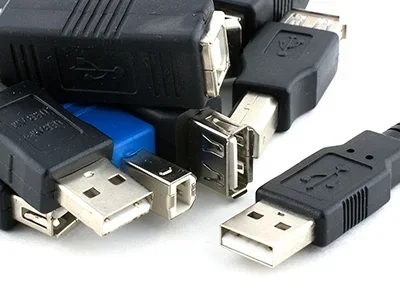
USB has become the most widely used connection standard in the tech world, but is it truly universal? The short answer is almost — USB connectors and protocols connect millions of devices, from laptops and cameras to gully cameras and CCTV systems. However, differences in USB versions, connector types, and power delivery mean that not every USB cable works with every device. Understanding the basics helps you avoid frustration and buy the right cables and accessories.
This is a comprehensive guide about Is Usb A Universal Standard.
Key Takeaways
- USB is the closest thing to a universal standard we have in tech, connecting devices from smartphones to security cameras.
- Multiple USB types exist — USB-A, USB-B, USB-C, and Micro-USB — and they are not all interchangeable.
- USB versions matter — USB 2.0, 3.0, and 4.0 offer different speeds and power levels that affect device performance.
- Backward compatibility is real but not always perfect, especially with older devices and cables.
- USB-C is becoming the new universal connector and is adopted by most modern laptops, phones, and accessories.
- Not all USB cables carry data — some are charge-only, which can cause confusion.
- The future points to USB4 and USB-C as the single standard for data, video, and power.
[FEATURED_IMAGE_PLACEHOLDER]
You plug in a cable, and it works. That is the promise of USB. After more than two decades of development, the Universal Serial Bus has become the most common connection standard on the planet. From your office laptop to the gully camera monitoring your driveway, USB shows up everywhere. But does that make it truly universal? The answer is more complicated than you might think.
In this guide, we break down everything you need to know about USB as a universal standard. We explore the different types, versions, and connectors, and we look at where USB falls short of being truly universal. By the end, you will know exactly what to look for when buying cables, chargers, and accessories.
Whether you are shopping for a new laptop, setting up a home security system, or just tired of tangled cables, this article has you covered. Let us dive in.
What Is USB and Why Does It Matter?
USB stands for Universal Serial Bus. It is a standard that defines how devices connect and communicate with each other. The goal was simple — create one connection type that works across all devices. Instead of carrying five different cables for five different gadgets, you carry one.
That vision has mostly come true. Today, USB connects computers, phones, printers, cameras, external hard drives, keyboards, and thousands of other devices. When you plug in a flash drive or charge your phone, you are using USB. It is the invisible backbone of modern device connectivity.
But here is the catch. Universal does not mean identical. There are many versions of USB, multiple connector shapes, and different power and data speeds. A cable that works perfectly on one device might not work on another. Understanding these differences is the key to making USB work the way it was always meant to.
Why the Universal Label? The Original Promise
The USB standard was created in the mid-1990s by a group of tech companies. Their mission was to simplify connections. Before USB, you had serial ports, parallel ports, and a mess of proprietary connectors. USB promised to replace all of that with one simple plug.
And for the most part, it delivered. Today, almost every computer, tablet, and phone includes at least one USB port. The Universal Serial Bus label was not just marketing — it was a genuine goal that the industry largely achieved. Even the best time to purchase a laptop often depends on which USB ports it offers, since modern laptops have largely dropped older connector types.
The Evolution of USB Standards
USB has gone through several major versions. Each version brought faster speeds, more power, and better features. Understanding these versions helps you choose the right cable and device for your needs.
USB 1.0 and 1.1 — The Early Days
The first USB standard launched in 1996. It was slow by today’s standards, with a maximum speed of 12 Mbps. USB 1.1, released shortly after, was the first widely adopted version. Back then, USB was mostly used for keyboards, mice, and simple storage devices.
USB 2.0 — The Workhorse
USB 2.0 arrived in 2000 and brought a massive speed boost to 480 Mbps. It also introduced the ability to charge devices. For many years, USB 2.0 was the default on almost every device. You can still find USB 2.0 ports on older laptops, printers, and budget accessories today.
USB 3.0 and 3.1 — The Speed Leap
USB 3.0, released in 2008, was a game changer. It offered speeds up to 5 Gbps — more than ten times faster than USB 2.0. It also introduced better power delivery. USB 3.1 followed with even faster speeds of 10 Gbps. These versions made it possible to transfer large files quickly and charge laptops through a single cable.
USB 3.2 and USB4 — The Modern Era
USB 3.2 pushed speeds to 20 Gbps and then 40 Gbps. USB4, the latest major standard, builds on the Thunderbolt 3 protocol and supports speeds up to 40 Gbps, video output, and up to 100 watts of power. USB4 is the future of the standard, and it is only available through USB-C connectors.
A Quick Look at USB Versions
- USB 1.0/1.1: 12 Mbps, basic connectivity
- USB 2.0: 480 Mbps, charging support
- USB 3.0: 5 Gbps, blue connectors
- USB 3.1: 10 Gbps, improved power
- USB 3.2: 20–40 Gbps, better efficiency
- USB4: 40 Gbps, video and power combined
Is USB Truly Universal? The Compatibility Question
Here is where things get interesting. USB is universal in the sense that the protocol is the same across devices. A USB flash drive uses the same language to talk to a laptop, a desktop, or a smart TV. But the physical connectors and cable capabilities vary a lot.
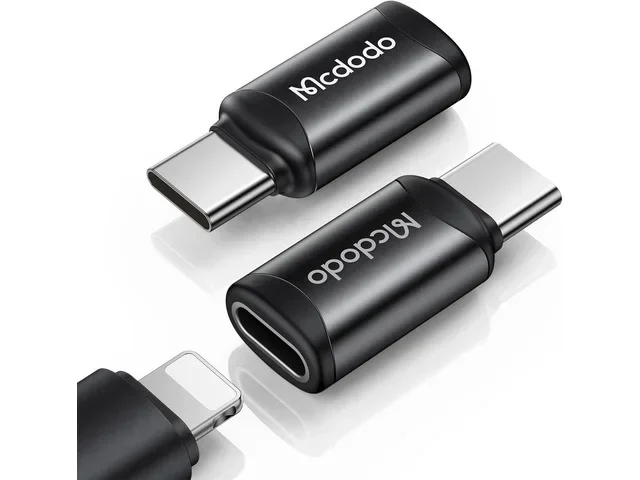
For example, your phone might use a USB-C cable while your older printer uses a USB-B cable. Both are USB, but they are not interchangeable without an adapter. This is where the universal claim starts to break down.
Backward Compatibility: A Partial Fix
One of USB’s strengths is backward compatibility. A USB 3.0 port can work with a USB 2.0 device, and vice versa. The connection will work, but it will run at the slower speed of the older device. This means your old USB 2.0 flash drive still works on a new USB 3.2 laptop — just not at full speed.
However, backward compatibility does not apply to all connector types. You cannot plug a USB-A cable into a USB-C port without an adapter. This is a common frustration and one reason why USB is not fully universal yet.
Where USB Falls Short of Universal
Despite its widespread adoption, USB has gaps. Some devices still use proprietary connectors. Older gadgets may only have USB-A or Micro-USB ports. And the growing variety of USB-C cables with different capabilities — some carry data and video, others carry only power — adds to the confusion.
Even in the security camera world, USB plays a role. When checking if your CCTV camera is on, you might need a USB connection for setup or firmware updates. The variety of USB standards means the cable you need depends on the camera model and its age.
USB Types and Connectors You Should Know
Not all USB connectors are the same. Each type serves a different purpose, and knowing them helps you buy the right cable the first time.
USB-A — The Classic Rectangle
USB-A is the flat, rectangular connector you have seen on computers for decades. It is the most common host connector. You plug it into your laptop or desktop, and it connects to devices like keyboards, mice, and flash drives.
USB-A is not reversible — you have to flip it to find the right orientation. It is also limited to older USB versions, with USB-A ports typically maxing out at USB 3.0 speeds.
USB-B — The Square Connector
USB-B is a square-shaped connector mostly used for printers and scanners. It is less common on consumer devices today but still appears on some larger peripherals. USB-B cables connect from a USB-A port on your computer to a USB-B port on the printer.
Micro-USB — The Old Phone Standard
Micro-USB was the go-to connector for phones and portable devices for many years. It is small, reversible on some versions, and still found on budget devices, Bluetooth speakers, and older gadgets. It has largely been replaced by USB-C in newer devices.
USB-C — The New Universal Connector
USB-C is the connector that is bringing USB closer to true universality. It is small, reversible, and supports the latest USB speeds and power standards. Most modern laptops, phones, tablets, and even some cameras now use USB-C.
USB-C is not just a connector — it is a platform. With USB-C, a single cable can carry data, video, and up to 100 watts of power. This makes it the most versatile USB connector ever created.
Mini-USB — The Forgotten Middle Child
Mini-USB was popular before Micro-USB took over. You can still find it on some older digital cameras, GPS devices, and portable hardware. It is being phased out but remains relevant for legacy devices.
USB in Everyday Devices
USB touches almost every tech product you own. Understanding how it works in different devices helps you appreciate both its universality and its limitations.
Laptops and Computers
Most laptops today come with at least one or two USB-C ports. These ports handle charging, data transfer, and video output. Older laptops may still have USB-A ports for legacy devices. The number and type of USB ports often influence buying decisions, especially when comparing models like the ram on a laptop or processor specs — USB port quality is an overlooked but important factor.
Phones and Tablets
Android phones have largely moved to USB-C. Apple iPhones still use Lightning, but even Apple is expected to adopt USB-C fully in the coming years, driven by regulatory requirements in Europe and elsewhere.
Cameras and Security Devices
USB plays a role in many camera setups. Trail cameras, security cameras, and monitoring devices often use USB for firmware updates or data transfer. When setting up a gully camera for drainage monitoring, a USB connection may be needed for initial configuration. The right USB cable ensures your camera stays connected and functional.
Streaming and Entertainment
Streaming devices like Chromecast, Roku, and even some TV sticks use USB for power. The Netflix SaaS platform and similar services rely on devices that connect through USB for seamless streaming experiences.
The Future of USB: Toward True Universality
The trajectory of USB points toward a single, unified connector and protocol. USB4, which is built on the Thunderbolt 3 foundation, is leading the way. It combines the fastest data speeds, video output, and maximum power delivery into one standard.
USB-C is the physical connector of the future. Governments around the world are pushing for USB-C as a mandatory charging standard. The European Union already requires USB-C on all phones, tablets, and cameras sold in the region. This regulation is accelerating the shift toward true universality.
In the near future, you should be able to use one USB-C cable for almost everything — charging your phone, connecting your laptop to a monitor, transferring files, and powering your accessories. The vision of a single universal cable is closer than ever.
Challenges That Remain
Even with USB4 and USB-C, challenges remain. Not all USB-C cables support the same speeds or power levels. A cheap USB-C cable might only charge your device and not transfer data. The market is still flooded with low-quality cables that do not meet the USB specification. Buying certified cables from reputable brands is essential.
Also, legacy devices with older USB types are not disappearing overnight. You will still need USB-A and Micro-USB cables for older equipment. True universality means supporting both new and old devices, and that takes time.
Quick Tips for Choosing the Right USB Cable
- Check the USB version: Look for USB 3.0 or higher for faster data transfer. USB 2.0 cables work but are much slower.
- Match the connector type: USB-A to USB-C, USB-C to USB-C, or USB-A to Micro-USB — make sure both ends fit your devices.
- Look for certification: Certified USB cables meet the official speed and power standards. Avoid unmarked cables.
- Consider cable length: Longer cables can reduce speed and power delivery. Keep cables under 6 feet for best performance.
- Buy from reputable brands: Anker, Belkin, and Cable Matters are trusted names for quality USB cables.
Common Mistakes People Make with USB
Even tech-savvy people make USB mistakes. Here are a few to avoid.
- Assuming all USB-C cables are the same: They are not. Some support 40 Gbps and 100W, while others only support basic charging.
- Using a charge-only cable for data transfer: Charge-only cables lack the data wires inside. They will not transfer files.
- Ignoring USB version compatibility: Plugging a USB 2.0 device into a USB 3.0 port works, but you will not get the faster speeds.
- Buying the cheapest cable available: Low-quality cables can damage your devices or fail to deliver promised speeds.
- Forcing a connector: If a cable does not fit, do not force it. You may be using the wrong connector type.
Expert Insights
Industry experts agree that USB is the most successful connectivity standard in history. The transition to USB-C and USB4 is expected to simplify device connections further. However, the experts also warn that the term universal should come with a caveat — it means broad compatibility, not identical functionality across all cables and devices.
Pro tip: Always check the specifications of your USB cable before purchasing. Look for the USB-IF certification logo, which guarantees the cable meets official standards for speed, power, and safety.
Final Thoughts
So, is USB a universal standard? The honest answer is yes and no. The USB protocol is universal — it connects devices from different manufacturers using the same language. The connectors, versions, and capabilities are not yet fully universal, but they are getting closer every year.
USB-C and USB4 are driving the industry toward a single, simple standard that handles data, video, and power through one cable. Until that day is fully here, understanding the basics of USB will save you time, money, and frustration.
Next time you reach for a USB cable, take a moment to check the type and version. A small bit of knowledge goes a long way in making your tech life simpler and more connected.
Frequently Asked Questions
Is USB-C the same as USB 3.0?
No. USB-C is a connector shape, while USB 3.0 is a speed standard. A USB-C cable can support USB 3.0, USB 3.1, USB 3.2, or USB4 depending on its quality and specifications. Always check the cable’s rated speed, not just the connector type.
Can I use any USB cable to charge my phone?
Most USB cables can charge your phone, but the charging speed depends on the cable’s power rating and the charger’s output. A USB-C cable with USB Power Delivery will charge much faster than a basic USB-A cable. For best results, use the cable that came with your device or a certified fast-charging cable.
Why does my USB cable only charge and not transfer data?
Some USB cables are charge-only. They have power wires inside but lack the data wires needed for file transfer. This is common with cheap or replacement cables. Look for cables labeled as data-capable or USB-IF certified to ensure they support both charging and data transfer.
Will USB ever be completely universal?
USB is closer than ever to true universality thanks to USB4 and USB-C. Government regulations are also pushing for a single charging standard. However, legacy devices and proprietary connectors mean USB will not be 100% universal overnight. The trend is clearly moving in that direction, though.
How do I know which USB version my port supports?
Look for symbols next to the port. A USB 3.0 port usually has a blue insert or the SS (SuperSpeed) logo. USB 3.1 and 3.2 ports may show the 10 or 20 Gbps logo. USB-C ports do not always indicate the version, so check your device manual or the manufacturer’s website for details.
Can I connect a USB 2.0 device to a USB 3.0 port?
Yes. USB is backward compatible, so a USB 2.0 device will work on a USB 3.0 port. However, the connection will operate at USB 2.0 speeds. The same applies in reverse — a USB 3.0 device on a USB 2.0 port will run at USB 2.0 speeds.
Frequently Asked Questions
What is Is Usb A Universal Standard?
Is Usb A Universal Standard is an important topic with many practical applications.