Is Displayport Usb C Better Than Hdmi
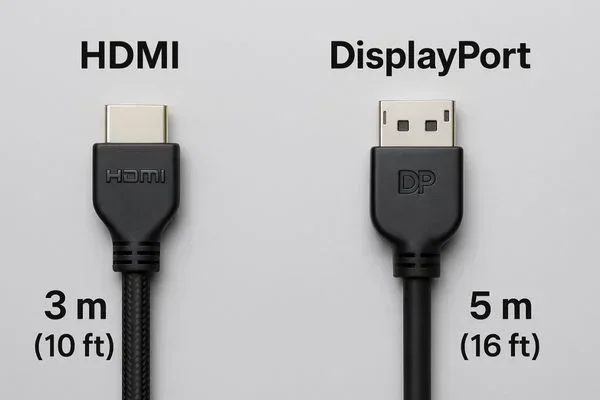
DisplayPort USB C delivers higher bandwidth and superior resolution support compared to standard HDMI in most scenarios. It is the preferred choice for professionals, gamers, and creators who demand reliable display connectivity at high speeds. However, HDMI still remains a solid option for everyday use and simple setups.
If you have been shopping for a new monitor or setting up a workstation, you have probably wondered about DisplayPort USB C versus HDMI. Both cables carry video and audio, but they work very differently under the hood. The right choice depends on your setup, your devices, and what you plan to do with your display.
DisplayPort USB C has become a favorite among professionals, gamers, and content creators. It offers higher bandwidth, better resolution support, and a sleek reversible connector. HDMI, on the other hand, is everywhere. Your TV, gaming console, and Blu-ray player likely all use HDMI. So which one is truly better? Let us break it down.
Key Takeaways
- DisplayPort USB C offers higher bandwidth: It supports greater data transfer speeds, making it ideal for high-resolution displays.
- HDMI is widely compatible: Most TVs, monitors, and consoles use HDMI, making it the universal choice for simple connections.
- USB-C is a versatile connector: It handles video, data, and power through a single cable, reducing cable clutter.
- Resolution and refresh rate matter: DisplayPort USB C excels at 4K and 8K, while HDMI is great for standard gaming and media.
- Adapter compatibility is key: You can use adapters to switch between formats, but quality varies by brand.
- Thunderbolt enhances USB-C: Thunderbolt over USB-C offers even faster speeds and better display support.
📑 Table of Contents
What Is DisplayPort USB C?
DisplayPort USB C is a digital display standard that uses the USB Type-C connector to carry video signals. Unlike traditional DisplayPort cables that use a larger rectangular plug, DisplayPort USB C fits into the same port you use for charging your laptop or connecting a phone. This makes it incredibly convenient for modern devices.
The USB-C connector is small, reversible, and supports multiple protocols. This means one cable can handle video output, data transfer, and even power delivery. Many modern laptops, tablets, and monitors now feature USB-C ports that support DisplayPort Alt Mode. This allows them to output video directly to an external display.
How Does DisplayPort USB C Work?
DisplayPort USB C uses a technology called DisplayPort Alt Mode. When a device supports this, it can send a video signal through the USB-C port. The video signal travels through the cable to your monitor or display. Because USB-C has multiple pins, it can handle high-bandwidth data without any issues.
The cable itself does not need to be a special “DisplayPort USB C” cable in most cases. Any certified USB-C cable that supports the right speed rating can carry a DisplayPort signal. However, using a high-quality cable ensures stable signal transmission at higher resolutions.
What Is HDMI?
HDMI stands for High-Definition Multimedia Interface. It has been the standard for connecting devices to displays for over two decades. Whether you are connecting a laptop to a TV or a game console to a monitor, HDMI is likely the cable you reach for.
HDMI cables carry both audio and video through a single cable. They come in several versions, including Standard, Mini, and Micro HDMI. The most common version today is HDMI 2.1, which supports 4K resolution at 120Hz and even 8K display at lower refresh rates. HDMI is deeply embedded in the consumer electronics world, which is its biggest strength.
Types of HDMI Ports
There are three main types of HDMI ports you will encounter:
- Standard HDMI: The full-size port found on TVs and desktop monitors.
- Mini HDMI: A smaller version used on some cameras and tablets.
- Micro HDMI: The smallest version, found on some older phones and portable devices.
All of these carry the same video and audio signals. The difference is purely in the size of the connector. For most users, Standard HDMI is the one that matters.
DisplayPort USB C vs HDMI: Head-to-Head Comparison
Now let us compare DisplayPort USB C and HDMI across the categories that matter most. This will help you decide which cable is right for your needs.
Bandwidth and Speed
Bandwidth determines how much data a cable can carry at once. Higher bandwidth means support for higher resolutions and refresh rates. DisplayPort USB C, especially through USB 3.1 or USB 4 connections, offers significantly more bandwidth than most HDMI versions.
For example, USB 4 can deliver up to 40Gbps of data. DisplayPort 2.0 over USB-C can handle 8K resolution at 60Hz or even 16K at lower refresh rates. HDMI 2.1 maxes out at 48Gbps, which supports 4K at 120Hz and 8K at 30Hz. In raw bandwidth, DisplayPort USB C has the edge.
Resolution and Refresh Rate Support
If you are a gamer or a video editor, resolution and refresh rate are critical. Here is a quick comparison:
- 4K at 60Hz: Both DisplayPort USB C and HDMI 2.1 handle this easily.
- 4K at 120Hz: HDMI 2.1 supports this natively. DisplayPort USB C can also handle it with the right version.
- 8K at 60Hz: DisplayPort 2.0 over USB-C supports this. HDMI 2.1 only supports 8K at 30Hz.
- 16K display: DisplayPort 2.0 over USB-C can push this at lower refresh rates.
For professional creators who need high-resolution displays, DisplayPort USB C is the clear winner. For casual gaming and media consumption, HDMI 2.1 is more than enough.
Audio and Video Quality
Both cables deliver excellent audio and video quality. HDMI supports up to 32 audio channels, which is more than most people need. DisplayPort supports up to 8 audio channels, which is still plenty for surround sound setups. In real-world use, you will not notice a difference in audio and video quality between the two.
Where they differ is in features like HDR metadata handling. HDMI 2.1 has better support for dynamic HDR, which adjusts brightness and color frame by frame. DisplayPort 2.0 also supports HDR, but HDMI has a slight edge in consumer TV compatibility.
Connector and Cable Design
The USB-C connector is small, reversible, and durable. You do not have to flip it around to plug it in, which is a small but nice convenience. HDMI connectors are larger and not reversible. They also tend to be more fragile over time, especially the thinner versions.
Cable quality matters for both standards. A cheap cable may not support the full bandwidth of DisplayPort USB C or HDMI 2.1. Always look for certified cables that match the version you need. A well-made USB-C cable can last for years and handle multiple tasks at once.
Compatibility and Device Support
HDMI is the most widely supported display standard in the world. Your smart TV, game console, streaming box, and Blu-ray player all use HDMI. If you want a simple plug-and-play experience, HDMI is hard to beat.
DisplayPort USB C is more common on computers, laptops, and professional monitors. Many modern devices support it, but not all TVs and consoles do. If you are connecting a PC to a monitor, DisplayPort USB C is often the better choice. If you are connecting a laptop to a TV, HDMI is usually the way to go.
One thing to keep in mind is that USB-C is not just for displays. The same port can charge your laptop, transfer files, and connect to peripherals. This makes it a docking station dream. You can daisy-chain monitors, connect external storage, and charge your device all through one cable.
When to Choose DisplayPort USB C
There are specific situations where DisplayPort USB C is the better choice. Here are the most common scenarios:
- You are a professional creator: Video editors, graphic designers, and 3D artists benefit from the higher bandwidth and resolution support.
- You use a laptop as your main computer: USB-C handles video, data, and power. This means fewer cables on your desk.
- You need high refresh rates: Competitive gamers who want 144Hz or higher at 1440p or 4K will get a smoother experience with DisplayPort USB C.
- You use a docking station: USB-C docks can connect to multiple monitors, external drives, and peripherals simultaneously.
- You have Thunderbolt support: Thunderbolt 3 and 4 use the USB-C connector and offer even greater bandwidth for demanding setups.
If any of these sound like your situation, go with DisplayPort USB C. The versatility and performance make it a strong investment for any modern workspace.
When to Choose HDMI
HDMI is not outdated. It still has a place in many setups. Here is when HDMI makes more sense:
- You connect to a TV: Most TVs only have HDMI inputs. There is no need to buy adapters or special cables.
- You game on a console: PlayStation, Xbox, and Nintendo Switch all use HDMI. This is the standard for console gaming.
- You want simplicity: HDMI is plug and play on almost every device. No need to check for Alt Mode or adapter support.
- You have older devices: Many older monitors and projectors only have HDMI. Using HDMI avoids compatibility headaches.
- You watch a lot of streaming content: Devices like Apple TV, Roku, and Chromecast all use HDMI for a reason.
HDMI also works great with USB-C accessories. For instance, you can use a USB-C to HDMI adapter to connect your laptop to a TV. This is a popular solution for people who want the best of both worlds. You can also pair your setup with other USB-C devices like the best USB Type C headphones for a clean, cable-minimized workspace.
Common Mistakes to Avoid
When choosing between DisplayPort USB C and HDMI, many people make avoidable mistakes. Here are the most common ones:
- Buying the wrong cable version: Not all USB-C cables support video output. Make sure your cable is certified for DisplayPort Alt Mode or Thunderbolt.
- Ignoring adapter quality: Cheap adapters can cause signal loss, flickering, or reduced resolution. Invest in a quality adapter from a reputable brand.
- Assuming all USB-C ports are the same: Some USB-C ports only support data and charging, not video output. Check your device specifications before buying a cable.
- Overlooking HDMI 2.1 features: If you have an HDMI 2.1 port, you get great 4K 120Hz support. Do not assume HDMI is always inferior.
- Using long cables without checking bandwidth: Longer cables can degrade signal quality. Stick to shorter cables or buy high-quality extended cables rated for the bandwidth you need.
Expert Insights on Display Connectivity
Industry experts agree that DisplayPort USB C is the future of display connectivity. As more laptops and monitors adopt USB-C as the primary port, the need for HDMI will gradually decrease. Thunderbolt, which uses the USB-C connector, is already pushing the boundaries of what a single cable can do.
However, HDMI is not going away anytime soon. The HDMI Forum continues to update the standard, and HDMI 2.1 has brought significant improvements. For the average consumer, HDMI still provides a reliable and straightforward connection for most use cases.
The real takeaway is that both standards have their place. The best choice depends on your devices, your workflow, and your display needs. If you are building a new setup, consider getting a monitor that supports both inputs. This gives you flexibility and future-proofs your purchase.
You may also want to explore USB-C connectivity beyond displays. For example, USB-C is widely used for external storage solutions like the M.2 NVMe to USB C SSD enclosure, which lets you connect high-speed storage through the same port you use for your display. This shows how versatile the USB-C ecosystem really is.
Final Verdict
So, is DisplayPort USB C better than HDMI? The answer is: it depends on your needs. For professionals, gamers, and anyone who wants a clean, versatile setup, DisplayPort USB C is the superior choice. It offers higher bandwidth, better resolution support, and the convenience of a single cable for video, data, and power.
For casual users, TV connections, and console gaming, HDMI remains the simpler and more universally compatible option. Both cables deliver excellent digital display quality, and both will serve you well in the right situation.
If you are still unsure, check what ports your devices have. Most modern laptops support both DisplayPort USB C and HDMI output. This gives you the freedom to choose the best cable for each use case. Start with your most demanding display needs, and let that guide your decision.
Frequently Asked Questions
Can I use a USB-C cable for DisplayPort output?
Yes, most modern USB-C cables support DisplayPort Alt Mode. You just need to make sure the cable is rated for video output. Not all USB-C cables carry video signals, so check the specifications before purchasing.
Is HDMI 2.1 better than DisplayPort USB C?
HDMI 2.1 and DisplayPort USB C each have strengths. HDMI 2.1 supports 4K at 120Hz and 8K at 30Hz, while DisplayPort 2.0 over USB-C can handle higher resolutions at smoother refresh rates. For most users, both are excellent.
Do I need a special cable for DisplayPort USB C?
You do not need a special “DisplayPort USB C” cable in most cases. Any certified USB-C cable that supports the required speed will work. However, using a high-quality cable ensures stable performance at higher resolutions.
Can I connect my laptop to a TV using DisplayPort USB C?
Yes, but you may need a USB-C to HDMI adapter. Most TVs only have HDMI inputs, so an adapter bridges the gap. Make sure the adapter supports the resolution and refresh rate you need.
Does DisplayPort USB C support audio?
Yes, DisplayPort USB C carries both audio and video through the same cable. You can connect to monitors and displays with built-in speakers and get sound without needing a separate audio cable.
What is the difference between Thunderbolt and DisplayPort USB C?
Thunderbolt uses the USB-C connector but offers much higher bandwidth than standard DisplayPort. Thunderbolt 4 supports up to 40Gbps and can connect to multiple displays, external storage, and peripherals through a single cable.
=== CONCLUSION ===
DisplayPort USB C is the better choice for most modern setups that demand high performance and versatility. It offers superior bandwidth, excellent resolution support, and the convenience of a single cable for everything. HDMI is still a reliable and widely compatible option for everyday use, especially for TV connections and console gaming.
Consider your devices, your workflow, and your display needs before making a decision. Both standards have earned their place in the tech world. Choose the one that fits your setup best, and you will enjoy a great viewing experience for years to come.