Do I Need Hdmi to Rca or Rca to Hdmi
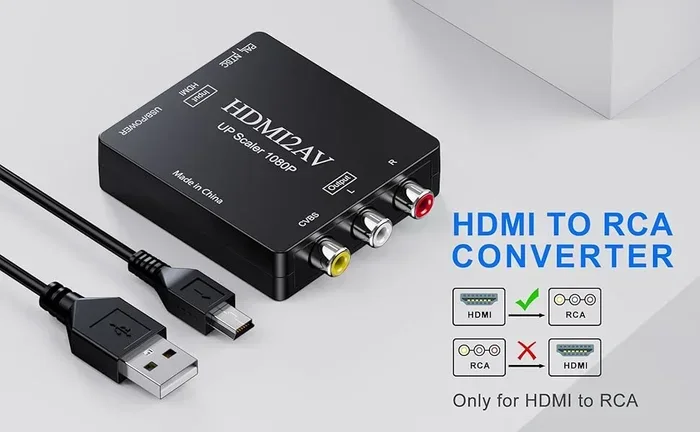
You need an HDMI to RCA adapter when your new device has HDMI output but your old TV or monitor only has RCA inputs. You need an RCA to HDMI adapter when your older device uses RCA cables but your modern display only accepts HDMI. Choosing the right direction matters for signal quality and compatibility.
You just plugged in a new device, and suddenly you are staring at a tangle of cables. One end has a wide flat HDMI connector. The other end has those classic red, white, and yellow RCA plugs. You pause and think, do I need HDMI to RCA or RCA to HDMI? It is a simple question, but the answer can trip up a lot of people. This guide breaks it all down in plain language so you can pick the right cable the first time.
Whether you are hooking up an old DVD player to a new TV or connecting a retro gaming console to a modern monitor, the right cable makes all the difference. HDMI to RCA and RCA to HDMI serve opposite purposes, and picking the wrong one means frustration. Let us walk through exactly what each one does, when you need it, and how to avoid common mistakes.
Key Takeaways
- Direction matters: HDMI to RCA converts digital signals to analog, while RCA to HDMI does the opposite.
- Not all converters are equal: Active converters need power, while simple cables are passive and work without batteries.
- Check your ports first: Look at both your source device and display to determine which adapter you need.
- Audio and video are separate: RCA cables carry audio and video on different cables, so you may need multiple connections.
- Signal quality can degrade: Converting between analog and digital may reduce quality compared to native connections.
- Match your device needs: Gaming consoles, older DVD players, and retro gear all have different cable requirements.
- Get the right adapter for your setup: A wrong choice can lead to no signal, poor picture, or no sound.
📑 Table of Contents
What Is HDMI and What Is RCA?
Before we dive into which adapter you need, let us quickly cover the basics. Understanding what each connector does helps you make smarter choices.
Understanding HDMI
HDMI stands for High Definition Multimedia Interface. It is the standard cable used in modern TVs, monitors, gaming consoles, and streaming devices. HDMI carries both audio and video through a single cable. This makes it super convenient. You plug one cable in, and you get high-definition picture and sound.
HDMI is a digital signal standard. That means the data travels in a clean, encoded format with very little loss of quality. Most devices made after 2005 use HDMI. If your TV or monitor was bought in the last 15 years, it almost certainly has HDMI ports.
Understanding RCA
RCA cables are the older style of connection. You know them by their color-coded plugs. Red and white carry audio, and yellow carries video. RCA cables have been around since the 1940s and were the standard for decades. They use analog signals, which means the audio and video travel as continuous electrical waves rather than digital data.
Many older devices still use RCA outputs. Think of vintage DVD players, retro game consoles, VCRs, and older stereo systems. If you are connecting older gear, you will likely run into RCA connections. Hooking up RCA cables is straightforward, but matching them to modern displays requires an adapter.
Do You Need HDMI to RCA or RCA to HDMI?
The direction of the conversion depends entirely on your devices. Here is a simple way to think about it. Look at the output port on your source device and the input port on your display. That tells you everything.
When You Need HDMI to RCA
You need an HDMI to RCA adapter when your source device outputs HDMI but your display only has RCA inputs. For example, say you have a modern laptop or a newer Blu-ray player with HDMI output. But your bedroom TV is an older model that only has the classic red, white, and yellow RCA jacks. In this case, you need an HDMI to RCA converter.
This type of adapter takes the digital HDMI signal and converts it into an analog RCA signal. The converter box usually has an HDMI input on one side and RCA outputs on the other. You connect the HDMI end to your source device and the RCA cables to your TV.
When You Need RCA to HDMI
You need an RCA to HDMI adapter when your source device has RCA outputs but your display only accepts HDMI. This is common when people connect older equipment to modern TVs. For instance, you might have a classic retro game console or an old VCR that only outputs via RCA cables. But your new flat-screen TV only has HDMI ports.
An RCA to HDMI converter does the opposite job. It takes the analog RCA signal and upscales it to a digital HDMI signal. The converter box receives the red, white, and yellow RCA cables on one side and outputs a single HDMI cable on the other side that plugs straight into your modern TV.
How HDMI to RCA Converters Work
HDMI to RCA converters are interesting little devices. They handle the job of turning digital data into analog signals that older equipment can read. Here is how they work in simple terms.
The Conversion Process
Inside an HDMI to RCA converter, a small chip processes the incoming digital HDMI signal. It decodes the digital data and rebuilds it as analog waveforms. The video signal goes to the yellow RCA output, while the audio splits into the red and white RCA outputs.
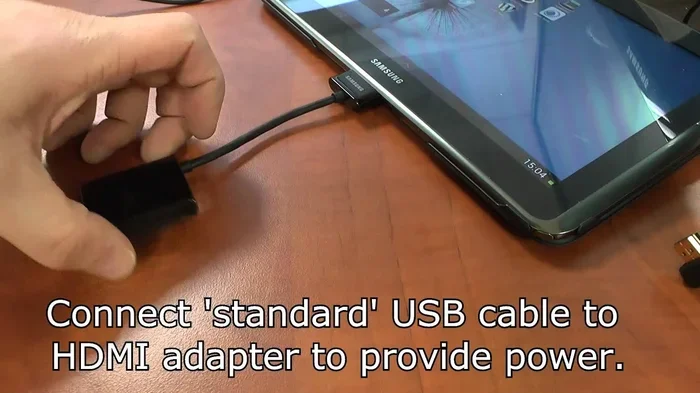
Most converters need external power, usually through a USB cable. This is because the conversion process requires processing power. A passive cable alone cannot do this job. You need an active converter box with a chip inside it to handle the signal transformation.
Quality Considerations
Keep in mind that converting from digital to analog can cause some signal loss. The original HDMI signal is high definition, but the RCA output is limited by the analog standard. You will not get true 1080p or 4K quality on an RCA connection. The best you can expect is standard definition or enhanced definition, depending on the converter quality.
If you want the best results, use a well-reviewed converter. Cheap adapters may produce a weak or noisy picture. Spending a little extra on a reputable brand pays off in cleaner output and better sound.
How RCA to HDMI Converters Work
RCA to HDMI converters perform the reverse task. They take the older analog signals and digitize them so modern displays can show them.
The Upscaling Process
Inside an RCA to HDMI converter, an analog-to-digital converter chip reads the incoming RCA signals. It then processes and upscales the video to a digital HDMI format. The audio is also digitized and combined with the video signal for output through a single HDMI cable.
Most RCA to HDMI converters support standard definition upscaling. Some higher-end models can upscale to 720p or even 1080p. However, the quality of the upscaled output depends heavily on the quality of the original RCA signal and the converter’s internal processing.
Do You Need an Amplifier?
Sometimes, when you are converting signals and running cables to speakers or a home theater system, you may need additional audio boost. If you are setting up an older audio system with modern displays, check whether you need an amplifier for your speakers. A weak signal after conversion can result in quiet or distorted audio. An amplifier can help strengthen the output for a better listening experience.
Common Devices That Need These Adapters
People use HDMI to RCA and RCA to HDMI converters in many situations. Here are some common scenarios where you will need one or the other.
- Retro gaming consoles: Classic consoles like the NES, SNES, Sega Genesis, and Nintendo 64 use RCA outputs. If you want to play them on a modern TV, you need an RCA to HDMI converter.
- Old DVD players: Many older DVD players only have RCA outputs. An RCA to HDMI adapter lets you use them with today’s flat-screen TVs.
- VCRs: Vintage VCRs are purely analog devices. To watch old tapes on a new TV, you need an RCA to HDMI converter.
- Modern laptops to old monitors: If your laptop has HDMI output but your monitor only has RCA inputs, an HDMI to RCA adapter solves the problem.
- Camcorders and older cameras: Some older video cameras output via RCA. You may need an HDMI to RCA converter to view footage on a modern display.
- Car entertainment systems: Some older car screens use RCA inputs. If your media player outputs HDMI, you need an HDMI to RCA adapter for your vehicle setup.
If you are connecting audio equipment alongside your video setup, it helps to understand how different audio connections work together. For example, if you are setting up a turntable with speakers, knowing your cable options is essential. Check out this guide on whether you need speakers with a turntable for more context on audio setups.
Quick Tips for Choosing the Right Adapter
Shopping for adapters can feel overwhelming with so many options on the market. Here are some practical tips to help you choose the right one.
- Check your ports first. Look at both your source device and your display. Identify what outputs and inputs are available. This tells you which direction the conversion must go.
- Decide between a converter box and a simple cable. Some adapters are simple passive cables, but most HDMI to RCA and RCA to HDMI conversions require active converter boxes with power.
- Check the supported resolution. Not all converters support the same resolution. If you want the best picture quality, look for converters that support at least 720p or 1080p upscaling.
- Read reviews before buying. Cheap converters often produce poor picture quality or have audio sync issues. Spending a bit more on a trusted brand saves you from headaches.
- Make sure you get the right audio cables. RCA connections use three separate cables for audio and video. Ensure your converter includes or supports red, white, and yellow RCA cables.
- Consider your power options. Most active converters need a power source. Some plug into a wall outlet, while others use USB power. Make sure you have a compatible power option available.
Common Mistakes to Avoid
Here are some mistakes people often make when buying and using these adapters:
- Buying the wrong direction. This is the most common error. Double-check whether you need HDMI to RCA or RCA to HDMI before purchasing.
- Using a passive cable for active conversion. A simple HDMI to RCA cable without a converter box will not work. You need an active converter with a processing chip.
- Ignoring audio separation. RCA cables carry audio and video on separate wires. Make sure all three cables are connected properly for both sound and picture.
- Skipping the power supply. If your converter needs external power and you skip it, you will get no signal or a very poor one.
- Expecting HD quality on RCA. RCA is an analog standard. Even with a great converter, the output will not match true HDMI quality. Set realistic expectations.
Expert Insights on Signal Conversion
Signal conversion between analog and digital is not a perfect science. Every conversion introduces some level of quality change. Here is what experts want you to know.
Digital to analog conversion (HDMI to RCA) involves decoding the digital signal and recreating it as an analog waveform. This process is well understood and works reliably with quality converters. However, the output is limited by the RCA standard, which maxes out at standard definition in most cases.
Analog to digital conversion (RCA to HDMI) is more complex. The converter must read the analog signal, clean up any noise, and digitize it. Then it upscales the image to fit modern HDMI resolutions. The better the internal processor, the cleaner the final output will be.
If you are dealing with a complex home setup involving multiple audio and video components, your overall home theater configuration matters. For car audio setups specifically, the connection type between your head unit and speakers can affect performance. Learn more about whether you need an amplifier for car speakers to ensure your audio system delivers the best possible sound alongside your video setup.
Final Thoughts
So, do you need HDMI to RCA or RCA to HDMI? The answer comes down to one simple question: what ports do your devices have? If your source has HDMI and your display has RCA, you need an HDMI to RCA converter. If your source has RCA and your display has HDMI, you need an RCA to HDMI converter.
Both types of adapters serve an important role in bridging the gap between older and newer technology. They let you use classic devices with modern screens and vice versa. The key is to buy the right one for your setup and choose a quality product that delivers clean signal conversion.
Take a moment to check your ports, read a few reviews, and pick the converter that fits your needs. With the right adapter in hand, you will be up and running in minutes. No more staring at blank screens or tangled cables. Just a simple connection that brings your devices together perfectly.
Frequently Asked Questions
Can I use a simple HDMI to RCA cable without a converter box?
No, a simple cable alone cannot convert the signal. HDMI is digital and RCA is analog. You need an active converter box with a processing chip to change the signal from one format to another. Passive cables only work when both ends use the same signal type.
Why is my picture fuzzy after using an RCA to HDMI converter?
Fuzzy pictures usually happen because the original RCA signal is low quality or the converter is cheaply made. RCA is an analog standard that limits resolution. Even with upscaling, the output will not match true HDMI clarity. Try a higher-quality converter for better results.
Do I need separate cables for audio and video with RCA?
Yes, RCA uses three separate cables. The yellow cable carries video, while the red and white cables carry the right and left audio channels. You need all three connected properly for both picture and sound to work through the converter.
Will an HDMI to RCA adapter support HD quality?
Most HDMI to RCA adapters output standard definition because RCA is an analog standard with limited bandwidth. Some higher-end converters can push enhanced definition, but true HD quality is not possible over RCA connections. The converter does its best, but the RCA format is the limiting factor.
Can I connect a modern gaming console to an old TV using RCA?
Yes, you can. Modern gaming consoles output HDMI, so you would need an HDMI to RCA converter. Keep in mind that the picture quality on the old TV will be limited by its analog display capabilities. The converter will do the job, but do not expect sharp high-definition graphics on an older CRT or basic LCD screen.
How much should I spend on an HDMI to RCA or RCA to HDMI converter?
decent converters typically cost between $15 and $40. Very cheap options under $10 often have poor signal quality and audio sync issues. Spending in the $20 to $30 range usually gets you a reliable converter that handles both video and audio properly. Read reviews and stick with trusted brands for the best experience.