Is There a Difference Between Hdmi Cables
Not all HDMI cables are the same, but the differences matter less than you think. This guide explains HDMI versions, cable categories, and whether premium cables are worth the extra cost. You will learn what to look for when buying an HDMI cable and how to avoid overpaying for features you do not need.
You walk into an electronics store or scroll through an online shop and see HDMI cables lined up from $5 to $80. They all look the same. They all have the same rectangular plug on each end. So does it really matter which one you pick?
The short answer is yes and no. There are real differences between HDMI cables, but they are not always obvious. A cheap cable might work perfectly fine for your setup, while a more expensive one might unlock features like 4K at 120Hz or enhanced audio return. The key is understanding what your devices need and what each cable type offers.
In this guide, we break down every major HDMI cable difference in plain language. Whether you are hooking up a gaming console, a home theater system, or a simple TV, you will know exactly which HDMI cable to buy. No jargon. No confusion. Just clear, practical advice.
Key Takeaways
- HDMI cable versions matter: HDMI 2.0 and HDMI 2.1 support different resolutions and refresh rates, so picking the right version is important.
- Cable category affects performance: High-Speed HDMI and Ultra High-Speed cables are designed for different bandwidth needs.
- Premium cables are not always better: A pricey HDMI cable does not guarantee a better picture if your device does not need that bandwidth.
- Cable length can affect signal quality: Longer runs may cause signal loss, especially with older cable standards.
- Gold-plated connectors help with durability: They resist corrosion and maintain a solid connection over time.
- HDMI ARC and eARC matter for home theater setups: These features let you send audio back to your sound system through a single cable.
- Certification labels help you choose: Look for HDMI Premium Certified or Ultra High-Speed labels for guaranteed performance.
📑 Table of Contents
What Is an HDMI Cable?
HDMI stands for High-Definition Multimedia Interface. It is a digital cable that carries both video and audio signals through a single cord. Before HDMI, you needed separate cables for video and audio. HDMI simplified things by combining them into one connection.
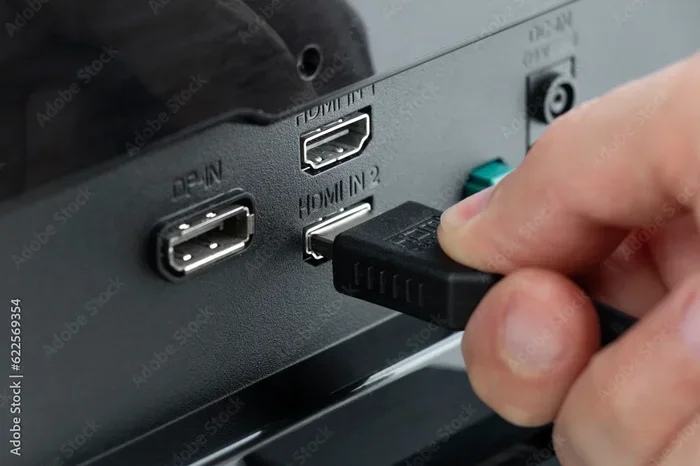
Almost every modern device uses HDMI in some form. Your TV, gaming console, Blu-ray player, laptop, and even some cameras rely on HDMI to deliver picture and sound. The standard connector is the flat, trapezoid-shaped plug you plug into the side of your TV or monitor.
What many people do not realize is that HDMI has evolved over the years. New versions bring higher bandwidth, better resolution support, and extra features. This evolution is the root of the differences between cables on the market today.
HDMI Versions: What Actually Changes?
HDMI versions are the biggest factor in cable differences. Each new version increases the bandwidth, which determines how much data the cable can carry. More bandwidth means higher resolutions, smoother refresh rates, and better color depth.
HDMI 1.4
HDMI 1.4 was a major step forward. It introduced support for 4K resolution at 30Hz. It also brought the Ethernet channel, which lets compatible devices share an internet connection through the HDMI cable. You will still find HDMI 1.4 cables in use, especially in older setups.
HDMI 2.0
HDMI 2.0 bumped the bandwidth up significantly. It supports 4K at 60Hz, which makes motion look much smoother. It also introduced HDR (High Dynamic Range) support, which delivers richer colors and better contrast. Most mid-range TVs and monitors made in the last five years use HDMI 2.0 or later.
HDMI 2.1
HDMI 2.1 is the latest standard, and it is built for serious performance. It supports 4K at 120Hz and even 8K at 60Hz. The bandwidth jumps to 48 Gbps, which is massive compared to earlier versions. If you own a next-gen gaming console like the PlayStation 5 or Xbox Series X, you need an HDMI 2.1 cable to get the full experience. The HDMI cable you choose here directly impacts your gaming and viewing quality.
HDMI Cable Categories Explained
The HDMI Forum and HDMI Licensing group classify cables into categories based on their capabilities. Understanding these categories helps you pick the right cable without overspending.
Standard HDMI Cable
A Standard HDMI cable supports resolutions up to 1080p. It works fine for older TVs, basic Blu-ray players, and standard-definition devices. If you are setting up a simple bedroom TV or a legacy system, a Standard HDMI cable gets the job done.
High-Speed HDMI Cable
High-Speed HDMI cables support 4K resolution at 30Hz and 3D content. They also handle deeper color depths. For most modern home setups, a High-Speed cable is the sweet spot. It covers 4K content without the premium price tag of the newest standards.
Ultra High-Speed HDMI Cable
This is the cable you need for HDMI 2.1 features. Ultra High-Speed cables support 4K at 120Hz, 8K at 60Hz, and dynamic HDR. They carry up to 48 Gbps of bandwidth. If you are building a gaming setup or a high-end home theater, this is the category to look for.
Premium High-Speed HDMI Cable
The Premium High-Speed label means the cable has been tested and certified by the HDMI organization. It guarantees performance for 4K at 60Hz with HDR. These cables often come with better shielding and more durable connectors, which adds to their reliability.
| Cable Category | Max Resolution | Bandwidth | Best For |
|---|---|---|---|
| Standard HDMI | 1080p | 4.95 Gbps | Older TVs, basic setups |
| High-Speed HDMI | 4K at 30Hz | 10.2 Gbps | Most modern TVs and monitors |
| Premium High-Speed HDMI | 4K at 60Hz with HDR | 18 Gbps | Mid-range home theater |
| Ultra High-Speed HDMI | 4K at 120Hz / 8K at 60Hz | 48 Gbps | Gaming, high-end setups |
Do Expensive HDMI Cables Sound or Look Better?
This is the question most shoppers want answered. The honest truth is that for most people, a $10 HDMI cable performs identically to a $70 one. Digital signals are binary, meaning they are either transmitted perfectly or not at all. There is no in-between with a “slightly better” signal.
That said, there are situations where price does make a difference. Longer cables, for example, can suffer from signal degradation. A well-built premium cable with better shielding maintains signal integrity over longer runs. If you need a cable that stretches across a room, investing in a higher-quality HDMI cable makes sense.
Build quality matters too. Gold-plated connectors resist corrosion and provide a snug fit. Cheaper cables with thin shielding can pick up electromagnetic interference, which might cause flickering or audio dropouts in certain setups. For short runs under six feet, a budget cable almost always works great.
One thing to watch for is the difference between studio monitors and regular speakers when setting up audio. If your sound system uses an HDMI connection, the cable quality can affect how cleanly the audio signal travels. Check out the difference between studio monitors and speakers to understand how your audio setup might be affected by your cable choice.
HDMI Cable Types and Connectors
HDMI cables come in different physical connector types, and not all of them fit every device. Knowing which connector you need prevents the frustration of buying the wrong cable.
Type A (Standard HDMI)
This is the most common HDMI connector. It is the full-size plug you see on TVs, monitors, and most devices. If you have ever plugged something into the back of a television, you have used a Type A connector.
Type C (Mini HDMI)
Mini HDMI is smaller and often found on tablets, DSLR cameras, and some laptops. It carries the same signal as a standard HDMI but in a more compact form factor. You will need an adapter or a cable with a Mini HDMI plug on one end if your device uses this connector.
Type D (Micro HDMI)
Micro HDMI is even smaller and is used on some smartphones and action cameras. It is less common than Mini HDMI but still important to know about if you are connecting mobile devices to a display.
Type E (Automotive HDMI)
Type E connectors are designed for vehicles and industrial equipment. They feature a locking mechanism that prevents the cable from coming loose due to vibration. You will rarely encounter these in a home setup.
When shopping for a cable, also consider the difference between monitors and speakers in terms of connection types. Monitors typically use HDMI for video input, while speakers may use HDMI ARC for audio, and understanding both helps you choose the right setup.
Features That Set HDMI Cables Apart
Beyond versions and categories, certain features make specific HDMI cables stand out. These features can enhance your experience in real-world setups.
HDMI ARC and eARC
ARC stands for Audio Return Channel. It lets your TV send audio back to a soundbar or receiver through the same HDMI cable. This means you only need one cable for both video input and audio output. eARC (enhanced ARC) supports higher-quality audio formats like Dolby Atmos and DTS:X. If you are building a home theater, look for cables that support ARC or eARC.
Ethernet Channel
Some HDMI cables include an Ethernet channel. This allows connected devices to share a network connection without a separate Wi-Fi router or Ethernet cable. While not essential for most users, it can be handy in setups where devices are far from the router.
3D Support
Older HDMI cables with 3D support let you connect 3D-capable TVs and Blu-ray players. While 3D TVs are less popular today, if you still have one, make sure your cable supports 3D signals.
Cable Length and Signal Quality
Cable length plays a bigger role than most people realize. Short cables under six feet rarely have signal issues. But as the length increases, the signal weakens, especially with lower-quality cables. For runs over 15 feet, consider an active HDMI cable or a fiber optic HDMI cable, which uses light to transmit the signal with minimal loss.
When choosing audio and video equipment, the overall setup matters too. If you are comparing different speaker types for your entertainment system, understanding the difference between subs and speakers can help you build a more balanced audio setup alongside your HDMI connections.
How to Choose the Right HDMI Cable
Choosing the right HDMI cable comes down to three things: your devices, your resolution needs, and your budget. Here is a simple guide to help you decide.
Step 1: Check your devices. Look at the HDMI ports on your TV, monitor, console, or player. Find the HDMI version if possible. If your TV has HDMI 2.1 ports, buy an Ultra High-Speed cable to take full advantage.
Step 2: Determine your resolution needs. If you watch 4K content or play games at high frame rates, you need a High-Speed or Ultra High-Speed cable. If you only use 1080p, a Standard cable works fine.
Step 3: Consider cable length. Measure the distance between your devices. Buy a cable that is long enough but not excessively long. Longer cables need better shielding to maintain signal quality.
Step 4: Look for certification. Certified cables carry labels like “Premium High-Speed” or “Ultra High-Speed.” These labels mean the cable has been tested and meets the official HDMI standards.
Step 5: Set a budget. You do not need to spend $50 on an HDMI cable. A well-certified $10 to $15 cable handles most setups perfectly. Save your money for features and devices that actually improve your experience.
For photographers and content creators, connecting a camera to a display often involves HDMI as well. If you are deciding between camera types, understanding which cameras have better output options can help. You might find it useful to review the difference between point-and-shoot cameras and DSLRs to see which options offer better connectivity for your workflow.
Common HDMI Cable Myths Debunked
There is a lot of misinformation about HDMI cables. Let us clear up some of the most common myths.
Myth 1: Thicker cables sound better. The thickness of an HDMI cable has nothing to do with audio or video quality. What matters is the internal wiring and shielding, not the outer jacket thickness.
Myth 2: Gold-plated cables deliver better signal. Gold plating prevents corrosion and improves connector durability. It does not change the digital signal. A gold-plated cable is not inherently better at carrying data than a silver-plated one.
Myth 3: You need a 4K cable for 4K TV. Not necessarily. If your 4K TV only displays content at 30Hz, a High-Speed cable handles it. You only need an Ultra High-Speed cable if you plan to use 4K at 120Hz or higher refresh rates.
Myth 4: All HDMI cables are the same. They are not the same. Different versions and categories support different features and resolutions. But for many everyday uses, the differences are minimal and do not justify a huge price gap.
Final Thoughts
The differences between HDMI cables are real, but they are often overstated for the average user. The version of the cable, its category, and its certifications matter more than the brand name or price tag. If you match your cable to your device capabilities and resolution needs, you will get a great experience without overspending.
Take a moment to check what your devices support. Then pick a cable that meets those requirements. Whether you go with a budget option or a premium one, the most important thing is that the cable fits your setup and delivers the signal you need. A well-chosen HDMI cable keeps your entertainment running smoothly and lets you enjoy your content the way it was meant to be seen.
Do not let marketing hype push you into buying a cable you do not need. Focus on the specs, trust the certifications, and you will be just fine. Happy watching and happy gaming.
Frequently Asked Questions
Do all HDMI cables support 4K?
No, not all HDMI cables support 4K. Standard HDMI cables only handle up to 1080p. You need a High-Speed or higher cable to transmit 4K signals. Check the cable specifications before purchasing to make sure it meets your resolution needs.
Can I use an HDMI 2.0 cable with an HDMI 2.1 device?
Yes, you can use an HDMI 2.0 cable with an HDMI 2.1 device. However, you will be limited to the capabilities of the HDMI 2.0 standard, which means 4K at 60Hz rather than 4K at 120Hz. For full HDMI 2.1 features, you need an Ultra High-Speed HDMI cable.
Does HDMI cable length affect picture quality?
For short runs under six feet, cable length has almost no effect on picture quality. Beyond 15 feet, signal degradation can occur, especially with lower-quality cables. For long runs, consider fiber optic HDMI cables or active cables that boost the signal.
What is the difference between HDMI ARC and eARC?
HDMI ARC allows audio to travel from your TV back to a soundbar or receiver. eARC is an enhanced version that supports higher-quality audio formats like Dolby Atmos. eARC requires an HDMI 2.1 connection and a compatible device on both ends.
Are certified HDMI cables worth the extra cost?
Certified cables are worth it because they have been tested to meet official HDMI standards. They guarantee the bandwidth and features listed on the label. However, a certified cable does not need to be expensive. Many affordable options carry the Premium or Ultra High-Speed certification.
Can a bad HDMI cable cause audio or video problems?
Yes, a damaged or low-quality HDMI cable can cause issues like flickering video, no sound, intermittent connections, or dropped resolution. If you experience these problems, try swapping the cable first before troubleshooting your devices. A simple cable replacement often solves the issue.