Do Usb C to Usb Converters Work

Yes, USB C to USB converters work and are essential for connecting older devices to newer laptops and phones. These small adapters bridge the gap between USB C and USB-A ports, letting you use your existing cables and peripherals without buying new ones. They support fast data transfer, charging, and plug-and-play simplicity for everyday users.
You just bought a sleek new laptop with only USB C ports, and now your favorite USB-A flash drive is useless, right? Wrong. That is where a simple USB C to USB converter saves the day. These tiny adapters have become one of the most practical accessories in the tech world. Whether you are a student, a professional, or just someone who wants to keep their old gear working, understanding how these converters work is essential.
The shift from traditional USB-A to the smaller, reversible USB C connector has left many people confused. You might wonder if your old cables, external drives, and peripherals will still work. The short answer is yes. With the right adapter, your existing USB-A devices plug right into modern USB C laptops, tablets, and phones. Let us dive deep into how these converters work, what to look for, and why they are worth every penny.
Key Takeaways
- USB C to USB converters are reliable: They work seamlessly for most devices and peripherals, including flash drives, keyboards, and external hard drives.
- Speed and compatibility depend on the adapter quality: Cheap adapters may limit data transfer speeds or fail with power-hungry devices.
- USB C is the universal standard: Its reversible design and versatility make adapters a smart bridge during the transition period.
- Not all converters are equal: Look for USB 3.0 or higher ratings for the best performance with external storage and accessories.
- Common issues are easy to fix: Driver updates, cable quality, and port selection solve most problems users face.
📑 Table of Contents
- What Is a USB C to USB Converter?
- Do USB C to USB Converters Really Work?
- Types of USB C Converters You Should Know About
- What to Look for When Buying a USB C Converter
- Common Problems and How to Fix Them
- Expert Tips for Getting the Most From Your USB C Converter
- Are There Alternatives to USB C Converters?
- Final Verdict: Do USB C to USB Converters Work?
What Is a USB C to USB Converter?
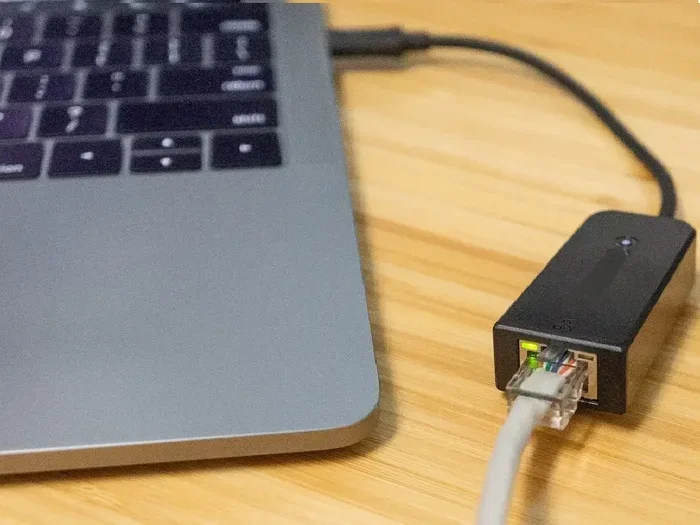
A USB C to USB converter is a small adapter that lets you connect USB-A devices to a USB C port. It translates the signals between the two connector types so your peripherals function normally. Think of it as a translator between two different languages that both understand the same data.
These adapters come in many shapes. Some are simple single-port dongles. Others are multi-port USB C hubs with several ports built in. The basic idea remains the same. You plug the converter into your USB C device, and then your USB-A device plugs into the other end.
How Do They Work Internally?
Inside every USB C adapter, there is a small circuit board that routes the correct pins from one connector to the other. USB C has 24 pins, while USB-A has 4. The adapter maps the data, power, and ground pins so communication flows smoothly. Good adapters maintain full bandwidth and power delivery, while cheap ones may cut corners.
The USB C reversible connector is one of its biggest advantages. You do not have to flip the cable around like you do with USB-A. The adapter itself is usually small enough to stay plugged into your laptop without adding much bulk. This makes it a convenient everyday carry item.
Do USB C to USB Converters Really Work?
The short answer is a definite yes. USB C to USB converters work reliably for the vast majority of users and devices. However, the experience depends on several factors, including the quality of the adapter, the version of USB it supports, and what you are connecting to it.
For basic tasks like using a USB-A mouse, keyboard, or flash drive, any decent converter will do the job. But if you need fast data transfers or high-power charging, you need a better adapter. Let us break down what works and what to watch out for.
What Devices Work With USB C Converters?
Most USB-A peripherals work fine with a USB C to USB adapter. Here is a quick list of devices that connect easily:
- USB flash drives and external hard drives
- Keyboards and mice
- Printers and scanners
- Webcams and microphones
- Game controllers
- USB-A to USB C cables for charging
If you use an external SSD like the Sandisk Extreme Portable 2TB External USB C NVMe SSD, you will want a high-quality adapter to maintain its fast speeds. A poor converter can bottleneck your data transfer and make your drive feel sluggish.
Types of USB C Converters You Should Know About
Not all converters are the same. Understanding the different types helps you pick the right one for your needs. Here are the most common options available today.
Single-Port USB C to USB-A Adapters
These are the simplest and most affordable options. They have one USB-A port on one end and a USB C connector on the other. They are perfect for occasional use. You plug it in when you need it and unplug it when you are done. They work great for flash drives, basic peripherals, and simple connections.
Multi-Port USB C Hubs
If you need more than one port, a USB C hub is the way to go. These devices offer several ports, including USB-A, HDMI, SD card slots, and Ethernet. They turn your single USB C port into a full docking station. Hubs are ideal for people who work from home or connect multiple devices at once.
USB C to USB-B and USB C to Micro USB Adapters
Some older devices use USB-B or Micro USB connectors. Adapters exist for these too. They work on the same principle as USB C to USB-A converters. Just make sure the adapter matches the connector type on your device. A USB C to USB 3.1 adapter often supports these variations and delivers faster speeds.
What to Look for When Buying a USB C Converter
Not every converter on the market is created equal. Some deliver excellent performance while others will frustrate you. Here is what to check before you buy.
Check the USB Version Support
This is the most important spec to look at. A converter that supports USB 3.0 or USB 3.1 will give you much faster data transfer than one limited to USB 2.0. For reference, USB 2.0 tops out at about 480 Mbps, while USB 3.0 reaches 5 Gbps. If you are transferring large files or backing up data from an external drive, the difference is huge.
Look for adapters that clearly state their USB version. If the packaging does not mention it, the adapter is likely USB 2.0. Brands like those making M 2 NVMe SSD to USB 3.1 adapters often produce high-quality conversion products that maintain full speed.
Power Delivery Rating
If you plan to charge your device through the converter, check its power delivery rating. Some adapters only support 5W charging, while others handle up to 100W. A converter with USB C power delivery support lets you charge your laptop while using your USB-A peripherals at the same time.
Build Quality and Brand Reputation
Cheap plastic adapters from unknown brands often fail within months. They may overheat, disconnect randomly, or limit data speeds. Stick with reputable brands and read user reviews. Spending a little more on a quality USB C adapter saves you from headaches down the road.
Common Problems and How to Fix Them
Even with a good converter, you might run into issues. Here are the most common problems and simple fixes.
Device Not Recognized
If your laptop does not detect a device plugged through a converter, try these steps:
- Unplug the converter and plug it back in firmly
- Try a different USB C port on your device
- Check if the converter needs a driver update
- Test the device directly without the converter to rule out a faulty peripheral
Slow Data Transfer Speeds
Slow speeds usually mean your adapter is limited to USB 2.0. Upgrade to a USB 3.0 or higher converter. Also, make sure your cable is not damaged. A frayed USB C cable can drastically reduce transfer speeds. For the best results, pair your adapter with high-quality cables that support the same USB standard.
Intermittent Connection Drops
If your device keeps disconnecting, the converter may be loose in the port. Some laptops have snug USB C ports that do not grip adapters well. A converter with a snug fit or a cable-tie loop to secure it can help. Also, avoid cheap adapters that use poor internal wiring.
Expert Tips for Getting the Most From Your USB C Converter
Here are some practical tips from people who use these adapters every day. Follow them and you will get the best experience possible.
- Keep your converter plugged in when needed. Leaving it in your USB C port avoids constant plugging and unplugging, which wears out the port over time.
- Label your adapters. If you have several, label them by type so you always grab the right one. A small piece of tape with “USB-A” or “USB-B” works great.
- Buy adapters with braided cables. Braided cables last much longer than thin rubber ones. They resist fraying and bending damage.
- Match your adapter to your needs. If you only need to connect a mouse occasionally, a simple single-port adapter works. If you need multiple ports, invest in a hub.
- Check compatibility before buying. Some converters work better with certain operating systems. Make sure yours is compatible with Windows, macOS, or ChromeOS.
Are There Alternatives to USB C Converters?
Converters are not your only option. Some devices come with built-in solutions. Many newer laptops include a USB C dock or docking station that provides multiple ports. Some monitors now act as USB C hubs, connecting your peripherals through the display cable.
For audio gear, you can also explore options like USB Type C headphones that connect directly without an adapter. However, for most people, a simple converter remains the most affordable and flexible solution. It lets you keep using all your existing gear while transitioning to the new USB C standard.
If you want to expand your storage options, adapters that connect NVMe SSDs to USB C are incredibly popular. These let you use ultra-fast external drives with modern laptops. Check out guides on NVMe SSD to USB adapters if you are interested in building a fast portable storage setup.
Final Verdict: Do USB C to USB Converters Work?
USB C to USB converters absolutely work and have become an essential accessory in today’s tech landscape. They bridge the gap between old and new devices effortlessly. Whether you need to plug in a USB-A flash drive, connect a printer, or charge older devices, a good converter handles it all.
The key is choosing a quality adapter that matches your needs. Look for USB 3.0 or higher support, solid build quality, and proper power delivery ratings. Avoid the cheapest options if you need reliable performance. With the right converter in your bag, you never have to worry about compatibility again.
These small adapters represent one of the smartest innovations in modern connectivity. They keep your old gear working while you enjoy the speed and convenience of USB C technology. So yes, they work, and they work really well when you pick the right one.
Frequently Asked Questions
Do USB C to USB converters support fast charging?
Yes, but only if the adapter supports USB Power Delivery. Many converters handle 5V to 20V charging speeds, allowing you to charge laptops and tablets quickly. Check the power delivery rating before buying if fast charging matters to you.
Can I use a USB C to USB converter for external hard drives?
Absolutely. External hard drives and SSDs work great with USB C converters. For the best speeds, choose a converter that supports USB 3.0 or higher. This ensures your drive runs at full speed without bottlenecks.
Why does my USB C converter keep disconnecting?
Loose connections usually come from a poor fit between the adapter and the port. Try a different USB C port on your device. If the problem continues, the adapter itself may be faulty or low quality. Replacing it with a better-rated converter usually solves the issue.
Are expensive USB C converters worth it?
They often are. Premium adapters use better internal components that maintain full data speeds and stable connections. They also tend to last longer. If you use your converter daily, investing in a quality one saves money over time.
Do USB C converters work with all laptops?
Most modern laptops with USB C ports work perfectly with these adapters. Some older or budget laptops may have USB C ports that only support charging, not data. Check your laptop specs to confirm your USB C port supports data transfer before buying an adapter.
Can I connect a USB-A monitor to a USB C laptop with a converter?
Not directly through a simple USB C to USB-A adapter. Monitors usually need a dedicated video output like HDMI or DisplayPort. However, USB C docks with video output ports can connect monitors to your laptop while also supporting USB-A peripherals through the same hub.