Is Usb C Apple Charger Better
The USB C Apple Charger is a faster, more versatile charging solution that replaces Apple’s old Lightning cables. It supports USB-C Power Delivery for quick charging across iPhones, iPads, and MacBooks. This guide explains the speed gains, compatibility, and whether the upgrade is worth it for you.
The USB C Apple Charger has become a hot topic among Apple users. Many people wonder if switching from the old Lightning charger to a USB-C model is worth it. This guide breaks down the real differences in speed, compatibility, and convenience. You’ll learn about USB-C Power Delivery, charging times, and whether it works with your iPhone or MacBook. By the end, you’ll know exactly if a USB C Apple Charger is the right upgrade for you.
Apple has been moving toward USB-C for a while now. The latest iPhones, iPads, and MacBooks all use USB-C ports. This shift brings faster charging and more flexibility. But is the USB C Apple Charger truly better than the older options? Let’s find out.
## What Is a USB C Apple Charger?
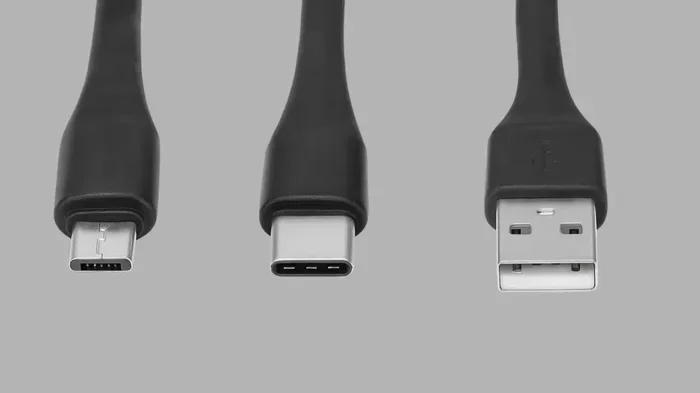
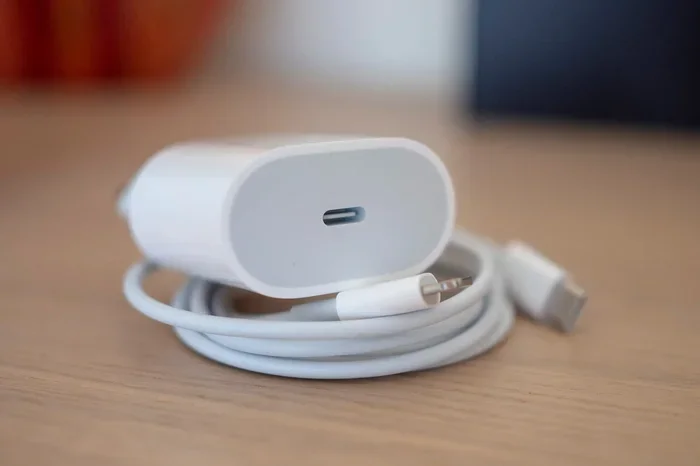
A USB C Apple Charger is Apple’s modern charging solution that uses the USB-C connector. It replaces the traditional Lightning cable and USB-A power adapter. The USB-C port is small, reversible, and supports higher power levels. Apple’s USB-C charger typically delivers 20W or more, depending on the model. It can charge iPhones, iPads, and MacBooks with a single cable. The USB C Apple Charger is part of Apple’s push toward a universal connector. This means fewer cables and a simpler setup.
The charger itself is compact and often comes with a USB-C to USB-C cable. Some versions include a USB-C to Lightning cable for older iPhones. The design is minimal and fits easily into a bag. It also supports fast charging, which can refill a dead battery in under an hour. Overall, the USB C Apple Charger is a sleek, modern tool that matches Apple’s current ecosystem.
Apple introduced the USB-C charger with the iPhone 15 lineup in 2023. Before that, every iPhone used a Lightning port. The change was big because it aligned Apple with the broader industry. Now, you can use the same charger for your iPad, MacBook, and even some Android devices. The USB C Apple Charger is not just a cable; it is a complete charging system. It includes the power brick, the cable, and the connector. This all-in-one approach makes it very convenient.
## How USB-C Charging Differs from Lightning
The old Lightning connector was Apple’s standard for years. It was reliable and worked with many accessories. But USB-C brings several clear advantages. First, USB-C is reversible, so you never flip it wrong. Lightning had a correct orientation, and it was easy to miss. Second, USB-C supports much higher wattage. A Lightning charger maxes out at around 12W for iPhones. A USB-C charger can deliver 20W, 30W, or even 100W for MacBooks. This means faster charging and better power delivery.
USB-C also works with many non-Apple devices. You can use the same charger for a Samsung phone, a Nintendo Switch, or a laptop. Lightning was locked to Apple products. The USB C Apple Charger opens up your charging options. It also supports data transfer at faster speeds. USB 3.0 and USB 3.1 can move files quickly, which Lightning could not do. So USB-C is not just about charging; it is a full upgrade.
Another key difference is the connector shape. USB-C is oval and small. Lightning is flat and rectangular. The USB-C design is more durable and can handle more plug cycles. Apple’s Lightning cables often fray near the tip. USB-C cables are braided and last longer. This durability means you replace cables less often, saving money over time.
## Speed and Power Delivery: Is It Really Faster?
One of the biggest selling points of a USB C Apple Charger is speed. USB-C Power Delivery (PD) is a smart charging protocol. It negotiates the right voltage and current with your device. This means your iPhone or MacBook gets exactly the power it needs. A 20W USB-C charger can charge an iPhone 13 from zero to 50% in about 30 minutes. A Lightning charger takes much longer. For iPads and MacBooks, the difference is even more dramatic.
But speed also depends on the cable and the device. Not all USB-C cables are equal. A cheap cable might limit the wattage. Apple’s own USB-C to USB-C cable is designed for high-speed charging. If you use a third-party cable, make sure it supports USB-C PD. Also, your device must support fast charging. Older iPhones may not take full advantage of a USB C Apple Charger. Check your model’s specs before buying.
Quick Tip: Always use the cable that comes with the charger or a certified USB-C PD cable. This ensures you get the fastest speeds and safest charging.
For MacBooks, a USB-C charger can fully charge a 16-inch MacBook Pro in under 2 hours. The 96W USB-C charger is ideal for professionals who need to work on the go. The USB C Apple Charger supports dynamic power adjustment, so it won’t overheat your device. This is a big safety advantage over older chargers that just pushed constant power.
Quick Tip: If you want the fastest possible charge, look for a GaN (Gallium Nitride) USB-C charger. GaN chargers are smaller, produce less heat, and deliver power more efficiently than traditional silicon chargers.
## Compatibility Across Apple Devices
The USB C Apple Charger works with a wide range of Apple products. It charges the iPhone 15 and newer models, which now come with USB-C. It also works with iPad Pro, iPad Air, and the latest iPad mini. For MacBooks, a USB-C charger can replace the old MagSafe or USB-A charger. Apple’s 14-inch and 16-inch MacBook Pros use USB-C for charging and data. The USB C Apple Charger is a one-cable solution for your entire Apple lineup.
However, compatibility has some limits. Older iPhones with Lightning still need a USB-C to Lightning cable. The charger itself is USB-C, but the cable adapts to Lightning. Apple includes this cable in some box sets, but not always. If you have older accessories, you might need an adapter. USB-C also works with many third-party docks and hubs. You can connect a USB-C monitor, external drive, or even best USB Type-C headphones to your MacBook while charging. This versatility is a huge plus.
Common Mistake: Not all USB-C chargers are created equal. A charger that works with your iPad may not deliver enough power for a MacBook. Always check the wattage rating. A 20W charger is fine for iPhones and iPads, but a 67W or 96W charger is better for MacBooks.
Comparison Table: USB-C vs Lightning Charging
| Feature | USB-C Apple Charger | Lightning Charger |
|—|—|—|
| Connector | Reversible USB-C | Lightning |
| Max Power | Up to 100W (USB-C PD) | Up to 12W |
| Fast Charging | Yes (iPhone 8 and newer) | No (except with specific adapters) |
| Data Transfer | Up to 10Gbps (USB 3.1) | Up to 480Mbps (USB 2.0) |
| Device Compatibility | iPhones 15+, iPads, MacBooks, many others | Older iPhones, iPads, iPods |
| Cable Durability | Braided, long-lasting | Prone to fraying |
This table shows that USB-C is the clear winner for power, speed, and durability.
## Pros and Cons of Switching to USB-C
Switching to a USB C Apple Charger has clear benefits. Here are the main pros and cons.
### Pros
– Faster charging for supported devices.
– Universal connector works with many gadgets.
– Reversible design eliminates wrong-side frustration.
– Data transfer speeds are much higher.
– Compact size fits in any bag easily.
– Future-proof as Apple moves fully to USB-C.
– Safer charging with smart power negotiation.
### Cons
– Higher cost compared to older Lightning chargers.
– Cable compatibility issues with older devices.
– Not all chargers support the same wattage.
– USB-C cables can be pricey if you need a long one.
– Some accessories still use Lightning and need adapters.
– USB mouse not working on some laptops if you use a low-powered hub.
Overall, the pros outweigh the cons for most users. The USB C Apple Charger is a smart long-term investment.
## Common Mistakes and Tips for Best Results
Many people make small mistakes that slow down their charging. Here are a few to avoid.
1. Using a low-quality USB-C cable. A thin cable can overheat and limit speed.
2. Charging through a computer’s USB-A port. A laptop USB-A port often delivers only 5W, which is very slow.
3. Ignoring the power adapter wattage. A 5W adapter will charge an iPhone slowly, even with USB-C.
4. Leaving your device plugged in all night. Modern devices stop charging at 100%, but it’s still best to unplug once full.
5. Not checking for USB-C certification. Look for USB-IF certified cables and chargers for safety.
Expert Insight: If you notice your USB mouse not working after plugging in a USB-C hub, the hub may not supply enough power. Use a powered USB-C hub or connect the mouse directly to the charger port if possible.
Another tip is to keep your USB C Apple Charger clean. Dust in the port can cause poor connection. Use a soft brush to gently clean the USB-C port on your device. This simple habit can prevent charging issues.
Also, if you use an Apple laptop and find that your mouse speed issues on Apple laptop persist, try a different USB-C port. Some ports may share bandwidth with other devices, causing lag. Connecting the mouse directly to the charger port or using a separate USB-C hub can help.
Quick Tip: When traveling, pack a GaN (Gallium Nitride) USB-C charger. These are smaller and cooler than traditional silicon chargers. They are perfect for fast charging on the go.
## Expert Insights on USB-C Charging
Charging technology evolves fast, and USB-C is at the heart of that change. Experts agree that USB-C Power Delivery is the safest and most efficient way to charge modern devices. It uses a chip inside the charger and device to communicate. This prevents overheating and overcharging. Apple’s USB-C charger is no exception. It intelligently adjusts power based on battery temperature and health.
Another expert tip is to avoid charging your device in hot environments. Heat degrades battery life over time. The USB C Apple Charger has built-in thermal management, but you should still keep your device cool while charging. If you notice your device getting warm, unplug it for a few minutes. This simple habit can extend your battery lifespan by years.
Some users also ask about wireless charging. The USB C Apple Charger is a wired solution, but you can pair it with a MagSafe wireless charger. MagSafe uses magnets to align perfectly with your iPhone. It delivers up to 15W of power wirelessly. For a complete charging setup, use the USB-C charger as the base and MagSafe on top. This gives you the best of both worlds.
## Conclusion
The USB C Apple Charger is a clear step forward for Apple users. It offers faster charging, universal compatibility, and a reversible design. While it costs a bit more than older options, the benefits are real. You get a single charger for your iPhone, iPad, and MacBook. You also enjoy faster data transfer and future-proof connectivity. If you still use Lightning cables, switching to USB-C is worth it. The USB C Apple Charger is not just better; it is the present and future of Apple charging.
Key Takeaways
- Faster Charging: USB-C Power Delivery charges your iPhone, iPad, and MacBook much faster than Lightning.
- Universal Connector: One USB-C charger works with all your Apple devices and many non-Apple gadgets.
- Reversible and Durable: The USB-C design is reversible and the cables last longer than Lightning cords.
- Smart Power Negotiation: The charger adjusts power to match your device, preventing overheating and overcharging.
- Future-Proof: Apple is moving fully to USB-C, so investing in a USB C Apple Charger now keeps you ready for what’s next.
Frequently Asked Questions
Can I use a USB C Apple Charger with older iPhones?
Yes, but you need a USB-C to Lightning cable. The charger itself is USB-C, so it works with any Lightning device. However, older iPhones may not support fast charging, so the speed will be the same as a standard charger.
Is a USB C Apple Charger safe for my battery?
Absolutely. USB-C Power Delivery is smart and negotiates the right power level. It will not overcharge your device. Apple designs its chargers with safety features to protect battery health.
What wattage should I choose for a USB C Apple Charger?
For iPhones and iPads, a 20W charger is perfect. For MacBooks, look for 67W or 96W depending on your model. Using a lower wattage charger will still work but will charge more slowly.
Can I charge my iPad and iPhone with the same USB C Apple Charger?
Yes, you can. The USB-C charger works with both devices. Just use the correct cable: USB-C to USB-C for iPad with USB-C, or USB-C to Lightning for older iPhones.
Are all USB-C cables the same for Apple devices?
No, not all cables support the same speed or wattage. Apple’s own USB-C to USB-C cable is certified for fast charging. Third-party cables should be USB-IF certified to ensure they handle the power safely.
Will a USB C Apple Charger work with non-Apple devices?
Yes, USB-C is a universal standard. You can use the charger with Android phones, tablets, and other USB-C devices. Just make sure the device supports USB-C Power Delivery if you want fast charging.