What Is Cyberlink Media Suite

Cyberlink Media Suite is a powerful all-in-one multimedia software package designed for laptops and desktops. It combines video editing, photo editing, media playback, and disc burning tools into a single bundle. The suite is ideal for content creators who want professional features without buying separate programs. In this guide, we break down every tool, feature, and benefit so you know exactly what you get.
If you love creating and watching media on your laptop, you have probably heard of Cyberlink Media Suite. But what exactly is it, and why do so many people swear by it? Let us dive in and find out.
Cyberlink Media Suite is a collection of multimedia software tools built by Cyberlink, a company known for its video and audio solutions. The suite brings together several powerful programs into one convenient package. Whether you want to edit videos, burn discs, or just play your favorite media files, this suite has you covered.
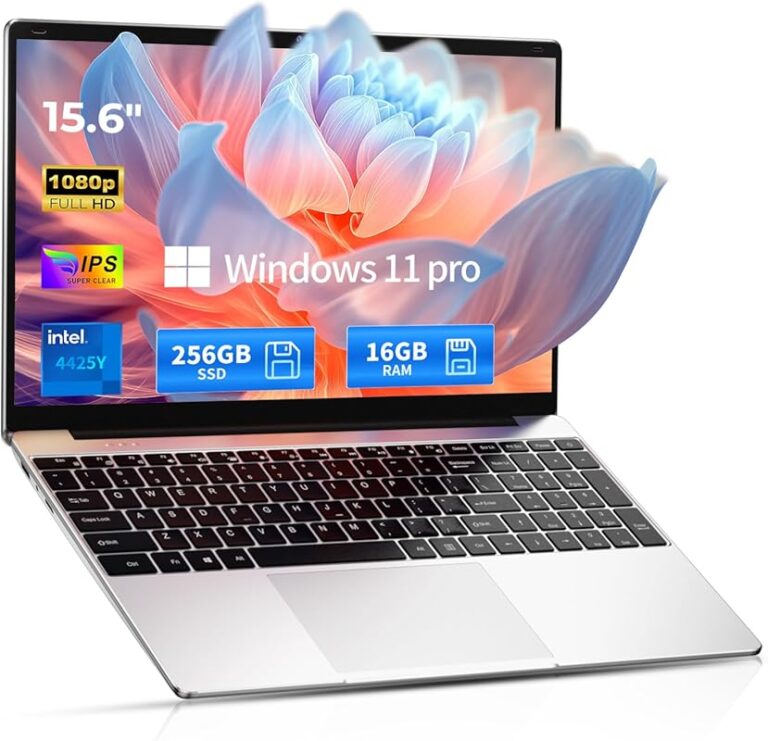
For laptop users, this is especially exciting. You do not need a desktop computer to create stunning content anymore. The software runs well on modern laptops, and it is designed to make the most of your hardware. If you are wondering whether your current setup can handle it, checking your RAM capacity is a great first step.
Key Takeaways
- All-in-One Solution: Cyberlink Media Suite bundles multiple tools like video editing, photo editing, and media playback into one package.
- Laptop-Friendly: The software is optimized to run on laptops, making it great for on-the-go editing and content creation.
- Professional Features: You get advanced tools like color correction, motion tracking, and multi-track timeline editing.
- Wide Format Support: The suite handles many video, audio, and image file formats without needing extra codecs.
- Great Value: Buying the suite saves money compared to purchasing each program separately.
- Disc Burning and Conversion: You can burn media to discs and convert files between formats easily.
📑 Table of Contents
What Makes Up Cyberlink Media Suite?
The suite includes several individual programs, each designed for a specific task. Here is a breakdown of what you get inside the package.
PowerDirector: Your Video Editing Powerhouse
PowerDirector is the star of the show. It is a full-featured video editor that lets you cut, trim, merge, and enhance your clips. You can add transitions, text overlays, and special effects with just a few clicks. The multi-track timeline makes it easy to work on complex projects.
One of the best things about PowerDirector is its motion tracking feature. You can attach text or effects to moving objects in your video. This is a tool that even some expensive desktop editors struggle to match. For anyone who wants to create YouTube content or social media videos, this is a game changer.
PhotoDirector: Edit Photos Like a Pro
PhotoDirector gives you tools to enhance your images right on your laptop. You can adjust brightness, contrast, and color balance. The software also offers AI-powered features that can remove backgrounds and apply artistic filters automatically.
It is not just about fixing photos either. You can create slideshows and video collages directly from your image library. This makes it a great companion to PowerDirector if you work with both photos and videos.
MediaEspresso: Fast and Simple File Conversion
MediaEspresso handles file conversion with ease. Need to convert a large video file so it plays on your phone? MediaEspresso does that quickly. It supports a wide range of input and output formats, so you are rarely stuck.
The software also optimizes files for specific devices. You can preset your output for iPhone, Android, or smart TVs. This saves a lot of time compared to manually tweaking settings for each device.
AudioDirector: Sound Editing Made Easy
AudioDirector lets you edit and enhance audio tracks. You can remove background noise, adjust volume levels, and add effects. It works well for podcast editing, music production, and cleaning up recordings from your laptop microphone.
The interface is straightforward, so even beginners can start making professional-sounding audio quickly. It pairs nicely with PowerDirector when you are working on video projects that need polished sound.
DiscBurner and ShowBiz: Create Physical Media
DiscBurner lets you burn videos, photos, and music to CDs, DVDs, and Blu-ray discs. ShowBiz helps you create professional-looking slideshows and DVDs with menus and transitions. These tools are especially useful if you still work with physical media or need to create backup copies of your projects.
Why Choose Cyberlink Media Suite on a Laptop?
You might wonder why this suite stands out among other multimedia software options. Let us look at some of the key reasons.
It Is Designed for Laptop Hardware
Cyberlink optimizes its software to work efficiently on laptops. This means you get good performance without draining your battery or overheating your machine. The software uses your processor and graphics card smartly, so you do not need a massive gaming laptop to get great results.
That said, if your laptop runs hot during heavy tasks, a quality CPU cooler can help keep temperatures in check during long editing sessions. Staying cool means better performance and a longer lifespan for your device.
All-in-One Saves Money and Space
Instead of buying five or six separate programs, you get them all in one suite. This saves you money and disk space on your laptop. You also avoid the headache of making different programs work together. Everything is built to integrate smoothly.
Think of it as investing in your setup. Much like choosing the best investment for your PC’s lifespan, the right software suite can make your laptop more capable and versatile for years to come.
Beginner-Friendly but Powerful Enough for Pros
One of the biggest strengths of Cyberlink Media Suite is its balance. Beginners can start with simple drag-and-drop editing and basic effects. At the same time, advanced users can dive into color grading, keyframing, and multi-layer timelines.
This means the software grows with you. You do not need to switch to a different tool as your skills improve. You can keep using the same suite and just explore more features over time.
System Requirements and Compatibility
Before you install Cyberlink Media Suite on your laptop, make sure your system can handle it. The requirements are not overly demanding, but they do matter for smooth performance.
Here is what you generally need:
- Operating System: Windows 10 or 11 (64-bit)
- Processor: Intel Core i5 or AMD equivalent
- RAM: At least 8 GB, though 16 GB is recommended
- Graphics Card: A dedicated GPU helps with video rendering
- Storage: At least 20 GB of free space
If you are unsure about your current RAM or storage, you can check your laptop specifications easily. Having enough memory is especially important when working with large video files. The more RAM your laptop has, the smoother your editing experience will be.
Key Features That Stand Out
Let us highlight some of the features that make Cyberlink Media Suite a strong choice for laptop users.
AI-Powered Editing Tools
Cyberlink has integrated artificial intelligence into several of its tools. This means the software can automatically adjust colors, remove shaky footage, and even suggest edits based on your content. AI features save a lot of time, especially if you edit videos regularly.
Wide Format Support
The suite supports almost every common video, audio, and image format. You do not need to convert files before importing them. Whether it is MP4, AVI, MOV, MKV, or WAV, Cyberlink handles it all. This compatibility makes your workflow much faster and less frustrating.
Real-Time Preview
You can preview your edits in real time without waiting for long renders. This is incredibly helpful when you are tweaking effects or adjusting timelines. It keeps your creative flow going without interruptions.
Regular Updates
Cyberlink releases regular updates that add new features and improve performance. This means your suite stays current with the latest technology and file formats. You get ongoing value long after your initial purchase.
Who Should Use Cyberlink Media Suite?
This suite is a great fit for a wide range of users. Here are some examples of who benefits most.
- Content Creators: YouTubers and social media managers who need a reliable editing toolkit on the go.
- Students: Those working on multimedia projects for school or college assignments.
- Small Business Owners: People who create marketing videos, presentations, or promotional content.
- Hobbyists: Anyone who enjoys editing home videos, creating slideshows, or organizing their media library.
- Freelancers: Videographers and photographers who need professional tools without a huge price tag.
If you fall into any of these categories, Cyberlink Media Suite is worth serious consideration. It gives you professional-grade tools without the professional-grade price tag.
Final Thoughts
Cyberlink Media Suite is one of the best all-in-one multimedia solutions available for laptop users today. It combines video editing, photo editing, audio editing, file conversion, and disc burning into a single, affordable package. The AI-powered features make editing faster and easier, while the professional-grade tools keep advanced users happy.
Whether you are just starting out or have been creating content for years, this suite has something to offer. It runs well on laptops, integrates smoothly between its different tools, and gets better with regular updates. If you want a reliable multimedia toolkit that does not break the bank, Cyberlink Media Suite is a strong choice.
Take some time to explore the features, try the free trials if available, and see how it fits into your workflow. You might be surprised at how much you can accomplish with just one software suite on your laptop.
Frequently Asked Questions
Is Cyberlink Media Suite worth the price?
Yes, it offers excellent value because you get multiple professional tools in one package. Compared to buying each program separately, the suite saves you a significant amount of money. The features and regular updates make it a solid investment for anyone who works with media.
Can Cyberlink Media Suite run on a low-end laptop?
It can run on modest hardware, but performance depends on your specs. A laptop with at least 8 GB of RAM and a decent processor will handle basic editing well. For smoother performance with large files, a stronger setup is recommended.
Does Cyberlink Media Suite include free updates?
Yes, Cyberlink provides regular updates that include new features, bug fixes, and performance improvements. This keeps your software current and ensures you get the most out of your purchase over time.
Can I use Cyberlink Media Suite on more than one computer?
This depends on the license you purchase. Some editions allow installation on a single device, while others may offer multi-device options. Check the specific terms of the version you buy to confirm.
What file formats does the suite support?
The suite supports a very wide range of formats including MP4, AVI, MOV, MKV, WAV, and many more. This broad compatibility means you can import and export files without needing extra conversion tools.
Is there a free trial available for Cyberlink Media Suite?
Yes, Cyberlink typically offers a free trial version so you can test the software before buying. The trial gives you access to most features, allowing you to see if the suite fits your needs and workflow on your laptop.