What Is a Thinkpad Laptop
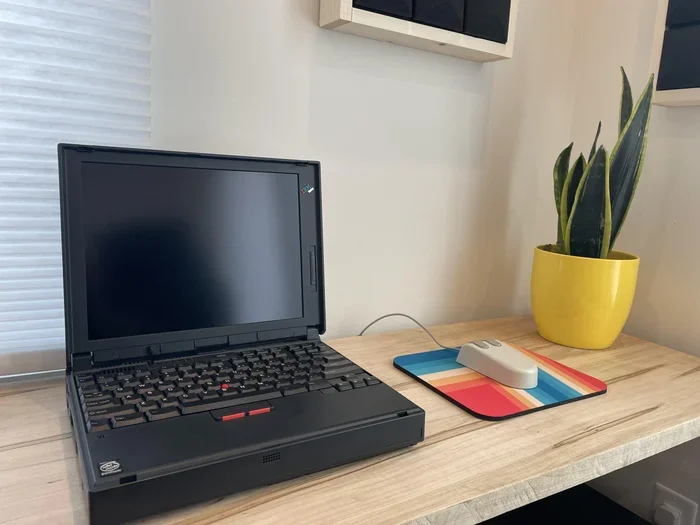
A Thinkpad laptop is a line of business-oriented computers made by Lenovo. Known for their rugged build, excellent keyboards, and reliable performance, ThinkPads are a top pick for professionals and students who need a dependable machine. These laptops come in different sizes and price ranges, making it easy to find one that fits your needs. Whether you work remotely, code, or handle corporate tasks, a Thinkpad laptop delivers the power and durability you can count on.
Have you ever heard someone mention a ThinkPad and wondered what makes it so special? You are not alone. The ThinkPad is one of the most recognized names in the laptop world. But what exactly is a Thinkpad laptop, and why do so many professionals swear by it?
ThinkPads are a line of laptops made by Lenovo, a company that took over the brand when it bought IBM’s PC division back in 2005. Since then, ThinkPads have built a reputation for being tough, reliable, and built for real work. They are not the flashiest laptops on the shelf. But they are the ones that keep running day after day without missing a beat.
In this guide, we will break down everything you need to know about the Thinkpad laptop. We will cover what makes them different, the main series available, who should buy one, and how to pick the right model for your needs. By the end, you will have a clear picture of whether a ThinkPad is the right choice for you.
Key Takeaways
- ThinkPad laptops are built by Lenovo and designed for business and professional use.
- They are known for their durable construction, legendary keyboard quality, and long battery life.
- ThinkPads come in several series, each targeting a different user need, from budget to high-end workstation.
- Most models support upgradeable RAM and storage, so you can customize them over time.
- They offer strong security features like fingerprint readers, TPM chips, and IR cameras.
- ThinkPads are a solid choice for anyone who values reliability and productivity over flashy design.
📑 Table of Contents
What Is a ThinkPad Laptop?
A ThinkPad laptop is a business-class notebook computer originally created by IBM and now manufactured by Lenovo. The name “ThinkPad” comes from IBM’s tradition of naming products with a “Think” prefix, reflecting the brand’s focus on thinking and productivity.
These laptops are designed with one main goal in mind: to handle serious work without breaking down. They are built for people who use their computers all day, every day. That includes office workers, software developers, engineers, students, and anyone who needs a machine they can trust.
ThinkPads stand out from consumer laptops in a few key ways. They use higher-grade materials, undergo more rigorous testing, and focus on practical features over flashy looks. The result is a laptop that feels solid, runs cool, and lasts for years.
What Makes a ThinkPad Different from Other Laptops?
So, what sets a ThinkPad apart from other business laptops or consumer notebooks? Here are the main differences:
- Build Quality: ThinkPads use a combination of magnesium, carbon fiber, and aluminum. This makes them both light and strong. Many models pass military-grade durability tests.
- Keyboard Quality: ThinkPads are famous for their keyboards. They have deep key travel, great tactile feedback, and a comfortable layout. Many typists consider ThinkPad keyboards the best in the industry.
- Security Features: These laptops come with built-in security tools like fingerprint readers, IR cameras for facial recognition, and Trusted Platform Module (TPM) chips.
- Black Design: The classic black exterior with the red TrackPoint is iconic. It gives ThinkPads a professional, no-nonsense look.
- Enterprise Focus: ThinkPads are built with IT departments in mind. They are easy to manage, deploy, and maintain at scale.
The Main ThinkPad Series Explained
Lenovo offers several ThinkPad series, each targeting a different type of user. Understanding these series helps you choose the right one for your needs.
ThinkPad T Series
The T Series is the backbone of the ThinkPad lineup. These are the classic business laptops that balance performance, portability, and price. They are great for professionals who need a reliable machine for everyday tasks, presentations, and document work.
T Series models typically feature 14-inch or 16-inch displays. They offer a good mix of power and portability. Most come with Intel Core or AMD Ryzen processors, and you can often configure them with up to 64 GB of RAM. This makes the T Series a versatile choice for a wide range of users.
ThinkPad X Series
The X Series focuses on ultraportability. These laptops are lighter and thinner than the T Series, making them ideal for people who are always on the go. Despite their smaller size, they still deliver strong performance.
X Series models are perfect for frequent travelers, remote workers, and students. They often come with smaller batteries, but Lenovo has been closing the gap on battery life with newer models. If you want a laptop you can carry everywhere without feeling weighed down, the X Series is worth a look.
ThinkPad P Series
The P Series is the powerhouse line. These are mobile workstations designed for demanding tasks like 3D rendering, video editing, and engineering simulations. They come with dedicated GPUs from NVIDIA and powerful processors.
If you are a creative professional or an engineer who needs desktop-class performance in a portable form, the P Series is what you want. These laptops are heavier and more expensive, but they deliver where it counts.
ThinkPad L Series
The L Series offers a more budget-friendly entry point into the ThinkPad world. These laptops still come with the build quality and keyboard excellence ThinkPads are known for, but at a lower price tag.
The L Series is a great option for small businesses, students, or anyone who wants a reliable ThinkPad without spending a premium. They may not have all the bells and whistles of the T or P Series, but they get the job done.
ThinkPad E Series
The E Series is Lenovo’s entry-level ThinkPad line. It targets budget-conscious buyers who still want the ThinkPad experience. These laptops are commonly used in education and small offices.
While the E Series may not match the performance of higher-end models, it offers solid value. You get a durable build, a great keyboard, and basic performance for everyday computing tasks.
Who Should Buy a ThinkPad Laptop?
A Thinkpad laptop is not for everyone, but it is perfect for certain types of users. Here is a closer look at who benefits most from a ThinkPad.
Business Professionals
If you work in an office or remotely and need a laptop that handles emails, spreadsheets, video calls, and document editing without any fuss, a ThinkPad is an excellent choice. The T Series and X Series are especially popular in this group.
Software Developers and IT Workers
Developers appreciate ThinkPads for their powerful processors, plenty of RAM, and excellent keyboards for long coding sessions. Many IT professionals also prefer ThinkPads because they are easy to manage and maintain in enterprise environments.
Students
Students who need a durable laptop that can survive the daily grind of campus life will find a lot to like in the ThinkPad lineup. The L Series and E Series offer affordable options, while the X Series provides a premium ultraportable experience.
Engineers and Creatives
Professionals who run heavy software like CAD tools, video editing suites, or data analysis platforms will benefit from the P Series. These mobile workstations pack the punch needed for resource-intensive tasks.
Key Features to Look For
When shopping for a ThinkPad, there are a few features you should pay close attention to. These will help you get the most value out of your purchase.
Processor
The processor is the brain of your laptop. Most ThinkPads come with Intel Core i5 or i7 chips, or AMD Ryzen equivalents. For everyday business tasks, an Intel Core i5 is more than enough. If you run heavy applications, consider an i7 or a Ryzen 7.
RAM
RAM affects how smoothly your laptop handles multiple tasks at once. Most ThinkPads come with 8 GB of RAM, which is fine for general use. If you run several applications at once or do more demanding work, you should look for models with 16 GB or more. To learn more about what RAM is good for a laptop, check out our guide on good RAM for a laptop. Having enough RAM ensures your system stays responsive and fast.
Display
ThinkPads offer a range of display options. You can find models with Full HD (1080p) panels, 4K displays, and even touchscreens. For most business users, a Full HD IPS display provides sharp visuals and good viewing angles. If your work involves photo or video editing, a 4K or higher-resolution panel is worth the extra cost.
Battery Life
Battery life varies by model and usage. The X Series tends to have smaller batteries for the sake of portability, while the T Series offers larger batteries that can last through a full workday. Look for models that promise at least 8 hours of real-world use.
Storage
Most modern ThinkPads use NVMe SSDs for fast boot times and quick file access. You can find models with 256 GB, 512 GB, or 1 TB of storage. If you need more space, many ThinkPads allow you to upgrade the storage later. To understand how storage and memory work together in a laptop, read our article on RAM for a laptop.
Connectivity
ThinkPads come well-equipped with ports. You will typically find USB-A, USB-C, HDMI, and sometimes even an Ethernet jack. This means you can connect to monitors, external drives, and wired networks without needing a lot of dongles.
Common Myths About ThinkPad Laptops
There are a few misconceptions about ThinkPads that can steer people away from a great purchase. Let us clear some of them up.
Myth 1: ThinkPads are only for businesses. While ThinkPads are designed with business users in mind, anyone can use them. Students, freelancers, and casual users all benefit from their reliability and build quality.
Myth 2: ThinkPads are boring. Yes, they keep a classic black design, but that is part of their charm. The focus is on function over form, which many users appreciate.
Myth 3: ThinkPads are too expensive. ThinkPads come in a wide price range. The L Series and E Series offer affordable options that do not break the bank. You do not have to spend a fortune to get a quality ThinkPad.
Myth 4: ThinkPads are heavy. The T and P Series are on the heavier side, but the X Series is very light. Lenovo has made great strides in reducing weight across the lineup without sacrificing durability.
How to Choose the Right ThinkPad for You
Choosing the right Thinkpad laptop comes down to understanding your needs and budget. Here are some tips to help you decide.
- Define your budget. ThinkPads range from around $500 to over $2,000. Know what you can spend before you start shopping.
- Identify your primary use. Are you doing basic office work, coding, graphic design, or engineering? Your use case will determine which series is the best fit.
- Check the RAM and storage. Make sure the model you choose has enough memory and storage for your tasks. For most users, 16 GB of RAM is the sweet spot. You can explore more about whether 16 GB of RAM good for a laptop in our detailed breakdown.
- Consider portability. If you carry your laptop everywhere, prioritize lighter models like the X Series.
- Read reviews. Check expert and user reviews for the specific model you are interested in. Real-world feedback helps you avoid surprises.
Final Thoughts
The Thinkpad laptop is a tried-and-true choice for anyone who values reliability, performance, and build quality. With a range of series to choose from, there is a ThinkPad for nearly every type of user and budget. Whether you are a business professional, a student, or a creative who needs serious power, Lenovo has a ThinkPad that fits the bill.
These laptops may not turn heads with their design, but they more than make up for it with what is inside. Strong processors, ample RAM, excellent keyboards, and rock-solid durability make ThinkPads a smart long-term investment. If you are in the market for a dependable laptop that will serve you well for years, a ThinkPad should be at the top of your list.
Take the time to compare models, check the specs, and pick the one that matches your workflow. A good ThinkPad will serve you well and keep you productive for a long time to come.
Frequently Asked Questions
Is a ThinkPad the same as a regular laptop?
A ThinkPad is a type of laptop, but it is designed specifically for business and professional use. It differs from regular consumer laptops in its build quality, durability, keyboard, and security features. ThinkPads are built to handle heavy daily use and last longer than most standard laptops.
Are ThinkPad laptops good for gaming?
ThinkPads are not primarily gaming laptops. However, the P Series models come with dedicated GPUs that can handle some lighter gaming and graphics work. If you are a serious gamer, you will be better served by a dedicated gaming laptop. But for casual gaming, a ThinkPad P Series can do the job.
How long do ThinkPad laptops last?
ThinkPads are known for their longevity. With proper care, many users get 5 to 7 years or more out of a ThinkPad. The durable build quality and Lenovo’s support for driver and firmware updates contribute to this long lifespan.
Can I upgrade the RAM in a ThinkPad?
Many ThinkPad models allow RAM upgrades, especially the T Series and P Series. Some newer models have soldered RAM, which cannot be upgraded. Always check the specific model’s specifications before purchasing if RAM upgradeability matters to you.
What is the TrackPoint on a ThinkPad?
The TrackPoint is a small red pointing stick located in the center of the ThinkPad keyboard. It lets you control the cursor without lifting your fingers from the home row. Many ThinkPad users love the TrackPoint because it speeds up navigation and keeps your hands on the keyboard.
Which ThinkPad series is best for students?
The ThinkPad L Series and E Series are the best options for students. They offer solid performance at affordable prices. The X Series is also a great choice if you want a lightweight, portable laptop for taking notes and doing research on campus.