What Is a Tn Display
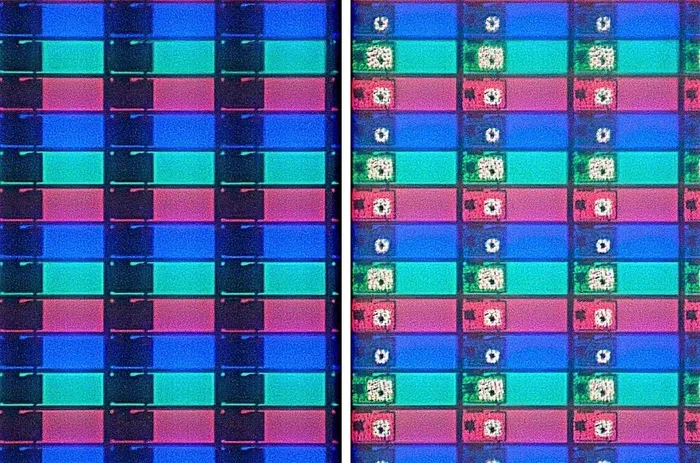
A TN display is a type of laptop screen panel known for its fast response times and affordability. It stands for Twisted Nematic and has been a popular choice for budget laptops and gaming setups. Understanding TN panels helps you pick the right laptop screen for your needs.
Have you ever wondered what kind of screen technology is inside your laptop? If you have ever noticed that colors look a bit off when you tilt the screen, you might be looking at a TN display. TN stands for Twisted Nematic, and it is one of the oldest and most common types of liquid crystal display panels used in laptops today.
Choosing the right laptop screen matters more than most people think. Your display affects everything from how movies look to how well you can work on spreadsheets for hours. A TN panel has specific strengths and weaknesses that set it apart from other screen types like IPS and VA panels. In this guide, we will break down exactly what a TN display is, how it works, and whether it is the right fit for you.
Whether you are a student, a gamer, or someone who just needs a reliable laptop, understanding your screen type helps you make smarter buying decisions. Let us dive into the world of laptop display technology and explore everything you need to know about TN panels.
Key Takeaways
- Fast Response Times: TN displays offer incredibly quick pixel response, making them great for fast-moving content.
- Budget-Friendly: TN panels are typically cheaper to manufacture, which keeps laptop costs down.
- Limited Viewing Angles: Colors and brightness shift when you view the screen from the side.
- Good for Gaming: The low input lag makes TN screens a solid pick for competitive gamers.
- Lower Color Accuracy: TN panels often can’t match IPS or VA panels in color reproduction.
- Widely Available: Many affordable laptops still use TN technology today.
📑 Table of Contents
What Is a TN Display?
A TN display uses twisted nematic liquid crystals to control light passing through the screen. These crystals twist and untwist when electricity is applied, which determines how much light gets through and what color you see. This technology has been around since the 1960s and has evolved a lot over the decades.
In a TN laptop screen, the liquid crystals are sandwiched between two glass panels with polarizing filters. When voltage is applied, the crystals align and let light pass through at specific angles. This process happens very quickly, which gives TN panels their biggest advantage: speed.
The twisted nematic structure is what gives this technology its name. The crystals start in a twisted arrangement when no power is applied. When electricity flows, they untwist and change the polarization of light. This allows for very fast switching between states, which translates to quick pixel response times.
How TN Panels Compare to Other Display Types
There are three main types of laptop display panels you will encounter. Each has its own strengths and trade-offs. Here is a simple comparison:
- TN Panels: Fast response times, affordable, but limited viewing angles and lower color accuracy.
- IPS Panels: Excellent color reproduction and wide viewing angles, but slower response times and higher cost.
- VA Panels: Good contrast ratios and decent color accuracy, but slower than TN and sometimes suffer from ghosting.
If you want to learn more about how display technology affects your laptop experience, check out our guide on what the RAM on a laptop does, since system performance and display quality work together to shape your overall experience.
Key Features of TN Displays
TN displays have several defining characteristics that make them unique. Let us look at the features that matter most to laptop users.
Response Time
The biggest selling point of a TN screen is its incredibly fast pixel response time. Most TN panels have a response time of 1 millisecond or close to it. This means pixels can change color almost instantly. For fast-moving content like action movies or competitive games, this speed makes a huge difference.
When pixels cannot keep up with the action, you see motion blur and ghosting. TN panels minimize these issues because their liquid crystals can realign so quickly. This is why many gaming laptops still use TN panels for competitive gaming where every millisecond counts.
Refresh Rate
TN displays often support high refresh rates, sometimes reaching 144Hz or even 240Hz. A higher refresh rate means the screen updates more times per second, which creates smoother motion. This is especially important for laptop gaming and video editing where smooth visuals matter.
Pairing a fast refresh rate with quick response times gives TN panels a noticeable edge in dynamic content. If you are into esports gaming, a high-refresh TN screen can give you a competitive advantage by reducing motion blur and input lag.
Color Accuracy and Gamut
Here is where TN panels fall behind. TN displays typically cover a smaller color gamut compared to IPS panels. This means colors may look less vibrant and less accurate. If you do any work involving photo editing or video production, a TN screen might not give you the color fidelity you need.
The color reproduction on TN panels tends to shift when viewed from different angles. What looks accurate head-on might appear washed out or tinted when you tilt the screen slightly. This is a direct result of the liquid crystal alignment technology used in TN panels.
Viewing Angles
TN panels are notorious for their narrow viewing angles. When you look at the screen straight on, the image looks fine. But the moment you shift your perspective to the side, colors wash out and the image can darken significantly.
This happens because the light polarization changes at different angles. For laptop users who often share their screen with others or work in different positions, this can be frustrating. It is one of the main reasons many people prefer IPS or VA panels for general use.
Pros and Cons of TN Displays
Every display technology has its trade-offs. Here is a balanced look at what TN panels bring to the table and where they fall short.
Advantages of TN Displays
- Speed: TN panels are the fastest mainstream display technology available. The 1ms response time is hard to beat.
- Cost: Manufacturing TN panels is less expensive, which keeps laptop prices lower.
- High Refresh Rates: TN screens often support 144Hz or higher, making them great for gaming.
- Low Input Lag: The fast pixel response reduces input lag, which matters for competitive gaming.
- Availability: Many budget and mid-range laptops still come with TN panels.
Disadvantages of TN Displays
- Poor Viewing Angles: Colors shift and darken when viewed from the side.
- Lower Color Accuracy: TN panels struggle with precise color reproduction.
- Lower Contrast: TN screens typically have lower contrast ratios compared to VA panels.
- Limited Use for Creative Work: Not ideal for photo or video editing due to color limitations.
- Outdated Technology: Newer panel technologies like IPS and OLED offer better overall experiences.
Who Should Choose a TN Display Laptop?
Not everyone needs the same type of laptop screen. A TN display works well for specific use cases and user groups. Here is a breakdown of who benefits most from this technology.
Competitive Gamers
If you play fast-paced competitive games like Fortnite or Valorant, a TN laptop screen can be a real advantage. The fast response time and high refresh rate reduce motion blur and give you a smoother, more responsive experience. In competitive gaming, every frame matters, and TN panels deliver where it counts.
Many professional esports players prefer TN displays for this exact reason. The speed advantage can translate into better performance during intense gaming sessions. If you are serious about competitive gaming, a TN panel is worth considering.
Budget-Conscious Buyers
TN panels are the most affordable display option available. If you are shopping for a budget laptop and need a functional screen without breaking the bank, a TN display gets the job done. You will find many entry-level laptops with TN panels that offer perfectly adequate performance for everyday tasks.
For students and casual users who primarily browse the web, type documents, and watch videos, a TN screen is more than sufficient. The cost savings can be significant, especially in lower-priced laptop models.
Users Who Prioritize Speed Over Color
Some people value screen responsiveness more than color accuracy. If your work involves data entry, coding, or other text-heavy tasks, a TN display will serve you well. The fast pixel response keeps everything feeling snappy and responsive.
However, if you work with images, design content, or do any creative work, you should look at IPS or OLED options instead. The color limitations of TN panels become more noticeable in these scenarios.
TN Display Technology: How It Works
Understanding the basics of TN panel technology helps you appreciate why it behaves the way it does. The technology relies on the unique properties of liquid crystals and how they interact with light.
The key component is the twisted nematic layer. In this setup, the liquid crystals are arranged in a helical spiral when no electric field is applied. This twisted structure rotates the polarization of passing light by 90 degrees. When an electric field is applied, the crystals untwist and align with the field, changing how light passes through the polarizing filters.
This mechanism allows for very fast state changes. The crystals can realign in just a few milliseconds, which is why TN panels have such quick response times. The trade-off is that the crystal alignment at different viewing angles produces the color and brightness shifts that TN panels are known for.
Modern TN panels have improved significantly from early versions. Manufacturers have developed advanced film compensation layers and improved electrode designs that partially address the viewing angle problem. However, TN panels still cannot match the viewing angle performance of IPS technology.
If you are curious about how other laptop components affect your display experience, our article on whether 8GB of RAM is good for a laptop explores how system memory impacts overall performance and multimedia tasks.
TN Display vs. IPS Display: The Real Difference
The debate between TN and IPS is one of the most common in the laptop world. Both technologies have their place, and the right choice depends on what you value most.
Speed Comparison
TN panels win the speed race hands down. With response times of 1ms and refresh rates up to 240Hz, TN screens are built for speed. IPS panels typically have response times of 4ms to 5ms, which is still fast but noticeably slower than TN.
For most users, this difference is barely noticeable. But for competitive gamers and professionals who work with fast-moving visuals, the TN advantage is real and meaningful.
Color and Viewing Angle Comparison
IPS panels dominate in color accuracy and viewing angles. An IPS screen maintains consistent colors and brightness across a wide range of viewing angles, often up to 178 degrees. TN panels, on the other hand, show visible color shifts at even moderate angles.
If you regularly work with multiple people around your laptop or need accurate colors for any reason, IPS is the clear winner. The color reproduction on IPS panels is simply superior for most professional and creative applications.
Price Comparison
TN panels cost less to produce, which means laptops with TN displays tend to be more affordable. The price gap has narrowed over the years as IPS technology has become more widespread, but TN panels still hold the edge in budget-friendly options.
For buyers who need a functional laptop at the lowest possible price, a TN display remains a practical choice. The savings can be significant, especially in lower-end laptop models.
Common Mistakes People Make with TN Displays
Many users buy laptops with TN screens without realizing what they are getting. Here are common mistakes to avoid.
- Assuming all laptop screens are the same: Different panel types produce very different results. Always check the panel type before buying.
- Ignoring viewing angles: If you often work in different positions or share your screen, narrow viewing angles will frustrate you.
- Overlooking color needs: If you do any creative work, a TN panel will hold you back.
- Focusing only on resolution: A high-resolution TN panel still has the same viewing angle and color limitations.
- Not testing the display in person: If possible, view the laptop screen from different angles before purchasing.
The Future of TN Display Technology
TN panel technology continues to evolve, though its role in the market is gradually shifting. Manufacturers are developing newer TN variants that aim to close the gap with IPS in areas like color accuracy and viewing angles. These advancements keep TN panels relevant for budget and gaming laptops.
However, the rise of OLED and Mini-LED technologies is changing the landscape. These newer technologies offer superior color, contrast, and viewing angles. As production costs decrease, we can expect TN panels to become less common in premium laptops.
For now, TN displays remain a solid choice for users who prioritize speed and affordability. Understanding what a TN display offers helps you make an informed decision that matches your needs and budget.
Conclusion
A TN display is a fast, affordable laptop screen technology that excels in speed but falls short in color accuracy and viewing angles. It is an excellent choice for competitive gamers and budget-conscious buyers who need a functional screen without spending extra. However, users who need accurate colors or wide viewing angles should consider IPS or other panel types instead.
When shopping for a laptop, always check the display panel type. Knowing what you are getting helps you avoid disappointment and ensures your laptop meets your specific needs. A TN panel can be a great fit if you understand its strengths and limitations.
Take the time to evaluate your usage patterns and priorities. Whether you need blazing speed for gaming or accurate colors for creative work, the right display panel makes all the difference in your daily laptop experience.
Frequently Asked Questions
Is a TN display good for a laptop?
A TN display is good for laptops that prioritize speed and affordability. It works well for competitive gaming, basic productivity, and everyday use. However, it may not be ideal for creative work that requires accurate colors.
What is the main advantage of a TN display?
The main advantage of a TN display is its fast pixel response time, typically around 1 millisecond. This makes TN panels excellent for fast-moving content and competitive gaming where quick visuals matter.
Can you see colors correctly on a TN display from the side?
No, TN displays have limited viewing angles. Colors and brightness shift noticeably when viewed from the side. For the most accurate colors, you should view a TN screen straight on.
How does a TN display compare to an IPS display?
A TN display is faster and cheaper than an IPS display. However, an IPS display offers better color accuracy and wider viewing angles. The choice between them depends on whether you value speed or visual quality more.
Are TN displays still used in modern laptops?
Yes, TN displays are still used in many modern laptops, especially budget and gaming models. They remain popular because of their low cost and fast response times, even though newer technologies like IPS and OLED are gaining ground.
What should I look for when buying a laptop with a TN display?
When buying a laptop with a TN display, check the refresh rate, response time, and resolution. Also consider your viewing habits and whether you need accurate colors. Testing the screen in person before purchase is always recommended.