What Is the Difference Between Thinkbook and Thinkpad
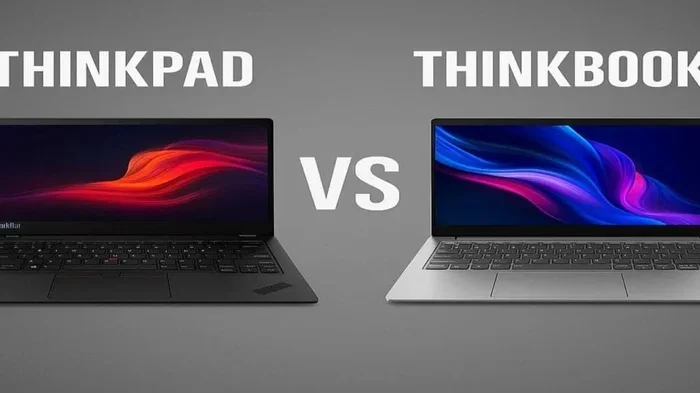
The Lenovo Thinkbook is a sleek, affordable business laptop made for everyday professionals, while the Thinkpad is a legendary, rugged powerhouse built for heavy-duty work. Thinkbooks offer modern designs and lower prices, but Thinkpads deliver superior build quality, keyboard comfort, and enterprise-grade durability. Choosing between them depends on your budget, work style, and what you need from a laptop.
When you are shopping for a business laptop, Lenovo has two lines that stand out: the Thinkbook and the Thinkpad. Both are made by Lenovo, but they serve very different types of users. If you have been wondering which one to buy, you are in the right place. This guide breaks down every major difference so you can make a smart choice.
The Thinkbook vs Thinkpad debate is more popular than ever. People want to know which laptop gives them the best value. Some need a lightweight machine for travel. Others need a rugged workhorse that can handle tough conditions. Whatever your reason is, this article covers it all.
Key Takeaways
- Thinkbook: A budget-friendly business laptop with a modern, lightweight design and solid everyday performance.
- Thinkpad: A premium, durable laptop with legendary keyboard quality and enterprise-level reliability.
- Price: Thinkbooks cost less, making them great for students and casual professionals.
- Build Quality: Thinkpads use stronger materials and undergo tougher testing standards.
- Target Audience: Thinkbooks suit general users, while Thinkpads are ideal for power users and businesses.
- Keyboard: Thinkpads have the best laptop keyboards on the market, hands down.
- Battery Life: Both offer decent battery life, but Thinkpads often last longer under heavy use.
📑 Table of Contents
What Is a Lenovo Thinkbook?
The Lenovo Thinkbook is a line of business laptops that launched to compete in the affordable productivity market. It gives you the core features of a business laptop without the premium price tag. Thinkbooks are designed for professionals who need a reliable machine for emails, spreadsheets, presentations, and light multitasking.
Design and Build
Thinkbooks have a clean, modern look. They use aluminum tops and plastic bottoms, which keeps the weight down. Most models are thin and light, making them easy to carry around. The design feels fresh and stylish, which appeals to younger professionals and students.
However, the build quality is not as tough as what you get with a Thinkpad. The chassis flexes a bit more under pressure. That said, for normal daily use, this is not a real problem. If you are someone who carries their laptop to coffee shops or co-working spaces, the Thinkbook handles it just fine.
Performance and Specs
Thinkbooks come with Intel Core or AMD Ryzen processors. You can find models with 8GB, 16GB, or even 32GB of RAM. Storage options include SSDs that load programs fast. The What Is The Ram On A Laptop is a common question, and Thinkbooks answer it well with plenty of memory options for everyday tasks.
Graphics are handled by integrated Intel or AMD GPUs. These are fine for office work, video calls, and streaming. You should not expect to run demanding games or heavy video editing on them. But for productivity and light creative work, they perform well.
What Is a Lenovo Thinkpad?
The Thinkpad is one of the most famous laptop lines in the world. It has been around for decades and has earned a reputation for being tough, reliable, and powerful. Thinkpads were originally built for business and enterprise use, and they still hold that crown today.
Design and Build
Thinkpads have a boxy, no-nonsense design. They are built with carbon fiber, magnesium alloy, and reinforced hinges. These laptops go through extreme testing, including drop tests, humidity tests, and temperature extremes. A Thinkpad can survive conditions that would destroy most other laptops.
The iconic Thinkpad design includes the red TrackPoint in the center of the keyboard. This tiny pointing stick has become a beloved feature among loyal users. The overall feel of a Thinkpad screams durability and professionalism. It is a laptop that looks like it means business.
Performance and Specs
Thinkpads offer top-tier processors, dedicated GPUs in some models, and up to 64GB of RAM. They are built for heavy workloads like data analysis, software development, and running virtual machines. If you need serious processing power, the Thinkpad delivers.
Cooling is another strong point. The What Is The Best Cpu Cooler for a Thinkpad is built right into the chassis. Lenovo engineers these machines with robust thermal systems that keep performance steady even under long workloads. The fans are loud under full load, but the performance stays consistent.
Thinkbook vs Thinkpad: Key Differences
Now let us compare these two lines directly. Here is a look at the most important areas where they differ.
Price and Value
The biggest difference between a Thinkbook and a Thinkpad is the price. Thinkbooks start at a much lower cost, often around $500 to $700. Thinkpads start higher, usually around $900 and can go well above $2,000 for high-end models.
If you are on a tight budget, the Thinkbook is the clear winner. It gives you solid business features at a price that does not hurt. But if you need top-tier performance and durability, the Thinkpad is worth the extra investment.
Display Quality
Thinkbooks usually come with IPS displays that look bright and colorful. Some models offer 2K or even 4K resolution options. The screens are good for office work and media consumption.
Thinkpads offer a wider range of display options. You can get models with Dolby Vision, high brightness, and even touchscreen displays. The color accuracy on premium Thinkpad models is excellent, which makes them better for creative professionals.
Keyboard and Input
This is where Thinkpads truly shine. The Thinkpad keyboard is widely considered the best laptop keyboard in the world. The keys have deep travel, great tactile feedback, and are comfortable for long typing sessions. The TrackPoint is a unique feature that many users love.
Thinkbook keyboards are good, but they feel more average. The key travel is shorter and the typing experience is less satisfying. If you type a lot for work, this difference matters a lot. You might also want to check What Is The Laptop Mouse Called if you are exploring input options for either machine.
Battery Life
Both lines offer respectable battery life. Thinkbooks typically last 8 to 10 hours with normal use. Thinkpads can last 10 to 14 hours depending on the model and workload.
Real-world battery life varies based on screen brightness, apps running, and Wi-Fi usage. But overall, Thinkpads tend to edge out Thinkbooks in endurance, especially when running demanding tasks.
Target Audience
Thinkbooks target students, freelancers, and general office workers. They are perfect for people who need a dependable machine without spending a fortune.
Thinkpads target enterprise users, IT professionals, engineers, and power users. These are people who need maximum reliability, performance, and support. Many large companies buy Thinkpads in bulk for their employees.
Which One Should You Choose?
Choosing between a Thinkbook and a Thinkpad comes down to your needs and budget. Here are some quick tips to help you decide.
Choose a Thinkbook if:
- You want an affordable business laptop.
- You mainly do office work, browsing, and video calls.
- You travel light and want a lightweight machine.
- You do not need top-tier performance.
Choose a Thinkpad if:
- You need maximum durability and reliability.
- You run demanding software or heavy workloads.
- You value keyboard quality and typing comfort.
- You want long-term enterprise support and warranty.
Both lines run Windows and support Linux. The operating system choice is the same for both, so that is not a deciding factor. What matters is what you will do with the machine every day.
Common Mistakes to Avoid
Many buyers make the mistake of choosing a laptop based only on price. A cheap laptop might save you money now but cause frustration later. On the other hand, some people overspend on features they do not need. Here are mistakes to avoid:
- Ignoring RAM needs: Make sure you get enough memory for your tasks. 8GB is the minimum for most users, but 16GB is better for multitasking.
- Overlooking keyboard comfort: You will spend hours typing on this keyboard. Do not skip this important factor.
- Skipping the SSD: Always choose a solid-state drive over a traditional hard drive. Speed matters a lot.
- Not checking the warranty: Thinkpads often come with better warranty and support options. Check what is included before you buy.
Expert Insights
From years of reviewing laptops, the Thinkpad line remains the gold standard for business computing. The build quality, keyboard, and reliability are unmatched. However, the Thinkbook line has closed the gap significantly in recent years.
Thinkbooks now offer features that used to be exclusive to premium laptops. Better screens, faster processors, and solid build quality at a fraction of the cost. If Lenovo did not make the Thinkbook line, many budget-conscious buyers would have no great option from this brand.
The Thinkpad line continues to evolve too. Newer models include better displays, faster charging, and improved security features like fingerprint readers and IR cameras. These laptops are built to last, sometimes 5 years or more with proper care.
Final Verdict
The difference between Thinkbook and Thinkpad comes down to three things: price, performance, and durability. Thinkbooks are affordable, stylish, and great for everyday tasks. Thinkpads are premium, powerful, and built to handle anything you throw at them.
If you are a student or a casual professional, the Thinkbook is a fantastic choice. It gives you everything you need without breaking the bank. But if you are a power user or work in a demanding environment, the Thinkpad is the better investment. Both are excellent laptops from Lenovo, and you cannot go wrong with either one.
Take your time, compare the specific models you are interested in, and pick the one that fits your workflow best. The right laptop makes a big difference in your daily productivity and overall satisfaction.
Frequently Asked Questions
Is a Thinkbook better than a Thinkpad?
A Thinkbook is not better or worse, it is just different. Thinkbooks are more affordable and great for everyday tasks. Thinkpads are more powerful and durable, making them better for heavy workloads. Your needs determine which is better for you.
Can a Thinkbook run the same software as a Thinkpad?
Yes, both run Windows and support the same software. The difference is in performance. A high-end Thinkpad will run demanding software faster, but a Thinkbook can handle standard business applications with ease.
Are Thinkpads worth the extra cost?
For most professionals, yes. Thinkpads offer superior build quality, better keyboards, and longer-lasting performance. The extra cost is justified if you use your laptop heavily or need enterprise-grade reliability.
Do Thinkbooks have good battery life?
Yes, Thinkbooks offer solid battery life that lasts 8 to 10 hours for typical use. Thinkpads often last a bit longer, especially under lighter workloads. Real-world battery life depends on your settings and usage habits.
Which Thinkpad model is best for beginners?
The Thinkpad L-series is a great starting point for beginners. It offers solid performance at a lower price. The Thinkpad E-series is another budget-friendly option that still delivers the classic Thinkpad experience.
Can I upgrade the RAM in a Thinkbook or Thinkpad?
Some models allow RAM upgrades while others have soldered memory. Check the specific model before buying if upgradeability matters to you. Both lines offer configurations with 8GB, 16GB, and 32GB options at purchase.
=== CONCLUSION ===
The Thinkbook vs Thinkpad comparison shows that Lenovo has two strong lines for different types of users. The Thinkbook brings affordable business computing to the masses, while the Thinkpad continues its legacy as a premium, rugged workhorse. Both are excellent choices, and your decision should be based on your budget, your work needs, and how much you value durability and keyboard quality.
Take the time to compare specific models within each line. Read reviews, check specs, and think about your daily workflow. The right laptop will serve you well for years to come, whether you pick a Thinkbook or a Thinkpad.