What Could Cause Ir Remote Interference
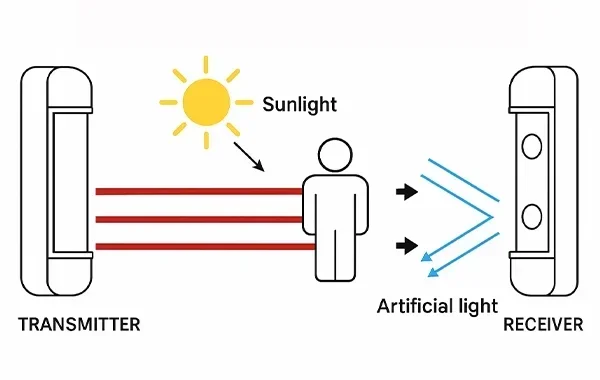
IR remote interference happens when infrared signals between your remote and device get disrupted by obstacles, other electronics, or environmental factors. Understanding the root causes helps you troubleshoot faster and enjoy uninterrupted control. This guide covers everything from signal-blocking objects to frequency conflicts that mess with your infrared remote control performance.
Key Takeaways
- Line-of-sight obstructions are the #1 reason IR remotes stop working properly.
- Ambient light and sunlight can overpower IR signals and cause intermittent failures.
- Electromagnetic interference from nearby electronics disrupts IR communication.
- Low batteries and weak IR LEDs reduce signal strength significantly.
- Frequency conflicts with other IR devices create confusion in your remote control setup.
- Dirty or damaged sensors on your device prevent proper signal reception.
- Simple fixes like repositioning or replacing batteries solve most IR interference problems.
📑 Table of Contents
- What Is IR Remote Interference and Why Does It Matter?
- Common Causes of IR Remote Interference
- How Device Hardware Affects IR Remote Performance
- Environmental and Setup Factors That Cause Interference
- How to Test and Diagnose IR Remote Interference
- Preventing Future IR Remote Interference
- Conclusion
What Is IR Remote Interference and Why Does It Matter?
IR remote interference is when something blocks or disrupts the infrared signal traveling between your remote and your TV, stereo, or other device. Think of it like trying to shout across a crowded room. Your voice (the IR signal) gets lost in the noise. The result? You press a button and nothing happens. Or worse, your device does something unexpected.
Infrared remotes have been around for decades. They use invisible light waves to send commands. These waves travel in straight lines and need a clear path. When that path gets blocked or confused, you get remote signal disruption. This is more than just annoying. It can make your smart home setup feel broken and unreliable.
Understanding IR remote interference matters because it saves you time and money. Before you call a technician or buy a new remote, you can try simple fixes. This guide walks you through every possible cause and gives you practical solutions. Let us dive in.
Common Causes of IR Remote Interference
Line-of-Sight Obstructions
The most frequent cause of IR remote problems is something blocking the path between the remote and the receiver. IR light travels in a straight line. It cannot bend around corners or pass through solid objects. If a book, a vase, or even your hand sits between the remote and the device sensor, the signal dies.
Here are common line-of-sight culprits:
- Furniture placement — shelves or cabinets positioned directly in front of your TV or receiver.
- Wall-mounted devices — if your TV is mounted high, the sensor might be hidden behind the bezel.
- Decor items — plants, picture frames, or decorative objects near the IR sensor.
- Your own hand or body — holding the remote at an odd angle can block the emitter.
The fix is simple. Move the object or adjust your position. Make sure the remote points directly at the IR receiver on your device. Most devices have a small dark window on the front. That is your target.
Ambient Light and Sunlight Interference
Here is something many people do not realize. Sunlight contains infrared wavelengths. Your TV remote also uses infrared wavelengths. When direct sunlight hits your device sensor, it creates a flood of IR noise. The sensor gets confused and cannot pick out your remote signal from the sunlight.
This is why your remote works fine in the evening but fails during the afternoon. The ambient light interference is strongest when the sun is shining directly through a window. Even fluorescent lights and some LED bulbs emit small amounts of IR radiation that can cause problems.
Quick tips to reduce light interference:
- Close blinds or curtains during the day.
- Move the device away from direct sunlight.
- Use your remote from a different angle where light does not hit the sensor directly.
- Consider switching to a RF (radio frequency) remote for devices in bright rooms.
Electromagnetic Interference from Other Electronics
Your home is full of electronics that emit electromagnetic fields. Some of these fields operate near the same frequencies as IR remotes. When too many devices run at once, they create electromagnetic interference that muddies the IR signal.
Devices that commonly cause this problem include wireless routers, microwaves, Bluetooth speakers, and even other remotes. If you have multiple IR-controlled devices in the same room, their signals can overlap. This is called IR frequency conflict. Your TV remote might accidentally trigger your stereo or set-top box.
Here is what you can do:
- Move competing electronics further away from the device you are controlling.
- Turn off unnecessary devices when using your remote.
- Use a universal remote with signal filtering to avoid frequency conflicts.
- Consider a smart home hub that uses RF or Wi-Fi instead of IR.
How Device Hardware Affects IR Remote Performance
Weak or Dead Batteries
Before you troubleshoot anything else, check your batteries. Weak batteries are the silent killer of remote control troubleshooting efforts. When the battery voltage drops, the IR LED emits a weaker signal. It might still reach your device from a short distance, but anything beyond a few feet fails.
Replace your batteries regularly. Do not wait until the remote stops working entirely. If you notice the remote works only when you hold it very close to the device, the batteries are likely the problem. Fresh alkaline batteries give the best IR signal strength and longest range.
Damaged or Dirty IR Sensors
The IR sensor on your device is a small dark window that receives signals. Over time, dust, dirt, and grime build up on this sensor. It blocks the incoming IR light just like a foggy window blocks your view. In some cases, the sensor itself gets damaged from age or heat exposure.
How to clean your IR sensor:
- Turn off the device.
- Use a soft, dry microfiber cloth.
- Gently wipe the sensor window on the front of the device.
- For stubborn grime, lightly dampen the cloth with a small amount of water.
- Never use alcohol or chemical cleaners directly on the sensor.
If cleaning does not help, the sensor may need replacement. This is more common in older devices that have been in use for many years.
IR LED Problems in the Remote
The IR LED inside your remote is what actually sends the signal. If this LED burns out or gets damaged, the remote becomes useless even with fresh batteries. You can test this with your phone camera. Open your phone camera app and point the remote at the lens. Press any button. If you see a purple or white flash in the camera view, the LED is working. If you see nothing, the LED is likely dead.
Replacing the LED requires opening the remote and soldering a new one in place. For most users, buying a replacement remote is the easier and more cost-effective option. Make sure the replacement remote is compatible with your specific device model.
Environmental and Setup Factors That Cause Interference
Distance and Range Limitations
Every IR remote has a maximum range. Most standard remotes work reliably within 10 to 15 feet. The signal weakens as distance increases. If you sit far from your TV or device, you may experience intermittent remote signal disruption.
Factors that reduce effective range include:
- Obstacles between the remote and device — even thin objects can weaken the signal.
- Low battery power — weak batteries reduce range significantly.
- Aging IR LED — older remotes emit weaker signals over time.
- Bright ambient light — sunlight or strong lamps compete with the IR signal.
If you need a longer range, consider a universal remote with a stronger IR transmitter. Some models offer double or triple the range of standard remotes. You can also look into smart home devices that use Wi-Fi or RF signals instead of IR, giving you whole-home control without range limits.
Signal Reflection and Multi-Path Issues
IR light bounces off shiny surfaces like mirrors, glass, and polished countertops. This can actually help in some cases. If you point your remote at a wall near the device, the reflected signal might still reach the sensor. However, signal reflection can also cause problems.
When IR signals bounce off multiple surfaces before reaching the sensor, they arrive at different times. This creates a multi-path interference effect. The device receives a garbled signal and does not respond correctly. You might see buttons doing the wrong thing or no response at all.
Expert insight: If you notice your remote works sometimes but not others, try changing your position or the angle of the remote. Eliminating reflective surfaces near the device sensor often solves this issue.
Smart Home and Multi-Device Interference
Modern homes often have dozens of IR-controlled devices. TVs, soundbars, streaming boxes, cable receivers, air conditioners, and fans all use infrared remotes. When these devices sit close together, their signals can overlap and create chaos. Pressing volume up on your TV remote might change the channel on your cable box.
This type of IR frequency conflict is especially common in entertainment centers and home theater setups. The more IR devices you have in one area, the higher the chance of interference.
Solutions for multi-device setups:
- Use a universal remote that learns and stores unique codes for each device.
- Program your remote to send device-specific signals only when aimed at that device.
- Use an IR blaster hub that manages signals for all your devices from a central location.
- Consider upgrading to Wi-Fi or RF-based smart home controls that avoid IR entirely.
How to Test and Diagnose IR Remote Interference
Before you start changing batteries or moving furniture, run a quick diagnostic. This helps you pinpoint the exact cause of the problem.
Step 1: The Phone Camera Test
Open your smartphone camera and point the remote at the lens. Press any button. Look for a flashing light. No flash means the remote’s IR LED is dead or the batteries are completely drained. A flash means the remote is working and the problem is elsewhere.
Step 2: The Distance Test
Move closer to the device. If the remote works from 3 feet but not 10 feet, you have a range or signal strength problem. Replace the batteries first and test again.
Step 3: The Obstruction Test
Remove any objects between the remote and the device sensor. Test again. If it works now, the obstruction was the cause.
Step 4: The Light Test
Turn off all lights and close curtains. Test the remote in complete darkness. If it works now, ambient light was the problem.
Step 5: The Interference Test
Turn off other electronics in the room one by one. Test after each one. If the remote starts working when a specific device is off, that device was causing electromagnetic interference.
Following these steps systematically helps you find the root cause quickly. Most IR interference problems fall into one of the categories above and are easy to fix at home.
Preventing Future IR Remote Interference
Once you fix your current interference problem, you want to keep it from happening again. Prevention is always easier than troubleshooting.
Best practices for clean IR performance:
- Keep the area around your device sensor clear of objects and clutter.
- Replace batteries every 6 months even if the remote still seems to work.
- Clean your device sensors and remote IR LED regularly with a soft cloth.
- Position devices away from direct sunlight and bright lamps.
- Use a universal remote or smart home hub to reduce the number of IR devices in your space.
- Store spare remotes in a drawer away from other electronics to prevent accidental signal pairing.
If you have a media center setup with multiple devices, proper cable management and device placement goes a long way. Keeping your IR receiver area clean and unobstructed ensures reliable performance for years.
For those who want a permanent solution, consider upgrading to RF-based smart home devices. These use radio frequency signals instead of infrared. They do not require line of sight and are immune to most types of IR remote interference. Many modern smart TVs and streaming devices now offer Wi-Fi and Bluetooth control as alternatives to traditional IR remotes.
It is also worth noting that if you have recently set up new equipment in your entertainment center, you may have introduced a new source of interference. When you add a new device, test all your remotes to make sure nothing has changed. This simple habit saves hours of frustration later.
Conclusion
IR remote interference is a common but solvable problem. Whether it is a simple line-of-sight blockage, weak batteries, or interference from other electronics, the causes are usually easy to identify and fix. Start with the basics — check your batteries, clear the path between the remote and sensor, and reduce ambient light. If those steps do not work, move on to more advanced diagnostics like the phone camera test and the interference isolation test.
Taking care of your infrared remote control setup prevents most problems before they start. Clean sensors, fresh batteries, and smart device placement go a long way. And if you are tired of dealing with IR limitations altogether, RF and Wi-Fi-based smart home solutions offer a modern alternative that eliminates interference entirely.
Now that you know what causes IR remote interference and how to fix it, you can enjoy seamless control over all your devices. No more pressing buttons and hoping for the best. Your remote should just work — and now it will.
Frequently Asked Questions
Why does my IR remote work intermittently?
Intermittent remote failure is usually caused by weak batteries, partial obstructions, or ambient light interference. Start by replacing the batteries and checking for anything blocking the path between the remote and the device sensor. If the problem persists, try the phone camera test to check if the IR LED is still functioning properly.
Can sunlight really interfere with my TV remote?
Yes, absolutely. Sunlight contains infrared wavelengths that are very similar to the ones your remote uses. When direct sunlight hits your device sensor, it creates a flood of IR noise that overwhelms the sensor. This is why remotes often work better in dimmer rooms or during evening hours. Closing curtains or moving the device away from windows can fix this issue.
What is the difference between IR and RF remote controls?
IR remotes use infrared light that requires a direct line of sight to work. RF remotes use radio frequency signals that can pass through walls and obstacles. RF remotes generally offer better range and are not affected by light interference. Many modern smart home devices use RF or Wi-Fi instead of traditional IR for more reliable control.
How can I test if my remote’s IR LED is working?
Open your phone camera app and point the remote at the lens. Press any button on the remote. If you see a purple or white flash in the camera view, the IR LED is working. If you see nothing, the LED is likely dead or the batteries are completely drained. This is a quick and easy diagnostic that everyone can do at home.
Why does my universal remote control multiple devices but cause interference?
Universal remotes send IR signals to all paired devices, and when multiple devices are close together, their sensors can pick up signals meant for other devices. This causes IR frequency conflicts. Programming your universal remote with the correct device codes and using device-specific buttons helps reduce this problem. Some universal remotes also have signal filtering features to prevent cross-device interference.
Is there a way to completely eliminate IR remote interference?
The most reliable way to eliminate IR interference is to switch from IR-based devices to RF or Wi-Fi-controlled alternatives. Smart home hubs and modern streaming devices use wireless protocols that do not rely on line-of-sight infrared signals. If you must use IR devices, keeping them well-maintained, properly positioned, and free from competing electronics greatly reduces interference issues.