What Is a Proxy Error
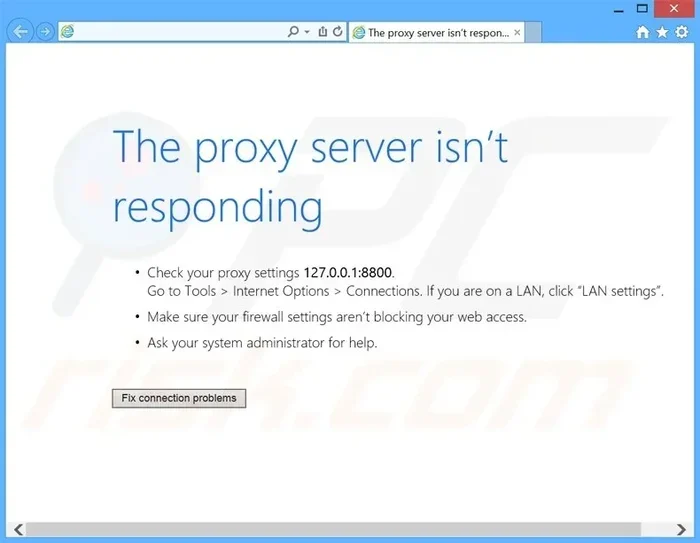
A proxy error happens when a proxy server fails to process your web request properly. It usually shows up as a confusing error code like 502 or 503, blocking you from accessing websites. Understanding the root cause and knowing how to troubleshoot can save you time and frustration.
A proxy error is one of those annoying moments on the internet that can stop you in your tracks. You try to open a website, and instead of the page you want, you get a strange message full of numbers and technical jargon. It can feel frustrating, especially when you just want to get something done quickly.
The good news is that most proxy errors are easy to understand and fix once you know what is going on. A proxy server acts as a middleman between your device and the internet. When something goes wrong in that process, you see a proxy error. This guide will walk you through everything you need to know.
We will cover what proxy errors are, the most common types, why they happen, and how to fix them step by step. By the end, you will feel confident handling these errors on your own.
Key Takeaways
- Proxy errors block your access to websites when a proxy server cannot complete your request.
- Common error codes like 502 and 503 each point to a specific type of problem.
- Quick fixes exist for most proxy errors, including clearing cache and checking settings.
- Proxy server misconfiguration is one of the leading causes of these errors.
- SaaS environments often use proxies, so understanding proxy errors matters for web-based tools. You can learn more about What Is A Saas Environment to see how proxies fit in.
📑 Table of Contents
What Is A Proxy Server?
Before diving into proxy errors, it helps to understand what a proxy server does. Think of it as a helper that stands between your computer and the websites you visit. When you type a web address, your request goes to the proxy first. The proxy then fetches the page and sends it back to you.
People use proxy servers for many reasons. Some want extra privacy online. Others need to access content that is blocked in their region. Companies also use proxies to manage employee internet use and improve security. When a proxy server works well, you barely notice it is there.
But when something breaks in the process, the proxy cannot complete your request. That is when you see a proxy error message. The error tells you that the proxy server could not fulfill your web request for some reason. It is like a traffic jam on the internet highway. Your data gets stuck, and the page never loads.
Common Types of Proxy Error Codes
Proxy errors come in different forms. Each error code tells you something specific about what went wrong. Here are the most common ones you will run into.
502 Bad Gateway
This is one of the most frequent proxy errors you will see. A 502 error means the proxy server received an invalid response from another server. Imagine asking a friend to grab something from a store, but the store is closed. The friend cannot bring you what you need, so they come back empty-handed. That is essentially what a 502 error is.
503 Service Unavailable
A 503 error means the proxy server is temporarily unable to handle your request. This often happens when the server is overloaded or undergoing maintenance. Think of it like a restaurant that is too busy to take your order. You will need to try again later.
504 Gateway Timeout
A 504 error means the proxy server waited too long for a response from another server. The request simply timed out. This often happens when a website is very slow or unresponsive. It is like waiting on hold with customer service for too long and eventually hanging up.
407 Proxy Authentication Required
This error means the proxy server needs your login credentials but you have not provided them. It is like trying to enter a building without a key. You need to enter the right username and password to get through the proxy.
Why Do Proxy Errors Happen?
Proxy errors can come from many different sources. Understanding the cause is the first step to fixing the problem. Here are the most common reasons you might see a proxy error.
Server overload is a big one. When too many people try to use a proxy server at the same time, it can crash or slow down. This is especially common on free proxy servers that many people share.
Incorrect proxy settings can also cause problems. If your browser or device is configured with the wrong proxy address or port, requests will fail. This happens often when someone sets up a proxy manually and makes a small typo.
Network connectivity issues play a role too. If your internet connection is weak or unstable, the proxy server may not be able to communicate properly with the target website. A dropped connection in the middle of a request can trigger a proxy error.
Firewall or security software might block the proxy server. Some antivirus programs and firewalls see proxy traffic as suspicious and block it. This can prevent your requests from going through at all.
Website-side problems can also lead to proxy errors. If the website you are trying to visit is down or experiencing issues, the proxy cannot fetch the page. The error is not always your fault.
For businesses running web-based tools, proxy errors can also impact costs and operations. If you are curious about how proxy-related issues affect SaaS product costs, it is worth exploring how downtime and errors affect the bottom line.
How to Fix a Proxy Error
Fixing a proxy error is usually straightforward. Most of the time, you can resolve the issue yourself without any technical expertise. Here are the steps that work best.
Step 1: Refresh the page. Sometimes the error is temporary. A simple page refresh can fix the problem if the server was just briefly overloaded.
Step 2: Clear your browser cache. Old cached data can interfere with proxy connections. Clearing the cache removes stored information that might be causing the conflict. This is one of the most effective quick fixes.
Step 3: Check your proxy settings. Go into your browser or device settings and verify the proxy configuration. Make sure the address and port number are correct. If you are not sure, try disabling the proxy temporarily to see if the site loads without it.
Step 4: Try a different browser. Sometimes the problem is specific to one browser. Switching to another browser can help you determine if the issue is with your browser or the proxy itself.
Step 5: Disable VPN or proxy extensions. If you use a VPN or browser extension that routes traffic through a proxy, try turning it off. It might be the source of the error.
Step 6: Restart your device and router. A simple restart can fix many network-related issues. It resets your connection and clears temporary glitches that might be affecting your proxy.
Step 7: Contact your IT team or network administrator. If none of the above works, the problem might be on the server side. Your IT team can check the proxy server logs and find the root cause.
Quick Tips to Avoid Proxy Errors
- Use reliable proxy servers from trusted providers.
- Keep your browser and device software up to date.
- Avoid using free public proxies for important tasks.
- Regularly clear your browser cache and cookies.
- Check your network connection before troubleshooting proxy issues.
How Proxy Errors Affect Your Device
Proxy errors do more than just block a single webpage. They can slow down your entire browsing experience. When a proxy fails to process requests, your device keeps trying to connect. This uses up bandwidth and processing power.
If you are on a laptop with limited resources, constant proxy errors can make everything feel sluggish. Having enough memory helps your device handle these hiccups better. If you want to learn more about how your device’s memory affects performance, check out our guide on Is 8Gb Of Ram Good For A Laptop.
For businesses, repeated proxy errors can disrupt workflows and reduce productivity. Employees might not be able to access cloud tools or internal systems that rely on proxy servers. This is why IT teams should monitor proxy health and set up proper failover systems.
When to Seek Professional Help
Most proxy errors resolve with basic troubleshooting. But some situations call for professional help. If you notice proxy errors happening frequently, it could signal a deeper network issue.
Businesses running SaaS environments should pay close attention to proxy errors. These environments often rely on proxy servers for security and traffic management. Persistent errors in a SaaS setup can affect user access and data flow.
You should also seek help if the error is accompanied by security warnings. Some proxy errors can indicate that your connection has been intercepted or compromised. In these cases, do not ignore the warning. Get a professional to check your network setup right away.
Final Thoughts
Proxy errors are frustrating but rarely serious. They usually point to a temporary glitch or a small misconfiguration that is easy to fix. By understanding what causes them and knowing the right steps to take, you can get back online quickly.
Remember to start with the simple fixes first. Refresh the page, clear your cache, and check your settings. These steps solve the majority of proxy errors. If the problem persists, dig deeper into your network configuration or reach out to your IT team.
The internet can be tricky sometimes, but you do not have to let a proxy error ruin your day. With the knowledge you have gained from this guide, you are well equipped to handle any proxy error that comes your way.
Frequently Asked Questions
What causes a proxy error on my browser?
A proxy error on your browser is usually caused by incorrect proxy settings, server overload, or network connectivity issues. Sometimes firewall or antivirus software can also block the proxy connection, triggering the error.
Is a proxy error the same as a 404 error?
No, they are different. A 404 error means the page you are looking for does not exist on the server. A proxy error means the proxy server could not process your request. They have different causes and solutions.
Can a VPN cause a proxy error?
Yes, a VPN can cause a proxy error if it conflicts with your proxy settings. VPNs route your traffic through their own servers, which can interfere with how the proxy handles your requests. Try disabling the VPN to see if the error goes away.
How do I know if my proxy server is down?
If multiple websites fail to load and show the same proxy error, the proxy server might be down. You can also try accessing a site directly without the proxy to confirm. If the site loads fine without the proxy, the issue is with the proxy server itself.
Are free proxy servers safe to use?
Free proxy servers can be risky. They often lack proper security and can slow down your connection. Some free proxies may even log your browsing activity. It is best to use trusted, reputable proxy services for better security and reliability.
Can proxy errors affect my laptop’s performance?
Yes, repeated proxy errors can make your laptop feel slow. Your device keeps trying to connect, which uses processing power and bandwidth. Having enough RAM helps your device handle these issues more smoothly, so make sure your system is well-equipped for the tasks you run.