What Is Ad Hoc 11n
Ad Hoc 11n refers to a wireless peer-to-peer networking mode built on the 802.11n WiFi standard. It lets devices connect directly without a router or access point, enabling fast wireless data transfer between laptops, phones, and other compatible gadgets. This guide covers everything you need to know about setting up and using ad hoc 11n networks.
Wireless networking has come a long way over the past two decades. From slow dial-up connections to blazing-fast WiFi 6, the evolution has been incredible. But not everyone knows about the lesser-known modes that make wireless connections between devices possible. One such mode is ad hoc 11n.
If you have ever wanted to share files between two laptops without using the internet or set up a quick peer-to-peer network on the fly, ad hoc 11n is the technology behind it. In this article, we will break down exactly what it is, how it works, and why you might want to use it.
Key Takeaways
- Ad Hoc 11n is a direct wireless connection mode: It uses the 802.11n standard to let devices talk to each other without a router.
- It offers faster speeds than older ad hoc modes: The 11n standard supports speeds up to 600 Mbps under ideal conditions.
- Setting it up is straightforward: Most modern operating systems have built-in options to create an ad hoc network.
- It works best for temporary file sharing: Ad hoc is perfect for quick transfers between two or more devices in the same location.
- Security is a concern: Ad hoc networks often have weaker encryption, so use strong passwords and avoid sensitive transfers.
- Not all devices support it: Older hardware may not recognize 802.11n ad hoc mode, so check compatibility first.
📑 Table of Contents
What Is Ad Hoc 11n?
Ad hoc 11n is a wireless networking mode that uses the 802.11n WiFi standard to create a direct connection between devices. Unlike regular WiFi, which requires a router or access point, an ad hoc network lets two or more devices communicate with each other directly. Think of it as a wireless link that skips the middleman.
The “11n” part refers to the specific WiFi standard being used. The “n” stands for the 802.11n amendment, which was ratified in 2009. It brought significant improvements over older standards like 802.11g and 802.11b. These improvements include faster speeds, better range, and improved wireless bandwidth. When you combine this standard with ad hoc mode, you get a quick and efficient way to connect devices without any extra equipment.
In a typical home or office setup, your phone, laptop, and tablet all connect to a central router. That router manages the traffic and keeps everything running smoothly. But what happens when there is no router available? Or what if you just want two devices to talk to each other privately? That is where ad hoc networking shines.
Ad hoc 11n is sometimes called WiFi Direct or peer-to-peer WiFi. It creates a small, temporary wireless LAN (Local Area Network) that exists only as long as the devices are connected. Once you turn it off, the network disappears. This makes it ideal for quick, on-the-go tasks.
How Ad Hoc 11n Differs from Regular WiFi
Regular WiFi operates in what is called infrastructure mode. In this mode, a central device like a router manages all connections. Every device sends and receives data through the router. This works great for everyday internet use, but it requires the router to be present and powered on.
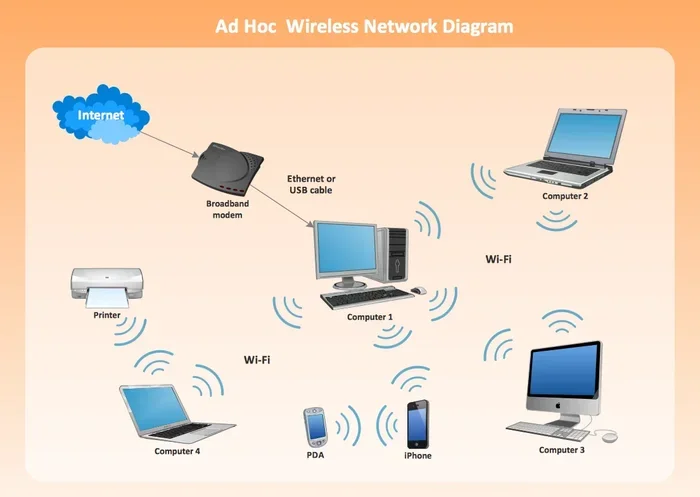
Ad hoc 11n skips the router entirely. Devices connect directly to each other in a mesh-like topology. One device acts as the host, creating the network, while the other devices join it. There is no internet access involved unless one of the devices shares its connection. The focus is purely on local data transfer between the connected devices.
This distinction matters because it affects speed, security, and range. Ad hoc 11n networks are generally faster for direct transfers since data does not need to pass through a router. However, they may have a shorter effective range and simpler security settings.
How Ad Hoc 11n Works
Understanding how ad hoc 11n works does not require a degree in engineering. Let us break it down into simple terms.
When you set up an ad hoc network, one device becomes the host. This device creates a wireless signal that other devices can detect and join. The host assigns a network name (also called an SSID) and a password if you choose to set one. Other devices scan for available networks, find the ad hoc network, and connect using the credentials provided.
Once connected, the devices form a small network topology where each device can send and receive data. The 802.11n standard uses Multiple Input Multiple Output (MIMO) technology, which means it uses multiple antennas to send and receive data simultaneously. This is what gives 11n its speed advantage over older standards.
Here is a simple breakdown of the process:
- Step 1: The host device enables ad hoc mode in its network settings.
- Step 2: The host sets a network name and security options.
- Step 3: The host starts broadcasting the wireless signal.
- Step 4: Other devices scan for networks and find the ad hoc network.
- Step 5: The joining devices enter the password (if any) and connect.
- Step 6: Devices can now share files, play games, or use shared resources directly.
The entire process usually takes less than a minute. It is fast, simple, and does not require any special software or hardware beyond a network adapter that supports 802.11n.
The Role of MIMO Technology
One of the key features of the 802.11n standard is MIMO. MIMO stands for Multiple Input Multiple Output. In simple terms, it means the wireless adapter uses multiple antennas to send and receive data at the same time. This increases both speed and reliability.
In an ad hoc 11n setup, MIMO helps maintain a strong connection between devices even if they are not perfectly aligned. Older WiFi standards used a single antenna, which made connections more fragile. With MIMO, the signal is more robust, and data transfers are faster.
Most modern laptops and smartphones come with MIMO-capable wireless adapters. This means they fully support ad hoc 11n networking out of the box. However, older devices may only support earlier WiFi standards, which limits their ability to participate in an 11n ad hoc network.
Ad Hoc 11n vs Infrastructure Mode
To really understand ad hoc 11n, it helps to compare it side by side with the more common infrastructure mode. Here is a quick comparison:
| Feature | Ad Hoc 11n | Infrastructure Mode |
|---|---|---|
| Requires a router | No | Yes |
| Connection type | Direct device-to-device | Device-to-router-to-device |
| Speed | Up to 600 Mbps (11n) | Up to 600 Mbps (11n) |
| Range | Shorter (no router booster) | Longer (router extends signal) |
| Setup complexity | Very simple | Simple (connect to router) |
| Internet sharing | Only if host device shares | Built-in through router |
| Security options | Limited (WPA2 supported) | Full range of options |
| Best use case | Quick file transfers | Everyday internet use |
As you can see, both modes use the same underlying 802.11n wireless protocol. The main difference is the presence or absence of a central router. Ad hoc 11n is perfect for situations where you need a quick, direct connection without any extra gear.
If you are setting up an ad hoc network on a laptop, make sure your device has enough RAM to handle the networking tasks smoothly. You can check our guide on what amount of RAM is good on a laptop for helpful recommendations.
Benefits of Using Ad Hoc 11n
Ad hoc 11n offers several advantages that make it useful in specific scenarios. Let us explore the biggest benefits.
1. No Router Required
The most obvious benefit is that you do not need a router. This makes ad hoc 11n perfect for situations where a router is unavailable or impractical. Think of a conference room with no WiFi, a camping trip, or a classroom where you want students to share files quickly.
2. Fast Data Transfer Speeds
The 802.11n standard supports speeds up to 600 Mbps in theory. In real-world ad hoc 11n setups, you can expect transfer speeds that are significantly faster than older WiFi standards. This makes it great for sharing large files like videos, presentations, or backups between devices.
3. Simple and Quick Setup
Setting up an ad hoc network takes just a few minutes. There is no need to configure a router, set up DHCP, or manage IP ranges. The host device handles everything. This simplicity is a huge advantage for quick, one-off connections.
4. Privacy and Security
Since an ad hoc network is temporary and local, it is not exposed to the broader internet. This means outsiders cannot easily access it. When you add WPA2 encryption and a strong password, the connection becomes quite secure for short-term use.
5. Low Cost
You do not need to buy any extra equipment. As long as your devices have WiFi adapters that support 802.11n, you can create an ad hoc network for free. This makes it an excellent option for budget-conscious users or temporary setups.
If you are building a quick network on a laptop and want to make sure your hardware is up to the task, check our article on how to know what RAM is compatible with your laptop to ensure smooth performance.
Common Uses for Ad Hoc 11n Networks
Ad hoc 11n is not just a technical curiosity. It has real-world applications that many people use every day without realizing it. Here are some common scenarios where ad hoc networking comes in handy.
File Sharing Between Laptops
This is the most common use case. Two colleagues need to share a presentation, or a student wants to send a large file to a classmate. Instead of using a USB drive or email, they can create a quick ad hoc 11n network and transfer the files directly at high speed.
Multiplayer Gaming
Gamers love ad hoc networks for local multiplayer sessions. Whether you are playing on two laptops in the same room or connecting several devices for a LAN party, ad hoc 11n provides the fast, low-latency connection needed for smooth gameplay.
Presentations and Screen Sharing
In a meeting or classroom, a presenter can share their screen with other devices connected to the ad hoc network. This works without needing internet access or a projector with wireless capabilities. It is a clean and professional way to collaborate in real time.
Temporary Internet Sharing
If one device has an internet connection through Ethernet or cellular data, it can share that connection over an ad hoc 11n network. Other devices can then access the internet through the host. This is useful in situations where a router is not available but internet access is needed.
IoT Device Testing
Engineers and developers sometimes use ad hoc networks to test wireless devices and IoT gadgets. The isolated environment allows them to debug communication protocols without interference from other networks.
For those interested in broader networking concepts, you might also want to explore what Webflow is if you are building a site to showcase networking projects or tutorials.
How to Set Up an Ad Hoc 11n Connection
Setting up an ad hoc 11n network is easier than you might think. Here is a step-by-step guide for Windows users. The process on other operating systems is similar.
Step 1: Open the Control Panel and navigate to the Network and Sharing Center.
Step 2: Click on “Set up a new connection or network.”
Step 3: Select “Set up a wireless ad hoc (computer-to-computer) network.”
Step 4: Click Next and choose the 802.11n option if available.
Step 5: Enter a network name (SSID) and choose a security type. WPA2-Personal is recommended.
Step 6: Create a strong password and click Next.
Step 7: The network will now be created and visible to other devices.
To connect another device, simply open its WiFi settings, find the network name you just created, and enter the password. That is it. Both devices are now connected and ready to share files or resources.
Tips for a Smooth Setup
- Keep devices close: Ad hoc networks work best when devices are within 30 to 50 feet of each other.
- Use WPA2 security: This encrypts your data and prevents unauthorized access.
- Check adapter compatibility: Make sure your wireless adapter supports 802.11n. You can check this in your device manager.
- Disable the firewall temporarily: If devices cannot see each other, a firewall might be blocking the connection. Disable it briefly during setup and re-enable it afterward.
- Use a strong password: Even for temporary networks, a strong password protects your data during transfer.
Before setting up any ad hoc network, make sure your laptop or device has enough RAM and a compatible network adapter. If you are unsure about your device’s specifications, you can refer to our guide on what is a good idle GPU temperature as a starting point for checking your hardware health.
Limitations and Challenges of Ad Hoc 11n
While ad hoc 11n is a useful tool, it is not without its limitations. Understanding these challenges helps you use it more effectively.
Limited Range
Ad hoc networks typically have a shorter range than router-based networks. Without a central access point to boost the signal, the effective range is usually around 100 to 150 feet indoors. Walls and obstacles can reduce this further.
Fewer Security Options
Ad hoc networks support fewer security protocols compared to infrastructure mode. While WPA2 is available, some older devices may only support WEP, which is considered insecure. Always use the strongest encryption your devices support.
Device Compatibility Issues
Not all devices handle ad hoc mode well. Some smartphones and tablets may not support joining ad hoc networks at all. This can be frustrating if you need to connect a mix of newer and older devices.
No Internet Access by Default
An ad hoc network does not provide internet access unless one of the connected devices shares its connection. This means you cannot browse the web or use cloud services unless you explicitly set up internet connection sharing.
Scalability Problems
Ad hoc networks work well for two to five devices. Beyond that, performance drops significantly. The network topology becomes unstable as more devices join, leading to slower speeds and dropped connections.
If you are dealing with hardware limitations, it is worth checking your device specifications. For instance, understanding your GPU temperature can help you determine if your laptop is running hot during intensive networking tasks. Visit our guide on what is a good idle GPU temperature for more details.
Is Ad Hoc 11n Still Relevant Today?
With WiFi 5, WiFi 6, and WiFi 7 becoming standard, you might wonder if ad hoc 11n is still useful. The answer is yes, in certain situations.
Many devices still ship with 802.11n adapters. These devices are common in offices, schools, and homes where upgrading every device is not practical. Ad hoc 11n provides a reliable way to connect these devices directly without needing additional equipment.
Additionally, the simplicity of ad hoc networking means it remains popular for quick tasks. You do not need to configure a router, set up a password manager, or worry about network conflicts. It just works, and that simplicity has real value.
That said, newer technologies like WiFi Direct are gradually replacing traditional ad hoc mode. WiFi Direct offers similar peer-to-peer connectivity but with better security and faster speeds. It is worth keeping an eye on this trend as wireless technology continues to evolve.
For those who want to understand the broader landscape of networking and technology, knowing how ad hoc 11n works gives you a solid foundation. It teaches you the basics of wireless protocols, network topologies, and device-to-device communication.
Conclusion
Ad hoc 11n is a practical and powerful way to create direct wireless connections between devices. It uses the 802.11n WiFi standard to deliver fast speeds without needing a router. Whether you are sharing files, gaming locally, or setting up a quick presentation, ad hoc networking gets the job done.
The setup is simple, the cost is zero, and the benefits are real. Just be mindful of the limitations, especially around range and security. With the right setup and a strong password, ad hoc 11n remains a valuable tool in any tech enthusiast’s toolkit.
Next time you need to connect two devices quickly without a router, remember ad hoc 11n. It might just be the simplest solution you have been looking for.
Frequently Asked Questions
What does Ad Hoc 11n mean?
Ad Hoc 11n refers to a wireless peer-to-peer networking mode that uses the 802.11n WiFi standard. It allows devices to connect directly to each other without a router or access point. This mode is ideal for quick file sharing and local data transfers.
Is Ad Hoc 11n the same as WiFi Direct?
They are similar in concept but not the same. Both allow device-to-device connections without a router. However, WiFi Direct is a newer standard with better security and faster speeds. Ad hoc 11n is the older but still widely supported method.
Can I use Ad Hoc 11n on a smartphone?
Some smartphones support ad hoc mode, but many do not. Android devices often have limited support, while iPhones generally do not support ad hoc networks at all. Laptops and desktops are the most reliable platforms for ad hoc 11n networking.
How fast is Ad Hoc 11n?
The 802.11n standard supports theoretical speeds up to 600 Mbps. In real-world ad hoc 11n setups, you can expect transfer speeds of 50 to 150 Mbps depending on distance, interference, and device capabilities.
Is Ad Hoc 11n secure?
It can be secure if you use WPA2 encryption and a strong password. However, ad hoc networks have fewer security options than router-based networks. Avoid transferring sensitive data over ad hoc connections unless you have taken proper security measures.
Do I need special hardware for Ad Hoc 11n?
No special hardware is needed. Most modern laptops and devices come with WiFi adapters that support the 802.11n standard. Just make sure your network adapter is 802.11n compatible, and you are good to go.