What Is Application Protocol
An application protocol is a set of rules that allows different software programs to communicate with each other over a network. It defines how data is formatted, sent, and received between devices, making sure everything works smoothly. Understanding application protocols helps you grasp how the internet, email, and web apps actually function behind the scenes.
Have you ever wondered how your phone talks to a website, or how two computers share files across the world? The answer lies in something called an application protocol. These invisible rules are the backbone of every digital interaction you have online.
Think of an application protocol as a language that devices use to understand each other. Just like humans need a shared language to communicate, computers and software need shared rules to exchange information. Without these rules, the internet as we know it simply would not exist.
In this guide, we will break down everything you need to know about application protocols. You will learn what they are, how they work, the different types, and why they matter in everyday technology. Whether you are a curious beginner or someone looking to refresh your knowledge, this article has you covered.
Key Takeaways
- Application protocols define communication rules: They set the standards for how devices and software exchange data across networks.
- They operate at the application layer: Application protocols sit at the top of the OSI model, handling the interface between software and the network.
- Common examples include HTTP, FTP, and SMTP: These protocols power everyday activities like browsing the web, transferring files, and sending emails.
- They are essential for modern computing: Without application protocols, cloud services, web apps, and online collaboration tools would not work.
- Security protocols matter too: HTTPS and TLS protect your data during transmission, keeping your online activities safe.
- They enable interoperability: Application protocols allow different systems and platforms to work together seamlessly.
📑 Table of Contents
- What Is an Application Protocol?
- Common Types of Application Protocols
- How Application Protocols Fit Into the OSI Model
- Why Application Protocols Matter
- Application Protocol Security
- Application Protocol vs Network Protocol: What Is the Difference?
- Quick Tips for Understanding Application Protocols
- Common Mistakes People Make With Application Protocols
- Final Thoughts
What Is an Application Protocol?
An application protocol is a formal set of rules that governs how two software applications communicate over a network. It defines the format, timing, sequence, and error handling of data exchanges between a client and a server. In simple terms, it is the agreement that two programs follow so they can talk to each other.
These protocols operate at the application layer of the networking model. This is the highest layer, closest to the end user. It is where your web browser, email client, and file transfer tools interact with the network. The application layer makes sure that the data your software sends matches what the receiving software expects.
How Application Protocols Work
When you open a website, your browser acts as a client. It sends a request to a web server using a specific application protocol. The server receives the request, processes it, and sends back the web page data. Both sides follow the same protocol rules to ensure the exchange succeeds.
Here is a simple breakdown of how this works:
- Request: The client sends a message formatted according to the protocol rules.
- Processing: The server receives and interprets the message based on the shared protocol.
- Response: The server sends back data in the format the client expects.
- Confirmation: Both sides confirm the exchange was successful or handle errors if something went wrong.
This process happens in milliseconds every time you click a link, send an email, or stream a video. The application protocol makes it all possible without you even noticing.
Common Types of Application Protocols
There are many application protocols in use today. Each one serves a specific purpose and is designed for a particular type of communication. Let us look at the most common ones you encounter every day.
HTTP and HTTPS
Hypertext Transfer Protocol, or HTTP, is the foundation of web browsing. When you type a URL into your browser, HTTP is the protocol that fetches the webpage for you. HTTPS is the secure version that encrypts your data using TLS (Transport Layer Security). This keeps your passwords, credit card numbers, and personal information safe from hackers.
If you have ever noticed the little padlock icon next to a website URL, that means the site uses HTTPS. It is one of the most visible signs that an application protocol is working to protect you.
FTP and SFTP
File Transfer Protocol, or FTP, is used to transfer files between computers over a network. You might use FTP when uploading files to a website server or sharing large files with a colleague. SFTP adds a layer of encryption, similar to how HTTPS secures web traffic. This makes SFTP a safer choice for sensitive data transfers.
SMTP, IMAP, and POP3
Email relies on several application protocols working together. SMTP (Simple Mail Transfer Protocol) handles sending emails. IMAP (Internet Message Access Protocol) and POP3 (Post Office Protocol version 3) handle receiving emails. When you check your inbox on your phone, these protocols are quietly working behind the scenes to fetch your messages.
DNS
The Domain Name System is another essential application protocol. It translates human-friendly website names like google.com into IP addresses that computers understand. Without DNS, you would need to memorize long strings of numbers to visit any website. It is one of the most used protocols on the internet, and most people never even know it exists.
How Application Protocols Fit Into the OSI Model
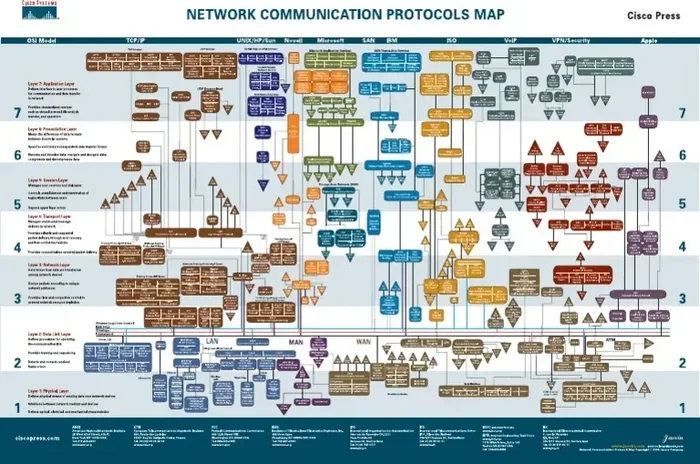
To truly understand application protocols, it helps to know where they sit in the OSI model. The OSI model is a framework that describes how data moves through a network. It has seven layers, and the application layer is the seventh and topmost layer.
Each layer has a specific job. The lower layers handle physical connections, routing, and error detection. The application layer is where the user actually interacts with the network. Application protocols live at this layer because they are the rules that software uses to access network services.
Think of it like a postal system. The lower layers are the trucks, roads, and sorting facilities. The application layer is the mailbox where you drop off your letter. The application protocol is the format and address rules you follow when writing that letter.
The Seven Layers at a Glance
Here is a quick look at the OSI model layers and how they relate to application protocols:
- Layer 7 – Application: This is where application protocols like HTTP, FTP, and SMTP operate. It is the interface between the user and the network.
- Layer 6 – Presentation: This layer handles data formatting, encryption, and compression.
- Layer 5 – Session: It manages connections between applications and keeps sessions active.
- Layer 4 – Transport: This layer ensures reliable data delivery using protocols like TCP.
- Layer 3 – Network: It handles routing and logical addressing using IP.
- Layer 2 – Data Link: This layer manages node-to-node data transfer.
- Layer 1 – Physical: The hardware layer that transmits raw bits over a physical medium.
Understanding this model helps you see why application protocols are so important. They are the layer that directly connects your everyday software to the vast network of the internet.
Why Application Protocols Matter
Application protocols are not just technical jargon. They are the reason the modern digital world works. Here are some key reasons why they matter so much.
Enabling Interoperability
One of the greatest strengths of application protocols is that they allow different systems to work together. A Windows laptop can talk to a Linux server. An iPhone can communicate with an Android backend. This is possible because both sides follow the same application protocol standards.
Without these shared rules, every piece of software would need its own custom way of communicating. The internet would be a fragmented mess of incompatible systems. Application protocols create a common language that everyone agrees on.
Supporting Cloud Computing and SaaS
Cloud computing and SaaS (Software as a Service) platforms depend entirely on application protocols. When you use a SaaS environment, your device communicates with remote servers using protocols like HTTPS and REST APIs. These application protocols make it possible to access software, store files, and collaborate with others from anywhere in the world.
Services like Google Workspace, Microsoft 365, and team collaboration tools all rely on application protocols to sync your data across devices in real time. If these protocols did not exist, cloud computing as we know it would simply not be possible.
Powering Web Development and Online Tools
Web developers build everything on top of application protocols. When you use a platform like Webflow to design websites, the platform uses HTTP and other protocols to publish your site to the internet. Every API call, every form submission, every page load depends on these application protocols working correctly.
Understanding how these protocols work can help you troubleshoot issues, optimize performance, and build better applications. Even if you are not a developer, knowing the basics of application protocols makes you a more informed technology user.
Enabling Business Collaboration Tools
Modern business relies heavily on digital collaboration. Tools for project management and team communication use application protocols to sync tasks, share files, and send notifications across distributed teams. These protocols ensure that whether your team is in the same office or spread across continents, everyone stays connected and up to date.
The reliability of these tools depends on robust application protocols that can handle high volumes of data exchange with minimal delays and errors.
Application Protocol Security
Security is a major concern when it comes to application protocols. As data travels across networks, it can be intercepted or tampered with. This is why secure versions of many protocols have been developed.
How Secure Protocols Protect Your Data
Secure application protocols use encryption to protect data in transit. HTTPS encrypts web traffic so that hackers cannot read your sensitive information. SFTP secures file transfers. STARTTLS upgrades plain email connections to encrypted ones.
Here are some practical tips to ensure you are using secure application protocols:
- Always look for HTTPS in website URLs before entering personal information.
- Use SFTP instead of FTP when transferring sensitive files.
- Keep your software updated so it supports the latest protocol security standards.
- Avoid using public Wi-Fi for sensitive transactions without a VPN.
- Check that your email client is configured to use encrypted protocols like IMAPS.
By following these simple steps, you can protect yourself from common security threats that exploit insecure application protocols.
Application Protocol vs Network Protocol: What Is the Difference?
People often confuse application protocols with network protocols, but they serve different purposes. Understanding the distinction helps clarify how networks actually function.
Network protocols handle the lower-level tasks of moving data across physical connections. They deal with routing, addressing, and packet delivery. Application protocols, on the other hand, focus on the specific format and meaning of the data that applications exchange.
Think of it this way: network protocols are like the roads and traffic signals that move cars around. Application protocols are like the rules of the road that determine how drivers interact at intersections. Both are essential, but they operate at different levels.
In practice, application protocols rely on network protocols to do their job. HTTP uses TCP, which relies on IP, which relies on physical network connections. This layered approach is what makes the internet so flexible and scalable.
Quick Tips for Understanding Application Protocols
Here are some practical tips to help you get comfortable with application protocols:
- Start with the basics: Learn HTTP, HTTPS, and FTP first. These are the most common protocols you will encounter daily.
- Use developer tools: Your web browser has built-in tools that show you the protocols in action. Press F12 and look at the Network tab to see HTTP requests in real time.
- Read protocol documentation: The official standards for protocols are freely available online. Reading even a small section can boost your understanding significantly.
- Practice with APIs: Many modern applications use REST APIs, which are built on HTTP. Experimenting with APIs is a great hands-on way to learn how application protocols function.
- Stay curious: Technology evolves fast. New application protocols emerge regularly, so keep learning and exploring.
Common Mistakes People Make With Application Protocols
Even tech-savvy people sometimes make mistakes when it comes to application protocols. Here are a few to watch out for.
- Assuming all protocols are secure: Not all application protocols encrypt data by default. Always check whether you are using the secure version of a protocol.
- Ignoring protocol versions: Older protocol versions may have known vulnerabilities. Keep your systems updated to use the latest versions.
- Overlooking configuration: A protocol is only as good as its configuration. Misconfigured servers can expose data even when using secure protocols.
- Confusing protocol layers: Remember that application protocols sit at the top of the networking stack. They depend on lower layers to function correctly.
Avoiding these mistakes will help you use application protocols more effectively and keep your systems secure.
Final Thoughts
Application protocols are the unsung heroes of the digital world. They work silently in the background, making sure your websites load, your emails arrive, and your files transfer correctly. Without them, modern computing would grind to a halt.
Now that you understand what an application protocol is and how it works, you can appreciate the incredible level of coordination that happens every time you go online. From HTTP to DNS, from SMTP to HTTPS, these protocols form the foundation of our connected world.
Take some time to explore the protocols you use every day. You might be surprised at how much smoother your digital life becomes when you understand the rules behind the technology. The more you know about application protocols, the better equipped you are to navigate the digital landscape with confidence.
Frequently Asked Questions
What is the difference between an application protocol and a transport protocol?
An application protocol defines how software applications communicate and exchange data, while a transport protocol handles the reliable delivery of data between devices. Think of the application protocol as the language two programs use to talk, and the transport protocol as the delivery service that ensures the message gets there intact.
Can application protocols be used offline?
Most application protocols are designed for network communication, so they require a connection to function. However, some applications can cache data locally and sync later using protocols when a connection is restored. The protocol itself still needs a network to perform its primary function.
Is HTTP an application protocol?
Yes, HTTP is one of the most widely used application protocols. It operates at the application layer and is responsible for fetching web pages and other resources from servers. Its secure version, HTTPS, adds encryption for safer browsing.
How do application protocols affect internet speed?
The choice of application protocol can impact speed. Efficient protocols with less overhead load data faster, while older or less optimized protocols may slow things down. Using modern, well-designed protocols helps ensure smoother and quicker online experiences.
Are application protocols the same as APIs?
Not exactly. An application protocol is a set of rules for communication between systems, while an API is a specific interface that allows software to interact with other software. Many APIs use application protocols like HTTP to function, but they are not the same thing.
What happens when an application protocol fails?
When an application protocol fails, communication between applications breaks down. You might see error messages like connection timeouts or failed page loads. In most cases, reloading the application or checking the network connection resolves the issue, but persistent problems may require protocol-specific troubleshooting.