What Is Ethernet Bridge
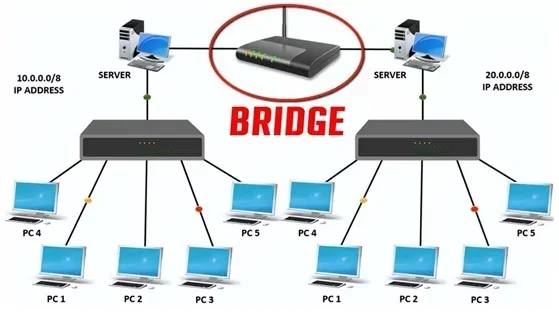
An Ethernet bridge is a networking device that connects two separate network segments, allowing them to communicate as if they were one unified network. It operates at the data link layer, filtering and forwarding data frames based on MAC addresses to reduce traffic and improve performance. Understanding bridge networking helps you optimize your home or office setup.
An Ethernet bridge is a networking device that connects two separate network segments, allowing devices on each segment to communicate as if they were part of the same network. When you have multiple networks in a home or office, a bridge ties them together seamlessly. This device operates at the data link layer of the OSI model, which means it works with MAC addresses rather than IP addresses.
Many people confuse an Ethernet bridge with a router or switch, but they serve different purposes. A router connects different networks and routes traffic between them using IP addresses. A switch connects devices within the same network. A bridge, however, specifically links two network segments together at Layer 2. This makes it perfect for extending a network without creating IP conflicts or requiring complex configuration.
The concept of bridging dates back to the early days of networking. Before switches became affordable, bridges were the primary way to connect network segments. Today, many modern routers include a bridge mode feature that lets you repurpose old routers as simple bridges. This is especially useful when you want to extend your wireless coverage or connect a wired device to a wireless network.
Key Takeaways
- Ethernet bridges connect separate networks: They link different network segments to function as a single network, improving communication between devices.
- Bridge mode works at Layer 2: The bridge operates at the data link layer, using MAC addresses to filter and forward data frames efficiently.
- Reduces network congestion: By segmenting traffic, bridges minimize collisions and improve overall network performance.
- Versatile use cases: Ethernet bridges are useful in homes, offices, and data centers to extend network reach and connect different network types.
- Easy to set up: Most modern routers and devices offer a bridge mode option that simplifies configuration without advanced networking knowledge.
- Different from routers and switches: While routers route between networks and switches connect devices within a network, bridges specifically link two separate segments together.
📑 Table of Contents
How an Ethernet Bridge Works
An Ethernet bridge operates by learning the MAC addresses of devices on each network segment. When a data frame arrives, the bridge examines the destination MAC address and decides whether to forward it to the other segment or filter it out. This process happens transparently, which is why bridges are often called transparent bridges.
The bridge maintains a table called a MAC address table or forwarding table. This table maps MAC addresses to the specific ports on the bridge. When the bridge first starts, it doesn’t know where any devices are located. As data frames pass through, the bridge learns which devices are on which segment and builds its table accordingly.
Here is how the process works step by step:
- The bridge receives a data frame on one port.
- It reads the source MAC address and updates its forwarding table.
- It checks the destination MAC address in its table.
- If the destination is on the other segment, it forwards the frame.
- If the destination is on the same segment, it filters the frame (doesn’t forward it).
- If the destination is unknown, it floods the frame to all ports except the one it received it on.
This intelligent forwarding mechanism reduces unnecessary traffic on each network segment. Instead of every device seeing every frame, only the relevant segment receives the traffic. This improves network performance and reduces collisions.
Bridge Protocols and Standards
Ethernet bridges follow specific protocols to ensure proper operation. The IEEE 802.1D standard defines the Spanning Tree Protocol (STP), which prevents loops in bridged networks. Loops can cause broadcast storms that bring down entire networks. STP creates a loop-free logical topology by blocking redundant paths while still allowing backup paths if primary links fail.
More modern bridges support Rapid Spanning Tree Protocol (RSTP) and Multiple Spanning Tree Protocol (MSTP). These offer faster convergence times and better scalability for larger networks. If you are setting up a network with multiple bridges, understanding these protocols helps you avoid common pitfalls.
Ethernet Bridge vs. Router vs. Switch
Understanding the differences between these networking devices helps you choose the right tool for your setup. Each device operates at a different layer of the OSI model and serves a distinct purpose.
| Feature | Ethernet Bridge | Router | Switch |
|---|---|---|---|
| OSI Layer | Layer 2 (Data Link) | Layer 3 (Network) | Layer 2 (Data Link) |
| Addressing Used | MAC Addresses | IP Addresses | MAC Addresses |
| Primary Function | Connects two network segments | Routes between different networks | Connects devices within one network |
| Traffic Filtering | Yes, based on MAC addresses | Yes, based on IP addresses | Yes, based on MAC addresses |
| Broadcast Domain | Does not separate | Separates | Does not separate |
| Complexity | Low to Medium | Medium to High | Low |
A bridge is ideal when you need to connect two separate network segments that use the same protocol. For example, if you have a wired Ethernet network in one room and want to connect it to a wireless network in another, a wireless Ethernet bridge makes this possible. The bridge translates between the two media types while maintaining a single logical network.
On the other hand, a router is better when you need to connect networks using different protocols or when you need Network Address Translation (NAT). A switch is best for connecting multiple devices within the same network segment. Many modern devices combine these functions into a single unit, but understanding the individual roles helps you troubleshoot issues more effectively.
Benefits of Using an Ethernet Bridge
Using an Ethernet bridge offers several advantages for both home and business networks. These benefits make bridging an attractive option in many scenarios.
Extends Network Reach
One of the primary benefits of an Ethernet bridge is its ability to extend your network’s physical reach. If you have a building with multiple floors or wings, running Ethernet cables across the entire structure can be expensive and impractical. A wireless Ethernet bridge can connect distant segments without running long cables, extending your network coverage affordably.
Reduces Network Congestion
By segmenting your network, a bridge reduces the number of devices that compete for bandwidth on each segment. Devices on one segment do not see traffic from the other segment unless it is specifically addressed to them. This filtering action reduces collisions and improves overall network performance.
Simplifies Network Expansion
When you need to add a new network segment, a bridge provides a simple solution. You don’t need to reconfigure IP addresses or change your network scheme. The bridge simply connects the new segment to your existing network, and devices on both segments can communicate freely.
Cost-Effective Solution
Using an old router in bridge mode is a cost-effective way to extend your network. Instead of purchasing expensive networking equipment, you can repurpose hardware you already own. Many modern routers include a built-in bridge mode option that requires just a few minutes to configure.
Common Use Cases for Ethernet Bridges
Ethernet bridges serve many practical purposes in both home and business environments. Understanding these use cases helps you identify whether a bridge would benefit your specific situation.
Connecting Wired and Wireless Networks
A wireless Ethernet bridge connects a wired network to a wireless network. This is useful when you have devices that only support wired connections but need to access a wireless network. For example, you might have a smart TV or gaming console in a room without an Ethernet jack. A wireless bridge can connect that device to your wireless network without running cables through walls.
Extending Coverage in Large Buildings
In large office buildings or warehouses, a single wireless access point may not provide adequate coverage. Placing Ethernet bridges at strategic locations extends the network to distant areas. Each bridge connects to the main network and creates a new wireless access point, effectively expanding coverage without adding complexity.
Connecting Different Building Segments
When you have separate buildings on a property, an Ethernet bridge can connect their networks. This is common in campus-style environments where multiple buildings need to share resources like printers and file servers. A bridge creates a seamless connection between the buildings as if they were part of the same physical location.
Legacy Device Integration
Some older devices only support wired Ethernet connections. If your main network is wireless, a bridge allows these legacy devices to connect to the modern network. This is especially useful for older printers, gaming consoles, or industrial equipment that lacks wireless capabilities.
How to Set Up an Ethernet Bridge
Setting up an Ethernet bridge is simpler than many people think. Most modern routers and networking devices include a bridge mode option. Here is a general guide to get you started.
Using a Router in Bridge Mode
Many routers can be configured to operate as a bridge. This is useful when you want to connect two routers together without creating a double NAT situation. To set this up, you typically access your router’s admin panel, find the bridge mode setting, and enable it. The router will then disable its routing functions and act purely as a bridge.
Using a Dedicated Bridge Device
Dedicated bridge devices are available for those who need a standalone solution. These devices connect to your network on one side and provide bridge connections on the other. They are especially useful for wireless bridging, where you need to connect a wired network to a wireless one.
When setting up any bridge, keep these tips in mind:
- Place the bridge within good range of the main network for wireless bridges.
- Ensure both network segments use the same IP addressing scheme.
- Disable DHCP on the bridge device to avoid IP conflicts.
- Give the bridge a static IP address outside the DHCP range.
- Test connectivity between devices on both segments after setup.
For those interested in learning more about networking fundamentals, understanding Webflow and its networking requirements can provide additional context on how web technologies interact with network infrastructure. Similarly, planning a network setup benefits from project management principles to ensure proper implementation and troubleshooting.
Common Mistakes When Using Ethernet Bridges
While Ethernet bridges are relatively simple to use, several common mistakes can cause problems. Avoiding these pitfalls helps ensure a smooth setup.
One common mistake is creating network loops by connecting multiple bridges without enabling Spanning Tree Protocol. Loops cause broadcast storms that can bring your entire network to a halt. Always ensure your bridges are configured correctly to prevent loops.
Another mistake is using different IP subnets on each side of the bridge. A bridge connects segments of the same network, so they should share the same IP address range. If you need to connect different networks, use a router instead.
Some users forget to disable DHCP on the bridge device. When two devices on the same network both assign IP addresses, conflicts occur, and devices cannot communicate properly. Always ensure only one device on your network serves as the DHCP server.
Finally, placing a wireless bridge too far from the main access point results in poor performance. The bridge needs a strong signal to function effectively. If you experience slow speeds or dropped connections, try moving the bridge closer to the access point or adding a repeater to boost the signal.
Future of Ethernet Bridging
Networking technology continues to evolve, and Ethernet bridging is no exception. Software-defined networking (SDN) is changing how bridges operate by allowing centralized control of network bridges through software. This approach offers greater flexibility and easier management of complex network setups.
Virtual bridges are also becoming more common in cloud environments. When you use a SaaS environment, virtual bridges connect your local network to cloud resources seamlessly. These virtual bridges operate on the same principles as physical bridges but exist entirely in software, offering scalability and flexibility that traditional hardware bridges cannot match.
As the Internet of Things (IoT) continues to grow, the need for efficient bridging solutions will only increase. More devices require network connectivity, and bridges provide a cost-effective way to integrate these devices into existing network infrastructure.
Conclusion
An Ethernet bridge is a powerful yet simple networking tool that connects separate network segments into one unified network. By operating at the data link layer and using MAC addresses to filter traffic, bridges reduce congestion and improve network performance. Whether you are extending wireless coverage, connecting wired devices to a wireless network, or linking separate buildings, an Ethernet bridge provides an effective solution.
Setting up a bridge is straightforward, especially with modern routers that include built-in bridge mode. By avoiding common mistakes like creating loops or using mismatched IP subnets, you can ensure a smooth and reliable connection. As networking technology evolves, bridging continues to play a vital role in connecting devices and networks of all sizes.
Understanding how an Ethernet bridge works gives you the knowledge to make informed decisions about your network setup. Whether you are a home user looking to extend coverage or a business owner connecting multiple locations, bridging technology offers a practical, cost-effective solution that meets your needs.
Frequently Asked Questions
What is the difference between an Ethernet bridge and a switch?
An Ethernet bridge connects two separate network segments together, while a switch connects multiple devices within the same network segment. A bridge operates with just two ports, whereas a switch has many ports. Both work at Layer 2 and use MAC addresses, but a bridge specifically links different network segments while a switch expands a single segment.
Can I use any router as an Ethernet bridge?
Many modern routers include a bridge mode option that allows them to function as an Ethernet bridge. However, not all routers support this feature. Check your router’s documentation or settings menu for a bridge mode option. If your router doesn’t support bridge mode, you may need to purchase a dedicated bridge device or use open-source firmware like DD-WRT.
Does an Ethernet bridge slow down network speed?
A well-configured Ethernet bridge should not significantly slow down your network. In fact, by filtering traffic and reducing unnecessary broadcasts, a bridge can improve performance on each segment. However, a wireless bridge may introduce some speed reduction due to the wireless connection itself. Wired bridges typically maintain full network speed.
Can an Ethernet bridge connect different types of networks?
Yes, certain types of bridges can connect different network media types. A wireless Ethernet bridge, for example, can connect a wired Ethernet network to a wireless network. Similarly, some bridges can connect Ethernet to fiber optic networks. The key requirement is that both sides of the bridge must support the same protocol at the data link layer.
Is an Ethernet bridge the same as a network bridge?
Yes, an Ethernet bridge and a network bridge are essentially the same thing. The term “Ethernet bridge” specifically refers to a bridge that works with Ethernet networks, while “network bridge” is a more general term that can refer to bridges for any type of network. In most modern contexts, these terms are used interchangeably.
Do I need special equipment to set up an Ethernet bridge?
You don’t necessarily need special equipment. Many people repurpose old routers by enabling bridge mode, which is free. You can also use dedicated bridge devices for more advanced setups. The equipment you need depends on whether you want a wired or wireless bridge and the distance between the network segments you want to connect.