What Is the Difference Between an External and a Portable Hard Drive for a Computer
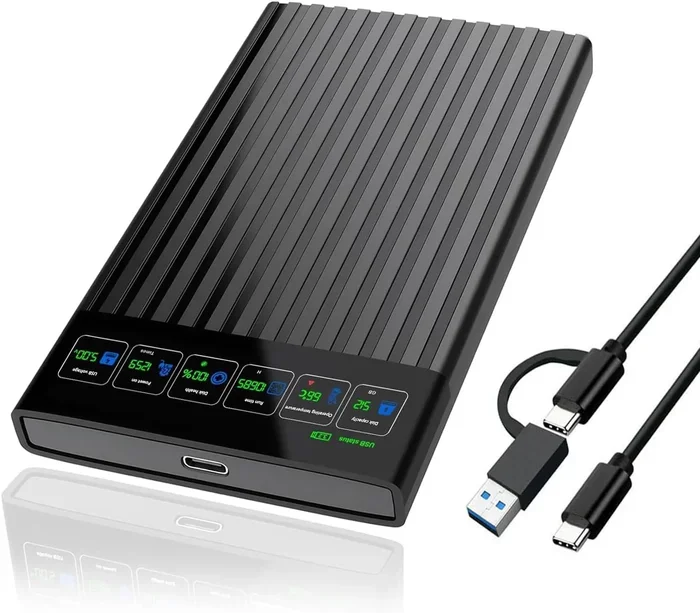
An external hard drive is a larger storage device that sits on your desk and connects to your computer, while a portable hard drive is small, lightweight, and built for on-the-go use. Both store your files, backups, and media, but they differ in size, power needs, and portability. Choosing the right one depends on your storage needs, lifestyle, and how often you move your data around.
If you have ever shopped for extra storage, you have probably seen both external hard drives and portable hard drives on the shelf. They look similar, they do similar jobs, and they both plug into your computer. But here is the thing — they are not the same. Understanding the difference between external and portable hard drive options can save you money, frustration, and a lot of guesswork.
In this guide, we break down everything you need to know. We will look at what each type is, how they compare, and which one is the right fit for you. Whether you are a student, a creative professional, or just someone who wants to keep files safe, this article has you covered. Let us dive in.
Key Takeaways
- External hard drives are larger, often desktop-sized, and usually need a separate power source.
- Portable hard drives are compact, bus-powered, and perfect for travel or commuting.
- Storage capacity varies widely in both types, ranging from 500GB to multiple terabytes.
- Data transfer speed depends on the connection type, such as USB 3.0 or USB-C.
- Durability and build quality differ, with portable drives built to withstand movement.
- Price per gigabyte is often lower for external desktop drives than for portable ones.
- Choosing between them comes down to your storage needs and how you use your computer.
📑 Table of Contents
What Is an External Hard Drive?
An external hard drive is a storage device that sits outside your computer. It connects to your PC or Mac through a USB cable or other interface. These drives are often bigger and heavier than their portable cousins. Many of them need to be plugged into a wall outlet for power.
You will often find external drives in desktop-style enclosures. They are designed to stay in one place, like on your desk or a shelf. People use them for file backup, storing large media libraries, or running additional storage for gaming and video editing.
How Does an External Hard Drive Work?
Inside the外壳, an external drive uses either a traditional hard disk drive (HDD) or a newer solid state drive (SSD). HDDs use spinning disks to read and write data. SSDs use flash memory with no moving parts. Both connect to your computer through a standard cable, usually USB.
Most external drives draw power from the wall or from a separate power adapter. This means they do not rely on your computer’s USB port for electricity. That is one reason they can offer higher performance and larger storage sizes.
Common Uses for External Hard Drives
- Backing up your entire computer system
- Storing large video files and photo libraries
- Running additional storage for gaming or creative work
- Sharing files across multiple devices on a home network
- Archiving old files you do not access often
What Is a Portable Hard Drive?
A portable hard drive is a smaller, lighter version of an external drive. It is built to travel with you. These drives fit easily in a backpack, purse, or even a large pocket. Most portable drives get their power directly from the USB port on your computer, which means no extra power cord is needed.
The term portable storage covers a wide range of devices. Some are traditional HDDs in slim enclosures. Others use flash memory or SSD technology for even smaller sizes and better durability. The key idea is simple — you can carry your data wherever you go.
How Does a Portable Hard Drive Work?
Portable drives work the same way as external drives on the inside. They use HDD or SSD technology to store your files. The big difference is in the design. A portable drive is built to be lightweight and compact. It draws power from the USB connection, which keeps things simple and convenient.
Because they are smaller, portable drives usually have lower storage capacities than desktop external drives. However, high-capacity portable options are becoming more common and more affordable every year.
Who Should Use a Portable Hard Drive?
- Students who need to carry large projects between classes
- Photographers and videographers working on location
- Business travelers who need access to files on the go
- Anyone who wants a simple backup solution without extra cables
- People who share files across multiple computers
Key Differences Between External and Portable Hard Drives
Now that you know what each type is, let us look at how they compare. The difference between external and portable hard drive comes down to several key factors. Here is a detailed breakdown.
Size and Portability
External hard drives are larger and heavier. They are designed to stay in one spot. Portable hard drives are small and light, built to move around. If you travel often or need files on different machines, a portable drive makes more sense.
Power Source
Most external drives need a wall outlet or a separate power adapter. Portable drives get all the power they need from the USB cable connected to your computer. This is a huge convenience factor if you are always on the move.
Storage Capacity
External drives typically offer more storage space. You can find them in sizes up to 18TB or more. Portable drives usually max out around 5TB, though some go higher now. If you need massive storage, an external desktop drive is usually the better choice.
Durability
Portable drives are built to handle being moved around. They are more resistant to bumps and drops. External drives are more fragile because they are not designed for travel. If you drop an external desktop drive, you risk damaging the internal components.
Price
External drives tend to cost less per gigabyte of storage. Portable drives cost a bit more for the same capacity because of their compact design and portability features. However, prices have been dropping, and the gap is getting smaller.
| Feature | External Hard Drive | Portable Hard Drive |
|---|---|---|
| Size | Larger, desktop-sized | Small, compact |
| Weight | Heavier | Lightweight |
| Power Source | Wall outlet or adapter | USB bus-powered |
| Storage Capacity | Up to 18TB or more | Up to 5TB typically |
| Portability | Stays in one place | Easy to carry anywhere |
| Durability | More fragile | Built for travel |
| Price per GB | Lower | Slightly higher |
Which One Should You Choose?
Choosing between an external hard drive and a portable hard drive depends on your lifestyle and needs. There is no one-size-fits-all answer. Let us look at a few scenarios to help you decide.
If you work from a home office and need to back up your entire computer, store huge video projects, or build a media library, go with an external drive. The larger size means more storage, and the extra power means better performance. You do not need to carry it around, so the lack of portability does not matter.
If you are a student, a freelancer, or someone who works from different locations, a portable drive is the clear winner. It fits in your bag, does not need an extra power outlet, and gives you access to your files anywhere. Just be mindful of the storage limits and handle it with care since it is smaller and lighter.
Some people even buy both. They keep a large external drive at home for backups and a smaller portable drive for daily use on the go. This is a great setup if you have the budget for it.
Quick Tips for Choosing the Right Drive
- Check the data transfer speed before buying. Look for USB 3.0 or USB-C connections.
- Consider the storage capacity you actually need. Do not overpay for space you will not use.
- Read reviews for durability and reliability, especially for portable drives.
- Think about whether you need a bus-powered drive or if a separate power source is fine.
- Compare prices across brands. Some brands offer better value than others.
Common Mistakes People Make When Buying a Hard Drive
Buying a hard drive seems simple, but many people make avoidable mistakes. Here are some of the most common ones to watch out for.
Confusing External with Portable
The biggest mistake is assuming all external drives are portable. They are not. An external desktop drive is heavy and needs a power outlet. If you try to carry it around daily, you will quickly get tired of it. Make sure you know what you are buying before you check out.
Ignoring the Connection Type
Not all USB connections are the same. A USB 2.0 connection is much slower than USB 3.0 or USB-C. If you are moving large files, the connection type matters a lot. Always check what ports your computer has and buy a drive that matches.
Skipping the Backup Plan
Even the best hard drive can fail. If you are using any drive for important files, make sure you have a backup. The difference between an external and a portable hard drive does not change this rule. Your data is only safe if you have more than one copy of it.
Overlooking the Need for More Storage Than You Think
Storage fills up fast. What seems like plenty of space today can be gone in a few months. It is usually better to buy a drive with more capacity than you currently need. This saves you from upgrading or buying a second drive sooner than expected.
Expert Insights on External vs Portable Hard Drives
We asked a few tech professionals about their thoughts on choosing between external and portable drives. Here is what they had to say.
Mark T., IT Specialist: “I always tell my clients to think about where the drive will live. If it stays on the desk, an external drive is perfect. If it goes in a bag every day, go portable. The performance difference is small for most users, so convenience matters more.”
Sarah L., Video Editor: “I use a portable SSD for my on-location work and a large external HDD at my studio for archiving. The combination works great for me. The portable drive gives me speed and mobility, and the external drive gives me space.”
David R., College Student: “I bought a small portable drive because I carry it to the library and to class. It is so light I forget it is in my bag. I back up my assignments every night, and it has saved me more than once.”
Final Thoughts
The difference between an external and a portable hard drive for a computer comes down to size, power, portability, and price. External drives are bigger, more powerful, and better for staying in one place. Portable drives are smaller, lighter, and perfect for taking your data on the go.
Both types serve the same core purpose — giving you extra storage and keeping your files safe. The best choice depends on your daily routine, your storage needs, and your budget. Take a moment to think about how you will use the drive, and you will make the right call.
Whichever you choose, make sure you buy from a reputable brand, check the connection type, and always keep a backup of your most important files. Storage technology is affordable and reliable, and having the right drive can make your digital life so much easier.
Frequently Asked Questions
Can I use a portable hard drive as an external hard drive?
Yes, absolutely. A portable hard drive functions as an external drive. You can plug it into any computer with a USB port and use it for storage, backups, and file transfers. The main difference is that portable drives are designed to be smaller and lighter for easy transport.
Do portable hard drives need external power?
Most portable hard drives do not need external power. They get the electricity they need directly from the USB port on your computer. This is one of the biggest advantages of a portable drive over a traditional external desktop drive.
Which is faster, an external or portable hard drive?
Speed depends more on the type of drive (HDD vs SSD) and the connection (USB 3.0, USB-C) than on whether it is external or portable. However, larger external drives sometimes offer better sustained performance because they have better cooling and a dedicated power source.
How long do external and portable hard drives last?
A good quality hard drive typically lasts between three and five years with normal use. Portable drives may wear out faster if they are moved around frequently or dropped. To extend the life of any drive, handle it carefully and avoid exposing it to extreme temperatures or moisture.
Can I store my entire computer’s data on a portable hard drive?
It depends on how much data you have and the capacity of the drive. Portable drives usually max out around 5TB, which is plenty for most users. If you have a massive media library or large project files, an external desktop drive with higher capacity may be a better fit.
What is the best connection type for external and portable hard drives?
USB-C and USB 3.0 are the best connection types for both external and portable drives. They offer fast data transfer speeds and are widely compatible with modern computers. Always check that your computer has the right port before purchasing a drive.