What Are Hybrid Networks and How They Transform Business
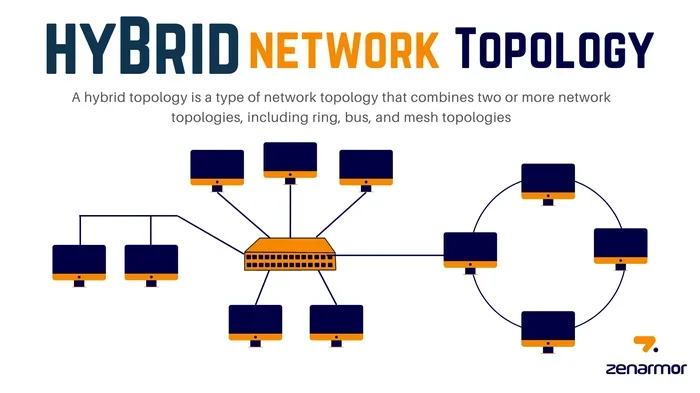
Hybrid networks combine on-premises infrastructure with cloud resources to give businesses the best of both worlds. They offer flexibility, scalability, and cost savings that traditional setups simply cannot match. More companies are adopting hybrid networks every year because they support modern work styles and growing data needs. This guide breaks down everything you need to know about how hybrid networks work and why they matter for your business.
Hybrid networks are changing the way businesses operate. They blend traditional on-premises setup with modern cloud services. The result is a flexible network architecture that adapts to what a company needs. Whether you run a small team or a large enterprise, understanding hybrid networks can give you a real edge.
In this article, we will walk through everything you need to know. We will cover what hybrid networks are, how they work, and why so many businesses are making the switch. You will also learn about the challenges, the best practices, and real-world examples that show the power of this approach.
Key Takeaways
- Hybrid networks blend local infrastructure with cloud services: This setup gives businesses control and flexibility at the same time.
- They improve scalability and cost efficiency: You only pay for extra cloud resources when you need them.
- Security stays in your hands: Sensitive data can remain on-premises while less critical workloads move to the cloud.
- Hybrid networks support remote and hybrid work: Employees can access resources from anywhere with proper setup.
- Migration takes planning: Common mistakes include poor bandwidth assessment and ignoring security policies.
- Small businesses benefit too: Even smaller setups can use hybrid networks with the right tools and budget.
📑 Table of Contents
- What Are Hybrid Networks?
- Why Businesses Are Switching to Hybrid Networks
- Hybrid Networks vs Traditional Networks
- Key Components of a Hybrid Network
- Hardware and Devices for Hybrid Networks
- Common Challenges and How to Avoid Them
- Expert Insights on Hybrid Networks
- Is a Hybrid Network Right for Your Business?
- Conclusion
What Are Hybrid Networks?
A hybrid network is a setup that uses both local hardware and cloud-based resources. Think of it as a bridge between your office servers and remote cloud platforms. Your critical systems stay on-premises, while less sensitive tasks run in the cloud. This hybrid IT environment gives you the control of local infrastructure with the flexibility of the cloud.
Not all businesses need the same thing. Some companies keep everything on-site. Others move fully to the cloud. But a hybrid deployment splits the workload. It puts each task where it fits best. This is called a multi-cloud strategy when it involves more than one cloud provider.
How Hybrid Networks Work
The core idea is simple. Your local data center handles what it does best. The cloud handles the rest. They talk to each other through secure connections. This could be a direct private link or a virtual private network. The key is that everything works together as one unified system.
For example, your email might run on a local server. But your file storage and backup could live in the cloud. Your employees access both systems the same way. They do not need to know where the data actually lives. That is the beauty of hybrid networks.
Why Businesses Are Switching to Hybrid Networks
More companies are choosing hybrid networks every year. The reasons are clear. This approach solves many problems that come with purely local or purely cloud-based setups. Let us look at the biggest benefits.
Flexibility and Scalability
With a hybrid network, you can scale up or down easily. Need more storage during a busy season? Spin it up in the cloud. When things slow down, scale back. You do not have to buy expensive new hardware for every growth spurt. This workload distribution keeps costs in check.
Cost Savings
Running a full on-premises setup is expensive. You need servers, cooling, power, and maintenance staff. Going fully cloud can also get pricey over time. A hybrid network lets you balance the cost. Keep what you already have. Move only what makes sense to the cloud. This smart cloud migration approach saves real money.
Better Security and Compliance
Some data must stay on-site for legal or security reasons. Hybrid networks let you keep sensitive information local. At the same time, you can still use cloud tools for everyday tasks. Your network security policies apply across both environments. This gives you strong control over your data.
Support for Remote and Hybrid Work
Today, many teams work from home or in mixed settings. A hybrid IT environment makes this easy. Employees can access local resources through secure connections. They can also use cloud apps from anywhere. This kind of unified communication keeps teams connected no matter where they are.
Hybrid Networks vs Traditional Networks
It helps to compare hybrid networks with traditional setups. Here is a quick look at how they stack up.
| Feature | Traditional Network | Hybrid Network |
|---|---|---|
| Infrastructure | All on-premises | Local + cloud |
| Scalability | Limited by hardware | Cloud scales easily |
| Cost Model | High upfront cost | Pay-as-you-go option |
| Security Control | Full local control | Control across both |
| Remote Access | Needs VPN setup | Built-in cloud access |
| Maintenance | High maintenance | Shared responsibility |
As you can see, hybrid networks offer more balance. They give you the security of local systems with the convenience of the cloud. Traditional networks still work for some use cases. But for most modern businesses, the hybrid approach wins.
Key Components of a Hybrid Network
Building a hybrid network means putting together several pieces. Each part plays an important role. Here are the core components you need to understand.
On-Premises Infrastructure
This is your local hardware. It includes servers, routers, switches, and storage devices. Your data center might be in a dedicated server room or a closet. This is where you keep the data and systems that need to stay close and secure.
Cloud Services
Cloud platforms like AWS, Microsoft Azure, or Google Cloud handle the remote side. You can use cloud connectivity to link your local setup with these platforms. The cloud gives you extra storage, computing power, and software services on demand.
Networking Equipment
Routers, firewalls, and load balancers connect everything. They make sure data flows smoothly between your local systems and the cloud. A good SD-WAN setup can make this connection faster and more reliable.
Management Tools
You need software to monitor and manage the whole hybrid deployment. These tools watch performance, spot issues, and keep everything running. Without proper network management, a hybrid setup can get messy fast.
Hardware and Devices for Hybrid Networks
Setting up a hybrid network starts with the right hardware. The devices you choose matter a lot. They affect speed, reliability, and how well everything works together.
When picking devices for your office or workspace, consider what fits your needs best. For laptops, you want machines that handle both local apps and cloud tools smoothly. Checking out What Are The Best Laptop Brands can help you find reliable options that work well in a hybrid network environment. You need devices that stay stable, run cool, and connect easily to both local and cloud resources.
For smaller setups or edge locations, compact machines are a smart choice. Mini PCs are affordable, use less power, and fit in tight spaces. They are great for branch offices or remote workstations. To learn more about whether mini PCs fit your needs, check out Are Mini PCs Good For Gaming, which also covers their performance and value for general computing tasks.
Servers and networking gear form the backbone of your local side. You want reliable hardware that can handle your daily load. For businesses that prefer a ready-made setup over building from scratch, Are Prebuilt PCs A Good Idea explores whether prebuilt systems can serve as a solid foundation for your hybrid network infrastructure.
Common Challenges and How to Avoid Them
Hybrid networks are powerful, but they come with challenges. Knowing these pitfalls helps you plan better.
Poor Bandwidth Planning
Your connection between local and cloud must be fast enough. If it is not, everything slows down. Measure your current usage. Add headroom for growth. Do not guess. Plan your bandwidth carefully before you go live.
Inconsistent Security Policies
Your local and cloud environments need the same security rules. If one side is weaker, attackers will find it. Apply network security policies across the board. Use firewalls, encryption, and access controls everywhere.
Ignoring Latency
Distance between your local setup and the cloud can cause delays. This is called latency. It affects real-time apps like video calls or file sharing. Choose cloud regions close to your office to reduce this problem.
Overcomplicating the Setup
Some businesses try to do too much at once. Keep your hybrid deployment simple at first. Add complexity only when you need it. A clean setup is easier to manage and troubleshoot.
Quick Tips to Avoid Mistakes
- Map your traffic first: Know what data moves where before you build.
- Set clear security rules: Apply them to both local and cloud sides.
- Start small: Migrate one workload at a time.
- Monitor everything: Use tools that track performance across the whole network.
- Train your team: Make sure staff understand how the hybrid setup works.
Expert Insights on Hybrid Networks
Industry experts agree that hybrid networks are here to stay. The trend toward edge computing makes them even more important. Edge computing brings processing closer to where data is created. This reduces delays and improves performance.
Many businesses now use hybrid networks as their default setup. They start with what they have on-site. Then they add cloud services as needed. This phased approach works well. It lets teams learn as they grow without big upfront risks.
The rise of remote work also boosted hybrid networks. Companies needed a way to support employees at home while keeping data secure. The hybrid model answered both needs. It gave workers access to tools and kept sensitive data under control.
Is a Hybrid Network Right for Your Business?
Not every business needs a hybrid network. But many do. If you have sensitive data that must stay local, a hybrid setup makes sense. If your workloads change with the seasons, it helps too. If you are moving toward remote work, a hybrid IT environment supports that transition well.
Ask yourself a few questions:
- Do you have data that must stay on-site for compliance?
- Do your workloads change a lot throughout the year?
- Do you need to support remote or hybrid workers?
- Are you looking to reduce IT costs over time?
- Do you want the flexibility to scale without buying new hardware?
If you answered yes to most of these, hybrid networks could be a great fit for you. Start with a small pilot. Migrate one or two workloads. See how it goes. Then expand from there.
Conclusion
Hybrid networks give businesses the best of both worlds. They combine the control of local infrastructure with the flexibility of the cloud. The result is a setup that is scalable, cost-effective, and secure. More companies are discovering that this approach fits their needs perfectly.
Whether you are a small business or a large enterprise, hybrid networks can transform how you work. The key is to plan carefully, choose the right hardware, and keep your security policies strong. With the right approach, your hybrid IT environment will serve you well for years to come.
Start small, learn as you grow, and do not be afraid to adjust. The beauty of a hybrid network is that it grows with you. Your business deserves a network that keeps up with your goals.
Frequently Asked Questions
What is a hybrid network in simple terms?
A hybrid network is a setup that uses both local servers and cloud services together. Your office hardware handles some tasks, while the cloud handles others. They work as one connected system, giving you flexibility and control.
How is a hybrid network different from a cloud-only network?
A cloud-only network runs everything remotely. A hybrid network keeps some systems on-site and moves others to the cloud. This gives you more control over sensitive data while still enjoying the benefits of cloud services.
Are hybrid networks more expensive than traditional setups?
Not necessarily. Hybrid networks can actually save money because you only use cloud resources when you need them. You keep your existing local hardware and avoid the cost of replacing everything.
What industries benefit most from hybrid networks?
Healthcare, finance, and legal industries benefit a lot because they have strict data rules. But really, any business with changing workloads or remote workers can gain from a hybrid IT environment. Even retail and education companies use them.
How hard is it to set up a hybrid network?
The setup takes planning but is not overly complex. You need reliable networking gear, a good internet connection, and clear security policies. Starting small and expanding over time makes the process much easier.
Can a small business use a hybrid network?
Yes, small businesses can benefit from hybrid networks too. You do not need a huge budget. A few local servers paired with cloud storage and services can give a small team the flexibility and security they need.