How Do You Know If a Security Camera Is On
Wondering if that security camera is actually recording? Look for LED indicators, listen for faint clicks, and verify through the camera’s app or web portal. These quick checks help you confirm activity and protect your privacy.
Key Takeaways
- LED indicator: Most cameras flash a green or blue light when recording.
- Sound cue: A soft click or whirring noise often means the lens is moving or the sensor is active.
- App verification: Logging into the camera’s app shows live status and last activity.
- Power source check: A plugged‑in camera usually stays on; battery‑powered units may enter sleep mode.
- Privacy modes: Some cameras have “off” switches or privacy shutters you can see physically.
- Network traffic: A steady data flow on your router indicates the camera is streaming.
- Legal awareness: Knowing when a camera is on protects you from accidental privacy violations.
📑 Table of Contents
Introduction
Security cameras are everywhere – on storefronts, in office hallways, and even in our homes. They give us peace of mind, but they also raise a simple question: how do you know if a security camera is on? The answer isn’t always obvious, especially with modern devices that hide their status behind sleek designs.
In this friendly guide we’ll walk you through the most reliable ways to tell if a camera is recording, whether it’s a tiny indoor dome or a rugged outdoor box. We’ll cover visual clues, sound cues, app checks, and even a few tech‑savvy tricks you can try at home. By the end you’ll be able to spot an active camera in seconds and feel confident that your privacy (or the security of your property) is being handled the way you expect.
1. Visual Indicators – The Light That Talks
LED status lights
Almost every modern security camera has an LED that signals power and recording status. The most common colors are:
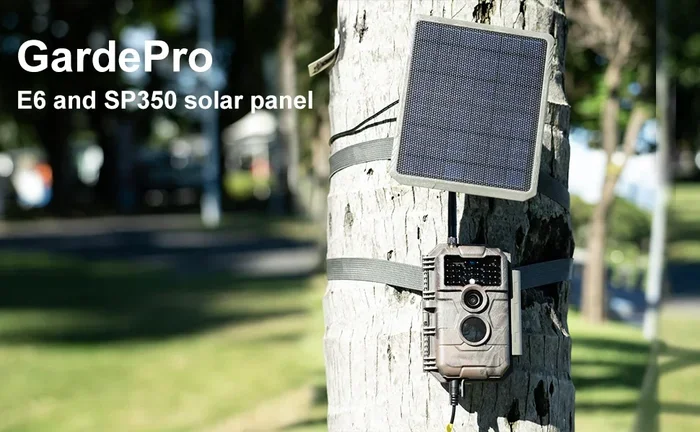
Visual guide about How Do You Know If a Security Camera Is On
Image source: img.ltwebstatic.com
- Green: Often means the camera is powered and ready to record.
- Blue: Usually indicates live streaming or active recording.
- Red: Some cameras use red for night‑vision mode.
Look for a steady glow or a blinking pattern. A rapid blink may mean the camera is booting, while a slow pulse often signals recording.
Physical shutters and privacy covers
Higher‑end models sometimes include a mechanical shutter that slides over the lens when the camera is off. If you see a dark bar covering the lens, the camera is likely in privacy mode. This feature is common in business environments where privacy laws require a clear “off” indicator.
External signs and placement
Even if the LED is hidden, the camera’s placement can give clues. Outdoor bullet cameras often have a small clear dome that reflects light, making the LED visible from a distance. Indoor dome cameras may be mounted near a ceiling light, so a faint glow can be seen against the ceiling.
2. Auditory Clues – Listening to the Machine
Click and whirr sounds
Many cameras make a soft click when the lens adjusts (especially PTZ – pan, tilt, zoom – models). A faint whirr may indicate the motor is moving. These noises are subtle but can be heard in a quiet room.
Visual guide about How Do You Know If a Security Camera Is On
Image source: i.weibomingzi.com
Infrared emitters
When night vision is active, infrared LEDs often emit a faint red glow that is visible to the naked eye. In total darkness you may not see the light, but you can sometimes feel a gentle hum from the IR emitters.
Alert tones
Some cameras emit a short beep when motion is detected or when they start recording. Check the user manual – many manufacturers let you disable these tones to keep the camera discreet.
3. Digital Confirmation – Using Apps and Web Interfaces
Log into the camera’s app
The quickest way to confirm status is to open the camera’s companion app on your phone or tablet. Most apps display a live feed, a “online” badge, and the last recorded timestamp. If the feed is live, the camera is definitely on.
Check the web portal
If the camera supports a browser interface, type its IP address into a web browser. A login screen followed by a live view confirms activity. Some routers even list connected devices; a constantly communicating IP address usually means the camera is streaming.
Review motion‑event logs
Many apps keep a log of motion events or recordings. Seeing recent entries (within the last few minutes) is solid proof the camera has been active.
4. Power Source and Connectivity Checks
Wired vs. battery‑powered cameras
Wired cameras are typically always on as long as they have power. A quick glance at the power adapter or PoE (Power over Ethernet) switch can confirm they’re receiving electricity.
Battery‑operated models
Battery cameras often enter a low‑power sleep mode when idle. Look for a power‑saving indicator (often a dim LED). If the camera’s battery level is high and you can hear it waking up, it’s likely active.
Router traffic monitoring
Log into your home router and view the bandwidth usage per device. A camera that is streaming video will show a steady upload stream, usually a few hundred kilobits per second. This method is especially handy for hidden cameras that lack visible LEDs.
5. Legal and Privacy Considerations
Know the local laws
In many regions, it is illegal to record audio without consent, and some places require a visible indication that video recording is taking place. Understanding these rules helps you avoid accidental violations.
Ask for permission
If you’re in a public space like a café or a coworking area, it’s courteous to ask the owner whether the cameras are always on. Most businesses will be transparent about their security setup.
Use privacy shields
If you’re uncomfortable with a camera’s presence, consider using a simple privacy shield – a piece of cardboard or a camera cover that blocks the lens when you need privacy. Just remember to remove it if the area requires monitoring for safety.
6. Practical Tips & Quick Checks
Carry a small flashlight
In a dark room, shine a flashlight at the camera lens. The LED indicator will often reflect off the glass, making it easier to spot.
Use a smartphone camera
Many smartphone cameras can detect infrared light. Point your phone’s camera at the security camera in total darkness; if you see a faint red glow on your phone’s screen, the IR LEDs are active, meaning the camera is on.
Check the manual for “stealth mode”
Some manufacturers offer a stealth mode that disables the LED while keeping recording active. If you suspect this feature, consult the user guide and look for a physical switch or a setting in the app.
Try the “network ping” trick
Open a command prompt and ping the camera’s IP address (e.g., ping 192.168.1.45). A consistent response indicates the camera is powered and connected.
Combine multiple methods
Relying on just one cue can be misleading. For best results, combine visual, auditory, and digital checks. If the LED is off but you hear a click and the app shows live feed, the camera is definitely on.
Conclusion
Knowing how to tell if a security camera is on doesn’t have to be a mystery. By watching for LED lights, listening for subtle sounds, verifying through apps or web portals, and checking power and network activity, you can confidently determine a camera’s status in seconds. These simple habits protect your privacy, ensure compliance with local laws, and give you peace of mind that your security system is working as intended.
Next time you walk past a camera, remember these quick checks. And if you’re installing your own system, consider adding clear status indicators or privacy shutters to make life easier for everyone.
Frequently Asked Questions
Can I tell if a camera is on without looking at its LED?
Yes. You can listen for faint clicks, check the camera’s app for a live feed, or monitor network traffic on your router to see if data is being sent.
Do all security cameras have a visible indicator?
No. Some models, especially those designed for discreet monitoring, may hide or disable the LED. In such cases, use the app or router check to confirm activity.
What does a blinking red light usually mean?
A blinking red light often indicates night‑vision mode or that the camera is recording in low‑light conditions.
Is it legal to record video without notifying people?
Legal requirements vary by country and state. Many places require a visible sign or indicator for video recording, while audio recording usually needs explicit consent.
How can I disable the LED on my camera?
Check the camera’s settings in its app; many manufacturers include an option to turn off the status LED for stealth mode.
Why does my camera’s app show “offline” even though I see the LED on?
This can happen if the network connection is interrupted. Verify Wi‑Fi strength, restart the router, or check that the camera’s firmware is up to date.