Do Usb Condoms Work
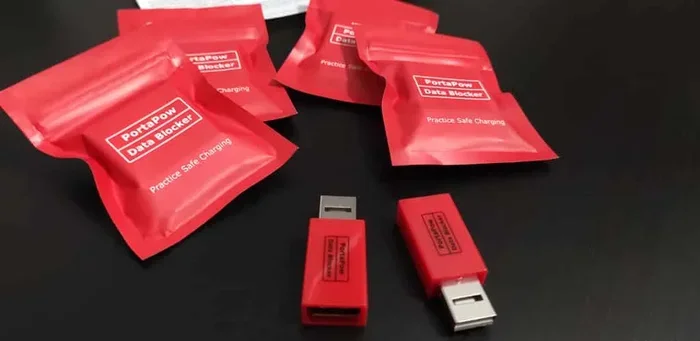
Do USB condoms work? Yes, they do. A USB condom is a small adapter that blocks data transfer while letting power flow through. It protects your device from juice jacking and data theft at public charging stations. If you charge your phone or laptop in airports, cafes, or hotels, a USB security device is a smart investment.
Have you ever plugged your phone into a USB port at an airport, hotel lobby, or coffee shop and wondered what happens behind the scenes? You hand over your charging cable, and suddenly your phone is connected to a device you know nothing about. It sounds like something out of a spy movie, but the risk is very real. This is where a USB condom comes in.
A USB condom is a small, unobtrusive adapter that sits between your charging cable and the USB port. Its job is simple but important: it allows electricity to flow through while blocking any data connection. Think of it as a bouncer for your USB port. It lets power in but keeps data thieves out. But the big question remains: do USB condoms work the way they claim?
The short answer is yes. USB condoms are real, they work, and they are one of the easiest ways to protect your device when charging in public. In this guide, we will break down everything you need to know. We will look at how they work, why you need one, what to watch out for, and whether they are worth the money. Let us get into it.
Key Takeaways
- USB condoms work: They block data pins and allow only power to pass through, keeping your device safe.
- Juice jacking is real: Public USB ports can be used to steal data or install malware on your device.
- Easy to use: You simply plug the USB condom between your cable and the charging port.
- Affordable: Most USB data blockers cost between $5 and $15, making them a budget-friendly security tool.
- Works with all USB types: They come in USB-A, USB-C, and Micro-USB versions for different devices.
- Not 100% foolproof: Always use trusted charging sources when possible, even with a USB condom.
📑 Table of Contents
What Is a USB Condom and How Does It Work?
A USB condom is also called a USB data blocker or a charge-only adapter. It is a small dongle that fits between your USB cable and the charging port. Inside, it has a clever design that disconnects the data pins while keeping the power pins active. This means your device gets the electricity it needs without any data connection.
The Science Behind USB Condoms
Every USB cable has multiple pins inside. The power pins carry electricity. The data pins carry information. A USB condom physically blocks the data pins so nothing can pass through them. The power pins stay open, so your device charges normally. This is why it is sometimes called a charge-only adapter. It only lets power through and nothing else.
The process is automatic. You do not need to install any software or change any settings. You plug in the USB condom, plug in your cable, and your device starts charging. That is it. No apps, no setup, no fuss. It works the same way every time, which is exactly what you want from a security tool.
Types of USB Condoms
USB condoms come in different shapes and sizes to fit various devices. Here are the most common types you will find:
- USB-A condoms: These fit standard USB-A ports found on older laptops, wall chargers, and public charging stations.
- USB-C condoms: These are for modern devices like newer laptops, Android phones, and tablets that use USB-C ports.
- Micro-USB condoms: These fit older Android phones and other devices that use the smaller Micro-USB connector.
- Multi-port adapters: Some models support multiple connector types in one device, which is great if you use different cables.
When shopping for a USB security device, make sure you pick the right type for your devices. Most brands offer universal models that work across different port types, so check the product details before buying.
Why Do You Need a USB Condom?
You might be thinking, “I never charge my phone in public, so I do not need this.” But the truth is, public charging is more common than you think. Airports, trains, hotels, shopping malls, and restaurants all offer USB charging stations. Every time you use one of those ports, you are trusting a device you have never seen and cannot control.
The Threat of Juice Jacking
The biggest reason to use a USB condom is to prevent juice jacking. Juice jacking is a cyberattack where a malicious USB port steals data from your device or installs malware while you charge. The name comes from the idea that the attacker is “jacking” your data while your phone is “juicing” up with power.
Here is how it works. When you plug your phone into a USB port, the device on the other end can communicate with your phone. It can ask for access to your photos, contacts, messages, and even install harmful software. All of this happens in the background without you noticing. A USB data blocker stops this completely because it cuts off the data connection.
Who Is at Risk?
Anyone who charges a device in a public place is at risk. This includes:
- Travelers who use airport or train station charging stations
- People who work from cafes and use public USB ports
- Hotel guests who use the USB ports in the room
- Anyone who borrows a cable or uses a shared charging station at events
If you travel often or charge your devices outside of your home, a USB condom is one of the simplest and most effective precautions you can take. It costs very little and takes seconds to use.
Do USB Condoms Really Work? What the Experts Say
The question on everyone’s mind is whether USB condoms actually deliver on their promises. The answer is yes, they do work. Security researchers and cybersecurity experts have tested these devices and confirmed that they effectively block data transfer. When a USB condom is properly inserted between your cable and the charging port, no data can pass through.
Independent Testing and Results
Several cybersecurity firms have conducted independent tests on popular USB data blocker brands. In every case, the devices successfully prevented data transfer while allowing full charging speeds. The tests involved connecting the blocked USB port to computers and attempting to access the device on the other end. The result was always the same: no data connection was established.
That said, not all USB condoms are created equal. Cheap, uncertified models may not work as advertised. Some may block data but also slow down charging speeds. Others may not fit securely in the port and could wobble loose. This is why it is important to buy from reputable brands and look for products that have been tested and certified.
Limitations to Keep in Mind
While USB condoms are effective, they are not a silver bullet. Here are some limitations to understand:
- They do not protect against compromised wall chargers: If the wall plug itself is tampered with, a USB condom will not help. The data block only applies to the USB connection.
- They do not encrypt your data: A USB condom blocks data transfer, but it does not encrypt the data already on your device.
- They do not protect against wireless attacks: Some modern attacks use Bluetooth or Wi-Fi. A USB security device only protects against wired USB threats.
Think of a USB condom as one layer in a multi-layered security approach. It is not the only thing you need, but it is a very important one.
How to Choose the Right USB Condom
Not all USB data blockers are the same. When you start shopping, you will find dozens of options at different price points. Here is what to look for to make sure you get a quality product.
Things to Look For
- Certification: Look for products that have been tested by a recognized cybersecurity organization. Certification tells you the product has been independently verified.
- Build quality: A good USB condom should feel solid and fit snugly in the port. Avoid flimsy plastic models that feel loose.
- Compatibility: Make sure it supports your device type. Check for USB-A, USB-C, or Micro-USB compatibility based on your needs.
- Charging speed: Some USB condoms support fast charging standards like Quick Charge or Power Delivery. If you want fast charging, look for models that support these protocols.
- Brand reputation: Stick with well-known brands that have positive reviews and a track record of quality products.
Top Brands to Consider
Several brands have built a solid reputation in the USB security device market. Some of the most trusted names include PortaPow, Sync Stop, and Innjoo. These brands offer reliable products that have been tested and reviewed by independent security experts. When in doubt, check online reviews and look for feedback from other users who have tested the product in real-world situations.
Common Mistakes People Make with USB Condoms
Even though USB condoms are simple to use, people still make mistakes that reduce their effectiveness. Here are some common errors to avoid.
Using a Damaged USB Condom
Over time, USB condoms can wear out. The pins inside may bend or corrode, especially if you use them frequently. A damaged condom may not block data properly. Check your device regularly for signs of wear and replace it if it looks worn out or loose.
Assuming All USB Ports Are Safe with a Condom
A USB condom protects your data, but it does not protect your device from physical damage or electrical issues. If a USB port has been tampered with at the power level, it could still damage your device. Always inspect the charging station or port before plugging in anything.
Forting to Use It Consistently
The biggest mistake is forgetting to use your USB data blocker. If you only use it sometimes, you leave gaps in your protection. Make it a habit to always carry one in your bag or keep one plugged in at your desk. Consistency is key when it comes to cybersecurity.
Quick Tips for Using USB Condoms Effectively
Here are some practical tips to get the most out of your USB condom:
- Keep one in your travel bag: Always have a USB security device with you when you travel. You never know when you will need to charge on the go.
- Label your condom: If you have multiple cables and adapters, label your USB condom so you do not forget it at a charging station.
- Pair it with a personal charger: The best protection is your own wall charger or power bank. Use a USB condom as a backup, not your only line of defense.
- Check for snug fit: Make sure the condom sits firmly in the port. A loose connection could reduce charging speed or fail to block data properly.
- Update your device software: Keep your phone and laptop software up to date. This adds another layer of protection against potential threats.
Using a USB condom is one of the easiest cybersecurity habits you can build. It takes two seconds to plug in, and it could save you from a serious data breach. If you are serious about protecting your personal information, a USB data blocker is a no-brainer addition to your tech kit.
Final Thoughts: Do USB Condoms Work?
So, do USB condoms work? Absolutely. They are a simple, affordable, and effective way to protect your devices from data theft and malware when charging in public. A USB condom blocks data pins while allowing power to flow, giving you peace of mind every time you plug in.
No cybersecurity tool is perfect, and a USB condom is not a replacement for good digital hygiene. But it is one of the most practical and accessible tools you can use. Whether you travel frequently, work from cafes, or simply charge your phone in public places, a USB security device adds a valuable layer of protection.
The next time you see a public USB port, you will know exactly what to do. Grab your USB data blocker, plug it in, and charge with confidence. Your data will thank you.
Frequently Asked Questions
What does a USB condom do?
A USB condom blocks data transfer through a USB cable while allowing power to pass through. It protects your device from data theft and malware when you charge in public places like airports, hotels, or cafes.
Is juice jacking a real threat?
Yes, juice jacking is a real cybersecurity threat. It happens when a malicious USB port steals data from your device or installs malware while you charge. Using a USB data blocker is the best way to prevent this.
Can a USB condom slow down charging?
Most quality USB condoms do not affect charging speed. However, cheap or poorly made models might slow down power delivery. Look for certified products that support your device’s fast charging standards.
Do I need a USB condom for my laptop?
Yes, if you charge your laptop in public places, a USB condom is a good idea. Laptops often store sensitive data, making them attractive targets for data theft through compromised USB ports.
Are USB condoms compatible with all devices?
Most USB condoms come in different types to fit USB-A, USB-C, and Micro-USB ports. Make sure you choose the right type for your device. Many brands offer universal adapters that work with multiple port types.
How much does a USB condom cost?
A good quality USB security device typically costs between $5 and $15. This small investment can save you from potential data loss, identity theft, and the cost of repairing a compromised device.