Why Is Everything Switching to Usb C
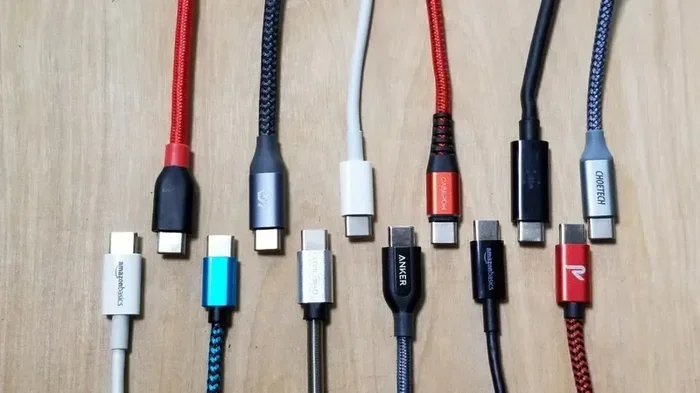
USB-C is replacing older ports because it offers faster data transfer, reversible plugging, and universal compatibility across devices. This small connector delivers power, video, and data through one cable, making it the go-to standard for laptops, phones, and accessories. Understanding USB-C helps you future-proof your tech setup and ditch cable clutter for good.
There is a good chance you have noticed something strange happening. Your new laptop has a different port. Your phone charger looks different. Even your headphones now use a slim, oval-shaped connector. The world is moving to USB-C, and fast. This tiny port is quietly replacing nearly every other connection type in the tech world.
If you are wondering why everything is switching to USB-C, you are in the right place. This guide breaks down the real reasons behind the shift. We will cover speed, power, compatibility, and what it means for your everyday devices. By the end, you will see why USB-C is not just a trend. It is the future of connectivity.
Key Takeaways
- Universal Connector: USB-C works with laptops, phones, tablets, and peripherals, replacing multiple cable types.
- Reversible Design: The connector flips both ways, so you never flip it wrong again.
- Fast Charging: USB Power Delivery can charge devices much faster than older USB standards.
- High Data Speeds: USB 3.2 and Thunderbolt over USB-C deliver blazing fast transfer rates.
- One Cable for Everything: Video, data, and power all run through a single USB-C cable.
- Growing Adoption: Major brands like Apple, Samsung, and Google have already made the switch.
- Future-Proof Investment: Buying USB-C accessories now keeps your setup ready for tomorrow’s devices.
📑 Table of Contents
What Exactly Is USB-C?
USB-C stands for Universal Serial Bus Type-C. It is a small, oval-shaped connector designed to carry data, power, and video signals. Unlike the old rectangular USB-A ports, USB-C is reversible. You can plug it in either direction. No more flipping the cable three times to get it right.
The USB-C connector is about the size of a micro-USB port but much more capable. It supports the latest USB standards, including USB 3.2 and USB4. It also works with Thunderbolt 3 and Thunderbolt 4 protocols. This means one small port can do the job of many older ports combined.
Here is what makes USB-C special at a glance:
- Reversible design — plug it in any direction
- Compact size — smaller than traditional USB-A
- High power delivery — up to 240 watts with USB PD
- Fast data transfer — up to 40 Gbps with Thunderbolt 4
- Video output — supports DisplayPort and HDMI alt modes
- Universal compatibility — works across brands and devices
The USB-C connector is not tied to one specific standard. It is a physical shape that can support many different protocols. This flexibility is a huge reason why manufacturers love it. They can use one port type and still offer multiple capabilities.
Why Is Everything Switching to USB-C?
The shift to USB-C is not random. Several powerful forces are driving this change. Let us look at the main reasons the industry is making the switch.
One Cable to Rule Them All
Before USB-C, you needed different cables for different jobs. You had a USB-A cable for your flash drive. A barrel charger for your laptop. A micro-USB for your phone. A HDMI cable for your monitor. The cable drawer became a mess. USB-C changes all of that.
With USB-C, a single cable can charge your laptop, transfer files to an external drive, connect to a display, and even audio to your USB-C headphones. This universal approach reduces clutter and saves money. You buy fewer cables and adapters. Your bag gets lighter. Your life gets simpler.
Many modern laptops now ship with only USB-C ports. The MacBook Air, for example, uses USB-C exclusively. Chromebooks and Windows ultrabooks follow the same path. This sends a clear message to consumers and accessory makers alike.
Faster Charging Than Ever Before
USB Power Delivery, or USB PD, is a game changer. It allows USB-C ports to deliver up to 240 watts of power. That is enough to charge a large laptop quickly. Compare this to the old USB-A standard, which maxed out around 7.5 watts for basic charging.
Fast charging matters more than ever. People want their devices powered up in minutes, not hours. USB-C with USB PD makes this possible. Phones, tablets, and laptops all benefit from the higher wattage.
Here is a quick comparison of charging speeds:
- USB-A (basic): up to 7.5 watts
- USB-C with USB PD: up to 240 watts
- USB-C with proprietary fast charge: varies by brand, often 65-100 watts
Because of these speeds, many people now use their USB-C charger for everything. Your phone, tablet, earbuds, and laptop can all share one power brick. This is a huge win for travel and desk setups.
Blazing Fast Data Transfer
Speed matters when you move large files. USB-C supports USB 3.2 Gen 2, which delivers 10 Gbps. Thunderbolt 3 and Thunderbolt 4 push that to 20 Gbps and 40 Gbps respectively. These speeds make it possible to transfer a full movie in seconds.
For creative professionals, this is a big deal. Video editors, photographers, and designers work with huge files every day. A fast USB-C connection means less waiting and more productivity. You can plug in an external drive and edit footage directly from it without lag.
You can also use a M.2 NVMe to USB-C SSD enclosure to get incredibly fast portable storage. These enclosures turn internal NVMe drives into super-speed external drives through a single USB-C cable. The result is storage that keeps up with your workflow.
USB-C and the Consumer Electronics Shift
The shift to USB-C is not limited to computers. Nearly every category of consumer electronics is adopting this connector. Let us explore how different industries are making the change.
Smartphones and Tablets
Apple made headlines in 2023 when the iPhone 15 switched to USB-C. The European Union played a big role in this decision. New regulations required a common charging standard for mobile devices. USB-C won that race.
Now, Android phones, iPads, and Samsung tablets all use USB-C. This means one charger can handle your entire family’s devices. Parents no longer need a drawer full of different charging cables. One USB-C cable handles it all.
Gaming and Peripherals
Gamers are also feeling the USB-C shift. Controllers, headsets, and external GPUs now commonly use USB-C connections. The Steam Deck runs entirely on USB-C for charging and docked play. Gaming laptops use USB-C for both power and display output.
Even audio gear is moving to USB-C. DACs, headphone amplifiers, and studio interfaces now feature USB-C connections. Musicians and audiophiles benefit from the digital audio quality that USB-C supports.
Storage and Accessories
External storage is one of the biggest beneficiaries of USB-C. Portable SSDs now offer blazing speeds through USB-C connections. The SanDisk Extreme Portable 2TB External USB-C NVMe SSD is a perfect example. It delivers up to 2000 MB/s transfer speeds in a pocket-sized drive.
Adapters and hubs have also exploded in popularity. A USB-C NVMe adapter lets you connect internal NVMe drives to any laptop with a USB-C port. These small accessories make USB-C even more versatile and practical for everyday use.
USB-C vs Older USB Standards
To truly understand the switch, it helps to compare USB-C with older connector types. The differences are significant.
| Feature | USB-A | USB-C |
|---|---|---|
| Shape | Rectangular | Oval, reversible |
| Max Data Speed | 5 Gbps (USB 3.0) | 40 Gbps (Thunderbolt 4) |
| Max Power | 7.5 watts (basic) | 240 watts (USB PD) |
| Video Output | No (requires adapter) | Yes (DisplayPort alt mode) |
| Reversible | No | Yes |
| Size | Large | Compact |
| Future Proof | No | Yes |
The table shows a clear picture. USB-C outperforms older USB standards in nearly every category. It is smaller, faster, more powerful, and more versatile. No wonder the industry is making the full switch.
One common question people ask is whether USB-C is the same as Thunderbolt. The answer is no. Thunderbolt is a protocol that can run over a USB-C connector. Not every USB-C port supports Thunderbolt. But every Thunderbolt port uses USB-C. This distinction matters when buying cables and devices.
How to Make the Switch Smoothly
If you are ready to embrace USB-C, here are some practical tips to make the transition easy.
Audit Your Current Cables
Start by looking at what you currently use. Which devices still rely on older USB-A or micro-USB connections? Make a list. Then gradually replace those cables with USB-C versions. You do not need to do it all at once.
Buy Quality Cables
Not all USB-C cables are created equal. Cheap cables may not support the full speed or power delivery of USB-C. Look for cables certified by USB-IF (USB Implementers Forum). These cables have been tested and meet official standards. A good USB-C cable is worth the extra few dollars.
Get a Good USB-C Hub
Since many modern laptops only have USB-C ports, a hub is essential. A USB-C hub adds USB-A ports, HDMI output, SD card slots, and more. This lets you connect all your older devices without buying new ones. A hub is one of the smartest USB-C investments you can make.
Check Compatibility Before Buying
Before purchasing a USB-C accessory, check what your device supports. Not every USB-C port supports every feature. Some only do charging. Others support data and video. Reading the specs saves frustration and wasted money.
Future-Proof with USB4
If you want the best of the best, look for USB4 support. USB4 is the newest USB standard and it runs exclusively over USB-C. It offers 40 Gbps speeds, supports multiple protocols, and is fully backward compatible. Investing in USB4 now means your setup stays relevant for years.
Common Mistakes People Make with USB-C
Even though USB-C is straightforward, some common mistakes can cause problems. Avoid these pitfalls to get the most out of your USB-C setup.
Using cheap, uncertified cables. This is the number one mistake. A poor quality cable can damage your device or fail to deliver full speeds. Always buy from reputable brands or look for USB-IF certification.
Assuming all USB-C ports are the same. A USB-C port on a budget laptop may only support basic charging and data. The USB-C port on a high-end laptop might support Thunderbolt 4 and 8K video output. Always check the specifications.
Ignoring power delivery limits. Not every USB-C charger delivers the same wattage. Using a low-wattage charger on a power-hungry laptop means slow charging or no charging at all under load. Match your charger to your device’s power needs.
Forgetting about adapter quality. A bad adapter can bottleneck your connection. If you are using a USB-C to HDMI adapter, make sure it supports the resolution and refresh rate you need. A $5 adapter from a random seller often causes headaches.
The Future of USB-C
USB-C is not slowing down. In fact, its role is only expanding. The EU mandated USB-C for all smartphones, tablets, and cameras sold in Europe starting in 2024. This regulation alone has accelerated adoption worldwide. Other regions are watching closely and may follow suit.
USB4 is the next evolution, and it is already gaining traction. USB4 doubles the bandwidth of USB 3.2 and introduces better resource allocation. It allows multiple data and display protocols to share the USB-C connection efficiently. This means one port can handle a fast external drive and a 4K monitor at the same time without slowdowns.
Wireless charging may grow, but wired connections through USB-C will remain essential. The reliability, speed, and versatility of USB-C are unmatched. As more devices adopt this standard, the ecosystem of compatible accessories continues to grow.
Accessories like M.2 NVMe SSD to USB 3.1 adapters and compact external SSDs are becoming staples in USB-C setups. The versatility of the USB-C connector means it will continue to be the backbone of personal technology for years to come.
The shift to USB-C is more than just a connector change. It represents a broader move toward simplicity, speed, and universal compatibility. When one cable can do everything, life gets easier. That is the promise of USB-C, and it is a promise the industry is keeping.
Final Thoughts
So why is everything switching to USB-C? The answer comes down to one word: better. USB-C is better because it is faster, more powerful, reversible, and universal. It replaces a tangled mess of cables with a single, elegant connector. It charges devices quicker, transfers files faster, and connects to more peripherals than any older standard.
The industry has spoken. Major brands, governments, and consumers all agree that USB-C is the way forward. Whether you are buying a new laptop, upgrading your storage, or just replacing old cables, USB-C is the smart choice. Embrace it now, and you will be ready for whatever comes next.
Make the switch today. Your future self will thank you when every device, cable, and accessory works together seamlessly. That is the real power of USB-C.
Frequently Asked Questions
Is USB-C the same as Thunderbolt?
No, but they are related. Thunderbolt is a protocol that uses the USB-C connector shape. Not every USB-C port supports Thunderbolt, but every Thunderbolt port uses USB-C. Check your device specs to see if Thunderbolt is supported.
Can I use a USB-C cable to charge my phone?
Yes, most modern phones use USB-C for charging. Just make sure your charger and cable support the right power delivery for your device. Most phones charge fine with standard USB-C cables and a USB PD charger.
Why does my USB-C cable feel different from other cables?
USB-C cables are smaller and oval-shaped compared to the older rectangular USB-A cables. The reversible design means there is no wrong way to plug them in, which is a major upgrade in convenience.
Do I need a special cable for fast charging with USB-C?
You need a cable that supports USB Power Delivery and the wattage your device requires. Cheap or low-quality cables may limit charging speed. Look for cables rated for the power level you need.
Can I connect a monitor to my laptop using USB-C?
Yes, if your laptop’s USB-C port supports video output. Many USB-C ports include DisplayPort alt mode, which lets you connect directly to a monitor with a USB-C to HDMI or USB-C to DisplayPort cable.
Are all USB-C adapters the same?
No, adapters vary widely in quality and capability. Some support only basic data transfer, while others handle 4K video, fast charging, and multiple peripherals. Always check the specs before buying a USB-C adapter.