Why Do Micro Usb Ports Wear Out
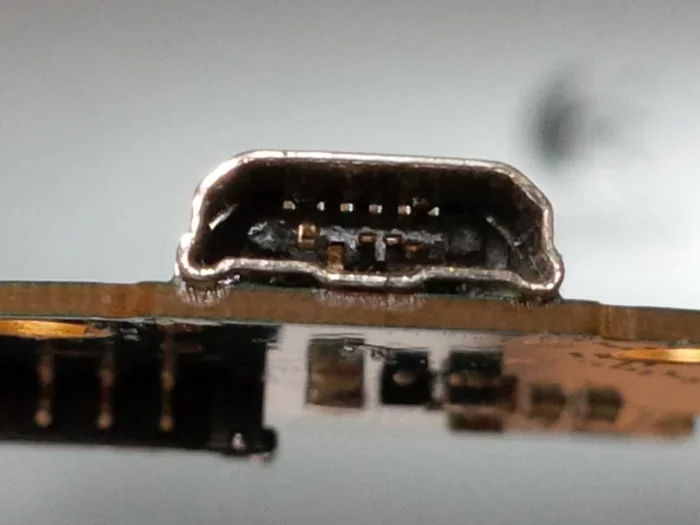
Micro USB ports wear out due to repeated insertion cycles, friction, dust buildup, and poor cable handling. Over time, the thin metal contacts inside the port degrade, leading to loose connections and charging failures. Understanding the causes helps you prevent damage and avoid costly repairs.
We have all been there. You plug your charger into your phone, and it barely stays in. You have to hold it at a weird angle just to get it to charge. Or maybe your device just stopped recognizing the cable altogether. This is the frustrating reality of a worn-out Micro USB port. It happens to millions of devices every single day.
The Micro USB port is one of the most widely used connectors in the world. From smartphones and tablets to Bluetooth speakers and handheld gaming devices, this small port powered an enormous range of electronics for over a decade. But here is the thing most people do not think about: Micro USB ports are mechanical components. They move. They flex. They endure thousands of insertions. And eventually, they wear out.
In this article, we will explore exactly why Micro USB ports wear out, what causes the damage, and how you can prevent it. Whether you are dealing with a loose charging port right now or want to protect your devices before problems start, this guide has you covered.
Key Takeaways
- Physical wear from plugging and unplugging is the #1 reason Micro USB ports degrade over time.
- Dust, lint, and debris accumulate inside the port and interfere with the connection.
- Poor cable quality and forceful insertion accelerate port damage significantly.
- Moisture and corrosion can quietly destroy internal port contacts.
- Regular cleaning and gentle handling can double or triple the lifespan of your Micro USB port.
- Knowing when to replace a device or seek repair saves money and frustration.
📑 Table of Contents
- What Is a Micro USB Port and How Does It Work?
- The Top Reasons Why Micro USB Ports Wear Out
- How to Tell If Your Micro USB Port Is Worn Out
- How to Prevent Micro USB Port Wear
- When Should You Repair or Replace a Worn Micro USB Port?
- The Future: USB C and the Decline of Micro USB
- Common Mistakes That Accelerate Port Wear
- Expert Insights on Port Longevity
- Final Thoughts
What Is a Micro USB Port and How Does It Work?
Before we dive into why ports wear out, it helps to understand what is inside them. A Micro USB port is a small, rectangular connector found on many electronic devices. It has five pins inside that handle power delivery and data transfer. The outer shell protects these delicate pins, but it does not make them indestructible.
The port relies on a snug fit between the Micro USB connector on your cable and the female receptacle on your device. When you plug in a cable, the metal contacts press together to complete the electrical circuit. This repeated contact and separation creates friction. Over time, that friction takes a toll.
There are different USB standards that the Micro USB connector follows. USB 2.0 is the most common version found in Micro USB devices. It supports data transfer speeds up to 480 Mbps and delivers up to 2.5 watts of power. Newer versions like USB 3.0 offered faster speeds but were not commonly used in the Micro USB form factor. Regardless of the standard, the physical design of the port remains the same, and the same wear patterns apply.
The Top Reasons Why Micro USB Ports Wear Out
Several factors contribute to the degradation of Micro USB ports. Some are within your control, and others are simply part of normal use. Let us break them down.
Repeated Insertion and Removal Cycles
The most obvious cause of port wear is simply using the port over and over again. Every time you plug in or unplug a cable, the metal contacts inside the port rub against the cable connector. This is called connector fatigue. Over thousands of cycles, the contact points become thinner and less responsive.
Think of it like a door hinge. Open and close it a few hundred times, and it works fine. But open and close it ten thousand times, and it starts to get loose. The same principle applies to your Micro USB cable and port. Most people plug and unplug their devices multiple times a day. Over a year or two, that adds up fast.
Poor Cable Quality and Forceful Insertion
Not all cables are created equal. Cheap, poorly made cables often have connectors that do not fit snugly into the port. When a cable does not fit well, people tend to force it in at odd angles. This puts uneven pressure on the port’s internal pins and causes them to bend or deform.
Forceful insertion is one of the fastest ways to damage a Micro USB port. The port is designed to accept the cable with gentle, straight pressure. When you jam it in at an angle or use excessive force, you risk bending the tiny contact pins inside. Once bent, those pins may never make proper contact again.
Dust, Lint, and Debris Accumulation
This is a sneaky one. Over time, tiny particles like dust, lint, and pocket debris find their way into your Micro USB port. Even a small amount of lint can push the port connector away from the cable, creating an intermittent connection. You might notice your device charges sometimes but not others, or the cable falls out on its own.
People who carry their devices in pockets or bags are especially prone to this issue. The port acts like a small trap for lint and dust. Without regular cleaning, this buildup can cause significant USB connection issues over time.
Moisture and Corrosion
Moisture is the enemy of electronics. When water or humidity gets inside a Micro USB port, it can cause the metal contacts to corrode. Corrosion creates a layer of oxidation on the pins that prevents proper electrical contact. This type of damage is often irreversible without professional cleaning or port replacement.
Even sweat from your hands can contribute to gradual corrosion over time. If you frequently plug in your device with wet or sweaty hands, you are slowly introducing moisture into the port. In humid climates, this risk is even higher.
Device Drops and Physical Impact
Dropping your device can do more than crack the screen. The impact can shift the Micro USB port slightly inside the device’s chassis. Even a millimeter of misalignment can cause the cable to not seat properly. Over time, this repeated stress weakens the soldered connections between the port and the device’s circuit board.
How to Tell If Your Micro USB Port Is Worn Out
Recognizing the early signs of port wear can save you from sudden charging failures. Watch for these warning signals:
- Loose cable fit: The cable wobbles or falls out easily when plugged in.
- Intermittent charging: Your device charges sometimes but not others, especially when you move the cable slightly.
- Slow charging speeds: A worn port may not make full contact, resulting in slower USB power delivery.
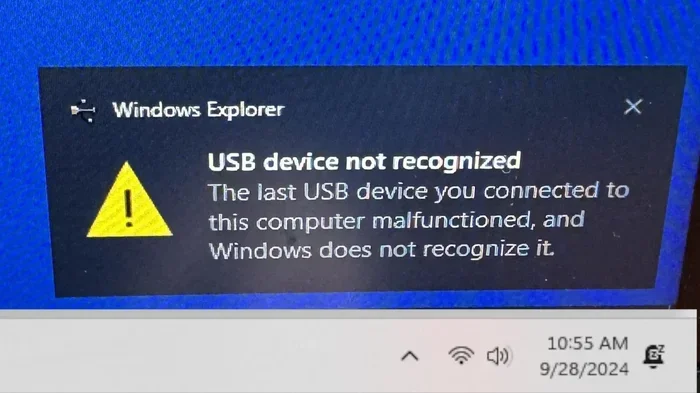
- Difficulty syncing data: Your computer may not recognize the device consistently when connected.
- Visible damage: You can see bent pins, discoloration, or debris inside the port with a flashlight.
- Heat at the port: If the port area gets unusually warm during charging, it may indicate poor contact resistance.
If you notice one or more of these signs, your port is likely showing wear. The good news is that catching it early gives you time to address the problem before it becomes a total failure.
How to Prevent Micro USB Port Wear
The good news is that you can take several steps to slow down port wear and keep your devices working longer. Here are practical tips that actually make a difference.
1. Pull the Cable Gently, Not by the Cord
Never yank the cable out by pulling on the cord itself. Always grip the connector and pull it straight out. Yanking the cord puts stress on the joint between the cable and the connector, which weakens both the cable and the port over time.
2. Keep the Port Clean
Regularly clean your Micro USB port to remove dust and lint. A wooden toothpick works great for gently scraping out debris. You can also use a can of compressed air to blow out particles. Avoid using metal objects like paper clips, as they can damage the internal pins.
Making port maintenance a weekly habit goes a long way. It only takes a few seconds and can prevent a lot of headaches.
3. Use High-Quality Cables
Invest in well-made cables from reputable brands. Quality cables have connectors that fit snugly and make proper contact. They also have better strain relief, which means the cable flexes at the connector rather than stressing the port. Cheap cables from unknown brands often have loose tolerances that grind against the port interior.
If you are looking for a reliable cable, check out options like the Sandisk Extreme Portable 2TB External USB C NVMe SSD which uses quality USB C connectors designed for durability. While this is a USB C product, the same principle of cable quality applies to all USB connections.
4. Avoid Using Your Device While Charging
Using your device while it charges means the cable gets bumped and moved frequently. This increases the number of micro-adjustments happening inside the port, accelerating wear. If possible, let your device charge undisturbed.
5. Store Devices Properly
When you carry your device in a bag or pocket, try to keep the port covered or protected. Port covers or even a small piece of tape over the port opening can prevent lint and dust from getting inside. This is a simple trick that many people overlook.
When Should You Repair or Replace a Worn Micro USB Port?
Sometimes, despite your best efforts, a Micro USB port wears out beyond repair. So how do you know when it is time to take action?
If your device still holds some charge and you can charge it occasionally by holding the cable in a specific position, you might be able to get by for a while. But if the port no longer charges at all or the cable falls out immediately, professional repair is likely your best option.
Port replacement is a common and relatively affordable repair at most electronics shops. A technician can remove the damaged port and solder a new one onto the device’s circuit board. However, for older or budget devices, the repair cost might not be worth it. In those cases, it may be time to consider replacing the device entirely.
Some people also wonder whether they can just use a different port type with an adapter. While adapters exist, they add another point of failure and do not solve the underlying problem. If your device has a worn Micro USB port, the real fix is either repairing the port or upgrading to a device with a more modern connector like USB C.
The Future: USB C and the Decline of Micro USB
It is worth noting that Micro USB is gradually being replaced by USB Type C across the electronics industry. USB C offers a reversible connector, faster data transfer, and more power delivery. The symmetrical design of USB C means there is no wrong way to plug it in, which significantly reduces port wear from angled insertions.
Many newer devices, including smartphones, tablets, and laptops, now use USB C as the standard. If you are shopping for a new device, choosing one with USB C can save you from the Micro USB port wear problem altogether. For those still using Micro USB devices, understanding how to care for the port becomes even more important since replacement parts may become harder to find over time.
Adapters like the M 2 NVMe SSD to USB 3.1 Adapter show how USB connectivity continues to evolve. While these adapters serve a different purpose, they highlight the broader trend toward more durable, versatile USB standards.
Common Mistakes That Accelerate Port Wear
Here are some habits that many people have without realizing they are damaging their ports:
- Using the wrong cable: Not all cables fit Micro USB ports the same way. Using a cable with a slightly different connector can grind against the port walls.
- Charging in dusty or dirty environments: Kitchens, workshops, and garages expose ports to more debris than clean indoor spaces.
- Ignoring early warning signs: A slightly loose port today becomes a completely dead port next month if you do not address it.
- Using cheap car chargers: Low-quality car charger cables often have poor connector fit and can cause rapid port degradation.
- Plugging in while the device is wet: Introducing moisture to a port, even in small amounts, accelerates corrosion.
Avoiding these mistakes alone can significantly extend the life of your Micro USB ports. It is all about being mindful of how you handle your devices every day.
Expert Insights on Port Longevity
According to electronics engineers, a well-maintained Micro USB port should last for around 10,000 insertion cycles under normal use conditions. That means if you plug and unplug your device twice a day, the port should last roughly 13 to 14 years. Of course, real-world conditions are rarely ideal, and many factors can shorten this lifespan considerably.
Engineers also point out that the biggest factor in premature port failure is not the number of insertions, but the angle and force applied during each insertion. A cable plugged in straight with gentle pressure will last far longer than one that is constantly jammed in at a tilt. This is why cable quality and user habits matter so much.
For those wondering about why my USB mouse is not working on my laptop or experiencing similar connectivity issues, port wear is one of the most common culprits. The same wear patterns affect all USB port types, not just Micro USB. Understanding this connection helps you troubleshoot and prevent future issues across all your devices.
Final Thoughts
Micro USB ports wear out because they are mechanical components that experience constant physical stress. From repeated insertions and poor cable quality to dust buildup and moisture exposure, many factors contribute to this inevitable degradation. But the good news is that you have more control over this process than you might think.
By adopting better habits, using quality cables, and keeping your ports clean, you can significantly extend the life of your Micro USB ports. These small changes save you time, money, and the frustration of dealing with unreliable connections. Taking care of your ports today means fewer problems tomorrow.
Remember, technology is meant to serve you. A little attention and maintenance go a long way in keeping your devices running smoothly. Start with the tips in this article and see the difference for yourself.
Frequently Asked Questions
How long should a Micro USB port last?
Under normal use conditions, a well-maintained Micro USB port can last around 10,000 insertion cycles, which translates to roughly 10 to 15 years for most users. However, poor handling habits can significantly shorten this lifespan.
Can a worn Micro USB port be repaired?
Yes, a worn Micro USB port can often be repaired by a professional technician. The repair involves desoldering the damaged port and replacing it with a new one. The cost is usually reasonable, but for older devices, replacement might not always be worth the expense.
Is it bad to use a device while it is charging?
Using your device while charging is not inherently bad, but it does increase cable movement and micro-adjustments inside the port. Over time, this can accelerate port wear. If possible, try to charge your device without frequent cable disturbance.
What is the best way to clean a Micro USB port?
The safest method is to use a wooden toothpick to gently scrape out lint and debris, followed by a burst of compressed air. Never use metal objects like pins or paper clips, as they can damage the internal contact pins.
Should I upgrade from Micro USB to USB C?
Yes, USB C offers a reversible connector, faster data speeds, and better durability. The symmetrical design reduces port wear from angled insertions. If you are buying a new device, USB C is the better long-term choice.
Why does my cable keep falling out of the port?
A cable that falls out easily usually indicates a worn or loose port. The internal metal contacts have degraded from repeated use, reducing their grip on the cable connector. Cleaning the port and using a higher-quality cable can sometimes improve the fit temporarily.