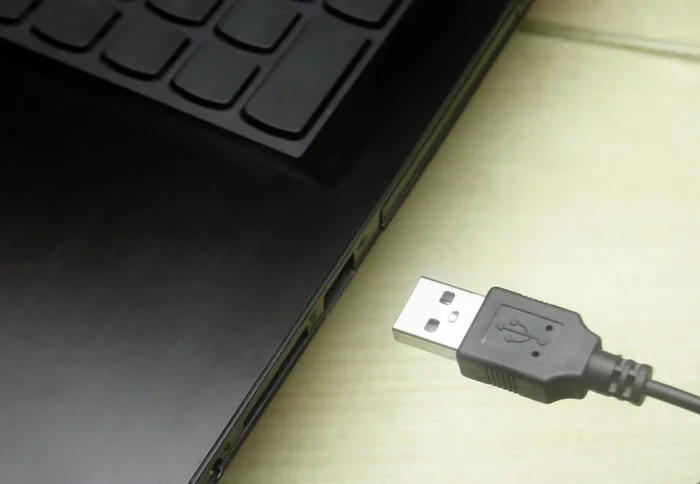
Are Usb Condoms Safe
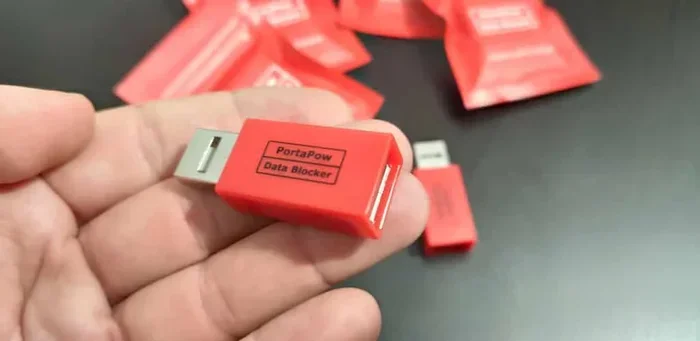
USB condoms are small adapters that block data transfer while allowing power to flow through. They protect your devices from juice jacking and data theft when using public charging stations. These simple tools add a critical layer of USB security for travelers and everyday users alike.
You are at the airport, your phone battery is at 2 percent, and you spot a USB charging station. It is tempting to plug in and let your phone juice up while you wait. But have you ever stopped to think about what happens when you connect your device to a public USB port? This is where USB condoms come into the picture.
A USB condom is a small, inexpensive adapter that sits between your charging cable and the USB port. It allows electricity to flow through for charging but blocks all data pins. Think of it as a bouncer for your USB connection, letting power in while keeping data threats out. In this article, we will explore whether USB condoms are truly safe and worth using.
Key Takeaways
- USB condoms prevent data theft: They block all data pins while letting power through safely.
- Juice jacking is a real threat: Public USB ports can be used to steal your personal data or install malware.
- USB data blockers are easy to use: You simply plug them between your cable and the charging port.
- They are affordable and portable: Most USB condoms cost under $15 and fit on your keychain.
- Not all USB condoms are equal: Look for certified products from reputable brands to ensure real protection.
- They work with multiple devices: USB condoms are compatible with phones, tablets, and laptops that use USB charging.
📑 Table of Contents
What Exactly Is a USB Condom?
A USB condom is also called a USB data blocker. It is a small device that fits between your charging cable and the USB port you are plugging into. The device sits inline and uses its internal circuitry to separate the power pins from the data pins inside a USB cable.
Inside every USB cable, there are multiple pins. Some carry power, and some carry data. A USB data blocker physically disconnects the data pins so no information can be transferred. Your device still receives power and charges normally. But hackers cannot access your files, install malware, or clone your data through the connection.
The concept is simple but effective. You plug the USB condom into the public port first. Then you connect your charging cable to the other side. Your device charges safely without any data exchange happening. It is a one-step process that takes seconds and requires no technical knowledge.
What Is Juice Jacking and Why Should You Care?
Juice jacking is a real cyber threat that targets people who use public USB charging stations. Hackers can compromise public USB ports with malicious hardware or software. When you plug your device in, the malicious system can access your data, install tracking software, or even lock your device and demand a ransom.
The term was coined by security researchers Brian Krebs and Robert Rowley in 2011. Since then, the threat has grown as public USB charging stations have become more common. Airports, hotels, cafes, and shopping malls all offer free USB charging. But many of these ports are not monitored or secured.
Here is how juice jacking can affect you:
- Data theft: Hackers can copy your photos, contacts, and files in seconds.
- Malware installation: Malicious software can be silently installed on your device.
- Credential stealing: Login passwords and banking details can be captured.
- Device locking: Ransomware can lock your phone until you pay a fee.
- Tracking: Your location and browsing habits can be monitored.
The risk is especially high when you are traveling and your battery is dying. In a rush, you might ignore the danger and just plug in. A USB condom eliminates this risk completely by ensuring no data can ever pass through the connection.
Are USB Condoms Actually Safe to Use?
The short answer is yes. USB condoms are safe and provide an extra layer of protection for your devices. They work by physically blocking the data pins inside the USB connection. This means no data can flow in either direction, regardless of what the charging port is designed to do.
However, safety depends on the quality of the product you buy. Not all USB data blockers are created equal. Some cheap, uncertified products may not properly block all data pins. In rare cases, a poorly made blocker could even introduce its own security risks.
To stay safe, follow these guidelines:
- Buy from reputable brands: Choose well-known companies with positive reviews.
- Look for certifications: Products tested by recognized security organizations are more reliable.
- Check compatibility: Make sure the blocker works with USB-C, USB-A, or Lightning depending on your device.
- Inspect the build quality: A solidly built device with tight connections is a good sign.
- Keep your firmware updated: Some advanced USB blockers have firmware that benefits from updates.
When you follow these steps, a USB condom is a very safe and effective tool. It adds a physical barrier between your device and potentially compromised charging ports. This is one of the simplest and most affordable cybersecurity steps you can take.
How USB Condoms Protect Your Device
A USB condom protects your device in several important ways. First, it prevents unauthorized data access. Even if a public USB port has been tampered with, the blocker ensures your device only receives power. Second, it stops malware injection. No data means no way for malicious code to reach your device. Third, it preserves your privacy. Your personal files, photos, and contacts stay exactly where they belong.
Using a USB data blocker is especially important for business travelers. Corporate devices often contain sensitive company data. A single compromised charging session could expose trade secrets or client information. A USB condom is a small investment that protects both personal and professional data.
Who Should Use a USB Condom?
Anyone who uses public USB charging stations should consider using a USB condom. This includes frequent travelers, students, office workers, and anyone who spends time in public spaces. The threat of juice jacking does not discriminate by age, profession, or device type.
Here are some groups who benefit the most from using a USB data blocker:
- Frequent travelers: Airports, trains, and hotels often have shared USB charging stations.
- Students: Libraries and campus buildings may offer public USB ports for charging.
- Business professionals: Conferences and coworking spaces often have charging stations available.
- Parents: Family devices used by children are especially vulnerable to data theft.
- Gamers and tech enthusiasts: Carrying multiple devices means more opportunities for risky charging situations.
Even if you are careful about where you charge your device, accidents happen. You might be at a cafe and your battery dies unexpectedly. In that moment, a USB condom gives you peace of mind. You can charge safely without worrying about who might be watching the port behind the wall.
USB Condoms vs. Other Charging Safety Methods
There are several ways to keep your devices safe when charging in public. Let us compare USB condoms with other popular methods.
| Method | How It Works | Effectiveness | Cost |
|---|---|---|---|
| USB Condom | Blocks data pins physically | Very High | $5-$15 |
| Charge-Only USB Cable | Cable has no data wires | High | $3-$10 |
| Portable Power Bank | Self-contained battery | Very High | $15-$50 |
| Wall Outlet Adapter | Uses AC wall plug only | Very High | $5-$20 |
| USB Data Blocker with Encryption | Blocks data and encrypts power | Highest | $15-$30 |
As you can see, USB condoms are among the most cost-effective options. A portable power bank is also excellent, but it adds bulk to your bag. A wall outlet adapter is safe, but not always available in public spaces. The beauty of a USB data blocker is its simplicity and portability. You can keep one on your keychain or in your laptop bag and use it anywhere.
Some people also use USB condoms in combination with other methods. For example, you might carry a power bank for daily use and a USB condom for emergencies when you must use a public port. This layered approach gives you the best of both worlds.
Common Mistakes People Make with USB Condoms
While USB condoms are simple to use, there are some common mistakes that people make. Avoiding these errors will help you get the most protection from your device.
Mistake 1: Buying the cheapest option available. Ultra-cheap USB condoms from unknown brands may not properly block all data pins. Always choose a product from a trusted manufacturer with verified reviews.
Mistake 2: Assuming all USB ports are dangerous. Not every public USB port is compromised. However, you cannot tell by looking at it. Using a USB data blocker every time is the safest habit to build.
Mistake 3: Forgetting to check compatibility. USB condoms come in different shapes and sizes. Some work with USB-A only, while others support USB-C or Lightning. Make sure your blocker matches your devices and cables.
Mistake 4: Not cleaning the device regularly. Dust and lint can build up inside the USB condom connector. This can affect the charging connection over time. A quick wipe with a dry cloth keeps things working smoothly.
Mistake 5: Thinking a USB condom replaces antivirus software. A USB condom protects against physical data theft through charging ports. It does not protect against all forms of malware or online threats. Use it alongside other security tools for full protection.
Expert Insights on USB Charging Security
Cybersecurity experts consistently recommend using a USB condom whenever you charge your device in a public space. The reason is simple: the risk of juice jacking is low for any single charging session, but the consequences can be severe if your data is compromised.
Security researcher Robert Graham has noted that the threat of juice jacking is real but often overstated for casual users. However, for business travelers and anyone carrying sensitive data, the risk is significant enough to warrant protection. A USB data blocker is a minimal investment that provides meaningful security benefits.
The best approach is to build a habit. Keep a USB condom with your charging cable at all times. Treat public USB ports the same way you would treat an unlocked public computer. You would not log into your bank account on a stranger’s computer, and you should not charge your device without protection either.
Another expert tip is to carry a wall adapter along with your USB condom. If you find a public USB port, use the condom. If you find a wall outlet, use your adapter directly. Having both options in your travel kit ensures you are always prepared for any charging situation safely.
Final Thoughts
USB condoms are a simple, affordable, and effective way to protect your devices from data theft and malware when charging in public. They block all data transfer while allowing your device to charge normally. The risk of juice jacking is real, and the cost of a USB data blocker is minimal compared to the potential damage of a data breach.
If you travel frequently or regularly use public USB charging stations, a USB condom is an essential accessory. It takes seconds to use and provides peace of mind every time you plug in. Keep one in your travel bag, your laptop case, or even on your keychain. Your personal data is worth the small investment.
Stay safe, stay charged, and always protect your connection. A USB condom is one of the smartest, simplest cybersecurity tools you can add to your daily routine.
Frequently Asked Questions
What does a USB condom actually do?
A USB condom blocks all data pins inside a USB cable while allowing power to pass through. This means your device charges normally, but no data can be transferred to or from your device. It protects you from juice jacking and unauthorized data access at public charging stations.
Can a USB condom damage my device?
No, a quality USB data blocker will not damage your device. It only blocks the data pins and lets the power pins pass through. However, you should buy from reputable brands to ensure the product is properly manufactured and safe for your devices.
Are USB condoms worth the money?
Yes, USB condoms are worth every penny. They cost between $5 and $15 and provide significant protection against data theft. Considering the potential cost of a data breach or identity theft, the investment is minimal and well worth it.
Do I need a USB condom for every cable I own?
Ideally, yes. You can use a USB condom with any standard USB cable. Some people keep one permanently attached to their charging cable, while others carry a separate blocker. Having at least one for each device you travel with is a good practice.
Can USB condoms protect against all types of cyber threats?
USB condoms specifically protect against data theft and malware injection through USB charging ports. They do not protect against all cybersecurity threats such as phishing, malware from downloads, or network-based attacks. Use them as part of a broader security strategy.
How do I choose the right USB condom for my needs?
Look for a USB condom that matches your device’s port type, such as USB-A, USB-C, or Lightning. Check for certifications and read reviews from trusted sources. Choose a brand known for quality and security products. Compatibility and build quality are the most important factors.
=== CONCLUSION ===
USB condoms are a practical and essential tool for anyone who charges their devices in public. They provide a simple physical barrier against data theft and malware through compromised USB ports. The threat of juice jacking is real, and the solution is both affordable and easy to use. Keep a USB data blocker with your charging gear and charge with confidence wherever you go.