Best Laptop for Retirees

Choosing the best laptop for retirees means focusing on simplicity, comfort, and reliability. A senior-friendly laptop should have a clear screen, a comfortable keyboard, and long battery life. Whether you want to browse the web, video call family, or edit photos, the right device makes life easier. This guide breaks down the top picks, key features, and buying tips to help you decide with confidence.
Retirement opens up a world of new possibilities. You have more time to explore hobbies, stay connected with family, and learn new things. But to do all of that, you need a reliable computer that just works. A best laptop for retirees is not about fancy specs or gaming power. It is about ease of use, comfort, and value.
Many older adults feel overwhelmed by modern technology. complicated setups, tiny text, and confusing menus can make using a laptop frustrating. That is why choosing the right device matters so much. The right laptop feels simple, feels good to use, and fits your daily life. In this guide, we walk you through everything you need to know to make a smart choice.
We will cover what makes a laptop senior-friendly, which features to prioritize, and our top recommendations. By the end, you will feel confident picking out a laptop that suits your needs perfectly. Let us get started.
Key Takeaways
- Simplicity Matters Most: A retiree laptop should be easy to set up and use without technical jargon.
- Screen Size and Clarity: Large, bright displays reduce eye strain and make reading comfortable.
- Battery Life Is Essential: A long-lasting battery means fewer charging hassles during the day.
- Affordability Is Key: You do not need to spend a fortune to get a great senior-friendly laptop.
- Portability Helps: A lightweight design makes it easy to carry around the house or on trips.
- Built-In Security Features: Look for laptops with good privacy and safety tools to stay protected online.
📑 Table of Contents
What Makes a Laptop Senior-Friendly?
Not all laptops are created equal, especially for older users. A simple laptop for older adults should focus on comfort, clarity, and ease of use. Here are the features that matter most when you are shopping for a best laptop for retirees.
Screen Size and Display Quality
One of the biggest challenges many seniors face is reading text on a small screen. A large screen laptop for seniors makes a huge difference. Look for a display that is at least 14 inches. A 15.6-inch screen is even better if you plan to use the laptop on a desk.
Brightness matters too. A laptop with a clear display helps you see images, videos, and text without squinting. IPS panels offer wide viewing angles, so you can tilt the screen and still see everything clearly. Anti-glare coatings are also helpful, especially if you use your laptop near a window.
Keyboard and Trackpad Comfort
You will spend a lot of time typing emails, writing letters, or searching the web. A laptop with a good keyboard for seniors should have keys that are easy to press and well-spaced. Backlit keyboards are a bonus, especially if you type in dim lighting.
The trackpad should be responsive and smooth. Some retirees prefer using a mouse instead. Most laptops let you connect an external mouse easily, so do not worry if you are not a trackpad fan.
Lightweight and Portable Design
You do not want a heavy laptop that feels like carrying a brick. A lightweight laptop for seniors makes it easy to move from room to room or take it on trips. Look for models that weigh under 4 pounds. Ultrabooks and slim laptops are great options for portability without sacrificing performance.
Top Features to Look For
When searching for the best laptop for retirees, certain features stand out above the rest. These are the things that make a laptop truly enjoyable to use every day.
Long Battery Life
Nothing is more annoying than a laptop that dies in the middle of a video call with your grandchildren. A long battery life laptop should last at least 8 hours on a single charge. Some models can go 12 hours or more, which is perfect for a full day of use without hunting for an outlet.
If you plan to use your laptop while traveling or on a patio, battery life becomes even more important. Look for laptops with battery capacities of 50Wh or higher for the best results.
Easy-to-Use Operating System
Windows 11 is currently the most popular and user-friendly operating system for retirees. It offers a clean interface, a helpful search bar, and built-in accessibility features. Best Windows laptop for seniors models come with Windows pre-installed, so you can start using it right away.
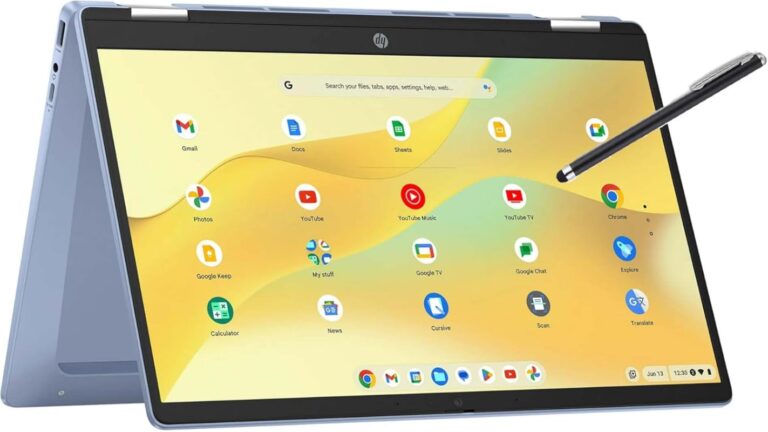
Some retirees prefer ChromeOS because it is extremely simple and designed for web-based tasks. Both options work well, but Windows offers more flexibility for installing different programs and apps.
Built-In Security and Privacy
Online safety is important at any age. A tech-friendly laptop for beginners should include solid security features. Look for laptops with fingerprint readers, facial recognition login, and built-in antivirus software.
Windows Hello is a great feature that lets you log in with your face or fingerprint. It is fast, easy, and adds a layer of protection without any complicated setup.
Affordable Options
You do not need to spend a lot of money to get a great laptop. A best budget laptop for older adults can be found for under $500. Many affordable laptops offer everything a retiree needs, including solid performance, a decent screen, and a comfortable keyboard.
If you are on a tight budget, check out our guide on the best laptop for under 500 for more great options that fit your wallet.
Our Top Picks for the Best Laptop for Retirees
After reviewing dozens of models, we have narrowed down the best options for retirees. Each laptop on this list is easy to use, reliable, and packed with features that make daily tasks a breeze.
Dell Inspiron 15 3000 Series
The Dell Inspiron 15 is a best Dell laptop for home use that combines simplicity with solid performance. It features a 15.6-inch HD display, a comfortable keyboard, and a long-lasting battery. Dell is known for building reliable machines, and the Inspiron line is no exception.
- 15.6-inch anti-glare display
- Up to 10 hours of battery life
- Lightweight at just 3.9 pounds
- Windows 11 Home pre-installed
- Built-in DVD drive for easy media playback
This laptop is perfect for retirees who want a straightforward machine for browsing, email, and video calls. Its affordable price makes it one of the most popular choices among older adults.
HP Pavilion 14
The HP Pavilion 14 is a slim, lightweight laptop that is easy to carry around. It has a crisp 14-inch display and a sleek design that looks great on any desk. The keyboard is comfortable to type on, and the trackpad is smooth and responsive.
- 14-inch Full HD IPS display
- Intel Core i5 processor
- 8GB RAM for smooth multitasking
- Up to 9 hours of battery life
- Fingerprint reader for quick, secure login
This is a great option if you want a portable best laptop for retirees that looks modern and feels premium without a high price tag.
Lenovo IdeaPad 3
The Lenovo IdeaPad 3 is known for its durability and user-friendly design. Lenovo laptops are built to last, and the IdeaPad 3 is one of the most affordable options in their lineup. It comes with a large 15.6-inch screen and a comfortable keyboard that is easy on the hands.
- 15.6-inch HD display with anti-glare coating
- AMD Ryzen processor for fast performance
- 8GB RAM and 256GB SSD storage
- Up to 7 hours of battery life
- Easy-to-use Windows 11 interface
If you are looking for a best laptop for retirees that offers great value and reliability, the Lenovo IdeaPad 3 is hard to beat. It is one of the top choices for older adults who want a simple, dependable computer.
Comparison Table
To help you compare the top options, here is a quick overview of each laptop we recommend.
| Laptop Model | Screen Size | Battery Life | Weight | Price Range |
|---|---|---|---|---|
| Dell Inspiron 15 3000 | 15.6 inches | Up to 10 hours | 3.9 lbs | $400 – $550 |
| HP Pavilion 14 | 14 inches | Up to 9 hours | 3.2 lbs | $450 – $600 |
| Lenovo IdeaPad 3 | 15.6 inches | Up to 7 hours | 4.0 lbs | $350 – $500 |
Each of these laptops is a strong choice for retirees. Your decision should come down to your budget, preferred screen size, and how portable you need the device to be.
Tips for Setting Up Your New Laptop
Getting a new laptop can feel intimidating, but it does not have to be. With a few simple steps, you can have your new best laptop for retirees up and running in no time.
Step 1: Connect to Wi-Fi
When you first turn on your laptop, it will ask you to connect to a Wi-Fi network. Choose your home network and enter the password. Once connected, your laptop can download updates and access the internet right away.
Step 2: Create a User Account
You will be asked to create a user account. Use a simple password that you can remember easily. Write it down and keep it in a safe place. A best laptop for retirees should always have a secure but easy-to-remember login setup.
Step 3: Adjust Display Settings
Go to your display settings and increase the text size and brightness. This makes everything on the screen easier to read. Windows 11 has a built-in “Make text bigger” slider that works great for senior users.
Step 4: Install Essential Apps
Install the apps you use most, like a web browser, email program, and video calling app. Zoom and Microsoft Teams are popular choices for staying in touch with family. Keep the number of apps to a minimum so your laptop stays fast and clutter-free.
Step 5: Ask for Help if Needed
Do not hesitate to ask a family member or friend for help with setup. Many laptop manufacturers also offer free online tutorials and customer support. You can also visit a local electronics store for hands-on assistance.
Common Mistakes Retirees Make When Buying a Laptop
Avoiding common pitfalls can save you time, money, and frustration. Here are mistakes many retirees make when shopping for a new laptop.
Buying the Most Expensive Model
More expensive does not always mean better for your needs. A best laptop for retirees does not need top-of-the-line specs. Focus on the features that matter to you, such as screen size, keyboard comfort, and battery life, rather than raw processing power.
Ignoring Ergonomics
An uncomfortable keyboard or a cramped screen can make using a laptop a chore. Always try a laptop in person if possible, or read reviews that discuss comfort and usability. A user-friendly laptop should feel natural and pleasant to use from the first moment.
Skipping the Return Policy
Always check the return policy before you buy. If the laptop does not feel right, you should be able to return it within a reasonable timeframe. Many retailers offer a 30-day return window, which gives you peace of mind.
How to Keep Your Laptop Running Smoothly
Once you have your new best laptop for retirees, keeping it in good shape is easy with a few simple habits.
- Restart your laptop weekly: This clears out temporary files and keeps the system running smoothly.
- Keep your software updated: Updates fix bugs and improve security. Turn on automatic updates whenever possible.
- Use a laptop cooling pad: If your laptop gets warm during use, a cooling pad helps prevent overheating and extends its lifespan.
- Back up your files regularly: Use an external hard drive or a cloud service to save important photos, documents, and contacts.
- Clean the screen and keyboard gently: Use a soft, damp cloth to wipe down your laptop. Avoid harsh chemicals that can damage the screen.
With proper care, a quality laptop can serve you well for 5 to 7 years or more. Taking a few minutes each week for basic maintenance goes a long way toward keeping everything running smoothly.
Final Thoughts
Finding the best laptop for retirees is all about matching your needs, budget, and comfort level. You do not need to be a tech expert to enjoy the benefits of a modern laptop. Whether you want to stay in touch with loved ones, explore new hobbies, or manage your finances online, the right laptop makes it all possible.
Focus on features like a clear display, a comfortable keyboard, long battery life, and a lightweight design. Choose a brand you trust, like Dell or HP, and do not be afraid to ask for help during setup. The technology world is more welcoming than ever, and a great laptop can truly enrich your retirement years.
Take your time, compare your options, and pick the laptop that feels right for you. You deserve a device that is as enjoyable to use as it is helpful. Happy computing!
Frequently Asked Questions
What is the easiest laptop for seniors to use?
Laptops with Windows 11 and a simple, clean interface are generally the easiest for seniors. Models like the Dell Inspiron 15 and Lenovo IdeaPad 3 come with intuitive layouts and helpful setup wizards that guide you through the process step by step.
How much should I spend on a laptop as a retiree?
A good laptop for retirees typically costs between $350 and $600. You do not need to spend more than that unless you have specific needs like video editing or gaming. Focus on value and features that match your daily routine.
Is a Chromebook good for retirees?
Yes, Chromebooks are simple, affordable, and perfect for basic tasks like browsing the web, checking email, and video calling. They are especially great for retirees who do not need advanced software or large storage capacities.
What screen size is best for older adults?
A screen size of 14 to 15.6 inches is ideal for most retirees. It offers a good balance between readability and portability. Larger screens are great for home use, while smaller ones are better if you travel frequently.
Can I use a laptop for video calls with my grandkids?
Absolutely. Most modern laptops come with a built-in webcam and microphone, making video calls easy. Simply download Zoom, Microsoft Teams, or Google Meet, and you are ready to connect with family in seconds.
How do I protect my laptop from viruses?
Windows 11 comes with built-in Windows Defender, which provides solid protection for free. Keep your system updated, avoid clicking on suspicious links, and use a reputable antivirus program for extra security. These simple steps keep your laptop safe and running smoothly.
=== CONCLUSION ===
Choosing the best laptop for retirees does not have to be complicated. With the right combination of screen size, battery life, comfort, and affordability, you can find a laptop that fits your lifestyle perfectly. Whether you pick the Dell Inspiron 15, the HP Pavilion 14, or the Lenovo IdeaPad 3, you are investing in a device that will bring you joy, connection, and convenience for years to come. Take your time, explore your options, and enjoy the journey into the digital world with confidence.
If you plan to travel with your laptop, consider a protective bag that keeps your device safe. Check out our guide on the best laptop bag for travel for durable and stylish options that suit any retiree on the go.