Top 10 Best USB Microphones for Streaming for 2026 – Expert Tested
Finding the right USB microphone can transform your streaming, podcasting, or content creation setup from amateur to professional. The best USB microphones for streaming offer plug-and-play simplicity, crystal-clear audio, and features like mute buttons and gain control—all without needing a complex audio interface. Whether you’re a beginner on Twitch or a seasoned podcaster, the right mic ensures your voice comes through loud and clear, cutting through game sounds and background noise. After testing dozens of models, we’ve rounded up the top performers that deliver studio-quality sound for any budget.
Quick Product Comparison
Our Top 10 Best Usb Microphones For Streaming Reviews – Expert Tested & Recommended
1. FIFINE AmpliGame AM8T Gaming Microphone Set
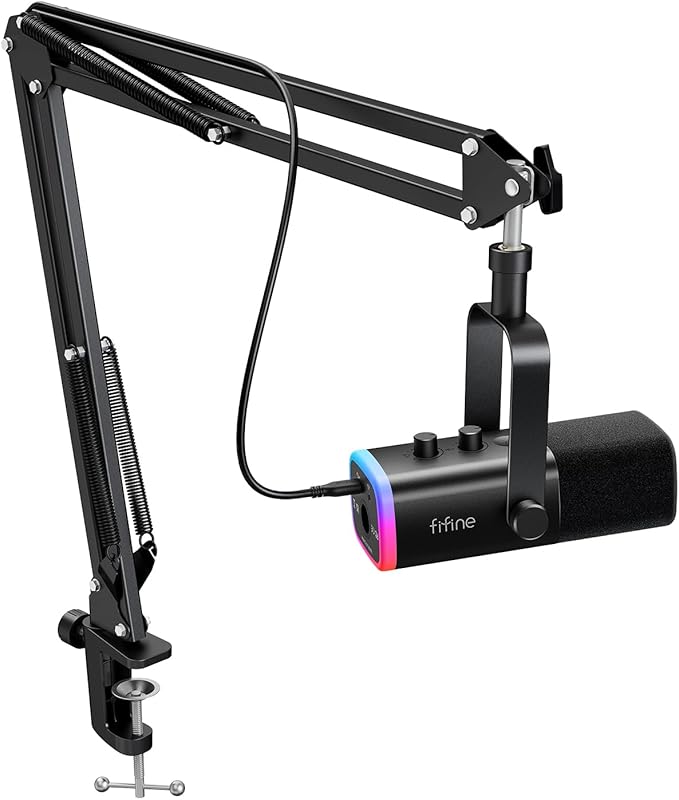
The FIFINE AM8T is a complete streaming kit that delivers shocking value. This dynamic microphone comes with a sturdy boom arm, making it an all-in-one solution for beginners and intermediate streamers. It offers both USB and XLR connections, so you can start simple and upgrade later. The sound is crisp, focused, and does a great job rejecting background noise, especially when you use software filters. The vibrant RGB lighting adds a nice aesthetic touch to any gaming setup.
Key Features That Stand Out
- ✓ USB and XLR dual connectivity for flexibility
- ✓ Includes a heavy-duty boom arm with cable management
- ✓ -50dB sensitivity and cardioid pattern for noise rejection
- ✓ Built-in mute button and headphone jack for real-time monitoring
- ✓ Customizable RGB lighting on the mic and boom arm
Why We Recommend It
This mic kit is a fantastic starting point for anyone serious about streaming. You get everything you need in one box—a high-quality dynamic mic, a functional boom arm, and all necessary cables. The sound quality rivals more expensive standalone mics, and the option to use XLR means it can grow with your setup. FIFINE’s customer support is also notably responsive, which is a huge plus for peace of mind.
Best For
Beginner and mid-level streamers, podcasters, and gamers who want a plug-and-play solution that includes a boom arm. It’s perfect for those who want the option to upgrade to an audio interface later without buying a new microphone.
Pros and Cons
Pros:
- Excellent sound quality for the price, clear and full-bodied voice capture.
- Extremely low noise pickup with proper positioning and software filtering.
- The included boom arm is sturdy and reduces desk vibrations well.
- Outstanding customer service and warranty support from FIFINE.
Cons:
- The included USB-C cable can sometimes cause minor crackling; using a high-quality cable solves this.
- No dedicated shock mount for the mic, though the boom arm helps.
- The touch-sensitive mute button can be overly sensitive for some users.
Customer Reviews
Customer Review: I decided to try my hand at streaming again but didn’t want to shell out 200$ for equipment again not knowing if I’d stick with it. Did some research, watched some reviews and settled on this one the Fifine AM8. Honestly I did not have super high expectations because it came with a boom arm and the mic for like 60 bucks total? Most sub 100$ mics on amazon just aren’t very high quality, but boy was I mistaken with this one. Out of the box this mic was crystal clear with vocal quality and super easy to start using… Fifine is an absolutely amazing company and I will buy stuff from them specifically going forward because a great product + a great price + outstanding customer service area literally everything I look for in companies I buy products from. Super impressed by everything start to finish so far!
Customer Review: I have nothing but good things to say about this microphone. If you don’t want to read a long review, the tl;dr: This is a great plug-n-play microphone that has great sound quality and a price that can’t be beat… It is seriously plug-n-play. It took me all of 5 minutes to unbox and get set up at my desk. It just…works. The only additional recommendation I’d make… is Nvidia Broadcast. It is free and it has some sort of noise filtering that does an excellent job to remove background noise… If you need a stand and a mic and don’t want to dive down the rabbit-hole of audio equipment, this is probably your best value-to-quality option.
2. FIFINE AmpliGame AM8 Dynamic Microphone
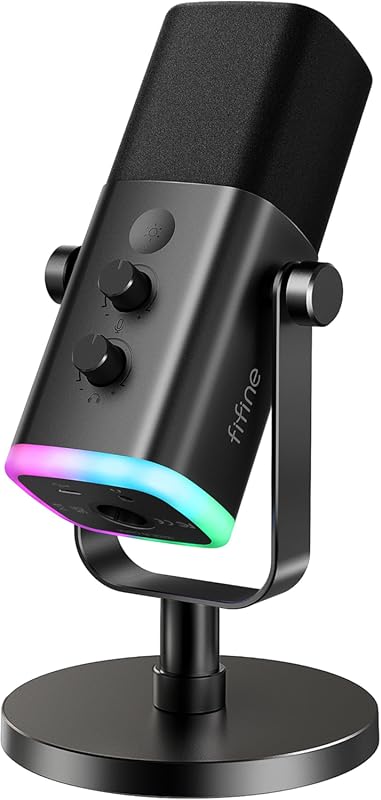
The FIFINE AM8 is the little sibling to the AM8T, offering the same core microphone without the bundled boom arm. This makes it a great choice if you already have a stand or boom arm. It features both USB and XLR connections, giving you the flexibility to grow. The sound profile is warm and present, ideal for vocals. The RGB lighting is a nice touch, though some find it a bit dim. The included desk stand is surprisingly solid for a budget mic.
Key Features That Stand Out
- ✓ Dual USB/XLR connectivity for future-proofing
- ✓ Cardioid polar pattern focuses on your voice and rejects side/rear noise
- ✓ Touch-sensitive mute button and built-in headphone jack
- ✓ Customizable RGB lighting on the microphone body
- ✓ Comes with a decent weighted desktop stand
Why We Recommend It
If you want the excellent audio quality of the AM8T but already own a boom arm or prefer a simpler setup, the AM8 is the perfect pick. It’s a proven workhorse with a loyal following. The ability to switch between USB for simplicity and XLR for professional audio interfaces is a massive advantage at this price point. It consistently delivers a clean, broadcast-ready sound with minimal processing.
Best For
Streamers and podcasters who have their own mounting solution (boom arm or stand) and want the flexibility of both USB and XLR connections. Also ideal for anyone looking for a reliable, no-fuss dynamic mic with good features.
Pros and Cons
Pros:
- Fantastic, clear vocal sound that works well for streaming and recording.
- XLR compatibility is a huge plus for future upgrade paths.
- The included desktop stand is sturdy and has a small footprint.
- Touch mute button is convenient, though it only works via USB.
Cons:
- The RGB lighting is not very bright compared to competitors.
- The mute button is touch-sensitive, which some users prefer a physical button.
- No built-in shock mount; you’ll need a separate one if using on a boom arm.
Customer Reviews
Customer Review: the audio quality is sooo crisp and clear, it literally makes your voice sound super clean and professional without even trying. no weird static, no muffled sound, just smooth audio. it also picks up my voice really nicely without catching a bunch of background noise which i love. it also doesn’t catch any noises, my fan is always blowing in my direction and no one hears it. setup was easy and it feels really good quality too, not cheap at all. for the price?? it’s actually insane.
Customer Review: This is the second time I have purchased this product – the first time for myself, and the second time as a gift. I’ve used the FIFINE AM8 for close to two years now and it’s an amazing microphone… The mic voice quality is great. Can it be better? Yes for sure, but at a considerably higher price point… I use my AM8 on an underslung boom arm and it works great from me (also from FIFINE). Additionally, I use my AM8 with the FIFINE Ampligame SC3 because I wanted to use the XLR instead of USB… I don’t think you can beat this microphone for the price. It sounds great, looks great and functions just how I need it to.
3. MAONO PD200W Hybrid Wireless Podcast Microphone
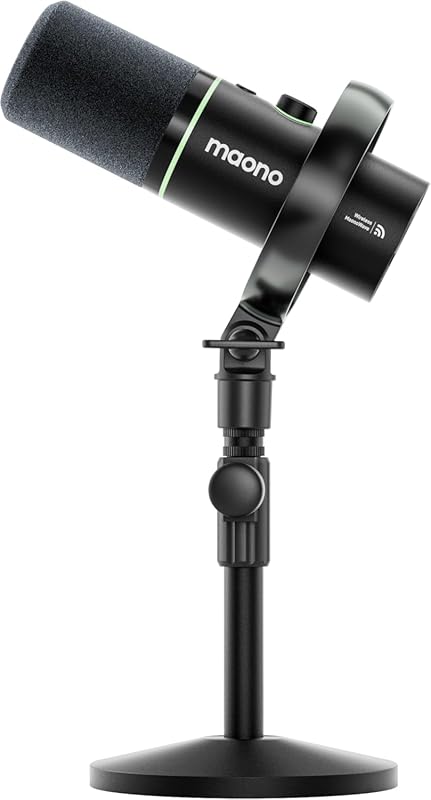
The MAONO PD200W stands out by offering true wireless freedom alongside traditional USB and XLR connections. This hybrid design means you can untether from your desk, which is a game-changer for dynamic recording situations or multi-person podcasts. It uses a 2.4GHz wireless system with a USB receiver for low-latency audio. The sound quality is surprisingly professional for a wireless mic in this price range, thanks to its 30mm dynamic capsule and cardioid pickup pattern.
Key Features That Stand Out
- ✓ Triple connectivity: 2.4GHz wireless, USB, and XLR
- ✓ Supports two wireless mics with one receiver for interviews/duos
- ✓ Premium 30mm dynamic capsule for studio-like vocal clarity
- ✓ Built-in noise reduction and a sturdy shock mount
- ✓ Includes a desktop stand and all necessary cables
Why We Recommend It
If cable clutter drives you crazy or you need mobility for your recordings, the PD200W is the most versatile mic on this list. The wireless function is reliable and the audio quality doesn’t suffer. It’s also incredibly adaptable—use it as a USB mic at your desk, an XLR mic in a pro setup, or a wireless mic for moving around. For the price, the feature set is almost unbeatable.
Best For
Podcasters conducting remote interviews, mobile streamers, YouTubers who move around, and anyone who hates cables but still wants good audio. Also great for two-person podcast setups with a single receiver.
Pros and Cons
Pros:
- Ultra-convenient wireless operation with stable connection and no noticeable latency.
- Sound quality is impressively clean and full for a wireless dynamic mic.
- Having USB, XLR, and wireless options makes it incredibly future-proof.
- The ability to pair two mics to one receiver is unique and very useful.
Cons:
- Battery life requires management for long streaming sessions (though it’s generally good).
- The wireless receiver adds another piece of hardware to your desk.
- Setup for the dual-mic function can be slightly finicky the first time.
Customer Reviews
Customer Review: I’ve been looking for a microphone that could keep up with my content creation workflow, and the Maono PD200W completely delivered. If you’re a podcaster, YouTuber, TikToker, or any kind of creator serious about leveling up your audio — this is it. The sound quality is clean, clear, and professional right out of the box. No complicated setup, no confusing software — it just works. I love that I can plug in and get broadcast-quality audio without needing a whole studio setup… What really sets this mic apart is how creator-friendly it is… My audience can hear the difference, and honestly, so can I. If you’re on the fence about investing in a quality mic, stop hesitating. The PD200W is worth every penny.
Customer Review: I *love* this product. After mediocre or just bad experiences with several other products, I stumbled on this one from a reddit thread. My use cases are frequent online Zoom and Teams meetings where I am a speaker and I host a podcast. I need simple and reliable connection and clear sound whether using my Mac or PC. I have a usb C connection to my Mac Mini and use Bluetooth to connect to my PC and both work flawlessly… The mic is hefty and comes already inserted to the shock mount… It also has an XLR connection if I ever need to cable it for a different use case. There’s a mute and connection wheel on the top making access to mute/change really easy. This is truly a phenomenal product.
4. Plug & Play USB Computer Microphone
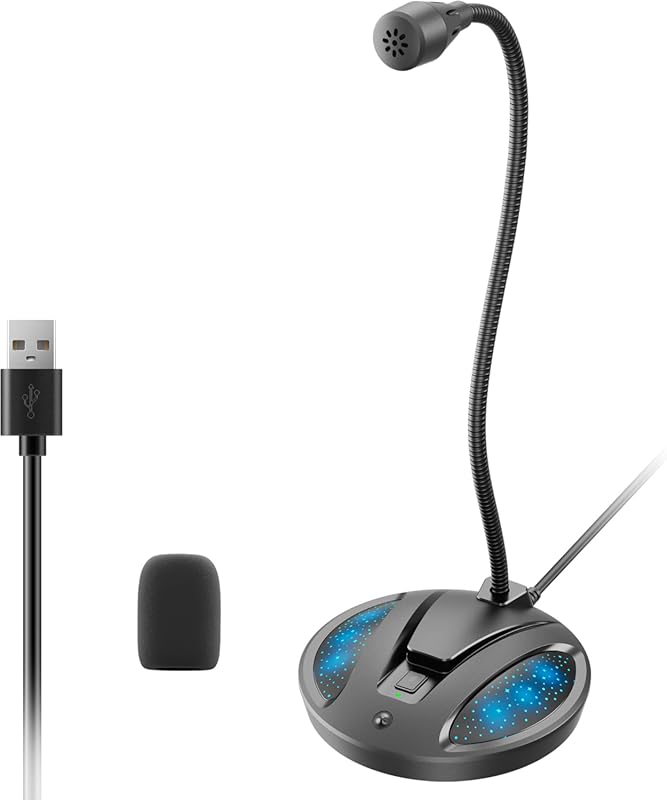
This is a no-frills, ultra-compact microphone designed for simplicity and desk space savings. Its gooseneck design lets you position the mic exactly where you need it without a bulky stand. It’s a condenser mic with an omnidirectional pickup pattern, meaning it captures sound from all around it—good for multi-person calls but less ideal for noisy environments. The plug-and-play nature makes it perfect for quick setups for meetings, Discord, or casual streaming.
Key Features That Stand Out
- ✓ Flexible gooseneck design for precise positioning
- ✓ Omnidirectional pickup pattern captures sound from all directions
- ✓ One-tap mute with LED indicator
- ✓ Built-in noise-canceling technology
- ✓ Truly plug-and-play with no drivers needed
Why We Recommend It
For anyone who needs a basic, reliable microphone without the “gamer” aesthetic, this is a solid choice. It’s incredibly easy to set up and takes up almost no space. The gooseneck is surprisingly useful for getting the mic close to your mouth while keeping the base out of the way. It’s an excellent secondary mic for video calls or a first mic for someone on a tight budget who doesn’t need the most focused pickup pattern.
Best For
Remote workers, students, and casual streamers who prioritize a small footprint and extreme simplicity. Also great for conference table setups or as a backup microphone.
Pros and Cons
Pros:
- Extremely compact and space-saving gooseneck design.
- Dead simple plug-and-play setup, works instantly with any computer.
- Good value for the price with decent noise suppression for quiet rooms.
- The mute button with LED is clear and easy to use.
Cons:
- Omnidirectional pattern picks up more ambient noise and keyboard clicks than a cardioid mic.
- Sound quality is good but not as rich or detailed as dedicated cardioid streaming mics.
- The build is mostly plastic and feels less premium than other options.
Customer Reviews
Customer Review: Small, well-constructed, and unobtrusive. Really clear voice recording, with a somewhat broad pickup area – so if you turn your head to look at the screen it still picks you up in a meeting. Great value for the price!
Customer Review: Installed in my Win-11 system in seconds. Sensitive, good sound, and somewhat directional.
5. Gaming USB Condenser Microphone

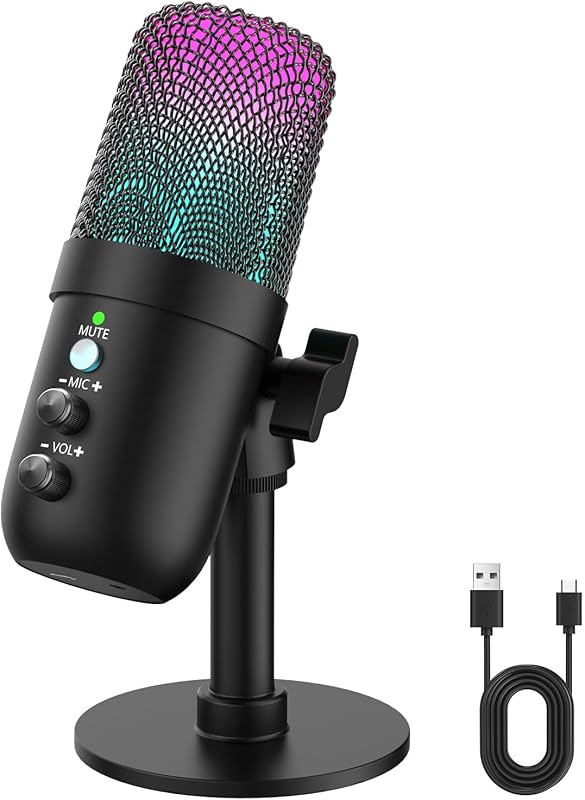
This condenser microphone is a visual and functional centerpiece for any gamer’s desk. It features gradient RGB lighting cycles that sync with your setup’s vibe. The sound is bright and detailed, typical of a condenser, which is great for voice but can be more sensitive to background noise. It comes with a built-in pop filter and a sturdy desk stand. The touch-sensitive mute is responsive, and it’s compatible with PC, Mac, PS4/5, and even some mobile devices.
Key Features That Stand Out
- ✓ Eye-catching gradient RGB lighting with multiple effects
- ✓ Built-in pop filter to reduce plosives (p, b sounds)
- ✓ Cardioid pickup pattern to focus on your voice
- ✓ One-touch mute sensor with LED status indicator
- ✓ Wide compatibility including PlayStation and mobile
Why We Recommend It
If you want a microphone that looks as good as it sounds and you’re primarily a gamer, this is a top contender. The RGB is a major selling point, and the audio quality is clear and sharp for in-game chat and streaming. The included pop filter is a practical bonus. It’s a straightforward, all-in-one package that doesn’t require any extra purchases to get started.
Best For
Gamers and streamers who want an aesthetically striking microphone with solid performance. Also suitable for console gamers (PS4/5) looking to upgrade their voice chat quality.
Pros and Cons
Pros:
- Bright, attractive RGB lighting that enhances gaming setups.
- Clear, detailed sound with good high-end presence for vocals.
- The built-in pop filter is effective and convenient.
- Simple plug-and-play operation on multiple platforms.
Cons:
- As a condenser, it’s more sensitive to background noise than a dynamic mic.
- The mute button is touch-sensitive and can be overly sensitive.
- The desktop stand is adequate but not as stable as heavier boom arms.
Customer Reviews
Customer Review: I was surprised by how good this mic sounds for the price. Voices come through clear and full with no background hiss, and the built-in pop filter actually works. Setup took less than a minute—plug it in and it’s ready. The RGB lighting looks great on my desk without being too bright. The mute button is handy and reacts instantly. I’ve used it for calls, recording, and gaming, and people immediately noticed the improvement in sound quality. Sturdy stand, consistent audio, and very reliable so far.
Customer Review: I wanted to try out a new mic, as I’ve been using the same microphone for 5 years. Didn’t want to break the bank, and looked at my options. That’s when I found the COCONISE Gaming Microphone… And honestly? It’s really good quality sound. Especially considering its price… Some neat features: The RGB lights are nice to look at. I don’t think there’s a way to turn them off, but they really aren’t too bright or distracting. I like it. The pop filter works pretty well, and is very sturdy on the mic. The sound itself is actually better than I expected!… The build quality is pretty good as well!… If you’re starting out content creation, if you’re just wanting something better sounding than your standard headphone mic? I’d suggest looking into this and seeing if it’s right for you!
6. USB Gaming Condenser Microphone
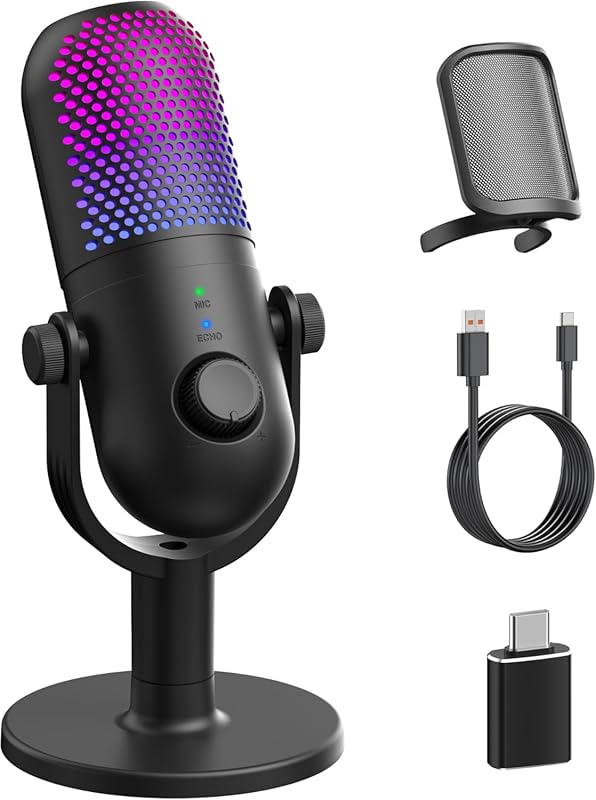
This microphone packs a lot of features into a classic vintage-style body. It’s a condenser mic with 10 different RGB lighting effects to choose from, giving you full control over your desk’s ambiance. It includes a physical noise reduction button, which is handy for cutting out sudden background sounds. The one-tap mute is very responsive, and the real-time headphone monitoring jack lets you hear your own voice with zero latency. It’s a feature-rich package for streamers who want it all.
Key Features That Stand Out
- ✓ 10 switchable RGB lighting effects (rainbow, breathing, gradient)
- ✓ One-touch noise reduction button to eliminate background hum
- ✓ Physical volume knob and tap-to-mute with LED indicator
- ✓ Real-time monitoring via 3.5mm headphone jack
- ✓ Includes a sturdy desk stand with cable management
Why We Recommend It
For streamers who love to customize every aspect of their setup, this mic offers the most lighting options and onboard controls. The dedicated noise reduction button is a standout feature that many mics lack. The sound is crisp and clear, and the monitoring jack is a must for professional-sounding streams without echo. It feels more premium than its price suggests, especially with the metal construction.
Best For
Streamers and content creators who want extensive onboard controls and vibrant, customizable RGB lighting. Also great for singers or musicians who need real-time monitoring and a noise reduction switch.
Pros and Cons
Pros:
- Excellent variety of RGB lighting effects with easy switching.
- Dedicated hardware noise reduction button works effectively.
- Real-time monitoring with zero latency is perfect for recording.
- Solid build quality with a metal body and stable stand.
Cons:
- As a condenser, it’s sensitive to room noise and requires a quiet environment.
- The noise reduction can sometimes slightly alter voice tone.
- The vintage aesthetic might not fit all modern minimalist setups.
Customer Reviews
Customer Review: Purchased to use for streaming and it has better quality for its build than most of the name brands. The sound is so crisp! Background noise? Cannot hear any! Want to use it for podcasts? Yes!! The setup was so simple, just plugged right in! Connection so stable and the best part is no battery required!
Customer Review: Looks like an old fashioned mic from the old radio days. Looks great sounds great and has echo effects,tap on and off and mute. I have my phone linked to my pc and everyone on the other end say it sounds great and clear. Up can also mute background noise. Remarkable quality ,sound and looks.
7. Shure MV7+ Podcast Dynamic Microphone
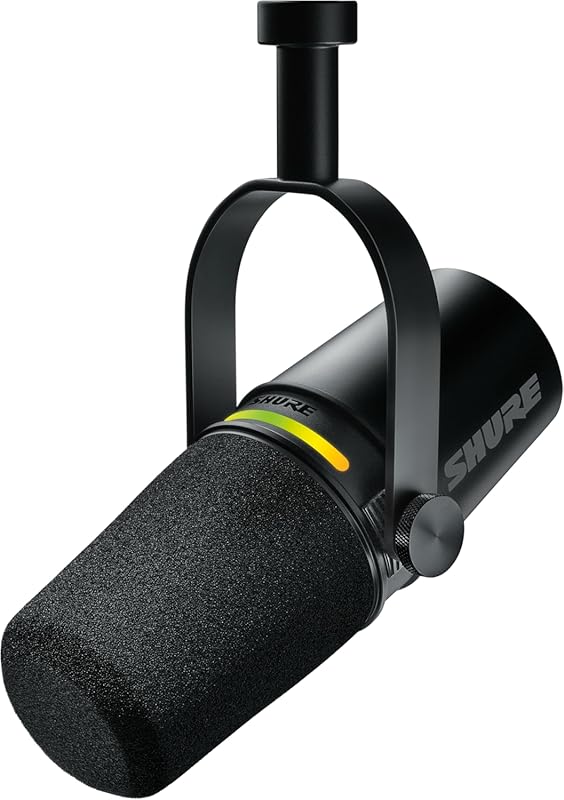
The Shure MV7+ is a professional-grade hybrid microphone that bridges the gap between USB simplicity and XLR flexibility. It’s OBS Certified, meaning it’s optimized for streaming software. The standout feature is the Auto Level mode, which automatically adjusts your gain as you move, ensuring consistent volume. The LED touch panel is fully customizable and shows your levels in real-time. It also includes a digital pop filter and reverb effects, all controllable via Shure’s app. The sound is rich, full, and instantly recognizable as a Shure.
Key Features That Stand Out
- ✓ OBS Certified with USB-C and XLR outputs
- ✓ Auto Level mode for automatic gain adjustment
- ✓ Customizable LED touch panel with real-time level metering
- ✓ Built-in digital pop filter and reverb effects
- ✓ Shure’s renowned dynamic capsule for smooth, broadcast sound
Why We Recommend It
This is the microphone for creators who want top-tier sound and smart features without the full complexity of an XLR setup. The Auto Level is a game-changer for streamers who move around or have inconsistent speaking volume. The build quality is exceptional, and the Shure name guarantees durability. It’s an investment, but it’s a “buy once, cry once” product that will last for years and sound amazing in any configuration.
Best For
Serious streamers, podcasters, and voice-over artists who want professional sound with the convenience of USB. Also ideal for anyone who wants the flexibility to add an audio interface later without buying a new mic.
Pros and Cons
Pros:
- Incredibly rich, warm, and professional broadcast sound out of the box.
- Auto Level feature is incredibly useful for dynamic speakers.
- Excellent build quality and heft; feels like a premium tool.
- Dual USB/XLR connectivity offers the best of both worlds.
Cons:
- Premium price point puts it out of reach for beginners.
- The touch panel can be overly sensitive; accidental muting is possible.
- Does not include an XLR cable, which is needed for that connection.
Customer Reviews
Customer Review: I love this microphone! It is so nice and the sound quality just straight out of the box is really great but if you pair it with a road caster duo or pro and use the SM7B setting you’re going to have even better audio. I will say even though you can use this as a USB or XLR it does not come with the XLR cable which is what I am currently using. I did go ahead and buy the Rode cable for it to run it through my rodcaster Duo… Shure is a real high quality product and it shows in every single way with this microphone… I think this is a solid winner and it is going to be a microphone that will grow with you and will always have really good quality sound.
Customer Review: I’ve settled on using this mic after trying out the Logitech Blue Yeti mic and the HyperX Quadcast. I don’t use this mic for professional use but more for gaming and occasional streaming/recording purposes. I will say it is pricey but it is worth every penny. The sound quality from the previous two mics I had versus this Shure microphone doesn’t compare. I love that it’s easy to set up and use, making it easy for beginners. It’s also the perfect size and looks super sleek in my setup. I love the LED panel on this mic… You really do get what you pay for meaning the quality and durability of the mic is amazing. If I could go back in time to get myself a mic, I would choose this one!
8. HyperX SoloCast 2 Gaming USB Condenser Mic
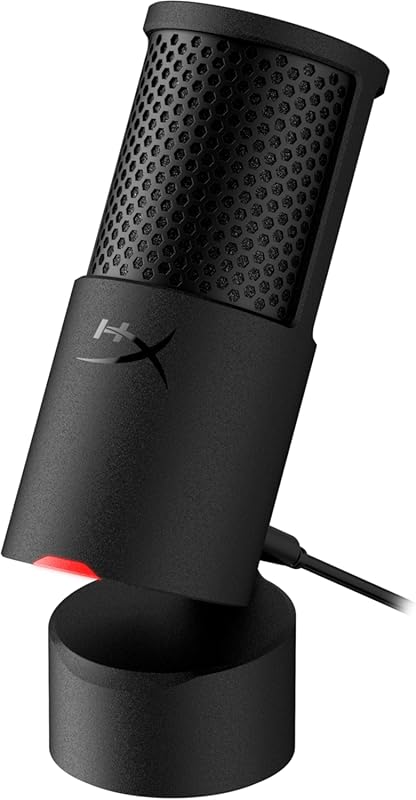
The HyperX SoloCast 2 is a no-nonsense, high-performance condenser microphone. It’s designed from the inside out to minimize vibrations, featuring a built-in suspension system that isolates your voice from desk bumps. It records in 24-bit/96kHz, which is high resolution for a USB mic. It includes a foam pop filter, a tilt-adjustable stand with both 3/8″ and 5/8″ threads for mounting, and a tap-to-mute sensor with an LED ring. It’s a compact, all-in-one package that prioritizes sound quality and simplicity.
Key Features That Stand Out
- ✓ Built-in suspension system to reduce vibration and handling noise
- ✓ High 24-bit/96kHz audio resolution
- ✓ Tap-to-mute with LED indicator on the mic head
- ✓ Includes foam pop filter and versatile tilt stand
- ✓ Compact design with standard threading for boom arms
Why We Recommend It
This mic is for the streamer who wants great sound without any flashy extras. HyperX focused on audio engineering first, and it shows. The internal shock mount is incredibly effective, and the 24-bit/96kHz resolution provides clean, detailed audio. It’s incredibly easy to set up and use, making it a fantastic plug-and-play option. The build is solid, and the included stand is more functional than many in this price range.
Best For
Gamers and streamers who prioritize clean, high-fidelity audio over RGB lighting. Also ideal for anyone who wants a reliable, compact mic with excellent vibration isolation and professional-grade resolution.
Pros and Cons
Pros:
- Excellent internal shock mount; very resistant to desk bumps and vibrations.
- High 24-bit/96kHz audio quality sounds clean and detailed.
- Simple, effective tap-to-mute with clear LED feedback.
- Compact and sturdy, with a good stand and universal mounting threads.
Cons:
- The USB-C port on the back is slightly loose; a boom arm with cable management is recommended.
- No RGB lighting, which might be a con for some gamers.
- The cardioid pattern, while good, is still a condenser and picks up more ambient noise than a dynamic mic.
Customer Reviews
Customer Review: The HyperX SoloCast 2 is an outstanding USB condenser microphone that delivers clear, professional quality audio in a simple and compact design. Right out of the box, it is truly plug and play. Setup takes seconds with no complicated software needed… The sound quality is crisp and natural, capturing voices clearly without distortion… One of my favorite features is the tap to mute sensor with the LED indicator… The build quality feels solid and premium despite its compact size… Overall, the HyperX SoloCast 2 offers incredible performance for its price. It is reliable, beginner friendly, and delivers sound quality that rivals more expensive microphones.
Customer Review: Great mic, excellent value! This mic is of top quality. Very solid mic, easy to connect, and sounds great! Has an adjustable base and standard mic mount female threads on the bottom for those who prefer a boom. The only issue I can see having is the type C connection on the lower back left side. It’s not super secure. I’d advise using a boom and securing cable to the boom itself via zip tie or tape so that it remains secure. If you move around a lot with this mic, I’m sure it will come unplugged. Seems to be the only design flaw I can find. Otherwise, this is a beautiful mic and works perfectly.
9. MAONO PD100W USB Wireless Microphone
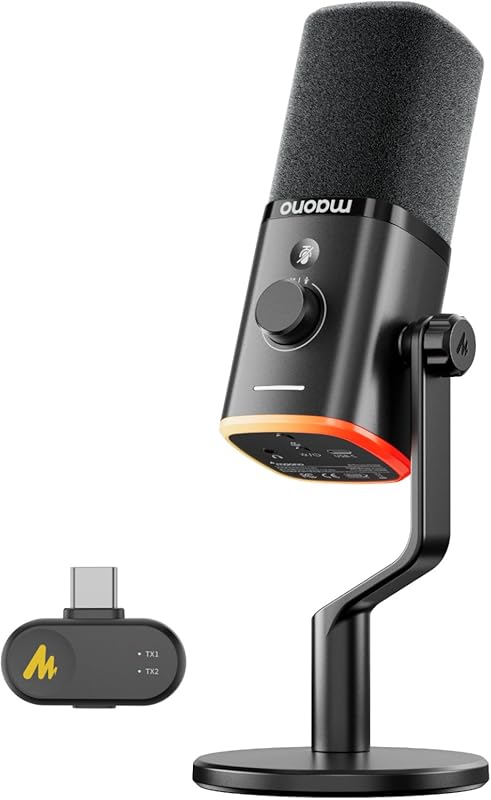
The MAONO PD100W brings wireless freedom to a more budget-friendly price point. It operates on a 2.4GHz connection via a USB receiver, offering cable-free convenience for streamers who move around or have a cluttered desk. It also has a USB-C port for wired use, making it versatile. The design includes RGB lighting, a mute button, and a headphone jack for monitoring. The sound is clear for a wireless dynamic mic, and the built-in noise reduction helps in less-than-perfect environments.
Key Features That Stand Out
- ✓ Dual-mode: 2.4GHz wireless or USB-C wired connection
- ✓ Upgraded foam windscreen and pop filter for noise control
- ✓ RGB lighting with mute status indicator
- ✓ Real-time headphone monitoring via 3.5mm jack
- ✓ Includes a desktop stand and receiver
Why We Recommend It
This is the most affordable way to get into wireless streaming audio. The ability to switch between wireless and wired is incredibly practical. For the price, the audio quality is very good, and the wireless connection is stable. It’s a fantastic option for mobile streamers, podcasters doing field recordings, or anyone who just wants to eliminate one cable from their desk without spending a fortune.
Best For
Budget-conscious streamers and content creators who want wireless freedom. Also great for anyone who needs a secondary, portable microphone for on-the-go recordings or interviews.
Pros and Cons
Pros:
- Very affordable entry into wireless microphone technology.
- Stable 2.4GHz connection with good range and no noticeable lag.
- Useful dual-mode (wireless/USB) adds versatility.
- Includes all necessary accessories (stand, receiver, cables).
Cons:
- Battery life is decent but requires charging for wireless use.
- Sound quality, while good, isn’t as rich as more expensive wired or wireless options.
- The wireless receiver is another dongle to plug into your computer.
Customer Reviews
Customer Review: This was a gift for my nephew and he absolutely loves it. He called to let me know how easy it is to set up, it works perfectly, it was compatible with both his laptop and desktop, the sound quality is great and it has noise cancellation.
Customer Review: I’ve been using the Maono wireless microphone for a bit now, and I’m genuinely impressed. Setup was ridiculously easy—plug it in, power it on, and it just works. No annoying pairing issues, no complicated menus. The sound quality is crystal clear, especially for a wireless mic at this price point. Voices come through clean and natural with very little background noise… Battery life has been great so far, easily lasting through long recording sessions, and the build quality feels sturdy and well-made, not cheap or flimsy. It’s compact, lightweight, and super portable. Overall, this mic punches way above its weight. If you’re looking for an affordable, reliable wireless microphone with excellent audio quality, Maono absolutely delivers.
10. FIFINE AM8PROT Gaming Microphone Kit
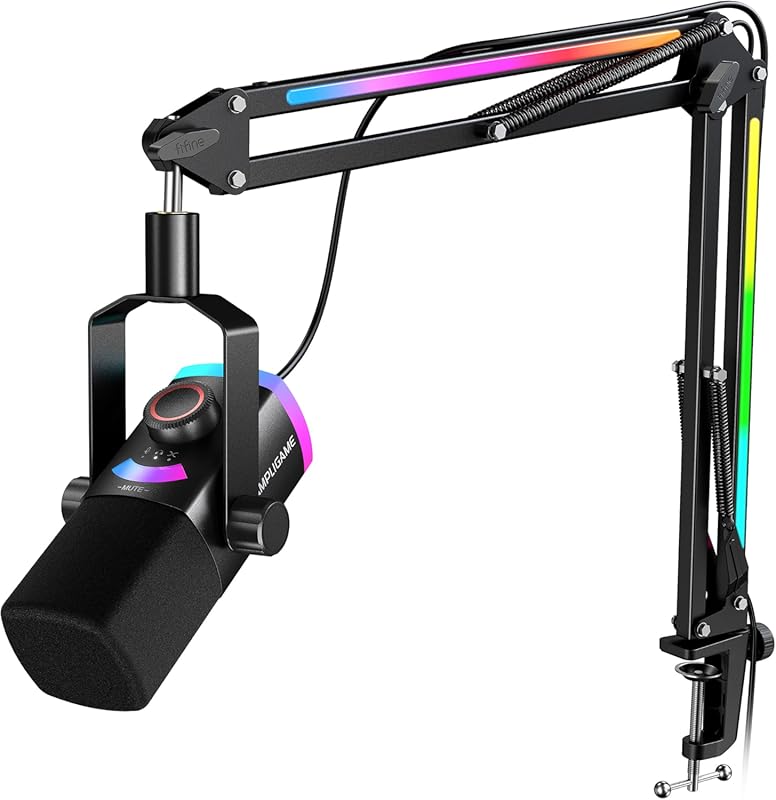
The AM8PROT is FIFINE’s premium offering, combining the excellent AM8 microphone with an upgraded, heavy-duty RGB boom arm and more advanced controls. This kit is designed for streamers who want a complete, aesthetically cohesive setup right out of the box. The microphone itself supports both USB and XLR, and features a tap-to-mute LED panel. The standout is the 3-in-1 dial on the mic body, which controls mic gain, headphone volume, and RGB lighting modes. The boom arm is thicker and more stable than the AM8T’s, with built-in cable management.
Key Features That Stand Out
- ✓ Complete kit with premium RGB boom arm and cable management
- ✓ 3-in-1 multifunctional dial (gain, headphone volume, RGB control)
- ✓ Tap-to-mute with LED indicator on the microphone
- ✓ USB and XLR connectivity, supporting 24-bit/48kHz audio
- ✓ Heavy-duty construction with a thicker boom arm for maximum stability
Why We Recommend It
If you want a high-end, all-in-one streaming kit with no need to buy separate accessories, the AM8PROT is the ultimate package. The boom arm is significantly better than the one on the AM8T, offering more stability and a cleaner look with hidden cables. The on-mic controls are intuitive and keep you from needing a separate mixer. The sound quality is identical to the excellent AM8, so you’re not compromising on audio for the convenience.
Best For
Streamers and content creators who want a premium, complete setup with a matching boom arm and advanced onboard controls. Perfect for anyone building a new desk from scratch who wants a cohesive, high-performance audio solution without piecing together parts.
Pros and Cons
Pros:
- The included boom arm is heavy-duty, stable, and has excellent cable management.
- 3-in-1 dial on the mic is convenient for adjusting gain, headphones, and lighting.
- Top-tier sound quality identical to the standalone AM8 microphone.
- Very cohesive and attractive all-in-one package; no need to shop for a boom arm.
Cons:
- More expensive than buying the AM8 microphone separately with a third-party boom arm.
- The microphone cable can still be a bit stiff to manage perfectly.
- The tap-to-mute sensor, while improved, can still be sensitive.
Customer Reviews
Customer Review: The media could not be loaded. I had a chance to review this new version of the FIFINE AM8PROT and let me lists some pros and cons! Firstly, out of the box it looks like you’re getting a product that’s worth the value… Pros: The clarity is top tier, I love that I can hear myself clearly and with the foam cover it helps reduce the noise as well as make your voice sound very professional. It supports up to 24 bit audio. The tap to mute is still the same as the Fifine AM8… Another thing is that I noticed the mic and boom arm itself is a lot thicker than the AM8, providing more support. It functions as it should and the ease of setup was pretty simply, almost a plug and play. I also like that the boom arm comes with cable management for the arm itself… Overall, I give this a 5 star rating because there’s little flaws in the design. The mic will sound similar to the AM8, but the design makes it more convenient and aesthetically pleasing as well into any setup.
Customer Review: This quality microphone delivers exceptional audio quality, capturing every emotional peak of your gameplay with crystal-clear precision. For those who need speed, the plug-and-play USB-C functionality allows you to swap between devices in seconds, and features a convenient tap-to-mute LED panel. The multifunctional 3-in-1 dial and real-time monitoring give you total control over your audio mix… The setup is stunning, featuring a vibrant RGB system. This included kit features a heavy-duty RGB boom arm and foam windscreen that eliminate unwanted noise and plosives for a polished, studio-grade broadcast. They have a software as well!
Complete Buying Guide for Best Usb Microphones For Streaming
Essential Factors We Consider
Choosing the right USB microphone hinges on understanding a few key specs. Microphone Type is first: condenser mics are more sensitive and detailed, great for quiet studios, while dynamic mics are tougher on background noise and better for louder rooms. Polar Pattern matters—cardioid is best for solo streamers as it focuses on sound from the front. Connectivity is why we’re here: USB offers simplicity, but some mics also have XLR for future upgrades. Sample Rate & Bit Depth (like 24-bit/48kHz) indicate audio quality, but higher numbers aren’t always perceptibly better. Finally, consider extra features like mute buttons, headphone jacks for monitoring, and software control.
Budget Planning
You don’t need to break the bank for great audio. Under $100, you’ll find excellent dynamic options like the FIFINE AM8 series that outperform many more expensive mics. The $100-$200 range offers premium features like hybrid connectivity, auto-level, and superior build quality (e.g., Shure MV7+). Set a budget based on your needs: a beginner can start strong under $80, while a professional should consider the long-term value of an XLR-capable mic. Remember to factor in potential accessories like a boom arm or pop filter, though many kits include them.
Final Thoughts
The “best” USB microphone is the one that fits your specific environment and workflow. A dynamic mic like the FIFINE AM8T is a fantastic, all-around starter that includes everything you need. If you crave wireless freedom, the MAONO PD200W is uniquely versatile. For those who want professional sound with smart features, the Shure MV7+ is worth the investment. Test the waters with a solid mid-range model first—you might be surprised how far your budget can go. Prioritize a cardioid pattern, a mute button, and good reviews from real streamers.
Frequently Asked Questions
Q: Do I need a pop filter with a USB microphone?
A: While not always mandatory, a pop filter is highly recommended. It reduces plosive sounds (like “p” and “b”) that can cause distracting bass booms in your audio. Many USB mics come with built-in pop filters or include one in the kit, which is usually sufficient. For the cleanest sound, especially with condenser mics, an external pop filter is a worthwhile $10-$15 addition.
Q: Is a dynamic or condenser microphone better for streaming?
A: For most streamers in typical home environments, a dynamic microphone is the better choice. Dynamic mics are less sensitive, meaning they pick up far less background noise like keyboard clicks, fan hum, or room echo. Condenser mics capture more detail but require a very quiet, treated room. Unless you have a soundproofed studio, a dynamic mic will give you cleaner, more consistent audio with less effort.
Q: Can I use a USB microphone on my PlayStation or Xbox?
A: Yes, but with limitations. Most modern USB microphones are “plug-and-play” on PlayStation 4/5 and Xbox Series X/S, but they often only work for voice chat, not for streaming capture via the console’s built-in tools. For full streaming functionality on console, you typically need to route the USB mic through a capture card connected to a PC. Always check the product listing for explicit console compatibility.
Q: What’s the difference between USB and XLR, and which should I get?
A: USB is simple: plug into your computer, no extra gear needed. XLR is a professional analog connection that requires an audio interface or mixer to convert the signal to digital. Get USB if you want simplicity and are just starting. Choose a mic with both USB and XLR options (like the FIFINE AM8 or Shure MV7+) if you think you might upgrade to an audio interface later for more control and better sound quality. This gives you a clear upgrade path without buying a new microphone.
Q: How important is a shock mount?
A: Very important for desk use. A shock mount isolates the microphone from vibrations transmitted through your desk—like typing, bumping the desk, or moving your chair. This prevents low-frequency rumbles in your audio. Some mics have built-in suspension (like the HyperX SoloCast 2), while others need a separate shock mount that attaches to a boom arm. If your mic is on a desk stand, a shock mount can make a huge difference in clarity.
Ready to upgrade your stream’s audio? The right USB microphone is the single most impactful piece of gear you can add for under $200. Whether you chose the all-in-one kit value of the FIFINE AM8T, the wireless freedom of the MAONO PD200W, or the professional hybrid power of the Shure MV7+, you’re making a smart investment in your content. Don’t let poor audio hold you back—click the “Check Price on Amazon” button for your top pick and hear the difference today. Your audience will thank you for it.