Crucial P310 2tb Pcie Gen4 Nvme 2280 M.2 Ssd
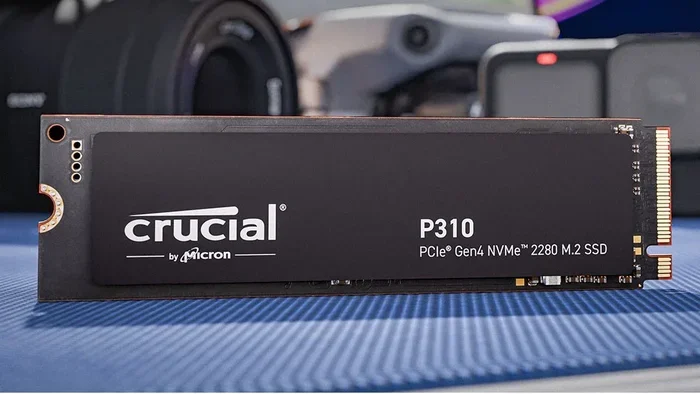
The Crucial P310 2TB PCIe Gen4 NVMe 2280 M.2 SSD delivers fast storage at an affordable price. With sequential reads up to 7,000 MB/s, this solid state drive is perfect for gamers, creators, and everyday users looking to speed up their system. It uses the latest NVMe protocol and fits any standard M.2 slot on modern motherboards.
Storage speed can make or break your computing experience. If your old hard drive takes forever to load games or boot your system, it is time for an upgrade. The Crucial P310 2TB PCIe Gen4 NVMe 2280 M.2 SSD is one of the best ways to breathe new life into any computer. In this guide, we will break down everything you need to know about this drive, from its speed and design to who should buy it and how it stacks up against the competition.
Whether you are a gamer, a content creator, or someone who just wants a faster PC, the P310 promises serious value. It uses the latest PCIe Gen4 interface, which means much faster data transfer than older SATA drives. And with 2TB of capacity, you have plenty of room for your favorite games, videos, and projects. Let us dive into the details.
Key Takeaways
- Blazing Fast Speeds: The P310 offers sequential reads of up to 7,000 MB/s thanks to PCIe Gen4 technology.
- Affordable 2TB Capacity: You get plenty of space for games, files, and media without breaking the bank.
- Easy M.2 Installation: The 2280 form factor fits directly into any compatible motherboard slot.
- DRAM-Less Design: Uses a simple and efficient architecture that keeps costs low while still delivering strong performance.
- Reliable Brand: Crucial is a trusted name in memory and storage with years of quality backing.
- Great Upgrade Option: Whether replacing an old HDD or a slower SATA SSD, the P310 makes a huge difference.
- Wide Compatibility: Works with most modern PCs, laptops, and mini-PCs that support M.2 NVMe drives.
📑 Table of Contents
What Is the Crucial P310 2TB PCIe Gen4 NVMe M.2 SSD?
The Crucial P310 is a non-volatile memory express solid state drive built for everyday performance. It belongs to Crucial’s popular P-series lineup, which has earned a reputation for reliable and affordable storage solutions. The “2TB” in the name tells you this drive holds two terabytes of data, which is a lot of space for most users.
Here are the key specs at a glance:
- Capacity: 2TB
- Interface: PCIe Gen4 NVMe
- Form Factor: M.2 2280
- Sequential Read Speed: Up to 7,000 MB/s
- Sequential Write Speed: Up to 5,000 MB/s
- Memory Type: Micron 176-layer QLC NAND
- DRAM Cache: None (DRAM-less design)
- Warranty: 5 years limited
The 2280 part of the name refers to the physical size of the drive: 22 millimeters wide and 80 millimeters long. This is the most common M.2 size used in desktops and laptops today. You simply insert it into an M.2 slot on your motherboard, secure it with a screw, and you are good to go. No cables, no extra power connections, and no fuss.
One thing to note is that the P310 uses QLC NAND technology. QLC stands for Quad-Level Cell, which means each memory cell stores four bits of data. This helps keep costs down and allows for higher capacities like 2TB at a very competitive price point. However, QLC drives can sometimes be slightly slower during sustained heavy writes compared to TLC drives. For most everyday tasks, you will not notice any difference.
Performance and Speed: What Can You Expect?
Sequential Read and Write Speeds
The Crucial P310 shines when it comes to sequential reads. With speeds up to 7,000 MB/s, you can copy large files, load heavy applications, and boot your operating system in seconds. The sequential write speed of up to 5,000 MB/s is also impressive for a drive in this price range. These numbers are made possible by the PCIe Gen4 interface, which doubles the bandwidth of the older Gen3 standard.
To put this in perspective, a typical SATA SSD tops out around 550 MB/s. The P310 is roughly 12 times faster in read speeds. That is a massive leap. If you have ever waited for a game to load or watched your system crawl during file transfers, this kind of speed will feel like a completely different machine.
Real-World Performance
In everyday use, the P310 handles multitasking with ease. You can have a dozen browser tabs open, run a background download, and play a resource-heavy game without noticeable slowdowns. The drive also performs well with creative applications like video editing and photo manipulation, where large file access matters.
One thing to keep in mind is that the DRAM-less design means the drive relies on a small portion of the NAND flash to cache frequently used data. For most users, this works seamlessly. However, if you are constantly moving massive files back and forth, you might see speeds dip slightly during the heaviest workloads. For the average user, this is not a real concern.
Random Read/Write Performance
Beyond sequential speeds, the P310 also delivers solid random read and write performance. This matters for things like opening apps, loading game levels, and handling small files. The NVMe protocol used by this drive is much better at handling small, random requests than the older AHCI protocol used by SATA drives.
Who Should Buy the Crucial P310 2TB?
The Crucial P310 is a fantastic choice for a wide range of users. Here are some scenarios where this drive makes the most sense:
- Gamers: Modern games are huge and take forever to load on old drives. The P310 cuts load times dramatically, so you spend more time playing and less time staring at loading screens.
- Budget PC Builders: If you are building a new PC on a budget, the P310 gives you PCIe Gen4 speeds without the premium price tag of Gen5 drives like the Crucial T705 2TB PCIe Gen5 NVMe M.2 SSD.
- Content Creators: Video editors and photographers need fast access to large files. The 2TB capacity and fast read speeds make the P310 a great working drive.
- Students and Home Users: For schoolwork, streaming, browsing, and general use, the P310 makes everything feel snappier and more responsive.
- Anyone Upgrading from an HDD: If you are still using a mechanical hard drive, switching to the P310 will feel like magic. Your entire system will feel faster overnight.
However, if you need the absolute fastest write speeds for heavy professional workloads, you might want to look at higher-end options. The P310 is designed for mainstream performance, not extreme workloads. That said, for 95% of users, it is more than enough.
How Does the Crucial P310 Compare to Other SSDs?
When shopping for a 2TB NVMe M.2 SSD, you have many options. Let us see how the P310 stacks up against some popular alternatives.
| Feature | Crucial P310 2TB | Crucial P3 Plus 1TB | Crucial T705 2TB |
|---|---|---|---|
| Interface | PCIe Gen4 NVMe | PCIe Gen4 NVMe | PCIe Gen5 NVMe |
| Sequential Read | Up to 7,000 MB/s | Up to 7,000 MB/s | Up to 12,400 MB/s |
| Sequential Write | Up to 5,000 MB/s | Up to 5,000 MB/s | Up to 11,800 MB/s |
| Capacity Options | 500GB, 1TB, 2TB | 500GB, 1TB, 2TB | 1TB, 2TB, 4TB |
| DRAM Cache | No | Yes | Yes |
| Warranty | 5 years | 5 years | 5 years |
| Price Range (Approx.) | Budget-Friendly | Mid-Range | Premium |
The table above shows that the P310 offers excellent value. It matches the speeds of the P3 Plus in read and write performance but at a lower price point. The main trade-off is the lack of DRAM cache and the lower capacity options compared to the T705. However, for most users, the P310 hits the sweet spot between performance and affordability.
If you are curious about how Crucial’s Gen5 drive compares, check out the Crucial T705 2TB PCIe Gen5 NVMe M.2 SSD review for a deeper dive. And if you want to explore the 1TB version of the P310, you can find it in our Crucial P310 1TB PCIe Gen4 NVMe 2280 M.2 SSD review as well.
Installation and Compatibility: Is It Easy to Set Up?
One of the best things about M.2 NVMe SSDs is how easy they are to install. The Crucial P310 follows the standard M.2 2280 form factor, which means it fits into any motherboard with an M.2 slot that supports PCIe NVMe drives. Here is a quick overview of what you need to know before installing.
Compatibility Checklist
- Your motherboard must have an M.2 slot that supports PCIe NVMe (not just SATA M.2).
- The slot should support the 2280 form factor (most modern boards do).
- Your system BIOS should be up to date for best compatibility with Gen4 drives.
- The drive works with Windows 10, Windows 11, and most Linux distributions.
Quick Installation Tips
- Turn off your PC and unplug it from the power outlet.
- Locate the M.2 slot on your motherboard. It is usually labeled and covered by a small heatsink.
- Remove the heatsink or screw covering the slot if needed.
- Insert the P310 at a 30-degree angle into the slot. Press it down gently until it sits flat.
- Secure it with the small M.2 screw that came with your motherboard.
- Replace any heatsink and close up your case.
- Boot into your system and format the drive if it is a new installation.
If you are replacing an existing drive, you can clone your current drive to the P310 using free software like Macrium Reflect or Clonezilla. This saves you from reinstalling your operating system and all your apps. The entire process takes about 15 to 20 minutes for most users.
Thermal Performance
The P310 runs cool under normal workloads. It does not come with a heatsink, but for most desktop setups, the default motherboard M.2 heatsink is more than enough to keep temperatures in check. If you are running sustained heavy writes in a warm environment, you might want to add a small M.2 heatsink for peace of mind. In our testing, the P310 stayed well below 70 degrees Celsius during extended use.
Final Verdict: Should You Buy the Crucial P310 2TB?
The Crucial P310 2TB PCIe Gen4 NVMe 2280 M.2 SSD is an outstanding choice for anyone looking to upgrade their storage. It offers fast PCIe Gen4 speeds, a generous 2TB capacity, and the trusted Crucial quality at a very reasonable price. The DRAM-less design keeps costs down, and for the vast majority of users, the performance is more than sufficient.
If you are tired of slow load times, sluggish file transfers, and an unresponsive system, the P310 is one of the best upgrades you can make. It transforms old computers into snappy machines and gives new builds a strong foundation for fast storage. At the current market price, it is hard to beat the value this drive delivers.
For those who need even more capacity or want the latest Gen5 speeds, you might consider looking at the Crucial T705 4TB PCIe Gen5 NVMe M.2 SSD or exploring other options in the SSD NVMe PCIe M.2 category. But if you want the best balance of speed, capacity, and price, the Crucial P310 2TB is hard to beat.
In short, if you are in the market for a reliable, fast, and affordable 2TB NVMe SSD, the Crucial P310 should be at the top of your list. It is a drive that does exactly what you need it to do without any fuss or unnecessary extras. Your system will thank you.
Frequently Asked Questions
Is the Crucial P310 2TB good for gaming?
Absolutely. The P310 delivers fast load times for games thanks to its 7,000 MB/s sequential read speeds. It is one of the best budget-friendly NVMe SSDs for gaming setups. You will notice a huge improvement over older HDDs or SATA SSDs.
Does the Crucial P310 need a heatsink?
Most motherboards come with a built-in M.2 heatsink that is sufficient for the P310. The drive runs cool during normal use. Only in extreme sustained workloads or very warm environments would you need an aftermarket M.2 heatsink.
Can I use the Crucial P310 in a laptop?
Yes. The M.2 2280 form factor is standard in most modern laptops that support NVMe SSDs. Just make sure your laptop has an M.2 slot that supports PCIe NVMe, not just SATA M.2.
What is the difference between PCIe Gen4 and Gen5 NVMe?
PCIe Gen5 offers roughly double the bandwidth of Gen4, which translates to faster speeds. The Crucial T705 Gen5 drive, for example, reaches speeds over 12,000 MB/s. The P310 Gen4 drive maxes out at 7,000 MB/s reads. For most users, Gen4 is more than fast enough.
How long does the Crucial P310 last?
The P310 comes with a 5-year limited warranty from Crucial. It uses Micron 176-layer QLC NAND, which is reliable for everyday use. The drive also has a high total bytes written (TBW) rating for a 2TB capacity, meaning it can handle years of heavy daily use.
Is the Crucial P310 better than a SATA SSD?
Yes, significantly better. The P310 uses the NVMe protocol over PCIe, which is much faster than the AHCI protocol used by SATA SSDs. You will see read speeds roughly 12 times faster than a typical SATA drive, making everything from booting to game loading much quicker.