Difference Between Computer Laptop
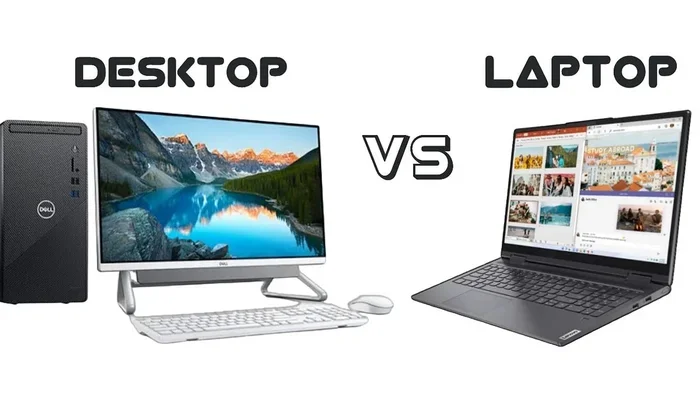
The difference between a computer and a laptop comes down to portability, power, and purpose. A desktop computer delivers raw performance and upgrade flexibility, while a laptop gives you mobility and convenience. This guide breaks down every key factor so you can choose the right setup for your computing needs.
When you sit down to pick a computer, one question keeps popping up: what is the difference between a computer and a laptop? It sounds simple, but the answer touches on everything from performance to price to how you actually use your machine every day.
A desktop computer sits on or under a desk and stays in one place. A laptop is a portable computer you can carry anywhere. Both do the same basic job, but they go about it in very different ways. Understanding these differences helps you make a smarter buying decision.
This guide walks you through every major factor. We will look at performance, portability, cost, upgrade options, and more. By the end, you will know exactly which type of machine fits your life best.
Key Takeaways
- Portability: Laptops let you work anywhere, while desktop computers stay in one fixed location.
- Performance: Desktop computers typically offer more processing power and better cooling for heavy tasks.
- Upgrade Options: Desktops are far easier to upgrade with new parts over time.
- Cost Value: Desktop computers often give you more bang for your buck at the same price point.
- Screen Size: Laptops come with built-in screens, but desktops let you choose any monitor size you want.
- Power Use: Laptops are designed to be energy efficient and run on battery power.
- Best Fit: Your choice depends on whether you need mobility or maximum performance.
📑 Table of Contents
What Is a Desktop Computer?
A desktop computer is a personal computer designed to stay in one place. It usually includes a separate tower or case, a monitor, a keyboard, and a mouse. You set it up on a desk and it does not move around much.
Desktop computers have been around since the 1970s. They are the workhorses of offices, homes, and studios. Many people associate them with power and reliability.
Key Parts of a Desktop Computer
- Tower or Case: Houses the motherboard, processor, and other internal parts.
- Monitor: The display screen. You can pick any size you want.
- Keyboard and Mouse: Input devices you choose yourself.
- Power Supply: A larger unit that provides steady power to all components.
Because each part is separate, you can mix and match. Want a bigger monitor? Just buy one. Need more storage? Add a new hard drive. This flexibility is one of the biggest strengths of a desktop setup.
What Is a Laptop?
A laptop is a portable personal computer. It combines the screen, keyboard, trackpad, battery, and all internal parts into one slim unit. You can open it, turn it on, and use it almost anywhere.
Laptops have become incredibly powerful over the years. What used to be a machine for basic tasks can now handle video editing, gaming, and programming. The best laptop for students today can do things that were impossible just a decade ago.
Key Parts of a Laptop
- Built-in Screen: Usually between 13 and 17 inches.
- Integrated Keyboard and Trackpad: Built right into the body.
- Battery: Allows you to use the laptop without plugging it in.
- Compact Components: Smaller parts designed to fit inside a slim chassis.
The trade-off is that you cannot easily swap out parts. Your screen is attached to your keyboard. Your battery is sealed inside. This limits how much you can customize a laptop after you buy it.
Difference Between Computer Laptop: Head-to-Head Comparison
Now let us get to the heart of the matter. Here is a side-by-side look at how desktop computers and laptops compare across the most important categories.
Performance and Power
Desktop computers use bigger, more powerful components. A desktop processor can run faster and stay cool longer because it has more space for fans and heat sinks. This means better performance for tasks like video rendering, 3D modeling, and gaming.
Laptops have come a long way, but they still face physical limits. A laptop processor must fit in a small space and run on battery power. It uses less electricity and generates less heat. This means it cannot match the raw power of a desktop at the same price point.
If you are doing heavy work like video editing or graphic design, a desktop will usually give you smoother performance. For lighter tasks like browsing, writing, and email, a modern laptop handles them with ease.
Portability and Mobility
This is where laptops win clearly. You can carry a laptop to a coffee shop, a library, a classroom, or a friend’s house. A desktop computer does not move unless you physically carry each piece separately.
Portability matters a lot in today’s world. Many people work remotely or attend classes online. A laptop lets you stay productive no matter where you are. If your computing needs involve working from different locations, a laptop is almost a must.
Screen Size and Display
Desktop computers let you connect any monitor you want. You can use a 27-inch 4K display or even two screens side by side. This flexibility is a huge advantage for multitasking and creative work.
Laptops have built-in screens that typically range from 13 to 17 inches. You are stuck with that size and that resolution. Some laptops support external monitors, but you need to carry the laptop wherever you go.
Upgrade and Customization Options
This is another area where desktops pull ahead. You can swap out the graphics card, add more RAM, replace the hard drive, or upgrade the power supply. A desktop computer can evolve with your needs over many years.
Laptops offer very limited upgrade options. You might be able to add more memory or replace the storage drive. But the processor and graphics card are usually soldered to the motherboard. You cannot change them.
Price and Value
Desktop computers generally offer more value for your money. At the same price point, a desktop will have a faster processor, more storage, and a better graphics card than a laptop.
Laptops cost more because of the engineering that goes into making them compact and portable. You are paying for the portability factor. If budget is a major concern, a desktop computer gives you the most computing power per dollar.
Battery Life and Power Use
Laptops run on rechargeable batteries. A good laptop can last 8 to 12 hours on a single charge. This makes them perfect for use without a power outlet.
Desktop computers need to stay plugged in at all times. They also use more electricity overall. A desktop setup can draw 300 to 500 watts, while a laptop typically uses 30 to 100 watts during normal use.
Which One Should You Choose?
Choosing between a desktop and a laptop depends on your lifestyle and what you plan to do with the machine. Let us break it down by use case.
Choose a Desktop Computer If
- You need maximum performance for gaming or creative work.
- You plan to keep the computer in one spot, like a home office.
- You want the ability to upgrade parts over time.
- You need a large display or multiple screens.
- You want the best value for your budget.
Choose a Laptop If
- You need to work or study from different locations.
- You travel frequently or attend classes on campus.
- You have limited space at home or in the office.
- You want a built-in screen, keyboard, and trackpad in one device.
- You need to use your computer away from a power outlet.
Many people end up owning both. They use a powerful desktop at home for heavy work and a laptop for on-the-go tasks. If your budget allows, this combination gives you the best of both worlds.
Common Mistakes People Make
When deciding between a desktop and a laptop, many buyers make the same errors. Here are a few to avoid.
Mistake 1: Buying a laptop just because it is cheaper. Some budget laptops look tempting, but they often have weak processors and limited storage. You may find yourself needing a replacement sooner than expected.
Mistake 2: Ignoring future needs. Think about what you will need in two or three years. If you plan to do more demanding work, invest in a machine that can handle it. A best computer for graphic design should have room to grow.
Mistake 3: Overlooking the total cost. A desktop computer requires you to buy a monitor, keyboard, and mouse separately. A laptop includes all of these. Make sure you compare the full setup cost, not just the base price.
Mistake 4: Assuming a laptop can replace a desktop for everything. Laptops are versatile, but they cannot match a desktop for raw power or screen flexibility. Be honest about what you need.
Quick Tips for Making the Right Choice
- List your needs first. Write down what you will use the computer for most often.
- Set a realistic budget. Include the cost of all accessories.
- Read reviews before buying. Look for real-world performance tests, not just specs on paper.
- Consider the best time to buy a laptop. Sales events like Black Friday and back-to-school season often bring great deals.
- Think about the long term. A computer is a multi-year investment. Choose wisely.
Expert Insight: The Future of Computing
The gap between desktop computers and laptops is slowly narrowing. Modern laptops are more powerful than ever. But desktops still hold the edge in raw performance and upgradeability. New technologies like M.2 NVMe SSDs are making both types faster and more efficient.
One trend worth watching is the rise of compact desktops. Machines like mini PCs offer desktop-level performance in a small form factor. They bridge the gap between the portability of a laptop and the power of a desktop.
No matter which type you choose, the most important thing is that the machine fits your life. The best computer is the one that helps you get things done without frustration.
Conclusion
The difference between computer and laptop comes down to a simple trade-off: power and flexibility versus portability and convenience. Desktop computers deliver top-tier performance and easy upgrade paths. Laptops give you the freedom to work from anywhere with a built-in screen and battery.
There is no single right answer. Your best choice depends on your daily routine, your budget, and your computing goals. Take the time to think about what matters most to you. Whether you pick a desktop or a laptop, the right machine will make your digital life smoother and more productive.
Start by listing your needs, compare options carefully, and do not rush the decision. A well-chosen computer will serve you well for years to come.
Frequently Asked Questions
Can a laptop replace a desktop computer completely?
For many users, a laptop can handle all daily tasks. However, if you do heavy creative work or gaming, a desktop will still outperform a laptop at the same price. Some people choose both to get the best of each world.
How long does a desktop computer last compared to a laptop?
Desktop computers often last longer because you can upgrade individual parts like the graphics card or memory. Laptops have a fixed lifespan since most components cannot be replaced easily. With proper care, both can last five to seven years or more.
Is a laptop or desktop better for students?
Most students benefit from a laptop because of its portability. You can take notes in class, study in the library, and work from home. The best laptop for students balances performance, battery life, and a reasonable price.
Do desktop computers cost more than laptops?
Not necessarily. Desktop computers often provide better performance at the same price. However, you need to factor in the cost of a monitor, keyboard, and mouse. A fully set up desktop can sometimes cost more upfront than a laptop.
Can I connect a second monitor to my laptop?
Yes, most modern laptops support external monitors through HDMI, USB-C, or DisplayPort connections. This gives you the flexibility of a larger screen when you are at your desk while keeping the portability of a laptop.
What should I look for when buying a new laptop?
Focus on the processor, RAM, storage type, and battery life. If you plan to do creative work or gaming, pay extra attention to the graphics card. Reading reviews and comparing real-world benchmarks helps you find the right machine.