Difference Between Saas and Iaas

SaaS (Software as a Service) delivers complete, ready-to-use applications over the internet, while IaaS (Infrastructure as a Service) provides virtualized computing resources like servers and storage. The core difference is the level of control and management responsibility you retain. SaaS offers maximum convenience with minimal IT overhead, whereas IaaS grants deep infrastructure control for custom setups.
So, you’re hearing a lot about “the cloud” and these acronyms—SaaS, IaaS, PaaS. It can feel like alphabet soup! But understanding the fundamental difference between SaaS and IaaS is one of the most important steps in making smart technology decisions for your business or project. Think of it this way: do you want to eat a fully prepared meal (SaaS), or do you want a kitchen with all the appliances and raw ingredients to cook your own masterpiece (IaaS)? Both get you fed, but the experience, effort, and control are wildly different.
This guide will cut through the confusion. We’ll break down exactly what each model is, how they work in practice, and how to decide which one fits your needs. No jargon, just clear explanations and real-world examples. By the end, you’ll be able to confidently navigate cloud service discussions and architect solutions that make sense.
Key Takeaways
- SaaS is application-focused: You use a complete software solution (like email or CRM) without managing any underlying infrastructure.
- IaaS is infrastructure-focused: You rent fundamental IT components (VMs, networks, storage) to build and manage your own platforms and applications.
- Control vs. Convenience Trade-off: IaaS offers high control and customization but requires significant IT expertise. SaaS offers plug-and-play convenience with limited customization.
- Management Responsibility Shifts: With SaaS, the vendor handles everything. With IaaS, you manage the OS, middleware, apps, and data.
- Cost Models Differ: SaaS typically uses simple per-user/month subscriptions. IaaS pricing is more complex, based on compute, storage, and network usage.
- Security & Compliance Shared Differently: In SaaS, the vendor secures the application and infrastructure. In IaaS, you are primarily responsible for securing your operating systems and applications.
- Use Case Dictates Choice: Choose SaaS for standard business apps (email, collaboration). Choose IaaS for migrating legacy apps, hosting custom environments, or needing full stack control.
📑 Table of Contents
What is SaaS? Software as a Service
Let’s start with the simpler, more common model for most end-users. SaaS, or Software as a Service, is a software delivery model where applications are hosted by a vendor on remote servers and made available to customers over the internet, typically via a web browser or a lightweight app.
How SaaS Works: The “Turnkey” Solution
Imagine you need to send an email. You don’t build an email server, install an operating system, configure SMTP protocols, and write the email client software. You go to Gmail, Outlook.com, or your company’s webmail portal, log in, and start typing. That entire infrastructure—the servers, the storage, the email application software, the security patches, the uptime monitoring—is all managed by the provider (Google, Microsoft, etc.). You simply consume the service.
This is the essence of SaaS. The vendor is responsible for:
- Everything underlying the application: Servers, storage, networking, data center facilities, virtualization.
- The application itself: Development, updates, security patches, bug fixes, and new features.
- Middleware and runtime: The software that connects the application to the infrastructure.
- High availability and scalability: Ensuring the service is up and can handle user load.
Your responsibility is limited to:
- Your data: Entering, managing, and configuring your information within the app.
- User management: Adding/removing users and setting their permissions.
- Device access: Ensuring your team can connect to the internet.
Real-World SaaS Examples You Know
You’re almost certainly using SaaS right now. Common examples include:
- Productivity & Collaboration: Google Workspace (Docs, Sheets), Microsoft 365, Slack, Zoom.
- Customer Relationship Management (CRM): Salesforce, HubSpot.
- Enterprise Resource Planning (ERP): NetSuite, SAP S/4HANA Cloud.
- Human Resources: Workday, BambooHR.
- Specialized Tools: Figma (design), Canva (graphics), Mailchimp (email marketing).
The key identifier? You pay a subscription fee (often per user, per month) and log in to use a finished product. There’s no installation on your local servers (beyond maybe a browser plugin).
What is IaaS? Infrastructure as a Service
Now, let’s peel back a layer. IaaS, or Infrastructure as a Service, provides the most fundamental building blocks of cloud computing: virtualized computing resources over the internet. Instead of buying and maintaining physical servers, storage arrays, and network hardware, you rent these as a service.
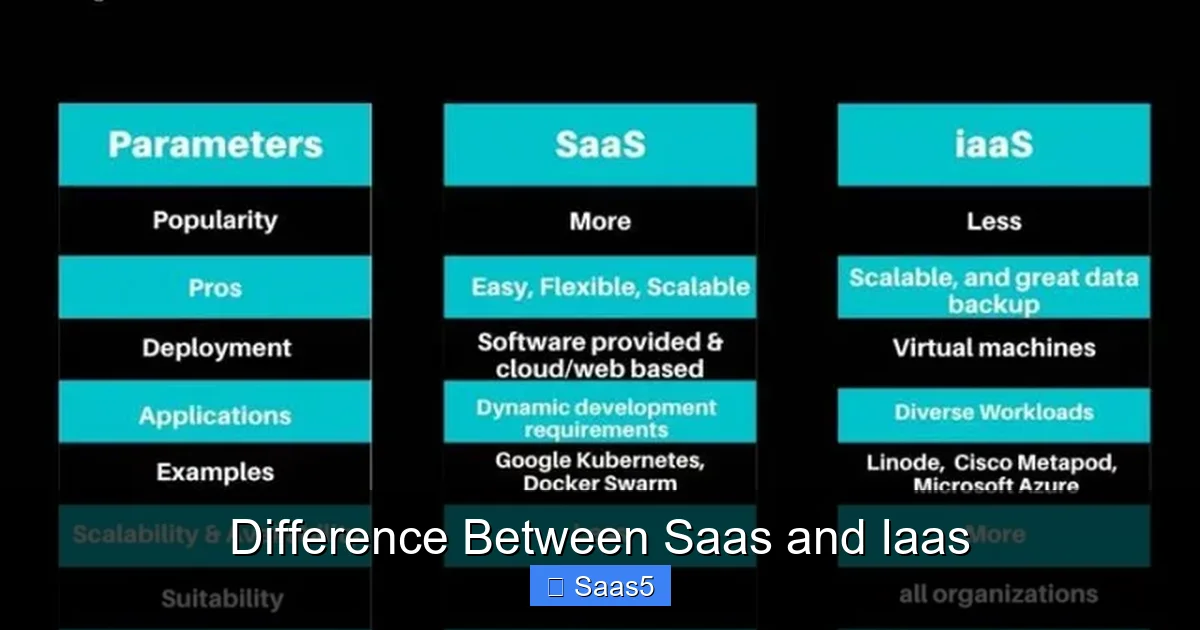
Visual guide about Difference Between Saas and Iaas
Image source: knowledgenile.com
How IaaS Works: The “Virtual Data Center”
Think of IaaS as leasing a fully equipped, empty warehouse (the virtual data center). The landlord (the IaaS provider like AWS, Azure, or Google Cloud) provides the basic structure: the walls, roof, power, and lighting (the physical servers, storage, and network backbone). They also provide the virtualized equivalents: virtual machines (VMs), virtual networks (VPCs), and block storage disks.
But inside that warehouse? That’s your space. You are responsible for:
- Installing and managing the operating system (Windows Server, Linux distributions).
- Deploying middleware and runtime environments (databases like MySQL, web servers like Apache, application servers).
- Developing, deploying, and managing your applications.
- Securing your environment: Configuring firewalls (at the OS/VM level), managing user access, and patching the OS and apps.
- Your data: Backing it up, ensuring its integrity, and managing its lifecycle.
The IaaS provider remains responsible for the physical hardware, the hypervisor (the software that creates and runs VMs), and the global network that connects everything. They ensure the “warehouse” is structurally sound, powered, and connected to the internet.
Real-World IaaS Examples and Use Cases
IaaS is the engine behind many modern digital services. Key providers and their core offerings include:
- Amazon Web Services (AWS): EC2 (virtual servers), S3 (object storage), VPC (networking).
- Microsoft Azure: Azure Virtual Machines, Blob Storage, Virtual Network.
- Google Cloud Platform (GCP): Compute Engine, Cloud Storage, VPC Network.
- Other: DigitalOcean Droplets, Linode Instances, Oracle Cloud Infrastructure.
Typical IaaS use cases:
- Lift-and-Shift Migrations: Moving a company’s existing on-premise server (with its OS and apps) directly to a virtual machine in the cloud with minimal changes.
- Hosting Complex, Custom Applications: Running a proprietary e-commerce platform, a custom-built analytics engine, or a legacy enterprise system that requires specific OS/configurations.
- Development & Testing Environments: Quickly spinning up identical, disposable development stacks for teams, then tearing them down to save costs.
- High-Performance Computing (HPC): Renting massive clusters of powerful VMs for short-term, intensive tasks like scientific simulations or financial modeling.
- Building a Platform for PaaS: Companies building their own PaaS or SaaS offering often start on IaaS for maximum control.
Head-to-Head: The Core Differences Between SaaS and IaaS
Now we get to the heart of the difference between SaaS and IaaS. It’s not just about what you get, but about what you do. The comparison boils down to a spectrum of control and responsibility.
Visual guide about Difference Between Saas and Iaas
Image source: ictinnovations.com
1. Level of Control & Customization
This is the most significant differentiator.
- SaaS: You have the least control. You can only customize within the boundaries provided by the vendor’s application—configuring settings, workflows, and maybe adding some approved third-party integrations via APIs or marketplaces. You cannot change the core code, the underlying database structure, or the server OS. It’s a standardized experience for all customers.
- IaaS: You have near-total control. You decide the OS, install any software, configure networks and security groups, and architect the entire stack. You can optimize for a specific database, run a non-standard application stack, or have complete control over network routing. This power comes with great responsibility (see next point).
2. Management Responsibility (The Shared Responsibility Model)
Both models operate on a shared responsibility model, but the split is completely opposite.
- SaaS: The vendor bears the overwhelming majority of the responsibility. They manage the infrastructure, the platform, and the application. Your team’s responsibility is essentially user training, data entry, and configuration within the app’s limits.
- IaaS: The responsibility split is much closer to the traditional on-premise model. The provider secures the physical infrastructure and hypervisor. You are responsible for everything from the OS upward: patching, antivirus, application security, database maintenance, backup configurations, and application-level firewalls. This requires a skilled IT or DevOps team.
3. Cost Structure & Financial Model
How you pay reflects the service depth.
- SaaS: Predictable, operational expenditure (OpEx). Usually a flat monthly or annual fee per user or per tier of features. It’s simple to budget for. There are no separate costs for servers or bandwidth—it’s all-inclusive.
- IaaS: Variable OpEx, often with some elements of capital expenditure (CapEx) if you reserve resources. You pay for what you consume: compute hours (by VM size), stored gigabytes, data transfer (egress), IP addresses, etc. Costs can scale dramatically with usage and require careful monitoring and governance to avoid “cloud bill shock.”
4. Security & Compliance
The division of security duties changes the compliance landscape.
- SaaS: The vendor is responsible for securing the application and infrastructure (SOC 2, ISO 27001 certifications are common). You must trust their security practices. Your main tasks are managing user access (using strong passwords, MFA), ensuring proper data handling within the app, and understanding the vendor’s data residency and privacy policies. You must always review the terms and conditions and Service Level Agreement (SLA) to understand their security commitments and your liabilities.
- IaaS: You inherit a much larger share of the security burden. You must secure the OS, applications, databases, and your internal network configurations. You are responsible for implementing your own security groups, intrusion detection, encryption at rest and in transit, and regular patching. Compliance (like HIPAA, PCI-DSS) becomes your responsibility to configure and prove on the infrastructure you manage.
5. Scalability & Elasticity
Both scale, but the mechanism differs.
- SaaS: Scalability is typically transparent and automatic from the user’s perspective. If the vendor’s platform scales, your experience remains consistent. However, you are limited to the scalability limits and pricing tiers defined by their application. You cannot, for example, request a larger database instance for your specific Salesforce org.
- IaaS: You have granular, on-demand scalability. With a few clicks or an API call, you can vertically scale (increase the CPU/RAM of a VM) or horizontally scale (add more identical VMs behind a load balancer). This elasticity is perfect for unpredictable workloads, like a seasonal e-commerce spike, as you can automate scaling up during peak hours and down during lulls to control costs.
Choosing the Right Model: Practical Scenarios and Decision Framework
Now that we’ve dissected the difference between SaaS and IaaS, how do you choose? Ask these questions.
Visual guide about Difference Between Saas and Iaas
Image source: assets-global.website-files.com
Ask Yourself: What Problem Am I Solving?
Choose SaaS if:
- You need a standard business function: email, CRM, accounting, project management.
- You want to go from zero to functional in days or weeks, not months.
- You have a small IT team or want to free them from mundane maintenance.
- The vendor’s feature set meets 90%+ of your requirements out-of-the-box.
- You prefer predictable subscription costs over complex usage-based billing.
- Example: A marketing team needs a collaboration and asset management tool. They should use a SaaS like Figma or Canva, not build one on IaaS.
Choose IaaS if:
- You are migrating existing, complex applications that require specific OS or middleware.
- You need complete control over the software stack for performance, security, or compliance reasons.
- You are building a unique, proprietary application that doesn’t fit a standard SaaS mold.
- You have specialized, fluctuating workloads (big data processing, rendering farms).
- You have a skilled IT/DevOps team that can manage the infrastructure layer.
- Example: A fintech startup needs to run a custom, latency-sensitive trading algorithm on a specific Linux kernel version with direct network access to a stock exchange. IaaS is the only viable path.
The “It Depends” Zone: Hybrid and Multi-Cloud Strategies
The world isn’t binary. Many organizations use both SaaS and IaaS together. Your customer-facing e-commerce site might run on Shopify (SaaS), while your proprietary inventory and logistics system runs on custom VMs in AWS (IaaS). Data might flow between them via APIs.
Furthermore, you might use IaaS to *host* a private instance of an application that is also available as SaaS, giving you control over data and customization while using a familiar software package. This is common with enterprise software like SAP or Oracle.
The Evolution Path: From IaaS to SaaS and Beyond
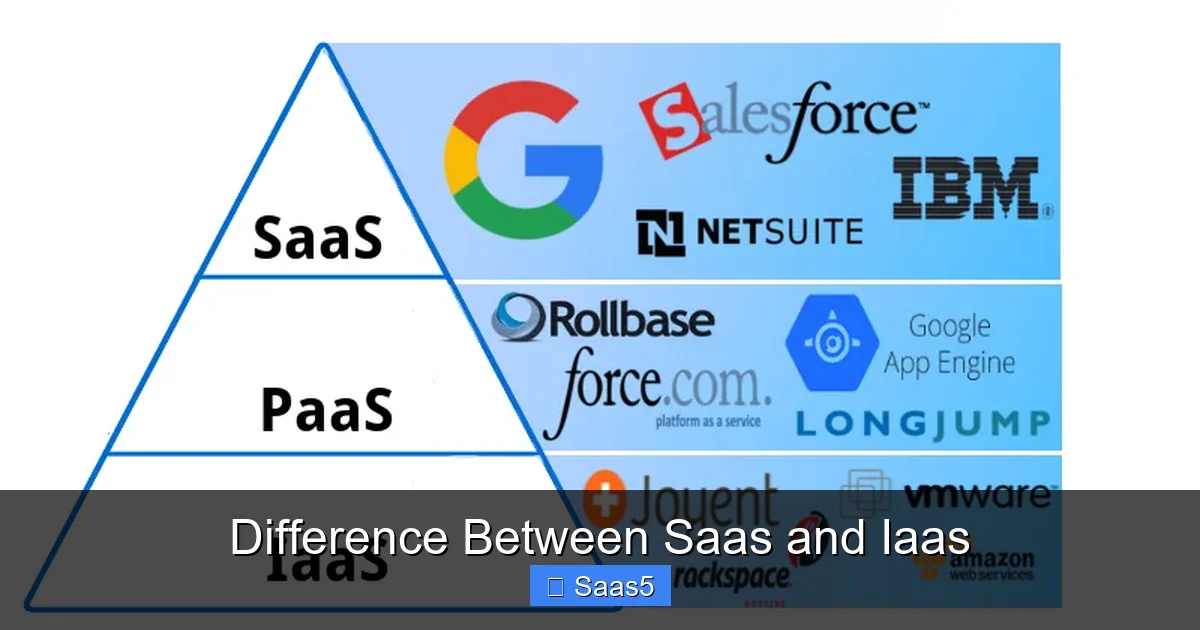
Understanding this difference also helps you see the cloud computing stack. IaaS is the foundational layer. On top of it, you can install your own platforms (like Kubernetes, databases) and then your applications—effectively building your own private PaaS or SaaS.
Conversely, a successful SaaS application is often built on top of an IaaS (or PaaS) provider. The SaaS vendor consumes IaaS to deliver their application to you. They handle all the complexity of managing that infrastructure so you don’t have to.
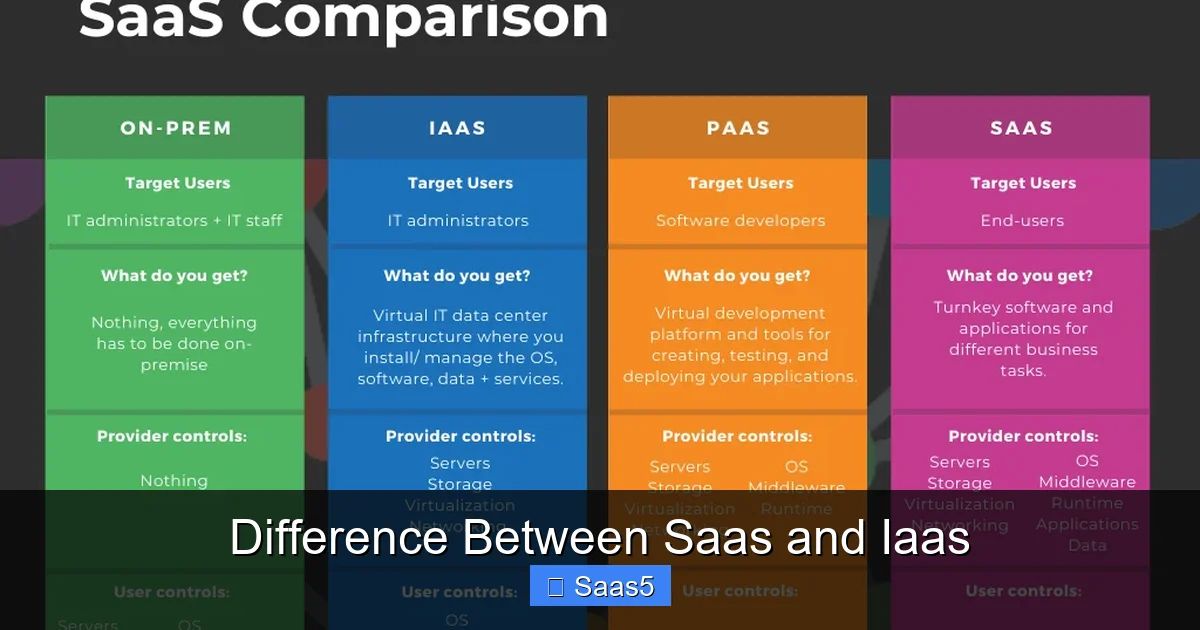
This creates a spectrum:
- On-Premise: You manage everything from the building to the application.
- IaaS: You manage from the OS upward. (Provider manages physical infra).
- PaaS: You manage only your application and data. (Provider manages OS, runtime, middleware).
- SaaS: You manage only your data and user configs. (Provider manages everything else).
Conclusion: Matching Model to Mission
The difference between SaaS and IaaS is profound and centers on a trade-off between control and convenience. SaaS is about consuming a finished product with minimal fuss, ideal for standardized business processes. IaaS is about procuring raw infrastructure power to build and run anything you can imagine, demanding significant technical expertise.
Your decision isn’t about which is “better,” but which is right for your specific need. For most general business software—communication, HR, sales—SaaS is the obvious, efficient choice. For specialized workloads, legacy application support, or when building a unique technical asset, IaaS provides the necessary flexibility and control.
Many modern architectures are hybrids. Start by clearly defining your requirements: your team’s skills, your need for customization, your compliance landscape, and your budget predictability needs. Then, match those to the model that hands you the right set of keys—whether it’s the key to a fully furnished apartment (SaaS) or the key to an empty, industrial warehouse where you must bring all your own tools (IaaS).
Frequently Asked Questions
Can a single business use both SaaS and IaaS?
Yes, absolutely. It’s very common for businesses to use SaaS for standard functions like email (Google Workspace) and CRM (Salesforce), while using IaaS (like AWS EC2) to host custom internal applications, legacy systems, or specialized data processing workloads. The two models are complementary.
Which is more secure: SaaS or IaaS?
It’s not about which is inherently more secure; it’s about shared responsibility. SaaS providers often have robust, certified security for their infrastructure and application. Your main risk is misconfiguration of user access or data mishandling within the app. With IaaS, the provider secures the physical layer, but you are responsible for securing the OS, applications, and network configurations you deploy. IaaS security is only as strong as your team’s expertise.
Is SaaS always cheaper than IaaS?
Not necessarily. For standardized, predictable workloads with a known number of users, SaaS is almost always cheaper and more cost-effective due to its simple subscription model. However, for highly variable, massive-scale, or uniquely configured workloads, IaaS can be significantly cheaper because you only pay for the exact resources consumed and can optimize aggressively. IaaS costs can also become unpredictable without careful management.
Can I customize a SaaS application as much as an app on IaaS?
No. SaaS customization is limited to the configuration options, APIs, and marketplace integrations the vendor chooses to provide. You cannot change the core code or database schema. On IaaS, you have full root/administrator access to your virtual machines, allowing you to install, modify, or build any software stack imaginable, offering unlimited customization at the cost of full management responsibility.
What is the biggest challenge when migrating to IaaS from on-premise?
The biggest challenge is the shift in management mindset and skill set. Moving to IaaS is not a “set it and forget it” move to a magic, self-managing cloud. It requires building or upskilling a team in cloud operations (DevOps), cloud security, and cost optimization. Organizations often underestimate the ongoing operational burden of managing their own OS and application stack in the cloud.
How does vendor lock-in differ between SaaS and IaaS?
Both have lock-in risks, but they manifest differently. SaaS lock-in is often business-process lock-in—your workflows and data are deeply embedded in that specific application’s format and features, making migration complex and expensive. IaaS lock-in is more technical—becoming dependent on a provider’s proprietary services (like AWS Lambda or Azure Functions) or specific APIs can make moving to another cloud provider difficult and costly, though standard VMs are more portable. Always review the terms and conditions and data export policies of any cloud service.