Does Hdmi Make Picture Better
Yes, HDMI can make your picture better, but it depends on the cable version, device compatibility, and what you are connecting. A high-quality HDMI cable supports higher resolutions, better color depth, and faster refresh rates that older cables simply cannot handle. Understanding which HDMI version you need is the key to unlocking sharper, clearer visuals on your screen.
You plug in an HDMI cable and expect a stunning picture. But does HDMI actually make the picture better? The short answer is yes, but the full answer involves a few important details that many people overlook.
Whether you are setting up a home theater, connecting a laptop to a monitor, or hooking up a gaming console, the HDMI cable you choose plays a real role in what you see on screen. Not all HDMI cables are created equal. The version, build quality, and compatibility with your devices all determine how good your picture will look.
In this guide, we will break down exactly how HDMI affects picture quality. You will learn which cable versions matter, what features to look for, and how to avoid common mistakes that hurt your display. By the end, you will know exactly what kind of HDMI setup you need for the best possible visuals.
Key Takeaways
- HDMI version matters: Newer versions like HDMI 2.0 and 2.1 support 4K and even 8K resolution for a noticeably better picture.
- Cable quality counts: Premium certified cables reduce signal loss and deliver cleaner visuals compared to cheap, uncertified options.
- Your source device matters too: Even the best HDMI cable cannot improve picture quality if your source device does not support high-resolution output.
- Distance and cable length affect signal: Longer HDMI runs can degrade picture quality without proper signal boosting.
- HDMI does not work alone: Your display device, settings, and overall system performance all contribute to final picture quality.
📑 Table of Contents
- What Does HDMI Do for Your Picture?
- HDMI Versions and Their Impact on Picture Quality
- Does Cable Quality Really Affect Picture Quality?
- How Your Source Device Affects HDMI Picture Quality
- Common HDMI Mistakes That Hurt Your Picture
- Quick Tips for Getting the Best HDMI Picture
- HDMI vs. Other Connection Types for Picture Quality
- Final Thoughts
What Does HDMI Do for Your Picture?
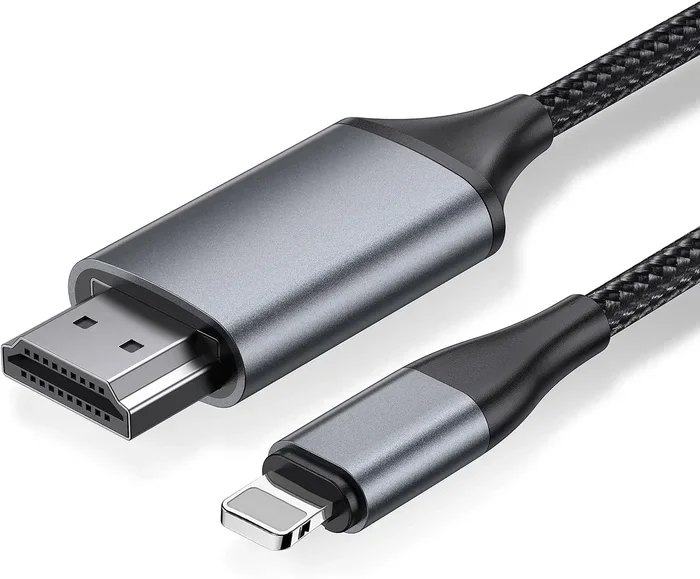
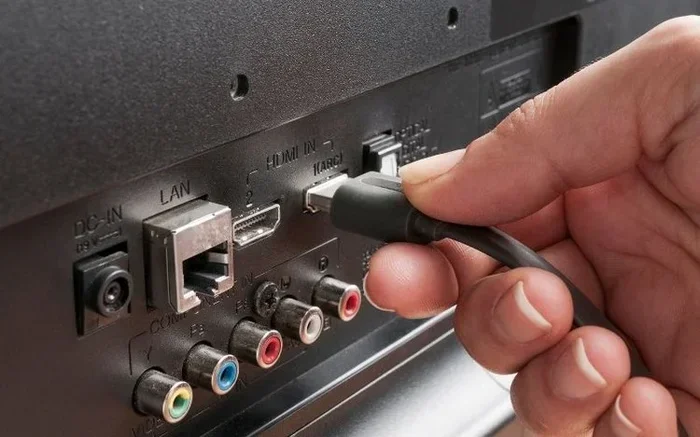
HDMI stands for High-Definition Multimedia Interface. It is the most common way to connect devices like TVs, monitors, laptops, and gaming consoles. The cable carries both video and audio signals through a single connection. This makes it incredibly convenient compared to older cables that needed separate audio and video lines.
But here is the thing people often misunderstand. HDMI does not magically improve your picture on its own. It simply transmits the signal from your source device to your display. If your source device sends a low-quality signal, the HDMI cable will pass that along. However, when you use a cable that supports higher bandwidth and better resolution, you unlock the full potential of your devices.
How HDMI Transmits Video
HDMI uses digital signaling to transfer data. Unlike older analog cables like VGA, digital signals do not degrade over distance in the same way. This means a digital HDMI connection generally produces a cleaner, sharper image. There is no analog interference, no ghosting, and no color bleeding.
The real difference comes down to bandwidth. Bandwidth determines how much data the cable can carry per second. Higher bandwidth means the cable can handle higher resolutions, deeper color, and faster frame rates. A basic HDMI 1.4 cable might handle 1080p just fine. But if you want 4K at 60Hz or even 4K at 120Hz, you need a cable with more bandwidth.
HDMI Versions and Their Impact on Picture Quality
Not every HDMI cable supports the same features. The version of HDMI your cable supports determines what kind of picture you can get. Let us walk through the main versions you will encounter.
HDMI 1.4
HDMI 1.4 was a major step forward when it launched. It introduced support for 4K resolution at 30Hz. For most casual viewing, this works fine. You can watch 4K movies and browse content. But if you want smooth motion for gaming or fast-action video, 30Hz feels a bit choppy.
HDMI 2.0
HDMI 2.0 brought a big upgrade. It supports 4K at 60Hz, which makes everything look much smoother. The color depth also improved significantly with support for 10-bit and 12-bit color. This means richer, more vibrant colors and smoother gradients. If you want a great picture for both movies and gaming, HDMI 2.0 is a solid choice.
HDMI 2.1
HDMI 2.1 is the latest standard and it is built for serious performance. It supports 8K resolution at 60Hz and 4K at 120Hz. The bandwidth jumps to 48 Gbps, which is a massive increase over older versions. If you have a modern gaming console or a high-end PC, HDMI 2.1 cables let you take full advantage of high frame rates and stunning resolution.
| HDMI Version | Max Resolution | Max Refresh Rate | Bandwidth |
|---|---|---|---|
| HDMI 1.4 | 4K | 30Hz | 10.2 Gbps |
| HDMI 2.0 | 4K | 60Hz | 18 Gbps |
| HDMI 2.1 | 8K | 120Hz | 48 Gbps |
Does Cable Quality Really Affect Picture Quality?
This is one of the most debated questions in the tech world. The honest answer is yes, but with some important caveats. A cheap, uncertified HDMI cable might work fine for basic tasks. But when you push it to higher resolutions or longer distances, problems start to appear.
Signal Loss and Interference
Lower-quality cables often have thinner shielding and smaller conductors. This can lead to signal loss and electromagnetic interference. You might notice flickering, sparkles on the screen, or intermittent dropouts. In worst-case scenarios, the picture might not display at all.
Premium cables from reputable brands use better materials and stricter manufacturing standards. They maintain a clean digital signal even at higher resolutions and longer cable runs. The difference is most noticeable with 4K and 8K content where the data rate is much higher.
Certified vs. Uncertified Cables
Look for cables that are HDMI Premium Certified. These cables have been tested to meet specific performance standards. They guarantee support for the features listed on the packaging. Uncertified cables might claim to support 4K but fail to deliver consistently.
When Cable Quality Does Not Matter
For standard 1080p content at short distances, most HDMI cables will work perfectly fine. You do not need to spend a fortune on a cable if you are just connecting a laptop to a monitor for everyday tasks. The digital signal either works perfectly or it does not work at all. There is no in-between degradation like you get with analog cables.
How Your Source Device Affects HDMI Picture Quality
The HDMI cable is only one piece of the puzzle. Your source device plays an equally important role in determining picture quality. Even the best HDMI cable cannot improve a signal that your device does not produce well.
For example, if you are using an older laptop that only outputs 1080p, plugging in an HDMI 2.1 cable will not suddenly give you 4K. The source device needs to support the resolution and features you want to use. Similarly, your display device must also be capable of receiving and showing the higher quality signal.
Your overall system performance matters too. If your computer or console struggles to render high-resolution content, no cable upgrade will fix that. The visual performance depends on the entire chain from source to screen.
The Role of Your Display
Your TV or monitor needs to match the capabilities of your HDMI setup. A 4K TV paired with an HDMI 2.0 cable and a 4K-capable source device will deliver excellent picture quality. But if your TV only supports 1080p, upgrading the cable will not make the image sharper than your screen can display.
Common HDMI Mistakes That Hurt Your Picture
Many people unknowingly make mistakes that prevent them from getting the best picture through HDMI. Here are the most common ones to avoid.
Using the Wrong Cable Version
Buying an HDMI 1.4 cable when your devices support HDMI 2.0 or 2.1 is a waste. You will be limited to lower resolutions and refresh rates. Always check the version your devices support before purchasing a cable.
Buying Extremely Long Cables
HDMI signals can weaken over long distances. A 50-foot cable might work for 1080p, but it could struggle with 4K. If you need a long run, consider using an active HDMI cable with a built-in signal booster or an HDMI extender.
Ignoring Cable Certification
Cheap, uncertified cables from unknown brands are a gamble. They might work today but fail tomorrow. Always look for HDMI Premium Certification or buy from reputable manufacturers.
Not Updating Device Settings
Sometimes the cable is fine but your device settings are holding you back. Make sure your output settings match your display capabilities. Check your resolution, refresh rate, and color settings in your device display menu.
Quick Tips for Getting the Best HDMI Picture
Want to get the most out of your HDMI connection? Follow these simple tips.
- Match your HDMI version to your devices. If your TV and source support HDMI 2.1, use an HDMI 2.1 cable.
- Buy certified cables. HDMI Premium Certified cables give you peace of mind and consistent performance.
- Keep cable runs under 15 feet when possible. Shorter cables maintain stronger signal quality.
- Check your display settings. Make sure your resolution and refresh rate are set to their maximum supported values.
- Replace old cables. HDMI standards evolve. An old cable from years ago might not support modern features.
- Consider your overall setup. A good cable works best when paired with capable source and display devices. For overall system performance that affects visual output, factors like your storage drive and memory play a role too. If you are wondering whether components like SSD drives affect how smoothly your system handles high-resolution output, the answer is yes. A fast SSD helps your device process and send video data more efficiently, which contributes to a better overall viewing experience over HDMI.
HDMI vs. Other Connection Types for Picture Quality
HDMI is not the only way to connect devices. Let us briefly compare it to some alternatives so you can see where HDMI stands.
- VGA: An older analog connection that produces lower-quality images with potential interference. HDMI is far superior in every way.
- DisplayPort: Offers similar or better performance than HDMI for PC monitors. DisplayPort 2.0 supports very high resolutions and refresh rates. However, HDMI remains more common in home entertainment setups.
- USB-C with Alt Mode: Some modern laptops and devices use USB-C for video output. It can deliver comparable quality to HDMI but depends on the specific implementation.
- DVI: Another older digital connection. DVI supports high resolutions but lacks audio support and modern features like HDR.
For most users, HDMI remains the best all-around choice. It handles both video and audio in one cable and is supported by virtually every modern TV, monitor, and projector.
Final Thoughts
So does HDMI make picture better? The answer is a clear yes, when you use the right cable and pair it with compatible devices. HDMI is the backbone of modern visual connections, and choosing the right version and quality of cable can make a real difference in what you see on screen.
Start by checking what your devices support. Then invest in a certified cable that matches or exceeds those capabilities. Avoid common pitfalls like using the wrong version or overly long runs. With the right setup, your picture will look sharper, colors will be richer, and motion will be smoother.
Remember that HDMI is just one part of the equation. Your source device, display, and overall system all contribute to final picture quality. But a good HDMI cable ensures that the signal travels cleanly and without loss, giving you the best possible experience from your setup.
Take a moment to evaluate your current HDMI setup. You might be surprised at how much better your picture can look with a simple cable upgrade. A small change that costs very little can deliver a big improvement in your daily viewing and gaming experience.
Frequently Asked Questions
Does HDMI cable quality affect picture quality?
Yes, it can. Premium certified HDMI cables maintain a cleaner digital signal, especially at higher resolutions like 4K and 8K. Cheap uncertified cables may cause flickering or signal loss, particularly over longer distances. For the best results, always use HDMI Premium Certified cables.
Can an HDMI cable make 1080p look better?
An HDMI cable itself does not improve the resolution beyond what your source device outputs. However, a quality HDMI cable ensures the 1080p signal is transmitted cleanly without interference or artifacts. The picture will look its best when the cable matches the device capabilities.
Do I need HDMI 2.1 for 4K gaming?
For 4K gaming at 60Hz, HDMI 2.0 is sufficient. But if you want to game at 4K with 120Hz or take advantage of features like Variable Refresh Rate, you need an HDMI 2.1 cable. Check your console or PC specifications to determine which version you need.
Can a longer HDMI cable reduce picture quality?
Yes, longer cables can weaken the HDMI signal, especially at higher resolutions. Standard cables work well up to about 15 feet. Beyond that, consider using an active HDMI cable with a built-in signal booster or an HDMI extender to maintain picture quality.
Does HDMI carry both video and audio?
Yes, HDMI carries both video and audio through a single cable. This is one of the biggest advantages over older connections like VGA or DVI, which required separate audio cables. It simplifies your setup and reduces cable clutter.
Will upgrading my HDMI cable improve my streaming experience?
If your current cable supports the resolution and features your streaming device uses, upgrading will not make a noticeable difference. However, if your cable is outdated or damaged, a new certified HDMI cable can eliminate issues like buffering, poor color, or dropped signals that affect your streaming experience.