Envato Elements Pricing
Envato Elements pricing offers a simple, flat‑rate subscription that unlocks millions of assets for unlimited downloads. This article breaks down the current plans, hidden costs, and real‑world tips so you can decide if the service fits your budget and workflow. Get clear answers on trials, team licenses, and how to maximize value.
Key Takeaways
- Flat‑rate model: One monthly or annual fee gives unlimited access to all assets.
- Free trial available: A 7‑day trial lets you test the library without a credit card.
- Team plans: Discounts start at 5 users, making it cost‑effective for agencies.
- Renewal pricing: Prices stay the same after the first year; there are no hidden hikes.
- Commercial use: All downloads include a commercial licence, but some assets have extra restrictions.
- Student & nonprofit discounts: Special rates can cut the cost by up to 30%.
- Comparison with Envato Market: Elements is cheaper for high‑volume needs, while Market is better for one‑off purchases.
📑 Table of Contents
- Introduction: Why Pricing Matters for Creative Professionals
- 1. The Core Subscription Plans
- 2. Free Trial: Test Before You Commit
- 3. Team & Enterprise Options
- 4. Hidden Costs & Licensing Nuances
- 5. Comparing Envato Elements to Envato Market
- 6. Real‑World Tips to Get the Most Value
- Conclusion: Is the Price Worth It?
Introduction: Why Pricing Matters for Creative Professionals
When you’re juggling design projects, video edits, or website builds, the last thing you want is a surprise bill. That’s why understanding Envato Elements pricing is crucial. The platform promises unlimited downloads for a single fee, but the details—trial length, renewal rates, team options—can change how much you actually spend.
In this guide we’ll walk through every pricing tier, compare it with other Envato services, and share practical tips to stretch every dollar. Think of it as a friendly chat over coffee, where I’ll point out the hidden gems and pitfalls so you can decide if the subscription is worth it for you or your business.
1. The Core Subscription Plans
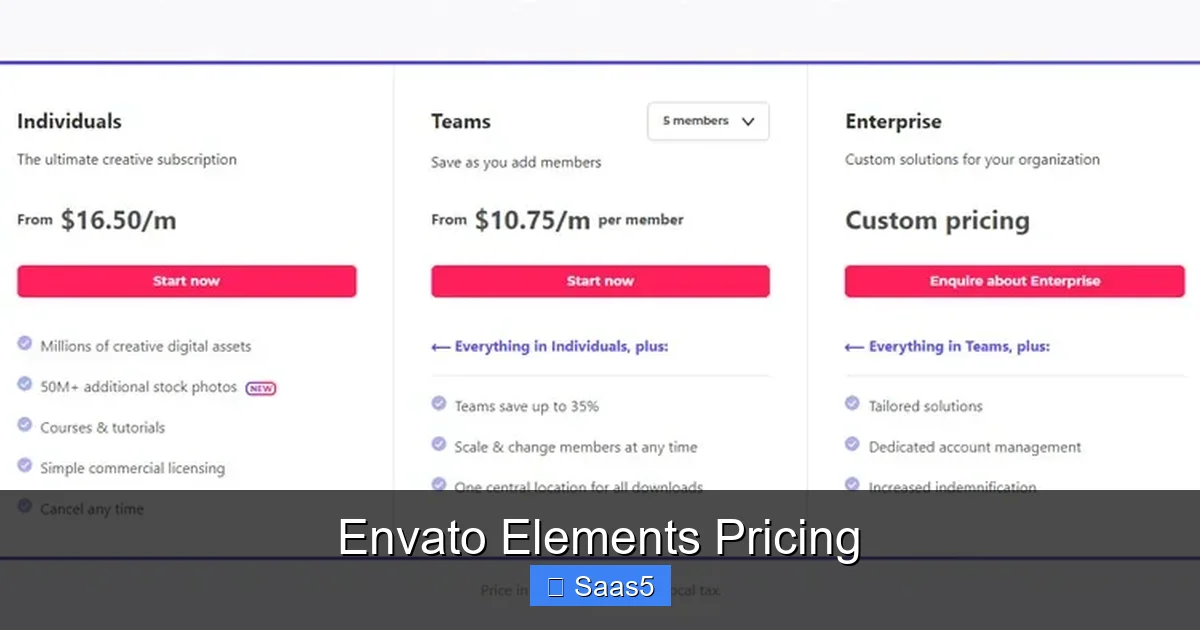
Envato Elements keeps things simple with two main plans: monthly and annual. Both give you the same access; the only difference is the price per month.
Visual guide about Envato Elements Pricing
Image source: thrillveeraentertainment.com
Monthly Plan
- Cost: $33 per month (as of 2026).
- Billing: Charged automatically each month; cancel anytime.
- Best for: Freelancers who want flexibility or those testing the service.
Annual Plan
- Cost: $198 per year (equivalent to $16.50/month).
- Savings: Saves $198 compared to twelve monthly payments.
- Best for: Agencies, studios, or anyone confident they’ll use the library long‑term.
Both plans include:
- Unlimited downloads of graphics, templates, video footage, audio, fonts, and more.
- Commercial licence for every asset (subject to specific item terms).
- Access to the Envato Elements and Envato Market ecosystem, meaning you can cross‑reference assets across both platforms.
2. Free Trial: Test Before You Commit
Envato Elements offers a 7‑day free trial. You can explore the library, download files, and even use them in client work—no credit card required. After the trial, you’ll need to choose a paid plan to keep the assets.
Visual guide about Envato Elements Pricing
Image source: pixel2pixeldesign.com
How to Activate the Trial
Visit the How To Get Envato Elements Free Trial guide for step‑by‑step instructions. The process is straightforward: create an account, click “Start Free Trial,” and you’re in.
Tips to Maximize the Trial
- Plan a small project ahead of time so you can download all needed assets in one go.
- Make a list of asset categories you’ll need (e.g., “motion graphics templates”).
- Export a spreadsheet of downloaded file names; this helps you track what you’ve used before the trial ends.
3. Team & Enterprise Options
If you work with a crew, the individual plan can become pricey. Envato Elements offers a “Teams” plan that scales with the number of users.
Pricing Structure
- 5 users: $49 per user per month (or $399 per user per year).
- 10 users: $44 per user per month.
- 15+ users: Custom pricing—contact sales for a quote.
Why Teams Save Money
Instead of each designer paying $33/month, a team of five pays $245/month total, which is a $20/month saving per person. Plus, the admin dashboard lets you manage licences, track usage, and revoke access instantly.
Enterprise Perks
Large agencies can negotiate additional benefits like priority support, dedicated account managers, and bulk‑download limits lifted. These are not advertised on the pricing page but can be unlocked with a sales conversation.
4. Hidden Costs & Licensing Nuances
While the headline price looks simple, a few details can affect your total cost.
Extended Licences
Most assets come with a standard commercial licence, which covers most client work. However, if you need to sell a product that incorporates the asset (e.g., a t‑shirt design), you may need an Envato Elements for Print On Demand extended licence. This usually costs an extra $50–$100 per asset.
Third‑Party Plugins
Some video templates require After Effects plugins that are not included in the subscription. You’ll need to purchase those separately, adding $20–$80 per plugin.
Renewal Transparency
Both monthly and annual plans lock in the price for the duration of the subscription. When the term ends, you’ll be charged the same rate unless you upgrade or switch plans. Envato does not raise prices retroactively, which is a relief compared to some competitors.
5. Comparing Envato Elements to Envato Market
Envato operates two marketplaces: Elements (subscription) and Market (pay‑per‑item). Understanding the cost differences helps you pick the right tool.
When Elements Beats Market
- You need more than 10 assets per month—Elements becomes cheaper.
- Your projects span multiple media types (photos, video, code).
- You prefer a predictable monthly budget.
When Market Is Smarter
- You only need one high‑quality asset (e.g., a premium WordPress theme).
- You want exclusive ownership; Market items often come with a “regular licence” that grants broader usage rights.
- You need assets that aren’t available on Elements, such as certain premium plugins.
For a deeper dive, read our Envato Elements And Envato Market comparison article.
6. Real‑World Tips to Get the Most Value
Now that you know the numbers, let’s talk strategy.
Batch Your Downloads
Instead of downloading assets on the fly, schedule a weekly “download day.” Collect everything you’ll need for the upcoming projects. This reduces time spent searching and ensures you’re using the subscription fully.
Leverage the Asset Library for Branding
Use Elements’ templates to create brand kits for clients. Because you can download and edit as many times as you want, you can offer multiple design concepts without extra cost.
Teach Your Team the Licensing Rules
Misunderstanding the standard licence can lead to costly compliance issues. Hold a quick 15‑minute training session covering:
- When an extended licence is required.
- How to check asset-specific restrictions.
- Where to find the licence details in the asset’s page.
Combine With Free Resources
Pair Elements assets with free UI kits from sites like Dribbble or Unsplash. This hybrid approach can stretch your budget even further, especially for low‑budget client work.
Conclusion: Is the Price Worth It?
Envato Elements pricing is refreshingly straightforward: $33/month or $198/year for unlimited access. If you regularly need graphics, video, audio, or code, the subscription pays for itself after just a handful of downloads. Team plans add another layer of savings, while the free trial lets you test the waters without risk.
Consider your workflow, project volume, and licensing needs. For freelancers who dabble in many asset types, the annual plan is a bargain. For agencies, the Teams option can shave off significant costs per head. And if you only need occasional one‑off items, the pay‑per‑item model of Envato Market might still be cheaper.
Bottom line: With transparent pricing, no hidden hikes, and a massive library at your fingertips, Envato Elements is a solid investment for creative professionals who value predictability and variety.
Frequently Asked Questions
What is the current monthly cost of Envato Elements?
The monthly subscription is $33, giving you unlimited downloads for that month.
Can I cancel my subscription at any time?
Yes, both monthly and annual plans can be cancelled anytime from your account dashboard. Monthly plans stop billing immediately; annual plans remain active until the year ends.
Does the free trial require a credit card?
No, the 7‑day free trial does not ask for credit‑card details. You can start using the library instantly and decide later if you want to upgrade.
Are there discounts for students or non‑profits?
Envato occasionally offers special rates for educational institutions and non‑profits, typically up to 30% off the regular price. Check the promotions page or contact support for eligibility.
How does the commercial licence work?
Every asset downloaded from Elements includes a standard commercial licence, allowing you to use it in client projects, ads, and products. Some items require an extended licence for resale or merchandise; those cases are clearly marked.
What’s the difference between Envato Elements and Envato Market?
Elements is a subscription service with unlimited downloads, while Market is a marketplace where you buy individual items. Choose Elements for high‑volume, varied needs; pick Market for one‑off premium assets.