Envato Elements Alternatives
Looking for a fresh source of design assets beyond Envato Elements? This guide walks you through the best alternatives, covering pricing, asset variety, and special features. Find the right platform that matches your budget and creative needs.
Key Takeaways
- Understanding envato elements alternatives: Provides essential knowledge
📑 Table of Contents
- Why Look for Envato Elements Alternatives?
- 1. Creative Market – A Marketplace with a Personal Touch
- 2. Adobe Stock – The Powerhouse for High‑Resolution Media
- 3. Motion Array – The Go‑To for Video Creators
- 4. Storyblocks – Unlimited Stock Media for Budget‑Conscious Teams
- 5. UI8 – Premium UI Kits and Design Systems
- 6. DesignBundles – Bundles and Subscription for the Bargain Hunter
- 7. Free Resources – When Budget is Zero
- How to Choose the Right Alternative for You
- Practical Tips to Maximize Any Asset Library
- Conclusion
Why Look for Envato Elements Alternatives?
Envato Elements has built a solid reputation for offering unlimited downloads of graphics, templates, and more for a flat monthly fee. But no single service can be perfect for everyone. You might need more high‑resolution photos, a larger selection of UI kits, or a pricing model that aligns with a small team’s budget. That’s why many designers, marketers, and SaaS founders start scouting for Envato Elements alternatives. The right substitute can save you money, give you access to niche assets, and even provide better licensing terms for commercial projects.
In this article we’ll explore the most popular and emerging platforms that stack up against Envato Elements. We’ll compare their core features, pricing structures, and the types of assets they specialize in. By the end, you’ll have a clear roadmap to choose the service that fits your workflow like a glove.
1. Creative Market – A Marketplace with a Personal Touch
What makes Creative Market different?
Creative Market operates as a marketplace rather than a subscription library. Designers upload their work, and buyers purchase items individually or through bundles. This model means you only pay for what you truly need, which can be a huge cost saver if you don’t download assets daily.
Visual guide about Envato Elements Alternatives
Image source: pace.edu.vn
Key features
- One‑off purchases: No recurring fees; you own the asset forever.
- Diverse creators: Over 10,000 independent artists contribute fonts, graphics, templates, and photos.
- Weekly freebies: A rotating selection of free assets keeps the library fresh.
Pricing example
A premium Photoshop mockup might cost $12, while a bundle of 50 icons could be $25. Compared with Envato Elements’ $33/month unlimited plan, Creative Market can be cheaper for occasional users.
When to choose Creative Market
If you prefer buying assets on demand, love supporting independent creators, or need high‑quality, unique items that aren’t mass‑downloaded, Creative Market is a solid alternative.
2. Adobe Stock – The Powerhouse for High‑Resolution Media
Why Adobe Stock stands out
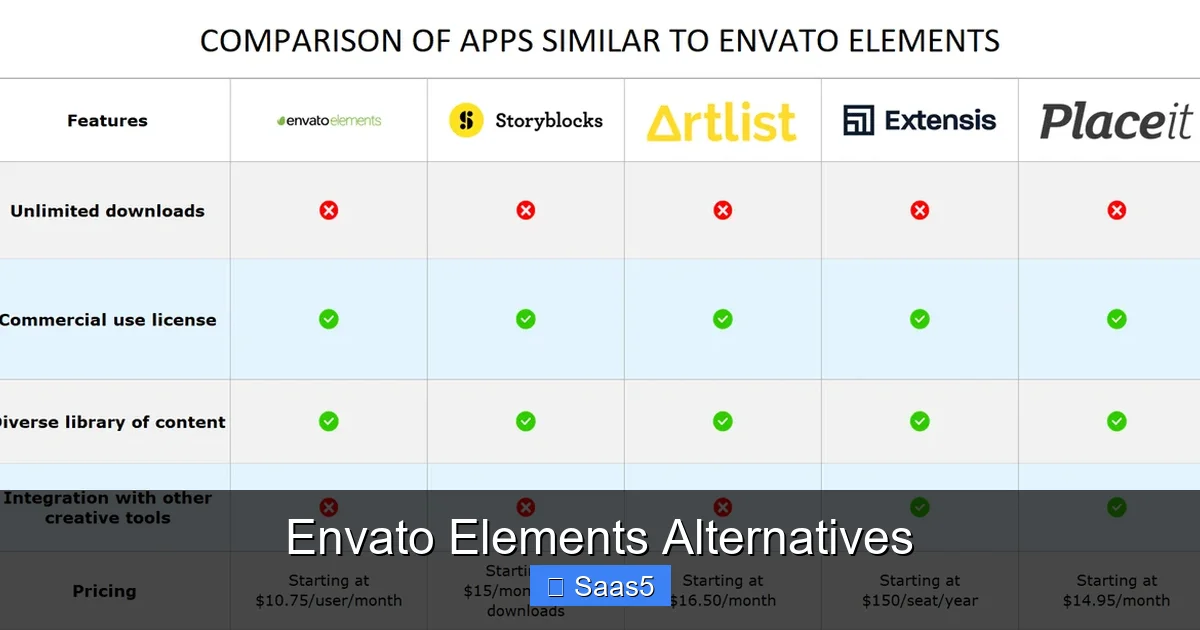
Adobe Stock integrates directly with Photoshop, Illustrator, and InDesign, making it a seamless choice for professionals already in the Adobe ecosystem. The platform offers over 200 million assets, including photos, vectors, videos, and 3D models.
Visual guide about Envato Elements Alternatives
Image source: cdn.techjockey.com
Pricing models
- Subscription plans: 10 assets/month for $29.99, 40 assets for $79.99, etc.
- Credit packs: Buy credits (e.g., 5 credits for $29) and spend them on any asset.
License clarity
All assets come with a standard license that covers commercial use, and an extended license is available for larger campaigns. This clarity is a relief for teams worried about legal compliance.
Best for
Businesses that need high‑resolution stock photos or video footage and want everything to sync with Adobe Creative Cloud.
3. Motion Array – The Go‑To for Video Creators
Specialization in motion
While Envato Elements offers video templates, Motion Array focuses exclusively on motion graphics, stock footage, and audio tracks. Its library includes After Effects templates, Premiere Pro presets, and royalty‑free music.
Visual guide about Envato Elements Alternatives
Image source: u3.iqiyipic.com
Pricing
Unlimited downloads for $49.95 per month (or $299 per year). The price is higher than Envato Elements, but the depth of video‑specific assets often justifies the cost for video‑centric teams.
Practical tip
Pair Motion Array with a basic photo library like Unsplash for a full media solution without paying for overlapping assets.
4. Storyblocks – Unlimited Stock Media for Budget‑Conscious Teams
What you get
Storyblocks offers unlimited downloads of video clips, audio tracks, and images for a flat monthly fee. Their “All‑Access” plan costs $39/month, slightly lower than Envato Elements, and includes a massive collection of royalty‑free footage.
Use case example
A small marketing agency creates weekly social videos. With Storyblocks, they can pull new footage each week without worrying about per‑download costs.
Integration
Storyblocks plugins for Premiere Pro and DaVinci Resolve let you search and import assets without leaving your editing suite.
5. UI8 – Premium UI Kits and Design Systems
Why UI8 matters for SaaS founders
If you’re building a SaaS product, UI8’s collection of UI kits, dashboards, and design systems is a treasure trove. The assets are curated for modern web apps, with a focus on consistency and hand‑off readiness.
Pricing options
- Pay‑per‑item: Individual kits range from $15 to $75.
- Subscription: $49/month for unlimited downloads of UI assets only.
Tip for developers
Combine UI8’s kits with a code‑ready library like Envato Market SaaS Scripts Review to accelerate front‑end development.
6. DesignBundles – Bundles and Subscription for the Bargain Hunter
Bundle‑centric approach
DesignBundles sells curated bundles of graphics, fonts, and templates at steep discounts. They also offer a “Design Bundle Club” subscription for $19.99/month, granting unlimited access to a rotating selection of assets.
When it shines
Perfect for freelancers who need a fresh batch of assets each month but don’t want to pay a premium subscription.
7. Free Resources – When Budget is Zero
Top free sites
- Unsplash & Pexels: High‑quality photos with commercial licenses.
- Font Squirrel: Free fonts vetted for commercial use.
- Mixkit: Free video templates and music tracks.
Combine with trials
Many paid platforms, including Envato Elements, offer a free trial. Pair a trial with free resources to stretch your budget while you evaluate long‑term fit.
How to Choose the Right Alternative for You
Step 1: List your asset priorities
Do you need more photos, UI kits, or video templates? Write down the top three asset types you use weekly.
Step 2: Match pricing to usage
If you download 5–10 items a month, a pay‑as‑you‑go model like Creative Market may be cheapest. For heavy users, an unlimited plan from Storyblocks or Motion Array could be more economical.
Step 3: Check licensing
Read the fine print. Some platforms require attribution for commercial projects, while others give you full rights. The Envato Elements commercial usage guide is a good benchmark.
Step 4: Test with a trial
Sign up for a 7‑day trial, explore the UI, and download a few assets. See if the workflow feels natural.
Practical Tips to Maximize Any Asset Library
- Organize downloads: Create folder structures by project type (e.g., “Social Media”, “Landing Pages”).
- Use naming conventions: Include version numbers and source tags to avoid duplicate work.
- Leverage templates: Customize rather than build from scratch; it speeds up delivery.
- Stay updated: Subscribe to newsletters of your chosen platform to get alerts on new collections.
Conclusion
There is no one‑size‑fits‑all answer to “What are the best Envato Elements alternatives?” The ideal choice hinges on the type of assets you need, your budget, and how you prefer to pay. Whether you gravitate toward Creative Market’s à la carte model, Adobe Stock’s seamless Adobe integration, Motion Array’s video focus, or UI8’s SaaS‑centric UI kits, each platform offers unique strengths that can complement or replace Envato Elements.
Take the time to audit your current asset usage, test a few platforms with free trials, and read the licensing terms carefully. With the right combination of tools, you’ll keep your creative pipeline flowing without overspending. Happy designing!
Frequently Asked Questions
What is the main difference between Envato Elements and its alternatives?
Envato Elements offers an unlimited download model for a flat fee, while many alternatives use pay‑as‑you‑go pricing, niche specializations, or tiered subscriptions that can be cheaper for specific needs.
Can I use assets from these alternatives for commercial projects?
Yes, most platforms provide commercial licenses, but it’s essential to read each site’s terms—especially for extended usage or resale.
Are there any free trials available?
Many services, including Envato Elements, Storyblocks, and Motion Array, offer free trial periods. Check the provider’s website for the latest offers.
Which alternative is best for SaaS UI design?
UI8 specializes in UI kits and design systems tailored for SaaS products, making it a top choice for developers and designers in that niche.
Do these platforms integrate with Adobe Creative Cloud?
Adobe Stock integrates directly, and several others like Storyblocks and Motion Array offer plugins for Premiere Pro and After Effects, streamlining your workflow.
How do I decide if I need a subscription or pay‑per‑item model?
Calculate your average monthly asset download count. If you download many items, a subscription often saves money; if you only need occasional assets, pay‑per‑item may be more cost‑effective.