Envato Market Saas Scripts Review
Envato Market is a massive digital marketplace offering thousands of SaaS scripts and templates, but its quality varies wildly. Our review finds it’s a treasure trove for budget-conscious startups and developers willing to vet products carefully. While you can find incredible, affordable solutions, you must prioritize sellers with strong ratings, update histories, and support. It’s not a plug-and-play guarantee, but a smart sourcing ground for custom SaaS development.
Key Takeaways
- Quality is a Mixed Bag: Envato Market is not a curated SaaS app store; it’s an open marketplace. Scripts range from professional, well-documented code to abandoned, buggy projects. Your due diligence is non-negotiable.
- Price is a Major Advantage: One-time purchase prices (often $20-$100) for full source code are dramatically cheaper than monthly SaaS subscriptions or hiring a dev team from scratch, offering incredible ROI if the script fits your needs.
- “SaaS Script” Means Different Things: Items range from full, multi-tenant application backends (true SaaS platforms) to single-tenant templates that need significant modification to become SaaS-ready. Read descriptions and demos meticulously.
- Support is Seller-Dependent: Envato provides the platform, but support comes from the individual author. Check their response time, support policy, and recent comments before buying. A 6-month support window is common.
- Updates Are Critical: A script last updated 3 years ago is a red flag. Look for recent updates that address framework versions, security patches, and PHP/Node.js compatibility. This indicates an active, responsible developer.
- You Are Buying Code, Not a Service: You purchase a license to use and modify the source code. You are responsible for installation, hosting, security, scalability, and compliance (like GDPR). It’s a development starting point, not a finished service.
- Checklist is Essential: Always verify: 1) Live demo works, 2) Documentation is thorough, 3) Author has >4.5 stars & recent sales, 4) Changelog shows consistent updates, 5) Support forum is active and helpful.
📑 Table of Contents
- What Exactly is Envato Market? (And Why It Matters for SaaS)
- The Pros: Why Envato Market is So Attractive for SaaS Founders
- The Cons and Significant Risks: What Can Go Wrong
- How to Vet an Envato Market SaaS Script: A Practical Checklist
- Top Categories of SaaS Scripts on Envato Market (With Examples)
- Alternatives to Envato Market for SaaS Foundations
- The Final Verdict: Is Envato Market Worth It for Your SaaS Idea?
What Exactly is Envato Market? (And Why It Matters for SaaS)
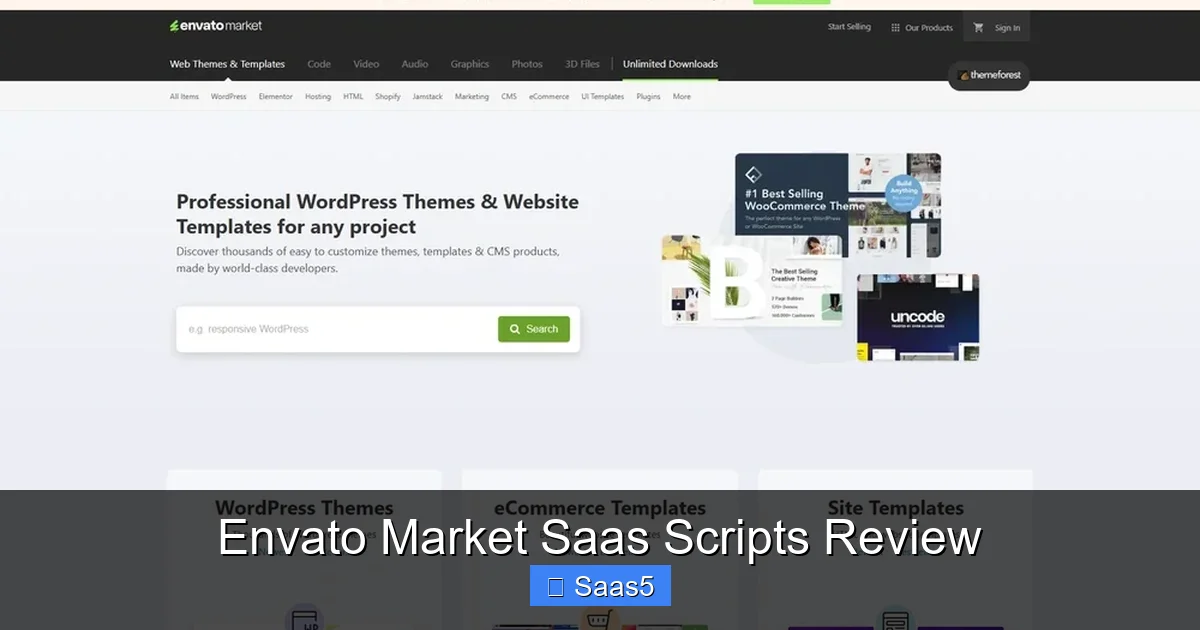
Let’s start with the big picture. Envato Market is one of the largest digital marketplaces on the web, part of the broader Envato ecosystem that includes ThemeForest (for WordPress themes) and CodeCanyon (for scripts and plugins). It’s essentially a giant, global garage sale for digital assets, where independent developers and companies (“authors”) list their creations for sale. This includes everything from WordPress plugins and PHP scripts to JavaScript apps and, crucially for us, SaaS application templates and scripts.
When we talk about “Envato Market SaaS scripts,” we’re referring to those items on CodeCanyon and similar sections that are designed to be the foundation for a Software-as-a-Service business. This could be a complete, multi-tenant booking system, a project management tool, a CRM, or a subscription-based course platform. The promise is alluring: pay a one-time fee (often less than the cost of a single month’s subscription to a mature SaaS) and get the source code to launch your own version.
The Allure vs. The Reality
The allure is powerful. For an entrepreneur with a great SaaS idea but a limited budget, a $49 script that claims to be a “fully-functional SaaS” seems like a magic bullet. The reality, as our Envato Market SaaS scripts review will detail, is more nuanced. You’re not buying a finished, scalable, secure, and supported business-in-a-box. You’re buying a codebase—a starting point. The difference between a promising prototype and a production-ready SaaS platform is vast, and that’s where your skill (or your hired developer’s skill) comes in.
The Pros: Why Envato Market is So Attractive for SaaS Founders
Despite the caveats, the advantages are significant and make Envato Market a compelling first stop for many.
Visual guide about Envato Market Saas Scripts Review
Image source: todaytesting.com
Unbeatable Upfront Cost
This is the headline benefit. A typical monthly subscription for a B2B SaaS tool can range from $50 to $500+. On Envato Market, a script with a “Regular License” (for a single end-product/service you sell) might cost $39. Even an “Extended License” (for resale or SaaS) is often under $200. For a bootstrapped founder, this upfront cost vs. ongoing commitment is a game-changer. It lowers the financial barrier to prototyping and validating an idea before seeking external funding.
Massive Selection and Niche Solutions
Need a very specific type of SaaS? A multi-vendor marketplace for local services? A niche appointment scheduling system for dentists? A learning management system with built-in live tutoring? You’ll likely find multiple options on Envato that you wouldn’t find from a major, generic SaaS provider. The marketplace thrives on serving long-tail, specific use cases.
Full Source Code Access and Ownership
When you buy a SaaS subscription, you rent access. You own nothing and are locked into their feature roadmap, pricing changes, and potential shutdown. With an Envato script, you own a license to the source code. This means you can:
- Fully customize every feature, UI, and workflow to match your unique vision.
- Host it yourself on your own servers or cloud infrastructure, giving you control over performance and data.
- Integrate deeply with your other internal systems without API limitations.
- Escape vendor lock-in. You are not at the mercy of a third-party’s business decisions.
Rapid Prototyping and MVP Development
For developers and technical founders, this is gold. Instead of spending 3-6 months building core authentication, user roles, payment integration, and admin panels from scratch, you can install a well-coded script in hours. You can then focus your development time on building the unique, differentiating features that provide real value to your customers. It’s a massive head start.
The Cons and Significant Risks: What Can Go Wrong
This is the critical part of any Envato Market SaaS scripts review. The risks are real and can turn a cheap script into a costly, time-sinking nightmare.
Visual guide about Envato Market Saas Scripts Review
Image source: todaytesting.com
Inconsistent Code Quality and Architecture
There is no quality control gate at Envato. An author can upload a script with spaghetti code, poor security practices (SQL injection vulnerabilities, weak password hashing), or an architecture that cannot scale beyond a few dozen users. You need to be able to read code or hire someone who can. A bad foundation will crumble under real user load.
The “Abandoned Project” Problem
This is the single biggest risk. An author sells 500 copies of a script, makes $20,000, and then disappears. No more updates when PHP 8.1 breaks the code. No security patches. No responses to support tickets. Your “SaaS” is now running on obsolete, unsupported software, a sitting duck for hackers and incompatible with modern hosting. Always check the “Last Update” date and the frequency of updates in the changelog.
Misleading Marketing and “SaaS-Washing”
Many listings use the term “SaaS” loosely. They might be selling a single-tenant script (where each customer gets their own install) that requires you to manually provision accounts—not a true multi-tenant SaaS where all customers share one codebase and database with logical separation. The latter is vastly more complex to build and manage. Read the features list and demo carefully. Does the admin panel show a list of all customers’ users? If not, it’s likely not multi-tenant.
Limited and Mandatory Support
Envato authors are required to provide support, but the scope is limited (usually to bug fixes and basic setup help for 6 months). They are not your personal development team. Complex customization requests will be quoted separately. If the author is unresponsive or unhelpful, you’re on your own. Check the item’s comments section—are authors actively answering questions from recent buyers?
Hidden Costs and Technical Debt
The $49 script is just the first cost. You’ll need to budget for:
- Server/Hosting Costs: A scalable cloud setup (AWS, DigitalOcean, etc.) costs money.
- Development Time: Customization, bug fixing, and integration can take weeks or months of developer hours.
- Ongoing Maintenance: You are now responsible for server security, updates, backups, and monitoring.
- Payment Gateway & Compliance: Integrating Stripe/PayPal is one thing. Handling taxes (VAT/Sales Tax), GDPR/CCPA compliance, and Terms of Service is your legal responsibility.
How to Vet an Envato Market SaaS Script: A Practical Checklist
Given the risks, a systematic vetting process is essential. Treat the purchase like you would hiring a key contractor.
Visual guide about Envato Market Saas Scripts Review
Image source: affiliateprograms.com
Step 1: Scrutinize the Live Demo
Do not just look at screenshots. Click through the live demo provided by the author.
- Test the user flow: Sign up as a customer, create an account, use core features. Is it intuitive? Does it feel polished?
- Test the admin panel: Log in as the admin. Can you easily see all users? Manage subscriptions? View reports? This reveals if it’s truly multi-tenant.
- Check responsiveness: Does it work well on mobile?
- Test on different browsers: Any glaring issues in Chrome, Firefox, Safari?
Step 2: Analyze the Author’s Profile and History
Click on the author’s name. This is your first line of defense.
- Rating: What is their overall rating? 4.5+ stars is a good baseline. Read the 3-star reviews—they often point out real, specific issues.
- Sales Count: High sales (1,000+) indicate popularity, but it’s not a guarantee of quality. A niche script with 200 sales from a highly-rated author can be better than a trendy one with 5,000 sales and a 4.0 rating.
- Portfolio: Do they have other scripts? Are they in the same niche? A specialist is often better than a generalist.
- Last Login: When was the author last active on Envato? If it was 6+ months ago, be extremely cautious.
Step 3: Deep Dive into the Comments and Support
The item’s comment section is a goldmine of information.
- Recency: Are there comments from the last month? Are they being answered?
- Nature of Questions: Are people asking simple setup questions (normal) or reporting major bugs and getting no response (alarming)?
- Author’s Tone: Is the author helpful and professional, or defensive and dismissive?
- Search for “bug,” “broken,” “not working”: See if these keywords appear in recent comments.
Step 4: Read the Documentation (If Previewable)
Some authors provide a link to documentation or a PDF preview. If available, scan it.
- Is it comprehensive? Does it cover installation, configuration, and common workflows?
- Is it well-structured? A messy document suggests a messy codebase.
- Are there code snippets? Good documentation includes practical examples.
Step 5: Understand the License
This is legally crucial. For a SaaS business, you need an Extended License. A Regular License is for a single end-product (e.g., one website for one client). The Extended License allows you to create an end-product (your SaaS) that is sold or offered as a service to multiple customers. Read Envato’s license terms carefully. When in doubt, ask the author directly in the comments before purchasing.
Top Categories of SaaS Scripts on Envato Market (With Examples)
While the marketplace is vast, certain categories dominate the “SaaS script” space. Here’s a look at what you can find, with realistic expectations.
Booking and Appointment SaaS
This is a huge category. Scripts like “Bookly Pro” (WordPress-based) or “SaasBook” (PHP/Laravel) offer full booking systems. They handle services, staff, calendars, payments, and email notifications. Vetting Tip: Ensure it supports recurring appointments, different time zones, and has a robust calendar sync (Google Calendar, Outlook). Check if the staff/calendar management is truly multi-tenant or just single-tenant.
Project Management & Team Collaboration
Think Asana, Trello, or Basecamp clones. Scripts like “Projectopia” or “Workio” provide task boards, Gantt charts, file sharing, and team chat. Vetting Tip: Scrutinize the real-time features. Does chat use WebSockets or slow polling? How does file storage work? Is it integrated with cloud storage (Dropbox, Google Drive)? The architecture for real-time collaboration is complex and often where these scripts fall short.
E-learning and Course Platforms
Beyond simple WordPress LMS plugins, there are full SaaS scripts for hosting and selling courses, like “Tutor LMS” (with SaaS capabilities) or standalone “Academy”. They include video hosting (or integration), quizzes, certificates, drip content, and payment gateways. Vetting Tip: Video delivery is critical. Does it use a service like Vimeo/Wistia or rely on slow, bandwidth-heavy direct file serving? Check the quiz engine’s flexibility and reporting depth.
CRM and Sales Pipeline Tools
Lightweight CRMs like “Perfex CRM” (open-source, but sold here with support) or “Smart CRM” are popular. They manage contacts, leads, deals, invoices, and support tickets. Vetting Tip: Look for strong email integration (IMAP/SMTP), automation workflows, and a clean, fast interface. A CRM is a daily driver; poor UI will kill adoption.
Multi-Vendor Marketplaces
These are complex scripts aiming to replicate Etsy, Airbnb, or Fiverr. Examples include “DooPHP” or “Martfury”. They handle vendor registration, product listings, commissions, payments, and reviews. Vetting Tip: This is one of the most complex architectures. Pay extreme attention to the payment split system (does it pay vendors automatically?), product search/filtering, and vendor dashboard usability. These are often the most poorly documented and buggy scripts.
Alternatives to Envato Market for SaaS Foundations
Envato isn’t your only option. Knowing the alternatives helps you make the best choice.
Open-Source Frameworks and Boilerplates
For a technical team, this is often a superior path. Projects like Laravel Spark, Django SaaS Boilerplate, or Node.js SaaS Kit provide a clean, modern, well-architected starting point. They are usually free (or low-cost) but require significant development skill to customize. The advantage is you start with a solid, secure, and scalable foundation you fully understand, without the “mystery meat” of a closed-source Envato script. You also avoid vendor lock-in to an author.
No-Code/Low-Code SaaS Builders
Platforms like Bubble.io, Softr, or Glide allow you to build a functional SaaS visually, connected to a database like Airtable or Xano. This is ideal for non-technical founders or for rapid prototyping. The trade-off is less flexibility for complex logic, potential higher long-term costs, and platform dependency. It’s a different model—you rent the builder, not the code.
Hiring a Development Team or Agency
The traditional route. It’s the most expensive (often $50k+ for an MVP) but gives you a bespoke, fully-owned product built to your exact specs. You have a direct relationship with the builders and full control. This is the path for unique, complex ideas where off-the-shelf scripts won’t fit.
Other Marketplaces
CodeCanyon (Envato’s sibling) is where most of these scripts live. Mercado focuses more on mobile app templates. Codester and WrapBootstrap are other alternatives with similar pros/cons. The vetting principles remain identical across all these open marketplaces.
The Final Verdict: Is Envato Market Worth It for Your SaaS Idea?
So, what’s the bottom line in our Envato Market SaaS scripts review?
Envato Market is an incredible tool for the right person, and a dangerous trap for the wrong one.
It is worth it if:
- You are a developer or have a developer on your team who can read, critique, and modify PHP/JavaScript/Node.js code.
- Your SaaS idea fits a well-defined, common use case (booking, basic CRM, course platform) and a high-quality script exists.
- You are using it as a rapid prototyping tool to build an MVP for user testing and validation, with the plan to eventually rebuild or heavily refactor.
- You understand you are buying a codebase, not a business, and are prepared for the ongoing responsibility of hosting, security, and maintenance.
- You follow our vetting checklist religiously and only buy from authors with proven, recent activity and stellar support histories.
It is NOT worth it if:
- You are a non-technical founder with no plan to hire a competent developer. You will be held hostage by the script’s limitations and the author’s support.
- Your idea is highly unique and doesn’t align with an existing script’s workflow. You’ll spend more time fighting the code than building your value proposition.
- You expect a “set it and forget it” SaaS that will scale to thousands of users with no work. This simply does not exist on Envato.
- You ignore the warning signs: old update dates, poor support comments, vague documentation, or a demo that feels clunky.
The smartest approach is often hybrid: use a high-quality Envato script as the initial MVP foundation, validate your market quickly and cheaply, and then use the revenue and learning from that MVP to fund a custom rebuild on a solid open-source framework. This leverages Envato’s low cost and speed while mitigating its long-term risks.
In the end, Envato Market SaaS scripts are powerful levers for acceleration, but they require a skilled hand on the wheel and a clear-eyed view of the road ahead. Do your homework, buy wisely, and remember: you are now the CTO of your own business.
Frequently Asked Questions
Is an Envato Market SaaS script a complete, ready-to-launch business?
No. It is a codebase or template. You must handle installation, hosting, security, legal compliance (terms, privacy policy), payment gateway setup, marketing, and customer support. It’s a development starting point, not a finished business-in-a-box.
What’s the difference between a Regular and Extended License for a SaaS script?
A Regular License is for a single end-product used by one client (e.g., one website). An Extended License allows you to use the item in an end-product (like your SaaS) that is sold or offered as a service to multiple customers. For any SaaS business, you must purchase the Extended License.
How do I know if a script is truly multi-tenant versus single-tenant?
In the admin demo, look for a “Customers,” “Companies,” or “Tenants” section where you can see a list of all your SaaS users and manage their accounts. In a single-tenant script, you would only see the admin’s own data. True multi-tenant architecture is complex and should be clearly demonstrated.
What if the script author stops supporting or updating the script?
This is a major risk. You are then responsible for all future maintenance, security patches, and compatibility updates (e.g., for new PHP versions). This can be very costly and technically challenging. That’s why buying from authors with a long history of updates is critical.
Are there any hidden fees with Envato Market SaaS scripts?
Beyond the one-time license fee, you will have hosting costs, potential costs for third-party API services (like email sending, video hosting, maps), and significant development/customization costs. The license fee is just the entry ticket.
Should I buy a SaaS script if I don’t know how to code?
Extreme caution is advised. Without technical expertise to vet the code and manage modifications, you are fully dependent on the author’s support (which is limited) and may end up with a product you cannot fix or adapt. Consider no-code platforms or partnering with a technical co-founder first.