Is 17 3 Inches Too Big for a Laptop
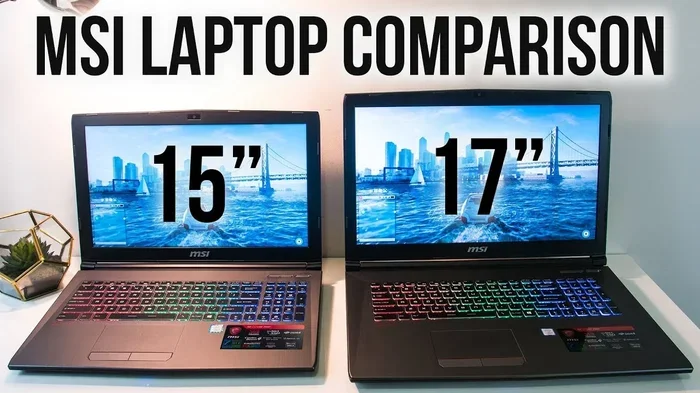
A 17.3 inch laptop is a big machine that offers a large screen for work, gaming, and multitasking. However, it may be too bulky for daily commuting or travel. Whether this size is right for you depends on your needs, lifestyle, and how you plan to use the device.
A 17.3 inch laptop is one of the largest screen sizes you can get. It feels more like a small desktop than a portable computer. But is 17.3 inches too big for a laptop? The answer depends on what you need it for. Let us break it down in a way that is easy to understand.
Big laptops have their perks. They give you a huge display, great for movies, games, and work projects. But they also come with trade-offs. They are heavy, bulky, and not always easy to carry around. In this guide, we will look at the real-world pros and cons of a 17.3 inch screen. By the end, you will know if this size fits your life.
Key Takeaways
- 17.3 inches is a large screen size that excels for gaming, video editing, and multitasking at home.
- Portability suffers with big laptops since they are heavier and harder to carry around daily.
- Screen real estate matters for productivity, and a 17.3 inch display gives you plenty of space.
- Battery life can be shorter on larger laptops due to bigger screens and more power-hungry components.
- Not ideal for students on the go unless you mostly work from a fixed location like a dorm room.
- The right size depends on your use case — home office users may love it, while travelers may prefer smaller options.
📑 Table of Contents
- What Does 17.3 Inches Actually Mean for a Laptop?
- The Pros of a 17.3 Inch Laptop
- The Cons of a 17.3 Inch Laptop
- Is 17.3 Inches Too Big for Students?
- How to Decide If 17.3 Inches Is Right for You
- Comparing 17.3 Inches to Other Laptop Sizes
- Tips for Using a 17.3 Inch Laptop Comfortably
- When Is the Best Time to Buy a 17.3 Inch Laptop?
- Final Verdict: Is 17.3 Inches Too Big?
What Does 17.3 Inches Actually Mean for a Laptop?
When we talk about a 17.3 inch laptop, we are measuring the diagonal length of the screen. That is from one corner to the opposite corner. This is a very large size in the laptop world. Most popular laptops come in 13, 14, 15, or 16 inch sizes. So 17.3 inches stands out as a big choice.
A 17.3 inch laptop often weighs between 5 and 8 pounds. That is quite heavy compared to a 14 inch model that might weigh only 3 pounds. The physical size also means the laptop takes up more space on your desk. It is not something you can easily slip into a small bag and go.
But size is not just about weight. A bigger screen means more room for windows, tabs, and content. If you multitask a lot, this can be a real advantage. You can have a spreadsheet open on one side and a video call on the other without squinting.
Who Typically Uses 17.3 Inch Laptops?
Most people who buy a 17.3 inch laptop fall into a few categories. Gamers love the large display because it makes games look and feel more immersive. Video editors and graphic designers also prefer big screens for detailed work. Some professionals who work from home and need a large display also choose this size.
Students sometimes go with 17.3 inches too, but it is less common. A student who carries a laptop to every class may find it too heavy. However, a student who mostly studies in a dorm or library might appreciate the extra screen space.
The Pros of a 17.3 Inch Laptop
There are many good reasons to choose a large laptop screen. Let us look at the benefits that make 17.3 inches worth considering.
Great for Gaming and Entertainment
A 17.3 inch screen makes gaming a much better experience. The large display pulls you into the action. Games look sharper and more detailed when you have more space to display them. Many gaming laptops in this size range also come with powerful graphics cards and fast refresh rates.
Watching movies and TV shows is also more enjoyable. The big screen feels closer to a home theater setup. You do not need a separate monitor or TV to enjoy your favorite shows in high quality.
Excellent for Multitasking and Productivity
If you juggle many windows at once, a 17.3 inch laptop can be a game changer. You can open multiple apps side by side without constantly switching tabs. Writers can have their document open on one side and research on the other. Programmers can see their code and terminal at the same time.
Business professionals also benefit from the extra space. Spreadsheets, presentations, and video calls all fit comfortably on a large screen. This can speed up your workflow and reduce eye strain from squinting at small text.
Better for Creative Work
Graphic designers, video editors, and photographers need accurate and spacious screens. A 17.3 inch display gives you room for your editing tools and your project at the same time. Many models in this size range also offer high resolution displays and good color accuracy.
When you are working on a detailed photo edit or a video timeline, every inch of screen matters. A larger display lets you see more detail and make finer adjustments. This is why many creative professionals prefer bigger laptops.
The Cons of a 17.3 Inch Laptop
Now let us look at the downsides. A big laptop is not for everyone, and there are real drawbacks to consider.
Poor Portability
This is the biggest issue with a 17.3 inch laptop. It is heavy and bulky. Carrying it to a coffee shop, a meeting, or a classroom can be a chore. Most people will need a large laptop bag or even a backpack designed for big screens.
If you commute daily or travel often, a 17.3 inch laptop may feel like a burden. You are essentially carrying a small desktop computer with you. For many people, a 14 or 15.6 inch laptop strikes a better balance between screen size and portability.
Shorter Battery Life
Big screens use more power. A 17.3 inch display requires more energy to light up and run smoothly. This means laptop battery life is often shorter on larger models. You may find yourself looking for a charger more often, especially if you are using demanding apps.
Some 17.3 inch laptops come with big batteries to offset this, but they add even more weight. It is a trade-off you need to think about before buying.
Takes Up More Desk Space
A 17.3 inch laptop needs a decent-sized desk to sit comfortably. It is not ideal for small coffee shop tables or tight dorm desks. The laptop itself, plus a mouse and maybe an external keyboard, can eat up a lot of space.
If you have a small workspace, a smaller laptop might be a better fit. You can always connect a large external monitor when you are at home and use a compact laptop when you are on the move.
Is 17.3 Inches Too Big for Students?
This is one of the most common questions we get. The answer really depends on the student’s lifestyle. A student who attends in-person classes every day and carries their laptop between buildings may find 17.3 inches too heavy. A student who mostly studies at home or in the library might love the extra screen space.
For students who need a laptop for research, writing papers, and online classes, a 15.6 inch model is often a sweet spot. It gives you a good screen without being too heavy. But if a student is studying graphic design, video production, or any creative field, a 17.3 inch laptop could be a great investment.
Also consider what you are studying. If you are an engineering student running complex software, the extra screen and power of a 17.3 inch model can really help. But if you are just taking notes and writing essays, a smaller and lighter laptop will serve you well.
How to Decide If 17.3 Inches Is Right for You
Choosing the right laptop size is a personal decision. Here are some questions to ask yourself before you buy.
Where Will You Use Your Laptop Most?
If you mostly use your laptop at a desk at home, a 17.3 inch model can be fantastic. You get all the benefits of a large screen without worrying about carrying it around. But if you are often on the go, you might want to consider a more portable size.
What Is Your Budget?
Big laptops with 17.3 inch screens often cost more. They tend to have better hardware to match the larger display. If you are on a tight budget, a smaller laptop might give you more performance for your money. You can always check guides on how much RAM is good for a laptop to make sure you are not overspending on features you do not need.
Do You Need It for Travel?
If you travel frequently for work or school, portability should be a top priority. A 17.3 inch laptop is not travel-friendly for most people. Consider a 14 or 15.6 inch model instead. These sizes offer a good balance of screen space and portability.
What Kind of Work Do You Do?
Heavy tasks like video editing, 3D rendering, and gaming benefit from a big screen. But simple tasks like browsing the web, writing emails, and taking notes do not require a 17.3 inch display. Match the laptop size to the type of work you actually do.
Comparing 17.3 Inches to Other Laptop Sizes
It helps to see how 17.3 inches stacks up against other common sizes. Here is a quick comparison to give you a clearer picture.
| Screen Size | Typical Weight | Best For | Portability |
|---|---|---|---|
| 13-14 inches | 2-3 lbs | Travel, commuting, light work | Excellent |
| 15.6 inches | 3-5 lbs | Everyday use, students, professionals | Good |
| 16 inches | 4-6 lbs | Creative work, home office | Moderate |
| 17.3 inches | 5-8 lbs | Gaming, video editing, home use | Poor |
As you can see, 17.3 inches sits at the less portable end of the spectrum. But it also offers the most screen real estate. The best choice depends on what you value more: portability or display size.
Tips for Using a 17.3 Inch Laptop Comfortably
If you do decide to go with a 17.3 inch laptop, there are ways to make the experience better. Here are some practical tips.
- Get a good laptop stand. This raises the screen to eye level and reduces neck strain. It also improves airflow to keep the laptop cool.
- Use an external mouse. The trackpad on a 17.3 inch laptop can feel small. A mouse for a laptop computer makes navigation much more comfortable and precise.
- Invest in a sturdy carrying case. A 17.3 inch laptop needs proper protection if you carry it anywhere. Look for padded bags with good support.
- Consider an external keyboard. The keyboard on a large laptop can feel cramped if the chassis is not designed well. An external keyboard gives you more room to type comfortably.
- Keep your charger handy. Big screens and powerful hardware drain batteries faster. Always have your charger with you, especially when you are away from home.
When Is the Best Time to Buy a 17.3 Inch Laptop?
If you have decided that a 17.3 inch laptop is right for you, timing your purchase can save you money. The best times to buy a laptop are usually during major sales events. Back-to-school season in August and September often brings good deals. Black Friday and Cyber Monday in November are also excellent times to find discounts.
New laptop models often launch in the spring and early summer. This is when older models go on sale to clear inventory. If you do not need the absolute latest model, buying a previous generation laptop can save you a lot of money without sacrificing much performance.
Keep an eye on sales throughout the year. Many retailers offer promotions during holidays and special events. Patience can pay off significantly when buying a large laptop like a 17.3 inch model.
Final Verdict: Is 17.3 Inches Too Big?
So, is 17.3 inches too big for a laptop? The honest answer is: it depends on you. If you stay home most of the time, game, edit videos, or need a powerful workstation, 17.3 inches can be perfect. The large screen gives you space, comfort, and an immersive experience.
But if you are always on the move, commute daily, or prefer a lightweight setup, 17.3 inches may feel like too much. In that case, a 14 or 15.6 inch laptop would serve you better. The key is to match the laptop size to your actual lifestyle and needs.
There is no one-size-fits-all answer. What works for a gamer at home may not work for a student rushing between classes. Think about where you will use the laptop, what you will use it for, and how often you will carry it. That will guide you to the right decision.
A 17.3 inch laptop is a powerful tool when used in the right context. It is not too big for everyone — but it is too big for some people. Now that you know the full picture, you can make a confident choice.
Frequently Asked Questions
Can a 17.3 inch laptop be used for everyday tasks?
Yes, absolutely. A 17.3 inch laptop can handle everyday tasks like web browsing, email, and document editing just fine. The large screen makes these tasks more comfortable and enjoyable. However, it may be overkill if you only need a laptop for basic use.
Is a 17.3 inch laptop good for students?
It depends on the student. A student who studies at home and needs a big screen for creative work or complex software will benefit from 17.3 inches. But a student who carries their laptop to classes every day may find it too heavy and bulky.
How heavy is a typical 17.3 inch laptop?
Most 17.3 inch laptops weigh between 5 and 8 pounds. The exact weight depends on the build materials, battery size, and components inside. Always check the specific model’s weight before buying if portability matters to you.
Can I connect a 17.3 inch laptop to an external monitor?
Yes, you can. Most 17.3 inch laptops come with HDMI or USB-C ports that support external displays. This is great because you can use the big laptop screen at home and connect to a smaller setup when you are on the go.
Does a bigger screen mean better battery life?
Actually, the opposite is true. A bigger screen like 17.3 inches uses more power, which means battery life is often shorter. If battery life is important to you, consider a smaller laptop size or one with a large battery capacity.
What is the best use case for a 17.3 inch laptop?
The best use case for a 17.3 inch laptop is a home setup for gaming, video editing, or heavy multitasking. It is also great for professionals who need a large display but work mostly from a fixed desk. These laptops shine when portability is not the main concern.