Is Hdmi C the Same as Micro Hdmi
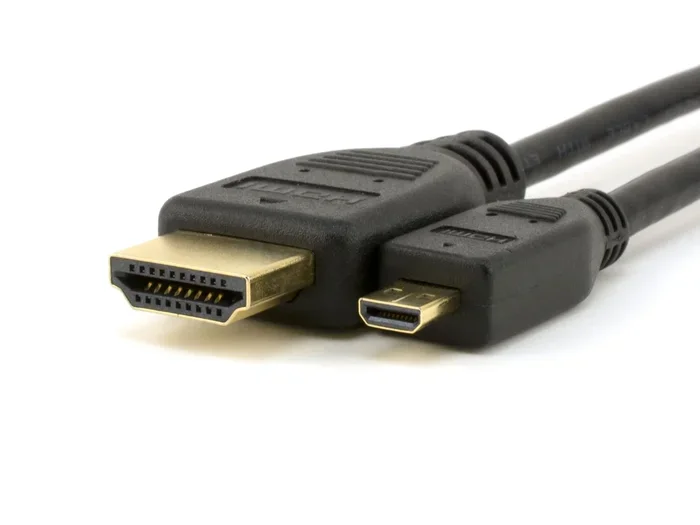
HDMI C and Micro HDMI are not the same connector. HDMI Type C is a mini-HDMI port found on some tablets and cameras, while Micro HDMI is a smaller port used on smartphones and compact devices. Understanding the difference saves you from buying the wrong cable or adapter.
Key Takeaways
- HDMI C and Micro HDMI are different connectors with distinct sizes and pin configurations.
- HDMI Type C is a mini-HDMI port commonly found on tablets and cameras.
- Micro HDMI is even smaller and typically appears on smartphones and portable media players.
- Using the wrong cable can lead to no signal or damaged ports.
- Adapters exist to convert between HDMI C, Micro HDMI, and standard HDMI.
- Always check your device manual before purchasing any HDMI cable or adapter.
📑 Table of Contents
- Is HDMI C the Same as Micro HDMI? Let Us Clear This Up
- What Is HDMI C (Mini HDMI)?
- What Is Micro HDMI?
- HDMI C vs Micro HDMI: Side-by-Side Comparison
- Can You Use Adapters to Connect Them?
- Common Mistakes People Make with HDMI C and Micro HDMI
- What About USB-C and DisplayPort? Are They Replacing HDMI?
- How to Identify Your HDMI Port Type
- Final Thoughts
Is HDMI C the Same as Micro HDMI? Let Us Clear This Up
If you have ever stood in front of a shelf of cables and felt confused, you are not alone. The world of HDMI connectors is messy. There are standard HDMI, mini HDMI, and micro HDMI. Add in the newer USB-C alternatives, and things get even trickier. So, is HDMI C the same as Micro HDMI? The short answer is no. They are two completely different connectors. But the longer answer is what really matters, and that is what we are going to walk through together.
Knowing the difference between these two ports can save you time, money, and a lot of frustration. Whether you are trying to connect a camera to a TV or hook up a smartphone to a monitor, using the right cable makes all the difference. Let us break it all down in plain, simple terms.
What Is HDMI C (Mini HDMI)?
HDMI Type C is also known as Mini HDMI. It is a smaller version of the standard HDMI Type A connector. The HDMI C connector has 19 pins, just like the standard one, but it is built into a much more compact design. This makes it perfect for devices where space is limited.
You will typically find HDMI C ports on devices like:
- Digital cameras
- Tablets
- Some laptops
- Portable media players
- Certain action cameras
The Mini HDMI port measures about 10.42 mm by 2.42 mm. That is significantly smaller than a standard HDMI port but larger than its Micro HDMI counterpart. If your device uses HDMI C, you need a Mini HDMI cable or an adapter to connect it to a standard HDMI display.
Why HDMI C Still Matters
Even though USB-C and wireless display options are becoming more popular, HDMI C is still relevant. Many professional cameras and older tablets rely on this connector. If you own a DSLR or a mirrorless camera, there is a good chance it has a Mini HDMI output. You will need the right cable to output video to an external monitor or recorder.
What Is Micro HDMI?
Micro HDMI, officially known as HDMI Type D, is even smaller than HDMI C. It was designed for the tiniest devices where every millimeter counts. The Micro HDMI connector measures just 5.83 mm by 2.20 mm. That is less than half the size of Mini HDMI.
Micro HDMI is commonly found on:
- Android smartphones
- Small tablets
- Portable gaming devices
- Compact action cameras
- Handheld media players
The Micro HDMI connector also has 19 pins, just like HDMI C and standard HDMI. But the physical size and pin layout are different. This is the key reason why HDMI C and Micro HDMI are not interchangeable. You cannot plug a Micro HDMI cable into an HDMI C port, and vice versa.
How Micro HDMI Compares to Other HDMI Types
To put it in perspective, here is a quick look at the three main HDMI connector types:
- HDMI Type A (Standard): The big one you see on TVs and monitors. Measures 13.9 mm by 4.45 mm.
- HDMI Type C (Mini): Found on cameras and tablets. Measures 10.42 mm by 2.42 mm.
- HDMI Type D (Micro): Found on phones and small devices. Measures 5.83 mm by 2.20 mm.
All three carry the same digital audio and video signals. The only real difference is the physical size and shape of the connector.
HDMI C vs Micro HDMI: Side-by-Side Comparison
Let us look at the differences more closely. This comparison will help you identify which connector your device uses and what cable you need.
- Size: HDMI C is noticeably larger than Micro HDMI. If you hold them side by side, the difference is obvious.
- Pin Count: Both have 19 pins, but the pin layout differs due to the size constraints.
- Device Compatibility: HDMI C is used on bigger portable devices like tablets and cameras. Micro HDMI is used on smaller devices like smartphones.
- Cable Availability: Mini HDMI cables are more common than Micro HDMI cables. You can find them at most electronics stores.
- Durability: The smaller Micro HDMI connector can be more fragile due to its size.
The table below summarizes the key differences:
- Feature: HDMI Type C (Mini) vs HDMI Type D (Micro)
- Dimensions: 10.42 x 2.42 mm vs 5.83 x 2.20 mm
- Common Devices: Cameras, tablets vs smartphones, small tablets
- Pin Layout: Same 19 pins, different arrangement
- Interchangeable: No, they are not compatible with each other
Can You Use Adapters to Connect Them?
Yes, you can use adapters to bridge the gap between HDMI C and Micro HDMI devices. However, you need to buy the right adapter for your specific situation. There are several adapter options available on the market.
Here are the most common adapter types you will come across:
- Micro HDMI to Standard HDMI: Lets you connect a phone with a Micro HDMI port to a TV or monitor with a standard HDMI input.
- Mini HDMI to Standard HDMI: Used for cameras and tablets with HDMI C ports to connect to regular displays.
- Micro HDMI to Mini HDMI: A less common adapter that lets you connect a Micro HDMI device to a Mini HDMI port.
- USB-C to HDMI Adapters: If your newer device uses USB-C instead of Micro HDMI, you can use one of these to connect to HDMI displays.
When buying an adapter, always check the port type on both ends. A common mistake is buying a Micro HDMI to standard HDMI adapter when your device actually uses Mini HDMI. Double-check your device specifications before making a purchase. If you are also looking into other laptop accessories, understanding what the laptop mouse is called can help you better navigate the world of laptop ports and connections.
Tips for Buying the Right Adapter
Not all adapters are created equal. Here are a few tips to keep in mind:
- Buy from reputable brands to ensure reliable signal transmission.
- Check if the adapter supports the resolution you need, such as 4K or 1080p.
- Read user reviews before purchasing to avoid cheap, poorly made adapters.
- Keep your adapter in a safe place. Small connectors are easy to lose.
Common Mistakes People Make with HDMI C and Micro HDMI
It is easy to mix up these two connectors, especially if you are not familiar with the different HDMI types. Here are some common mistakes to avoid.
Mistake 1: Assuming They Are Interchangeable
This is the biggest mistake people make. HDMI C and Micro HDMI look similar at first glance, but they are not the same. Forcing the wrong cable into a port can damage the connector or the device. Always verify the port type before plugging anything in.
Mistake 2: Buying the Wrong Cable Length
Micro HDMI cables tend to be shorter than Mini HDMI cables. If you need a longer cable, make sure it is specifically designed for your connector type. A cable that is too short can limit where you place your device.
Mistake 3: Ignoring the Version
Not all HDMI cables support the same features. Some only support 1080p, while others can handle 4K resolution. Check the HDMI version of your cable to make sure it meets your needs. If you are shopping for other tech accessories at the same time, it is always a good idea to know when the best time to purchase a laptop is, since sales often overlap with cable and accessory deals.
Mistake 4: Forgetting About Audio
HDMI carries both video and audio through a single cable. But some adapters only support video. If you need audio output as well, make sure your adapter supports it. This is especially important when connecting to external speakers or soundbars.
How to Avoid These Mistakes
- Always read your device manual to confirm the port type.
- Take a photo of your port before shopping for cables.
- Measure the connector size if you are unsure.
- When in doubt, ask a knowledgeable salesperson or check online resources.
What About USB-C and DisplayPort? Are They Replacing HDMI?
The short answer is yes, to some extent. USB-C has become the go-to connector for many modern devices. It can carry video signals through Alt Mode, which means you can connect a USB-C device directly to an HDMI display with the right cable or adapter.
However, HDMI C and Micro HDMI still have their place. Many professional cameras, older tablets, and specialized devices still use these connectors. If you are working with legacy equipment, you will need the right HDMI cables to get the job done. And if you are curious about other laptop specs, understanding what the RAM on a laptop involves can help you make better decisions about your overall device setup and connectivity options.
The transition from Micro HDMI to USB-C is happening fast. Most new smartphones no longer include Micro HDMI ports. Instead, they rely on USB-C for charging and video output. This shift means fewer cables to carry, but it also means older devices with Micro HDMI may become harder to support.
The Future of HDMI Connectors
As devices get thinner and lighter, the demand for smaller connectors will continue. Micro HDMI served its purpose well for many years. But USB-C and wireless technologies like Miracast and AirPlay are changing how we connect our devices to screens. For now, though, HDMI C and Micro HDMI remain important connectors that you should understand.
How to Identify Your HDMI Port Type
If you are unsure whether your device has HDMI C or Micro HDMI, here are a few ways to find out.
- Check the device manual: The simplest method. Look up your device model online or in the printed manual.
- Measure the port: Use a ruler or caliper to measure the port dimensions. Mini HDMI is about 10.42 mm wide, while Micro HDMI is about 5.83 mm wide.
- Look it up online: Search for your device model followed by “HDMI port type” and you will likely find the answer quickly.
- Compare with a known cable: If you have a standard HDMI cable, compare the port size. Micro HDMI is much smaller, and Mini HDMI is in between.
Taking a few minutes to identify your port type can save you from buying the wrong cable or adapter. It is a small step that makes a big difference.
Final Thoughts
So, is HDMI C the same as Micro HDMI? No, they are not the same. HDMI C, or Mini HDMI, is a mid-sized connector used on cameras and tablets. Micro HDMI is a much smaller connector used on smartphones and compact devices. They both carry the same digital signals, but their physical differences mean they are not interchangeable.
The good news is that adapters can help you connect devices with different HDMI port types. Just make sure you buy the right one for your specific needs. Always double-check your device specifications before purchasing any cable or adapter.
Understanding your HDMI connections might seem like a small detail, but it can make a huge difference in your daily tech use. Whether you are connecting a camera to a TV, hooking up a phone to a monitor, or just trying to figure out which cable to buy, knowing the difference between HDMI C and Micro HDMI gives you confidence and saves you from unnecessary hassle.
Next time you are shopping for cables or accessories, you will know exactly what to look for. And that is one less thing to worry about in the world of tech.
Frequently Asked Questions
Can I plug a Micro HDMI cable into an HDMI C port?
No, you cannot. Micro HDMI and HDMI C have different sizes and pin layouts. Pluging the wrong connector into a port can damage the port or the cable. Always use the correct cable type for your device.
Are Micro HDMI cables hard to find?
Micro HDMI cables are less common than standard or Mini HDMI cables, but they are still available online and at electronics stores. Make sure to buy from a trusted brand to ensure quality and reliability.
Does HDMI C support 4K video?
Yes, HDMI C supports the same video resolutions as standard HDMI, including 4K, depending on the HDMI version of the cable and the device capabilities. Check the specifications of both your cable and device for details.
Can I use a USB-C to HDMI adapter instead of a Micro HDMI cable?
Yes, if your device supports USB-C Alt Mode, you can use a USB-C to HDMI adapter to connect to an HDMI display. This is a popular alternative for newer smartphones and tablets that have moved away from Micro HDMI.
What is the difference between HDMI 1.4 and HDMI 2.0 in Micro HDMI cables?
HDMI 2.0 supports higher bandwidth, which means it can handle 4K at 60Hz, while HDMI 1.4 is limited to 4K at 30Hz. The connector type (Micro or Mini) does not determine the version. Always check the cable specifications for the HDMI version it supports.
Do all Android phones use Micro HDMI?
No, not all Android phones use Micro HDMI. Many newer Android phones have switched to USB-C for video output. Micro HDMI was more common in older and mid-range Android devices. Check your phone specifications to confirm the port type.