Is Mini Hdmi the Same as Type C
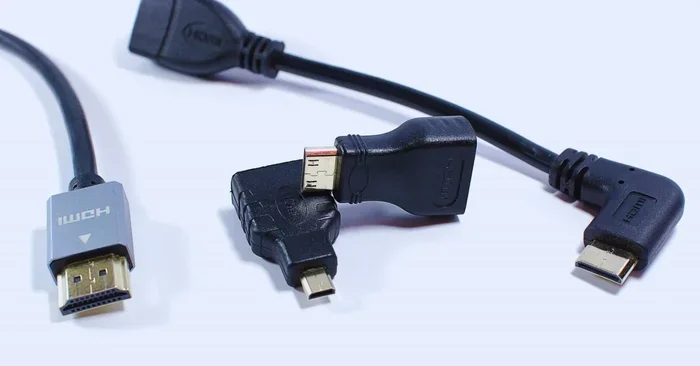
Mini HDMI and USB Type C are not the same connector. Mini HDMI is a dedicated video output port found on older tablets, cameras, and some laptops. USB Type C is a versatile reversible connector that handles data, power, and video through Alt Mode protocols. You can use a USB-C to HDMI adapter to get video output from a USB-C port, but the two ports are not interchangeable without one. Understanding these differences helps you choose the right cable for your setup every time.
If you have ever looked at a laptop or tablet and wondered about those tiny ports, you are not alone. Two common connectors that often cause confusion are Mini HDMI and USB Type C. They both appear on modern devices, but they are far from the same thing. Knowing the difference matters when you are trying to connect your device to a TV, monitor, or projector.
This guide will walk you through everything you need to know. We will cover what each connector is, how they differ, and which one you should use for your setup. By the end, you will feel confident picking the right cable every time.
Key Takeaways
- Mini HDMI and USB Type C are different connectors — they have different shapes, sizes, and purposes.
- Mini HDMI carries a direct digital video and audio signal — no conversion is needed for clean output.
- USB Type C is a multi-purpose port — it handles data transfer, power delivery, and video output through Alt Mode.
- Not all USB-C ports support video output — always check your device specifications before buying an adapter.
- USB-C to HDMI adapters are affordable and widely available — they bridge the gap between modern devices and HDMI displays.
- Choosing the right cable depends on your device — match your port type to avoid compatibility headaches.
📑 Table of Contents
What Is Mini HDMI?
The Basics of Mini HDMI
Mini HDMI, also known as Type C HDMI, is a smaller version of the standard HDMI connector. It was designed for compact devices like tablets, cameras, and some laptops. The connector has 19 pins and carries both audio and video signals in one cable.
You will often find Mini HDMI on older tablets and digital cameras. It provides a direct digital connection to displays. This means you get a clean signal without any conversion needed. The signal quality remains excellent because it is a direct digital path from your device to the screen.
Where You Will Find Mini HDMI
Mini HDMI is not as common today as it used to be. Many manufacturers have moved to USB Type C for video output. However, you can still find it on some older devices.
- Older tablets and e-readers
- Digital cameras and camcorders
- Some laptops from the early 2010s
- Certain portable media players
If your device has a Mini HDMI port, you will need a Mini HDMI to standard HDMI cable to connect it to a TV or monitor. The signal quality remains excellent because it is a direct digital connection. This makes it a reliable choice for devices that still use this port type.
What Is USB Type C?
The Basics of USB Type C
USB Type C is a reversible connector that supports data transfer, power delivery, and video output. It has become the standard port on most modern laptops, phones, and tablets. Unlike Mini HDMI, USB-C is not limited to video. It handles many tasks at once.
The USB-C connector is small and oval-shaped. It is about the same size as Micro USB but with a different shape. You can plug it in either way, which is a big convenience. This reversible design is one reason it has become so popular across the industry.
What Can USB Type C Do?
USB Type C is incredibly versatile. Here are some of the things it can handle:
- Data transfer at speeds up to 40 Gbps with USB4
- Power delivery up to 240 watts
- Video output through HDMI Alt Mode or DisplayPort Alt Mode
- Charging your device while using it
This versatility is why USB-C has replaced many older ports. You no longer need separate cables for charging, data, and video. One USB-C cable can do it all with the right adapter. For example, you can charge your phone and connect it to a display using the same cable and a simple adapter. The best USB Type C headphones also use this same versatile port, showing how universal USB-C has become.
Key Differences Between Mini HDMI and Type C
Connector Shape and Size
The physical difference is the first thing you will notice. Mini HDMI is a trapezoid-shaped connector with a flat top. USB Type C is oval and symmetrical. You cannot plug a Mini HDMI cable into a USB-C port or vice versa without an adapter. They are completely different shapes designed for different purposes.
Signal and Compatibility
Mini HDMI carries a pure HDMI signal. It supports resolutions up to 4K on some implementations. USB Type C supports video through Alt Mode protocols, but the actual output depends on the device and the adapter you use.
Not all USB-C ports support video output. Some laptops and devices have USB-C ports that only handle data and power. These ports cannot output video no matter what adapter you use. Always check your device specifications before buying a cable or adapter. This is one of the most important things to understand about display connectivity today.
Comparison Table
| Feature | Mini HDMI | USB Type C |
|---|---|---|
| Connector Shape | Trapezoid | Oval, reversible |
| Primary Use | Video and audio output | Data, power, video |
| Video Support | Direct HDMI signal | Through Alt Mode |
| Common Devices | Tablets, cameras, older laptops | Modern laptops, phones, tablets |
| Reversible | No | Yes |
| Max Resolution | Up to 4K | Up to 8K with compatible devices |
Can You Use USB Type C for HDMI Output?
HDMI Alt Mode on USB-C
Yes, USB Type C can output HDMI signals through a feature called HDMI Alt Mode. This allows a USB-C port to carry an HDMI signal directly. You still need an adapter or cable that supports this mode. The adapter translates the USB-C signal into a standard HDMI signal that your display can read.
HDMI Alt Mode is built into many modern devices. When you use a compatible adapter, the video output is nearly identical to what you would get from a direct Mini HDMI connection. The quality depends on the adapter and the capabilities of your device.
Using Adapters and Cables
To connect a USB-C device to an HDMI display, you need a USB-C to HDMI adapter. These adapters are widely available and affordable. Some cables combine both connectors in one piece, which is even more convenient. You simply plug the USB-C end into your device and the HDMI end into your display.
When shopping for adapters, look for ones that support the resolution you need. If you want 4K output at 60Hz, make sure the adapter supports that. Cheap adapters may only support 1080p or lower refresh rates. Investing in a quality adapter ensures you get the best signal quality for your display.
Does Every USB-C Port Support Video?
No, not every USB-C port supports video output. Some laptops and devices have USB-C ports that only handle data and power. These ports cannot output video no matter what adapter you use.
Always check your device manual or the manufacturer’s website to confirm whether your USB-C port supports Display Output or HDMI Alt Mode. This is a common mistake that leads to frustration. If you are unsure, look up your device model online or contact the manufacturer directly. Knowing your port capabilities saves you time and money.
Which One Should You Choose?
When to Use Mini HDMI
Mini HDMI is the right choice if your device has a Mini HDMI port and you want a direct connection. It gives you a reliable HDMI signal without any conversion. If you own a camera or an older tablet with Mini HDMI, this is your best option. You simply plug in a Mini HDMI cable and you are ready to go.
Mini HDMI is also great for situations where you need a guaranteed video connection. There is no negotiation between devices or Alt Mode compatibility to worry about. The signal is direct and consistent every time you connect.
When to Use USB Type C
USB Type C is the better choice for most modern devices. It offers more flexibility and can handle multiple tasks at once. If you are buying a new laptop or tablet, USB-C is the way to go. You will thank yourself later when you need to charge your device and connect to a display at the same time.
USB-C also future-proofs your setup. As more devices adopt USB-C as the standard port, having USB-C cables and adapters means you stay compatible with new technology. This is especially important if you buy a new laptop with only USB-C ports.
Quick Tips for Choosing the Right Cable
- Always check your device ports before buying a cable
- Buy adapters from reputable brands to ensure signal quality
- Look for adapters that support your desired resolution and refresh rate
- Consider a docking station if you need multiple connections
- Keep a USB-C to HDMI adapter in your bag for travel
Common Mistakes People Make
Assuming All USB-C Ports Support Video
This is the most common mistake. Many people buy a USB-C to HDMI adapter only to find out their port does not support video output. Always verify your port capabilities first. A quick search for your device model online will tell you what your USB-C port supports.
Buying Cheap Adapters Without Checking Specs
Low-cost adapters often lack the bandwidth needed for high resolutions. They may work fine for basic tasks but fail when you need 4K or higher refresh rates. Investing in a quality adapter saves you from headaches later. Look for adapters that are certified and have clear specifications listed.
Confusing Mini HDMI with Micro HDMI
Micro HDMI is even smaller than Mini HDMI. They are not the same and require different cables. Make sure you know which port your device has before purchasing a cable. The two connectors look similar but are not interchangeable. Check your device manual to confirm the exact port type.
Expert Insights
The Future of Display Connectivity
The industry is moving toward USB Type C as the universal display standard. More devices are dropping legacy ports in favor of USB-C. This trend means adapters and USB-C cables will become even more important in the coming years. If you are shopping for new devices, look for ones with USB-C ports that support Thunderbolt or HDMI Alt Mode for maximum flexibility.
What Experts Recommend
Tech experts recommend always having a USB-C to HDMI adapter on hand. Whether you are presenting at work or streaming a movie on a big screen, the right adapter makes all the difference. The RAM and processing power of your device also matter when outputting video. A device with sufficient RAM on a laptop handles video output more smoothly, especially at higher resolutions.
Experts also suggest keeping your adapters in a dedicated bag or pouch. This prevents damage and ensures they are always ready when you need them. A small investment in quality adapters pays off every time you connect to an external display.
Conclusion
Understanding the difference between Mini HDMI and USB Type C is essential for anyone who connects devices to external displays. They are not the same connector, and each serves a different purpose. Mini HDMI offers a direct and reliable video connection for compatible devices, while USB Type C provides unmatched versatility for modern setups.
If you are dealing with older devices, Mini HDMI cables remain a solid choice. For newer laptops and tablets, USB Type C with an HDMI Alt Mode adapter gives you the flexibility you need. Always check your device specifications before buying any cable or adapter.
The right connection makes all the difference in your setup. Take a few minutes to understand your ports, and you will save time, money, and frustration in the long run. When you are ready to upgrade or buy new gear, consider the best time to purchase a laptop that fits your connectivity needs.
Frequently Asked Questions
Is Mini HDMI the same as USB Type C?
No, Mini HDMI and USB Type C are not the same. Mini HDMI is a dedicated video connector, while USB Type C is a multi-purpose connector that can carry video, data, and power through Alt Mode protocols. They have different shapes and serve different purposes.
Can I connect a Mini HDMI device to a USB-C monitor?
Yes, but you will need an adapter. You would use a Mini HDMI to USB-C adapter or a Mini HDMI to standard HDMI cable connected through a USB-C hub. Make sure the adapter supports the resolution you need for the best results.
Does USB Type C support 4K video output?
Yes, USB Type C can support 4K video output through HDMI Alt Mode or DisplayPort Alt Mode. However, the exact resolution and refresh rate depend on the device and the adapter or cable you use. Always check the adapter specifications before purchasing.
Why is my USB-C port not outputting video?
Your USB-C port may be a data-only port that does not support video output. Check your device specifications to confirm whether the port supports HDMI Alt Mode or DisplayPort Alt Mode. Some devices use USB-C ports exclusively for charging and data transfer.
Are USB-C to HDMI adapters expensive?
No, USB-C to HDMI adapters are generally affordable. Basic models cost between $10 and $20. Higher-quality adapters that support 4K at 60Hz may cost a bit more but are worth the investment for reliable signal quality.
Can I use a USB-C to HDMI cable instead of an adapter?
Yes, USB-C to HDMI cables are available and work just as well as adapters. They are more convenient because they do not require a separate adapter box, making them great for travel and everyday use. Just make sure the cable supports your desired resolution.