Is Micro Usb Different Than Usb
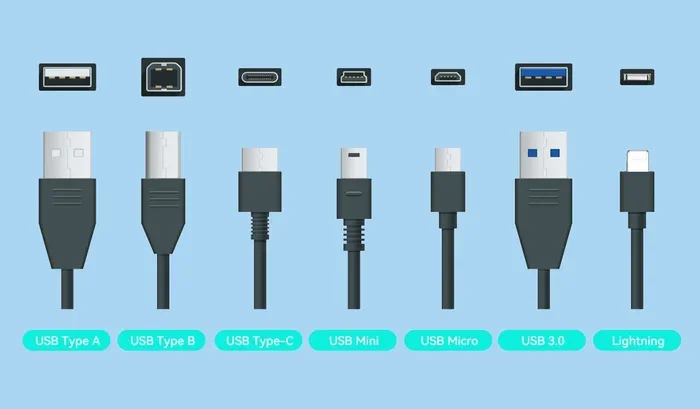
Yes, Micro USB is different from standard USB in size, shape, speed, and the devices they serve. The Micro USB connector is smaller and designed for older mobile devices, while standard USB Type-A is the classic rectangular plug found on computers and chargers. Understanding these differences helps you pick the right cable and avoid frustration.
You have probably held a Micro USB cable in one hand and a standard USB cable in the other and wondered if they are really that different. The short answer is yes. They look different, they work differently, and they serve different purposes. But the details matter, especially when you are trying to charge a device or transfer files.
In this guide, we break down everything you need to know about Micro USB vs standard USB. We will cover what each connector is, how they differ, which devices use them, and how to choose the right one. Whether you are sorting through a junk drawer of cables or buying a new one, this article has you covered.
The world of USB connectors can feel confusing. There are Type-A, Type-B, Micro, Mini, and now USB-C. Each one has a role. But understanding the basics makes it much easier to pick the right cable for the right job. Let us start from the beginning.
Key Takeaways
- Micro USB and standard USB are not the same — they differ in size, design, and purpose.
- Micro USB is smaller and was the go-to connector for smartphones and portable devices before USB-C took over.
- Standard USB Type-A offers faster data transfer and more power delivery than Micro USB in most cases.
- They are not interchangeable without the right adapter or cable.
- USB adapters can bridge the gap between Micro USB and standard USB ports.
- USB-C is replacing Micro USB as the modern standard for mobile devices and accessories.
- Knowing your connector type saves time, money, and prevents damaged ports.
📑 Table of Contents
- What Is USB? Understanding the Basics
- What Is Micro USB? The Smaller Connector
- Key Differences Between Micro USB and Standard USB
- Which Devices Use Micro USB?
- Can You Use Micro USB and Standard USB Interchangeably?
- The Future of USB Connectors
- Quick Tips for Choosing the Right USB Cable
- Common Mistakes People Make with USB Cables
- Expert Insights: Why Connectors Matter
- Key Takeaways
- Conclusion
What Is USB? Understanding the Basics
USB stands for Universal Serial Bus. It is a standard that defines how devices connect and communicate with each other. USB cables carry both data and power. This makes them incredibly versatile. You use USB to charge phones, connect keyboards, transfer photos, and much more.
The USB standard has evolved a lot over the years. Early versions like USB 1.0 and USB 2.0 were slow by today’s standards. USB 3.0 brought much faster speeds. And now USB 3.1 and USB 3.2 push data transfer rates even higher. The connector shape has also changed to keep up with the demand for smaller, faster devices.
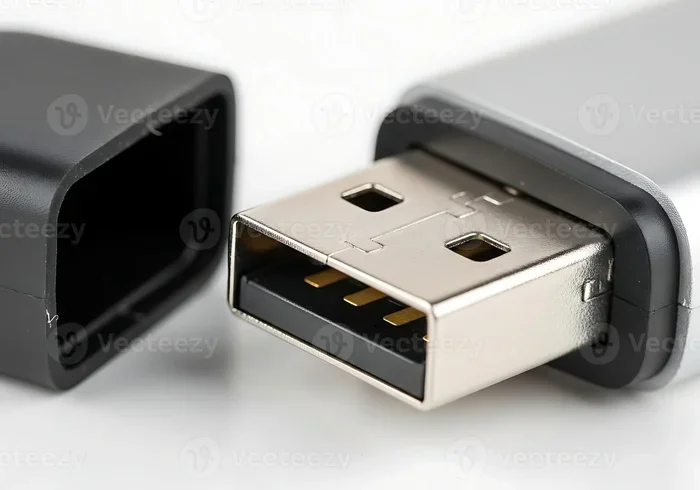
The most common USB connector you see is the Type-A plug. It is the flat, rectangular shape that plugs into your laptop, desktop, or wall charger. This is what most people think of when they hear the word “USB.” But it is just one piece of a larger puzzle.
How Does USB Data Transfer Work?
USB data transfer happens through a process called serial communication. Data moves in packets from one device to another. The speed of this transfer depends on the USB version and the cable quality. A USB 2.0 cable can move data at up to 480 Mbps. A USB 3.0 cable jumps to 5 Gbps. That is a huge difference.
When you plug in a device, the host (like your computer) and the peripheral (like your phone) negotiate the connection. They agree on the speed and power level. This handshake happens in milliseconds. You rarely notice it, but it is essential for a smooth connection.
What Is Micro USB? The Smaller Connector
Micro USB is a smaller version of the standard USB connector. It was designed for compact devices like smartphones, Bluetooth speakers, and portable chargers. You have likely seen it on older phones and gadgets. It has a tapered shape with a slightly wider top and a narrow bottom.
Micro USB came into widespread use around 2008. Before that, many devices used Mini USB. Micro USB was smaller, more durable, and fit better in slim devices. It became the universal standard for mobile accessories for nearly a decade.
There are two main types of Micro USB. The Micro-A and the Micro-B. Micro-A is white and flatter. Micro-B is black and slightly thicker. Both fit into different ports, so it matters which one you have. Mixing them up can lead to a cable that simply does not fit.
Micro USB Speed and Power
Most Micro USB cables support USB 2.0 speeds. That means a maximum data transfer rate of 480 Mbps. Some early Micro USB 3.0 cables existed, but they were rare. They had a dual-connector design that looked unusual and never caught on widely.
In terms of power, Micro USB typically delivers up to 2.5 watts at 5 volts. That is enough to charge most smartphones, but it is slow compared to modern fast-charging standards. If you have ever wondered why your old phone took forever to charge, the Micro USB connection was a big part of the reason.
Key Differences Between Micro USB and Standard USB
Now let us compare them side by side. Understanding the differences helps you make better buying decisions and avoid compatibility headaches.
Size and Shape
The most obvious difference is size. Micro USB is much smaller than a standard USB Type-A plug. Micro USB measures about 6.85 mm by 1.8 mm. A standard USB Type-A is roughly 12 mm by 4.5 mm. The smaller size made Micro USB ideal for tight spaces in phones and tablets.
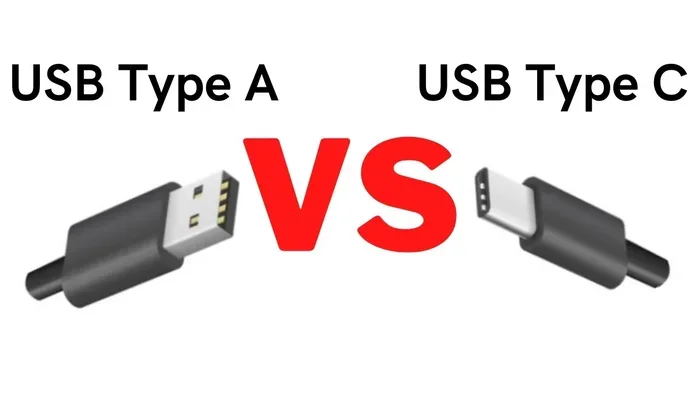
The shape also differs. Standard USB has a flat, rectangular design. Micro USB has a tapered, trapezoid shape with a slightly angled top. You cannot plug a Micro USB cable into a Type-A port without an adapter. They are physically incompatible.
Data Transfer Speeds
Standard USB connections generally offer faster speeds. USB 3.0 Type-A can transfer data at 5 Gbps. USB 3.1 Type-A goes up to 10 Gbps. In contrast, most Micro USB cables max out at 480 Mbps. That is roughly one-tenth the speed of USB 3.0.
If you need to move large files quickly, a standard USB connection is the better choice. For simple charging, Micro USB works fine. But for anything involving heavy data transfer, you will notice the difference.
Power Delivery
USB power delivery varies between the two types. Standard USB 3.0 can deliver up to 4.5 watts. USB-C and newer standards push this much further. Micro USB is limited to about 2.5 watts under the standard USB 2.0 spec.
This power gap means Micro USB charges slower. Modern devices that need fast charging require more wattage than Micro USB can provide. This is one reason the industry moved toward USB-C.
Durability and Lifespan
Micro USB connectors are rated for about 10,000 insert cycles. Standard USB Type-A connectors are rated for around 1,500 cycles. So Micro USB actually lasts longer in terms of plug-and-unplug cycles. However, the smaller pins in Micro USB can be more fragile under heavy use.
Both connector types suffer from the same common problem: the cable breaks near the plug. This is usually caused by bending stress. Using a cable with a reinforced strain relief can help extend its life significantly.
Compatibility and Devices
Standard USB Type-A is found on computers, laptops, gaming consoles, and wall chargers. It connects to virtually every modern accessory. Micro USB was found on most smartphones before the USB-C transition. It also appears on some speakers, e-readers, and portable battery banks.
If you are trying to connect a Micro USB device to a computer, you will need an adapter. A USB adapter can bridge the gap between Micro USB and standard ports. These adapters are inexpensive and widely available.
Which Devices Use Micro USB?
Micro USB was everywhere for a long time. Before USB-C became standard, it was the default connector for most portable electronics. Here are some common devices that use or still use Micro USB:
- Older smartphones — Most Android phones made before 2017 used Micro USB.
- Portable Bluetooth speakers — Many compact speakers still rely on Micro USB for charging.
- E-readers — Devices like older Kindle models use Micro USB.
- Fitness trackers and smartwatches — Some budget wearables still include Micro USB cables.
- Portable power banks — Many external battery packs use Micro USB input.
- USB peripherals — Some mice, keyboards, and game controllers use Micro USB.
- Car mounts and dashcams — These often include Micro USB charging cables.
If you own any of these devices, you likely have Micro USB cables in your collection. They are still widely sold and supported, even though the industry is shifting toward USB-C.
Can You Use Micro USB and Standard USB Interchangeably?
The short answer is no, not without an adapter. The physical shapes are different, so they do not fit into each other’s ports. A Micro USB plug simply cannot go into a Type-A port. And a Type-A plug is too large for a Micro USB port.
However, you can use adapters to make them work together. A USB adapter cable can convert Micro USB to Type-A or even to USB-C. These are handy when you have a device with a Micro USB port but only a standard USB cable available.
Keep in mind that using an adapter does not improve speed or power delivery. The connection will still be limited by the weakest link in the chain. If your Micro USB cable only supports USB 2.0, using it through an adapter will not suddenly make it USB 3.0 fast.
One more thing to watch out for: cheap adapters can be unreliable. They may cause connection drops or slow charging. It is worth spending a little more on a quality adapter from a trusted brand.
The Future of USB Connectors
The industry is moving fast. USB-C is becoming the universal standard. It is small, reversible, fast, and powerful. Most new smartphones, laptops, and tablets now use USB-C. This shift means Micro USB is slowly becoming a thing of the past.
USB-C supports USB Power Delivery, which can push up to 100 watts. It also supports USB 3.2 and Thunderbolt speeds. For a tiny connector, it is remarkably capable. It is hard to imagine a smaller, more efficient design replacing it anytime soon.
For now, Micro USB is still very much in use. Millions of devices rely on it. But if you are buying new cables or accessories, USB-C is the smarter long-term investment. A USB-C enclosure or adapter can future-proof your setup and keep you compatible with the latest devices.
Quick Tips for Choosing the Right USB Cable
Choosing the right cable does not have to be confusing. Here are some simple tips to keep in mind:
- Check your device’s port type before buying a cable. Micro USB and USB-C look similar but are not the same.
- Look for the USB version on the cable or packaging. USB 3.0 or higher means faster speeds.
- Buy from reputable brands. Cheap cables can damage your devices or charge slowly.
- Consider cable length. Longer cables can reduce charging speed slightly.
- Keep an adapter handy if you have older devices with Micro USB ports.
- Inspect your cables regularly for fraying or damage. A worn cable is a safety risk.
These simple habits can save you from frustrating connection issues and extend the life of your devices. A good cable is a small investment that pays off every day.
Common Mistakes People Make with USB Cables
Even tech-savvy people make mistakes with USB cables. Here are a few to avoid:
- Forcing a cable into the wrong port. This can damage the port or the cable. If it does not fit, do not push harder.
- Using a damaged cable. Frayed or exposed wires can cause short circuits or slow charging.
- Assuming all USB cables are the same. They are not. Different cables support different speeds and power levels.
- Ignoring the USB version. A USB 2.0 cable will not give you USB 3.0 speeds, even if your port supports it.
- Buying the cheapest option. Extremely cheap cables often lack proper wiring and safety certifications.
Avoiding these mistakes keeps your devices safe and your connections reliable. It is a small effort that makes a big difference.
Expert Insights: Why Connectors Matter
According to industry experts, the shift from Micro USB to USB-C was driven by consumer demand for faster charging and more versatile connections. The USB Implementers Forum, the group that manages USB standards, has been pushing USB-C as the universal connector for years.
One key factor is reversibility. USB-C plugs in either direction, which is a small convenience that adds up over time. Micro USB only works one way, which can be annoying, especially in low-light conditions.
Another factor is versatility. A single USB-C cable can charge your phone, connect your laptop to a monitor, and transfer large files. Micro USB was never designed to handle all of those tasks. As devices become more capable, the cables need to keep up.
For now, both connector types have their place. Micro USB is still widely used, and there is no shortage of cables and accessories. But the writing is on the wall. USB-C is the future, and it is arriving faster than most people expected.
Key Takeaways
- Micro USB and standard USB are different in size, shape, speed, and power delivery.
- Micro USB is smaller and was designed for mobile devices. Standard USB Type-A is the classic rectangular plug.
- Data transfer speeds are faster with standard USB connections, especially USB 3.0 and above.
- They are not interchangeable without an adapter.
- USB adapters can bridge the gap between Micro USB and standard USB ports.
- USB-C is replacing Micro USB as the modern standard for mobile devices and accessories.
- Knowing your connector type saves time, money, and prevents damaged ports.
Conclusion
Is Micro USB different than USB? Absolutely. They differ in size, shape, speed, power delivery, and the devices they serve. Micro USB served us well for over a decade. It charged our phones and connected our accessories. But the world has moved on to faster, smaller, and more versatile connectors.
If you still have devices that use Micro USB, there is no need to panic. Plenty of cables and adapters are still available. Just understand the limitations. Micro USB will not match the speeds or power of modern USB standards. And as devices continue to shift toward USB-C, Micro USB will become even less common.
The best thing you can do is stay informed. Know what connectors your devices use. Keep the right cables on hand. And when it is time to upgrade, look for USB-C options that will serve you well for years to come. The right cable makes all the difference in how your devices perform and how smoothly your daily tech routine runs.
Frequently Asked Questions
Is Micro USB the same as USB Type-A?
No, they are not the same. Micro USB is a smaller connector designed for mobile devices, while USB Type-A is the standard rectangular plug found on computers and chargers. They have different shapes and sizes and cannot be used interchangeably without an adapter.
Can I charge a Micro USB device with a USB Type-A charger?
Yes, you can. You just need a cable with a Micro USB connector on one end and a Type-A connector on the other. The charger itself does not need to be Micro USB compatible. Just make sure the cable matches your device’s port.
Why did phones switch from Micro USB to USB-C?
Phones switched to USB-C because it offers faster data transfer, higher power delivery, and a reversible design. USB-C is smaller than Micro USB and more versatile. It can handle charging, data, and video output through a single cable.
Is Micro USB still being manufactured?
Yes, Micro USB cables and accessories are still widely manufactured and sold. Many devices still use Micro USB, including Bluetooth speakers, e-readers, and portable power banks. However, USB-C is quickly becoming the new standard.
How do I know if my cable is Micro USB or USB-C?
Look at the connector shape. Micro USB has a trapezoid shape with a slightly angled top. USB-C is small, oval-shaped, and reversible. If the cable plugs in either direction, it is USB-C. If it only fits one way, it is likely Micro USB.
Do Micro USB cables support fast charging?
Most Micro USB cables do not support fast charging. They are typically limited to USB 2.0 speeds and deliver around 2.5 watts of power. For fast charging, you need a device that supports USB Power Delivery or a proprietary fast-charging standard, which usually requires USB-C.