Is Rs232 Faster Than Usb
RS232 and USB are two very different communication interfaces. RS232 is an older serial standard with slower speeds, while USB offers much faster data transfer rates. USB is significantly faster than RS232 for almost all modern applications, but RS232 still holds value in specific industrial and legacy systems.
Key Takeaways
- USB is much faster: USB 2.0 tops out at 480 Mbps, while RS232 maxes out around 115.2 Kbps.
- RS232 still matters: It remains widely used in industrial equipment and embedded systems.
- Speed depends on your needs: For modern devices, USB is the clear winner.
- Legacy systems rely on RS232: Many machines still use serial ports for reliable communication.
- Conversion is possible: You can bridge RS232 and USB with adapters and converters.
- Both interfaces serve different purposes: Understanding their strengths helps you choose the right one.
📑 Table of Contents
Is Rs232 Faster Than Usb? The Short Answer
If you are comparing RS232 and USB for speed, the answer is clear. USB is far faster than RS232 in almost every scenario. RS232 is an older serial communication standard that was designed decades ago. USB came along and completely changed the game for data transfer.
But speed is not the only factor. RS232 still has a place in modern technology, especially in industrial settings. Let us break down everything you need to know about RS232 vs USB speed and performance.
Whether you are working with legacy equipment or building a new system, understanding these two interfaces matters. Choosing the wrong one can slow down your entire setup. This guide will help you make the right call.
What Is RS232?
A Look at the Serial Standard
RS232 is a serial communication protocol that dates back to 1960. It was originally designed for connecting modems and other serial devices to computers. The standard defines how data is transmitted between devices using a serial data format.
RS232 uses a simple point-to-point connection. This means one device talks directly to another. It does not support multiple devices on a single cable the way modern protocols do.
The maximum baud rate for RS232 is typically 115.2 Kbps. Some specialized implementations can go slightly higher, but that is rare. For most practical purposes, RS232 operates at low data transfer speeds.
Where RS232 Is Still Used
You might be surprised how many devices still rely on RS232 serial ports. Here are some common use cases:
- Industrial machinery: Factory equipment often uses RS232 for reliable control signals.
- Medical devices: Many older medical instruments communicate through serial ports.
- Networking equipment: Routers and switches sometimes include RS232 console ports.
- Embedded systems: Microcontrollers and PLCs frequently use serial communication.
- Point-of-sale systems: Some cash registers and barcode scanners still use RS232.
The reason RS232 persists is its simplicity and reliability. It does not need complex drivers or software. It just works. For many industrial applications, that reliability is more important than raw speed.
What Is USB?
The Universal Serial Bus Explained
USB stands for Universal Serial Bus. It was introduced in the mid-1990s and has become the most common device connectivity standard in the world. USB replaced many older interfaces, including RS232, for most consumer applications.
USB supports a huge range of devices. Keyboards, mice, external drives, cameras, and printers all use USB. The plug and play nature of USB makes it incredibly user-friendly.
There are several versions of USB, and they differ significantly in speed:
- USB 1.1: Up to 12 Mbps (Full Speed)
- USB 2.0: Up to 480 Mbps (High Speed)
- USB 3.0: Up to 5 Gbps (SuperSpeed)
- USB 3.1: Up to 10 Gbps
- USB 3.2: Up to 20 Gbps
- USB4: Up to 40 Gbps
As you can see, even the oldest USB standard dwarfs RS232 in terms of transfer rate. USB 3.0 is over 40,000 times faster than the maximum RS232 speed. That is a massive difference.
Why USB Became the Dominant Standard
USB won the market for several key reasons. First, it offers much higher data transmission speeds. Second, it supports hot swapping, meaning you can plug and unplug devices without restarting your computer. Third, USB can deliver power to devices, eliminating the need for separate power cables.
The universal nature of USB means one cable type works for countless devices. This convenience drove adoption across every segment of the tech industry.
RS232 vs USB: Speed Comparison
The speed difference between these two interfaces is enormous. To put it in perspective, let us look at a direct RS232 vs USB comparison.
| Feature | RS232 | USB 2.0 | USB 3.0 |
|---|---|---|---|
| Max Speed | 115.2 Kbps | 480 Mbps | 5 Gbps |
| Cable Length | Up to 15 meters | Up to 5 meters | Up to 3 meters |
| Direction | Simplex or Half-Duplex | Full Duplex | Full Duplex |
| Power Delivery | No | Yes (500mA) | Yes (900mA) |
| Connector Types | DB9, DB25 | Type A, B, Mini, Micro | Type A, B, C, Mini, Micro |
| Hot Swapping | No | Yes | Yes |
| Device Support | Point-to-point only | Up to 127 devices | Up to 127 devices |
The numbers speak for themselves. USB is orders of magnitude faster than RS232. For any task involving large file transfers or high-bandwidth devices, USB is the only practical choice.
When Speed Does Not Matter
Here is the thing though. Speed is not always the most important factor. In some applications, RS232 serial communication is actually better. Let me explain.
RS232 uses a simple, direct voltage-based signal. This makes it very resistant to electrical noise. In industrial environments with lots of electromagnetic interference, RS232 can be more reliable than USB.
Also, RS232 cables can run much longer than USB cables. A standard RS232 cable can reach 15 meters without signal loss. USB cables are limited to about 5 meters for reliable operation. For connecting equipment across a factory floor, that extra length matters.
Converting Between RS232 and USB
Why You Need a Converter
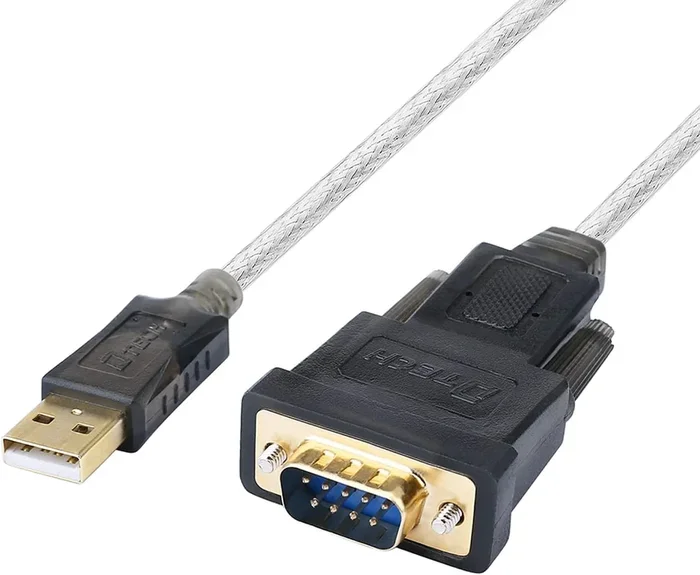
Many modern computers no longer include RS232 ports. If you have an older device that uses serial communication, you need a way to connect it. This is where USB to serial converters come in handy.
These converters bridge the gap between old and new technology. They allow your modern computer to communicate with legacy RS232 devices. The converter handles the translation between the two communication protocols.
You can find USB to RS232 adapters in many forms. Some are simple cable adapters. Others are standalone converter boxes. The choice depends on your specific setup and how much data transmission you need.
Things to Watch Out For
Not all converters are created equal. Cheap adapters can introduce latency and errors. If you are working with time-sensitive industrial equipment, invest in a quality converter from a reputable brand.
Also, keep in mind that a USB to RS232 adapter does not make RS232 faster. The serial communication speed is still limited by the RS232 standard. The adapter just gives you a convenient way to connect.
If you need higher speeds for your serial devices, consider looking at USB-based alternatives that support faster data protocols. Some modern serial devices use USB at their core while maintaining serial communication compatibility.
Pros and Cons of Each Interface
RS232 Advantages
- Simple and reliable in noisy environments
- Long cable runs up to 15 meters
- Widely supported in industrial equipment
- No complex drivers needed
- Low cost for basic implementations
RS232 Disadvantages
- Very slow data transfer rates
- Limited to point-to-point connections
- No power delivery over the cable
- No hot swapping support
- Increasingly rare on modern computers
USB Advantages
- Extremely fast data transfer speeds
- Supports many devices on one bus
- Delivers power to connected devices
- Hot swapping is fully supported
- Universal compatibility across devices
USB Disadvantages
- Shorter maximum cable length
- More susceptible to electromagnetic interference
- Requires drivers for some devices
- More complex protocol stack
- Higher cost for cable and host hardware
Which Interface Should You Choose?
The right choice depends entirely on your situation. Here are some guidelines to help you decide.
Choose USB if: You are connecting modern peripherals like keyboards, mice, external drives, or printers. If you need fast file transfers or high-bandwidth communication, USB is the clear winner. For most home and office setups, USB handles everything you need.
Choose RS232 if: You are working with legacy industrial equipment that only supports serial communication. If you need long cable runs in a noisy environment, RS232 may be more reliable. For simple embedded systems and control applications, RS232 remains a solid choice.
Consider both if: You have a mixed setup with old and new equipment. A good USB to serial adapter can bridge the gap. This approach gives you the speed of USB where you need it and the compatibility of RS232 where it still matters.
For most people today, USB is the only practical choice for general-purpose connectivity. But dismissing RS232 entirely would be a mistake. Understanding both interfaces makes you better equipped to handle any technical challenge.
Expert Insights on Serial vs USB Communication
Industry professionals often say that the right tool for the job matters more than raw speed numbers. RS232 has survived for over 60 years because it works well in specific scenarios. USB replaced it for consumer use because it is faster and more versatile.
One expert tip: always check the communication protocol requirements of your devices before choosing an interface. Some equipment simply will not work over USB without additional configuration. In those cases, RS232 is your only option.
Another consideration is future-proofing. If you are building a new system, USB is the safer long-term investment. RS232 ports are becoming increasingly rare on new hardware. If you depend on serial communication, plan for adapters or converters in your design.
The bottom line is that USB is faster, more versatile, and more widely supported. RS232 has niche uses where its simplicity and reliability shine. Both interfaces have their place in the modern tech landscape.
Conclusion
So, is RS232 faster than USB? The answer is a clear no. USB offers vastly superior data transfer speeds compared to RS232. For any modern application, USB is the better choice in terms of performance.
However, RS232 is not obsolete. It remains essential in industrial, medical, and embedded systems where reliability matters more than speed. Understanding the strengths of both interfaces helps you make informed decisions about your setup.
Choose USB for speed and versatility. Choose RS232 for simplicity and reliability in specific environments. And when you need both, use a quality converter to bridge the gap. With the right knowledge, you can confidently navigate the world of serial and USB communication.
Frequently Asked Questions
Can I connect an RS232 device directly to a USB port?
Not directly. You need a USB to RS232 adapter or converter to bridge the two interfaces. The converter translates the signals between the serial protocol and USB protocol so your computer can communicate with the RS232 device.
Is RS232 still used in modern technology?
Yes, RS232 is still widely used in industrial equipment, medical devices, networking hardware, and embedded systems. While it has been replaced in consumer electronics by USB, its reliability and simplicity keep it relevant in specialized applications.
What is the maximum speed of RS232 communication?
The standard maximum baud rate for RS232 is 115.2 Kbps. Some implementations can reach slightly higher speeds, but 115.2 Kbps is the practical limit for most RS232 devices and cable lengths.
How much faster is USB compared to RS232?
USB 2.0 is over 4,000 times faster than RS232 at maximum speeds. USB 3.0 is over 43,000 times faster. The difference is enormous, which is why USB has replaced RS232 in most consumer and general-purpose applications.
Can I use USB to RS232 adapters for industrial equipment?
Yes, USB to RS232 adapters work well with industrial equipment. However, choose a high-quality adapter with reliable drivers. Cheap adapters may introduce latency or communication errors that can cause problems in industrial settings.
Why does RS232 still exist if USB is so much faster?
RS232 persists because of its simplicity, reliability, and long cable runs. In electrically noisy industrial environments, RS232’s simple voltage-based signaling is more robust than USB. Additionally, many legacy devices only support serial communication, making RS232 irreplaceable in those contexts.